
A prospective client searches for help after a collision, a workplace dispute, or a family crisis. Your firm appears in the results, but the visitor lands on a slow page with vague practice-area language, no obvious attorney contact, and a form that doesn't work well on a phone. Within seconds, that visitor may leave for another firm.
That scenario captures the core work of legal website design. A law firm site isn't merely a polished brochure. It's a lead-generation system that must make the firm discoverable, understandable, credible, accessible, and easy to contact. The visual design matters, but it only performs when the underlying structure supports search visibility and client intake.
Table of Contents
- What Legal Website Design Actually Means
- Required Pages and Content Structure
- Accessibility and Compliance Requirements
- Trust Signals and Credibility Design
- SEO, AEO, and Local Search Foundations
- Building a Law Firm Website Strategically
- Choosing the Right Legal Web Partner
What Legal Website Design Actually Means
A visitor rarely arrives with patience. They want to know whether your firm handles their problem, serves their location, and can offer a credible next step. If the homepage makes them decode broad claims such as “trusted advocacy” before identifying the relevant service, the design has created friction at the most important moment.
Legal website design should answer three questions immediately:
- Relevance: Does this firm handle my legal issue?
- Fit: Does it serve my location and situation?
- Action: How do I call, submit an inquiry, or request a consultation?
The best sites treat those answers as an information architecture problem, not a decoration problem. A clear mobile layout, focused practice-area pages, visible contact options, and concise explanations usually outperform visual effects that slow the page or compete with the call to action.
Practical rule: Every major page should make the next sensible action obvious without forcing the visitor to hunt for it.
Mobile deserves particular attention. Unbounce's legal conversion benchmark reports a 6.3% median landing-page conversion rate for legal pages, compared with 6.6% across all industries. It also reports a 21% median conversion rate for mobile legal landing pages, versus 15.9% on desktop, while mobile drives 7x more traffic than desktop in the legal industry. Those figures don't prove that a particular redesign will produce the same result, but they show why mobile-first structure, form placement, and page speed deserve serious attention.
A good site therefore balances three systems. The first helps search engines and answer engines understand the firm. The second helps people evaluate the firm under pressure. The third gives the firm a reliable way to capture and respond to qualified inquiries. If one system fails, attractive branding won't repair the intake experience.
Required Pages and Content Structure
A high-performing site maps the visitor's journey instead of collecting disconnected pages. Start with a homepage that identifies the firm, primary services, service area, differentiators, and immediate contact options. It should preview the most important destinations, including practice areas, attorney profiles, reviews, results where appropriate, and useful resources.
Build around service intent
Create a dedicated page for every major practice area the firm wants to grow. A personal injury firm might separate car accidents, truck accidents, premises liability, and wrongful death. A business firm might distinguish contracts, employment matters, litigation, and formation work. Each page should explain who the service is for, what problems the firm handles, how the process works, and what the visitor should do next.
A simple structure keeps both users and crawlers oriented:
- Practice-area overview: Establishes the service portfolio and links to priority pages.
- Detailed service pages: Match specific questions and local search intent.
- Attorney profiles: Connect relevant experience, credentials, bar admissions, and approach to each service.
- About page: Explains the firm's history, values, location, and working style.
- Contact page: Provides phone, address, hours, accessible forms, and alternative contact methods.
- Resources: Answers recurring questions through articles, videos, guides, and FAQs.
Internal links should follow the user's likely next question. A service page can link to the attorney who handles that matter, a related FAQ, and the contact page. An article can link to the relevant service rather than ending in a generic “learn more” button.
Forms need the same discipline. Ask only for information the intake team can use, explain what happens after submission, and make labels readable with keyboards and screen readers. Don't bury the phone number on a separate page when urgent visitors may need immediate help.
The structure also needs legal review. State rules can govern advertising language, disclosures, names, office locations, and retention of computer-accessed communications. For example, New York City Bar guidance on retargeting addresses misleading advertising, required identifying information, attorney advertising language in some circumstances, hidden code, pre-approval, and retention. Florida Bar advertising guidance states that lawyer advertisements must identify at least one lawyer or firm and a bona fide office location, and that website content is governed by specified advertising rules.
Accessibility and Compliance Requirements
Accessibility affects whether a visitor can read, browse, and submit an inquiry. It also affects whether the site's structure is clear to search systems. Semantic HTML, descriptive image alternatives, logical headings, keyboard access, and useful labels give assistive technology a coherent page to interpret.
The baseline remains poor. WebAIM's analysis of one million homepages found that approximately 95.9% had at least one WCAG 2 accessibility failure. The WebAIM finding and its legal website implications show why a firm shouldn't treat accessibility as a final checkbox. If most sites contain failures, a disciplined implementation can improve usability while distinguishing the firm's experience.
Test the interaction, not only the code
A practical accessibility review should include:
- Contrast: WCAG-aligned implementation typically uses a 4.5:1 minimum contrast ratio for normal text, as summarized in legal accessibility and SEO guidance.
- Keyboard operation: Visitors should reach menus, buttons, forms, dialogs, and submission controls without a mouse.
- Screen-reader support: Test with tools such as NVDA or VoiceOver, especially on attorney bios, service pages, and contact forms.
- Media access: Provide captions or transcripts for video and audio content.
- Form clarity: Associate labels with fields, identify errors in text, and preserve entered information where possible.
- Heading structure: Use headings in a logical order so users can scan and jump between topics.
The U.S. Department of Justice explains that the ADA applies to state and local governments under Title II and to businesses open to the public under Title III. Its web guidance says the April 24, 2024 final rule sets technical requirements for accessible web content and mobile apps, with WCAG 2.1 Level AA as the technical standard for state and local governments. The DOJ web accessibility guidance provides the governing context, while the DOJ Title II web rule addresses the rule's scope and publication.
Accessibility and SEO overlap, but they aren't identical. Clean markup doesn't guarantee rankings, and an accessibility audit doesn't replace technical SEO. Still, a site that exposes its structure clearly, loads efficiently, and works across devices gives users and crawlers fewer obstacles.
Run automated checks with tools such as axe DevTools or Lighthouse, then perform manual keyboard and screen-reader tests. Re-test after template changes, plugin updates, and content migrations. A firm shouldn't wait for a complaint to discover that its primary intake form is unusable.
Trust Signals and Credibility Design
Legal services involve perceived risk. Visitors want evidence that the firm is real, qualified, reachable, and experienced with matters like theirs. A stock photograph and a slogan can't carry that burden.
Credibility should sit inside the page hierarchy. Put attorney names, professional photographs, relevant credentials, bar admissions, office location, review context, and appropriate case results close to the claims they support. A visitor evaluating a practice-area page shouldn't need to visit the footer, open a separate menu, and search another page to verify who handles the matter.
Put proof beside the decision
The highest-value signals usually include:
- Attorney identity: Use current, professional photos and concise profiles tied to services.
- Credentials: Show verifiable admissions, memberships, certifications, and relevant experience without turning the page into an unreadable CV.
- Results with context: Explain the type of matter and outcome carefully, with required disclaimers and no implication that every client will receive the same result.
- Reviews: Display authentic ratings or testimonials with appropriate attribution and avoid selective presentation that could mislead.
- Contact legitimacy: Show the firm's name, phone number, office details, business hours, privacy information, and HTTPS-protected forms.
Placement changes how quickly visitors can evaluate a firm. A trust badge buried below several screens may be accurate, but it arrives after the visitor has already decided whether the page feels credible. A relevant attorney photo beside the service introduction, followed by a clear call to action, supports a faster judgment.
This principle applies beyond law firms. The practical framework in what makes a website credible is useful when deciding which proof elements deserve space and which decorative elements can be removed.
Don't overfill the first screen with badges. Too many seals, awards, and slogans can look like compensation for missing substance. Strong legal website design makes the proof specific, verifiable, and close to the action the visitor needs to take.
SEO, AEO, and Local Search Foundations
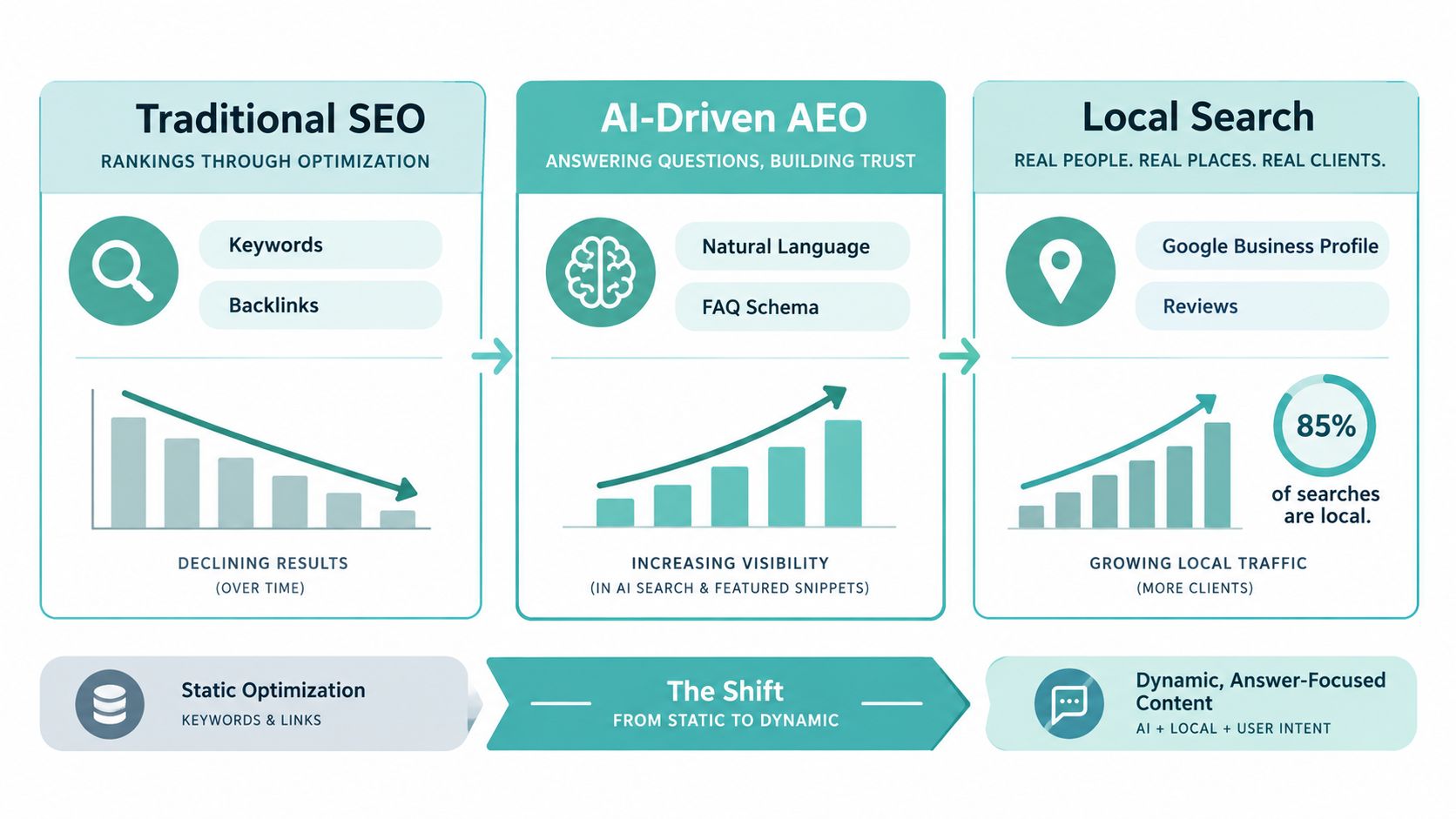
Classic SEO asks whether a page can rank for a query. Modern legal website design must also ask whether a search engine or answer engine can extract a reliable answer, associate it with the correct firm, and present the firm when a user needs legal help.
The difference matters because AI Overviews can reduce the need to click through to a website. One analysis of AI search summaries reports organic click-through rate falling from 1.76% to 0.61% when AI Overviews appear, with zero-click search rates reaching 69% in 2025. Those figures describe the analyzed search environment, not a guaranteed result for every legal query. They do show why ranking alone is an incomplete success metric.
Compare the two approaches
| SEO-only approach | SEO plus AEO and local search |
|---|---|
| Targets keyword variations | Answers the user's underlying question in direct language |
| Measures rankings and visits | Also evaluates qualified inquiries and answer visibility |
| Treats FAQs as secondary copy | Structures FAQs, definitions, and process explanations for extraction |
| Builds local relevance through pages | Aligns service areas, business details, reviews, and local intent |
| Optimizes for a click | Makes the brand understandable even when no click occurs |
AEO doesn't mean writing for machines at the expense of people. Use descriptive headings, concise answers, clear definitions, supporting detail, and accurate author and firm information. Explain exceptions instead of hiding the answer inside vague marketing language. Structured data can help machines interpret entities and content, but it can't compensate for thin or unreliable information.
Local foundations still matter. Keep the firm's name, address, phone number, service areas, and office information consistent. Build pages around genuine locations and services rather than creating interchangeable pages filled with city names. Reviews, professional profiles, bar records, and other reputable references can reinforce the firm's identity beyond its own domain.
For a deeper planning process, use keyword research for lawyers to connect search demand with actual practice priorities. The output shouldn't be a list of phrases. It should be a page map that assigns each intent to the clearest, most useful destination.
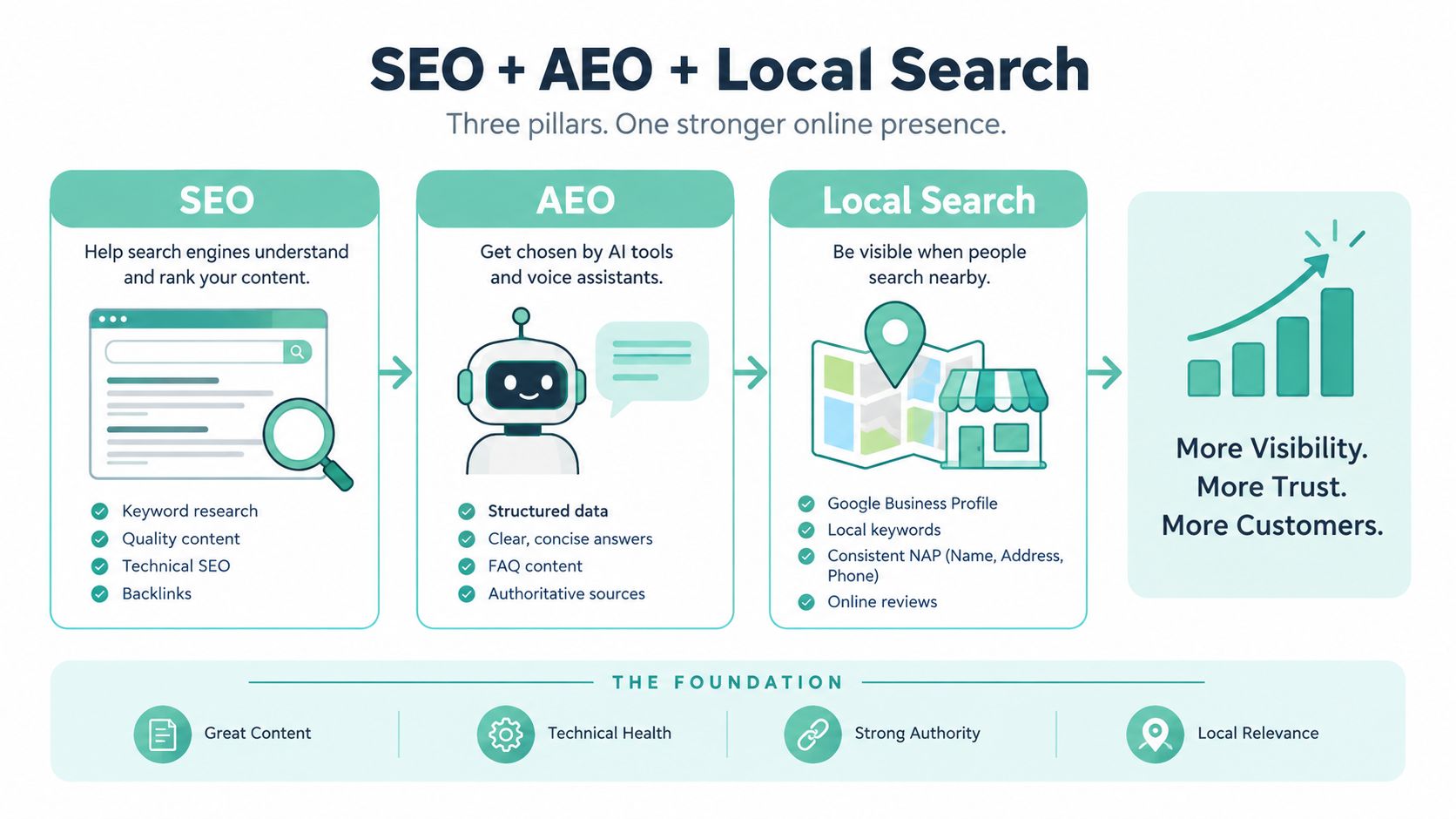
A firm also needs to monitor how people find and contact it. Rankings can rise while forms remain confusing, calls go unanswered, or pages attract the wrong matters. Visibility is valuable only when it connects to a usable intake path.
Building a Law Firm Website Strategically
A serious rebuild starts before anyone chooses colors. Digital Skyrocket's delivery model begins with fit meetings and discovery sessions that examine business goals, audience, current traffic, existing rankings, services, and search opportunities. That baseline prevents a team from redesigning the pages that look dated while ignoring the pages already generating valuable demand.
Start with evidence
The next phase turns discovery into a content strategy. The team maps services, value points, local areas, attorney expertise, page hierarchy, internal links, and conversion paths. Writers then develop or guide page content around user questions and search intent. Firms should resolve difficult decisions at this stage, such as whether a broad litigation page deserves a new structure or whether several specific service pages will better serve prospective clients.
Design and implementation happen together with technical SEO and AEO. Custom WordPress development can create responsive templates for practice areas, attorney profiles, articles, reviews, and contact flows. Developers should also address clean code structure, performance, analytics instrumentation, redirects, metadata, indexability, and structured content before launch.
A redesign that preserves the old visual hierarchy can preserve the old conversion problems too.
Conversion optimization shouldn't wait for a launch report. During the build, review headline clarity, button labels, phone placement, form length, attorney proof, and mobile interaction. After launch, compare lead activity with rankings and organic traffic, then refine pages based on user behavior and intake quality.
The process is iterative rather than theatrical. A firm may discover that a service page attracts visitors but produces weak inquiries, while a narrower page receives less traffic and better-fit calls. The response might involve sharper qualification language, a different attorney introduction, a more visible phone option, or a form that asks a more useful first question.
Ongoing support keeps the site aligned with changes in services, attorneys, regulations, search behavior, and technology. Reporting should connect rankings and traffic to calls, emails, and form submissions instead of celebrating visibility in isolation. Digital Skyrocket is one example of a partner that combines custom WordPress development, technical SEO, AEO, local foundations, reporting, and CRO for lead-generating service websites.
Choosing the Right Legal Web Partner
Evaluate a web partner by the system it can build, not by the mockup it presents. A polished homepage is easy to show. A durable intake system requires stronger evidence.
Ask these questions before signing:
- Who owns strategy: Will the partner map services, audiences, locations, and conversion paths, or only implement supplied copy?
- How is performance measured: Will reporting connect rankings and organic traffic with calls, emails, and form activity?
- What happens after launch: Does the agreement include technical support, content updates, testing, and iterative CRO?
- How are accessibility and compliance handled: Are keyboard, screen-reader, contrast, form, privacy, and advertising requirements addressed during development?
- How is competition managed: Does the provider work with one client per industry and service area, or could it build competing firms in the same market?
- What does the migration include: Will the team protect valuable URLs, metadata, internal links, analytics, and existing search equity?
A transactional project may be appropriate for a firm that only needs a basic online presence. It won't provide the same operating model as an ongoing partnership focused on search visibility and qualified inquiries. Ask to see the discovery deliverables, content map, technical checklist, reporting format, and post-launch optimization process before judging the proposal.
The right partner should also be candid about trade-offs. More animation can reduce clarity and speed. More form fields can improve qualification while lowering completion. More pages can expand visibility while increasing maintenance demands. Good strategy makes those choices deliberately.
Use this guide to choosing a web design agency as a starting point, then interview providers about your actual market, practice areas, intake process, and growth goals. Legal website design succeeds when accessibility, discovery, credibility, and conversion are engineered together from the first planning session.
Digital Skyrocket plans and builds lead-generating websites for law firms, combining custom web design, technical SEO, AEO, local search foundations, and ongoing conversion optimization. Visit Digital Skyrocket to discuss a redesign built around qualified inquiries rather than appearance alone.