Most advice about meta descriptions starts with the wrong question: How many characters should this be? Character counts matter, but they don't determine whether your copy survives Google's snippet generation or earns a click from someone looking for a lawyer, roofer, HVAC technician, or dentist.
Google says there's no fixed maximum length for a meta description. Search snippets are truncated to fit the available device width, and Google may replace your description with text pulled from the page. Independent research across 30,000 keywords found rewrites in about 71% of mobile results and 68% of desktop results (Google's snippet documentation, Search Engine Journal's rewrite analysis).
That changes the job. You're not crafting a fragile line of text that Google must display exactly. You're writing a concise promise, aligned with the page, that gives Google useful context and still makes the searcher want to act when the wording changes.
Table of Contents
- The Uncomfortable Truth About Meta Descriptions in 2026
- Length Rules That Actually Hold Up in Google Search
- Matching Keywords, Intent, and a Single Benefit
- Real Before and After Examples for Service Businesses
- Local SEO and AEO Adjustments for Service Area Pages
- Testing, Measuring, and Iterating With Search Console
- Common Mistakes and a Same-Day Implementation Checklist
The Uncomfortable Truth About Meta Descriptions in 2026
Google rewrites most meta descriptions. Treating the field as a guaranteed advertisement creates the wrong workflow, especially for service businesses where one missed click can mean a missed call, form submission, or appointment.
Google may use your supplied description when it accurately matches the query and page content. It may also select visible page copy that appears more relevant to the searcher's wording. Queries with clear intent often encourage Google to pull a passage that answers the query more directly than the original metadata.
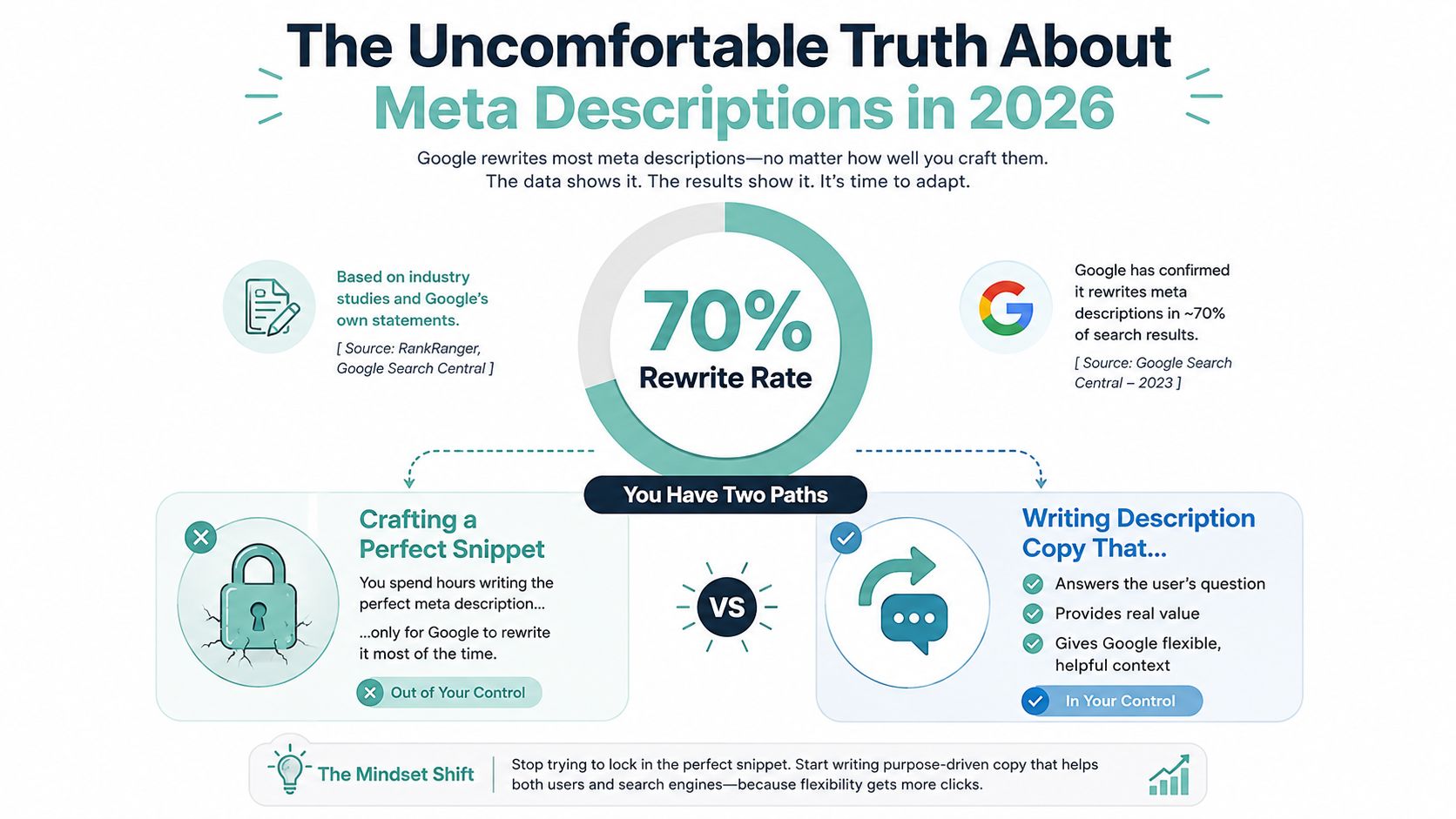
A useful description therefore works in three possible outcomes:
- Google keeps it verbatim: The copy matches the page, query, and intent closely enough to remain useful as written.
- Google rewrites it into something better: Your page contains clear, relevant language that gives Google strong alternatives instead of vague filler.
- Google rewrites it, but the result still earns the click: The page promise remains obvious because the title, headings, opening copy, and service details support the same intent.
Practical rule: Write meta descriptions as rewrite-resistant sales copy, not as text Google is obligated to display.
This is particularly important for local service pages. A description that says “trusted professionals providing quality solutions” gives Google little useful information and gives a prospect no compelling reason to choose the page. A description that names the service, location, customer problem, and next step supplies a much clearer content signal.
The best practitioners still monitor character length, but they don't stop there. They ask whether the first visible words communicate the search match, whether the benefit is specific, and whether the landing page fulfills the promise. That mental model produces descriptions that perform across the three outcomes above, even when Google changes the displayed wording.
Length Rules That Actually Hold Up in Google Search
Google measures available snippet space in pixels, not characters. Letter widths vary, so a description filled with narrow characters can occupy less space than one filled with wide characters. Industry pixel-width testing commonly places the available space around 920 pixels on desktop and about 680 pixels on mobile (meta description pixel-width guidance).
That doesn't mean you should chase a precise pixel number for every page. Use a practical drafting range, then inspect the result on both desktop and mobile. For most service pages, a draft around 140 to 155 characters gives you enough room to state the query match and benefit without padding the copy to reach an arbitrary limit (Search Engine Journal's snippet-length benchmarks).
| Surface | Recommended Draft Length | Hard Truncation Point | Front-Load Cutoff |
|---|---|---|---|
| Desktop | 140 to 155 characters | Around 920 pixels | First 100 characters |
| Mobile | Roughly 95 to 105 characters for date-sensitive or mobile-heavy pages | Around 680 pixels | First 100 characters |
| General service page | 140 to 155 characters | Device-width dependent | Primary match and benefit first |
The table is a drafting guide, not a promise about what Google will show. Desktop snippets commonly peak around 156 characters and drop off sharply after 165, while mobile snippets without dates commonly peak around 118 characters. Rewritten snippets often display roughly 160 to 167 characters on desktop and 114 to 121 on mobile (Search Engine Journal's benchmark discussion).
Front-load the useful words
Put the primary service and main benefit early. If someone searches for emergency roof repair, don't open with a brand slogan. Start with the service and problem, then add the response or offer.
A strong working rule is to draft 150 to 160 characters, then check whether the first 100 characters still communicate the page's purpose. For pages with publication dates or mobile-heavy traffic, compress the value proposition into approximately 95 to 105 characters so truncation doesn't hide the important part (Search Engine Journal's snippet-length guidance).
Shorter copy often resists rewriting better than long, padded copy because every phrase has a job. Don't add adjectives just to fill space. A complete promise that ends early is stronger than a longer sentence that buries the offer near an ellipsis.
Matching Keywords, Intent, and a Single Benefit
Every service-page description has three jobs in its opening words:
- Match the primary keyword.
- Signal the searcher's intent.
- Present one concrete benefit.
Put those elements inside the first 100 characters whenever possible. The keyword establishes relevance, intent determines the type of promise, and the benefit answers the question behind the search, “Why should I click this result?”
A commercial investigation query needs a differentiator. Someone comparing personal injury firms may respond to “flat-fee consultation” or “no upsell,” if the page supports that claim. A transactional query needs an action and a credible service detail, such as “book today” paired with “same-day response,” only when the business offers it.
Local searches require geography and service specificity. “Denver emergency roof tarping, 24/7” tells the searcher and Google far more than “professional roofing services.” The location belongs early because the user may be deciding whether the business can serve them before reading anything else.
Use one primary phrase naturally
Keyword stuffing usually appears when a writer tries to include every variation in a short space:
“Personal injury lawyer, accident attorney, injury law firm, car accident lawyer, legal help.”
That reads like a tag cloud. It doesn't explain what happens after the click, and it can make the copy less useful to both Google and the searcher.
A cleaner version uses the primary phrase once and lets the sentence carry a natural variant:
“Denver car accident lawyer helping injured drivers understand their options. Request a free case review.”
The page can target related language through its headings, body copy, internal links, and structured content. The description doesn't need to carry the entire keyword map. Guidance on placing keyphrases in supporting page elements is available in this keyphrase placement guide.
Choose one outcome, not a feature list
Features describe what the business has. Benefits describe what the customer gets. “Licensed technicians, modern equipment, flexible scheduling” is a list of features. “Get your failed AC diagnosed and repaired before the next hot day” expresses a result.
If the description needs two sentences to land one benefit, the benefit is probably too vague. Give the reader one reason to click, one action to take, and only the trust signal that helps make the action believable.
Real Before and After Examples for Service Businesses
Weak descriptions often fail for the same reason across industries. They name the business category but omit the customer's situation, local relevance, and next step. The rewrites below use a consistent pattern: intent keyword, concrete benefit, action verb, and one trust or urgency element.
| Industry | Before (Weak) | After (Rewrite-Resistant) |
|---|---|---|
| Personal injury law | “We are a trusted personal injury law firm dedicated to helping clients. Contact us today.” | “Texas personal injury lawyers helping accident victims pursue compensation. Request a free case review with no obligation.” |
| Roofing | “We provide quality roofing services for residential and commercial properties. Call now.” | “Storm-damage roof repair in Fort Worth with rapid response and free inspections. Call today to protect your home.” |
| HVAC | “Our HVAC company offers reliable heating and cooling services at affordable prices.” | “Emergency HVAC repair in Plano with same-day service when available. Call now for help restoring comfort.” |
| Dentist | “Visit our friendly dental office for comprehensive care for the whole family.” | “Family dentist in Arlington accepting many insurance plans, with convenient family hours. Book your visit today.” |
The law-firm rewrite leads with the case category and service area, then gives the visitor a clear intake action. It doesn't promise a legal result that the page can't guarantee. The roofing version replaces “quality” with the actual problem, storm damage, and adds a free inspection offer that must be available on the landing page.
The HVAC example puts emergency intent and location before supporting language. “Same-day service when available” is more responsible than making an unconditional response promise. The dentist description makes insurance acceptance and family scheduling visible without turning the copy into a list of every office feature.
Service-area pages need different copy
A roofing company's generic service page might say:
“Roof repair for leaks, storm damage, and aging shingles. Schedule a professional inspection.”
A service-area page should make the geography part of the match:
“Fort Worth roof repair for leaks and storm damage. Schedule a free inspection with a local roofing team.”
The structural difference matters more than the adjective swap. The generic page explains the service category. The local page confirms where the service is available, then repeats the relevant problem and action.
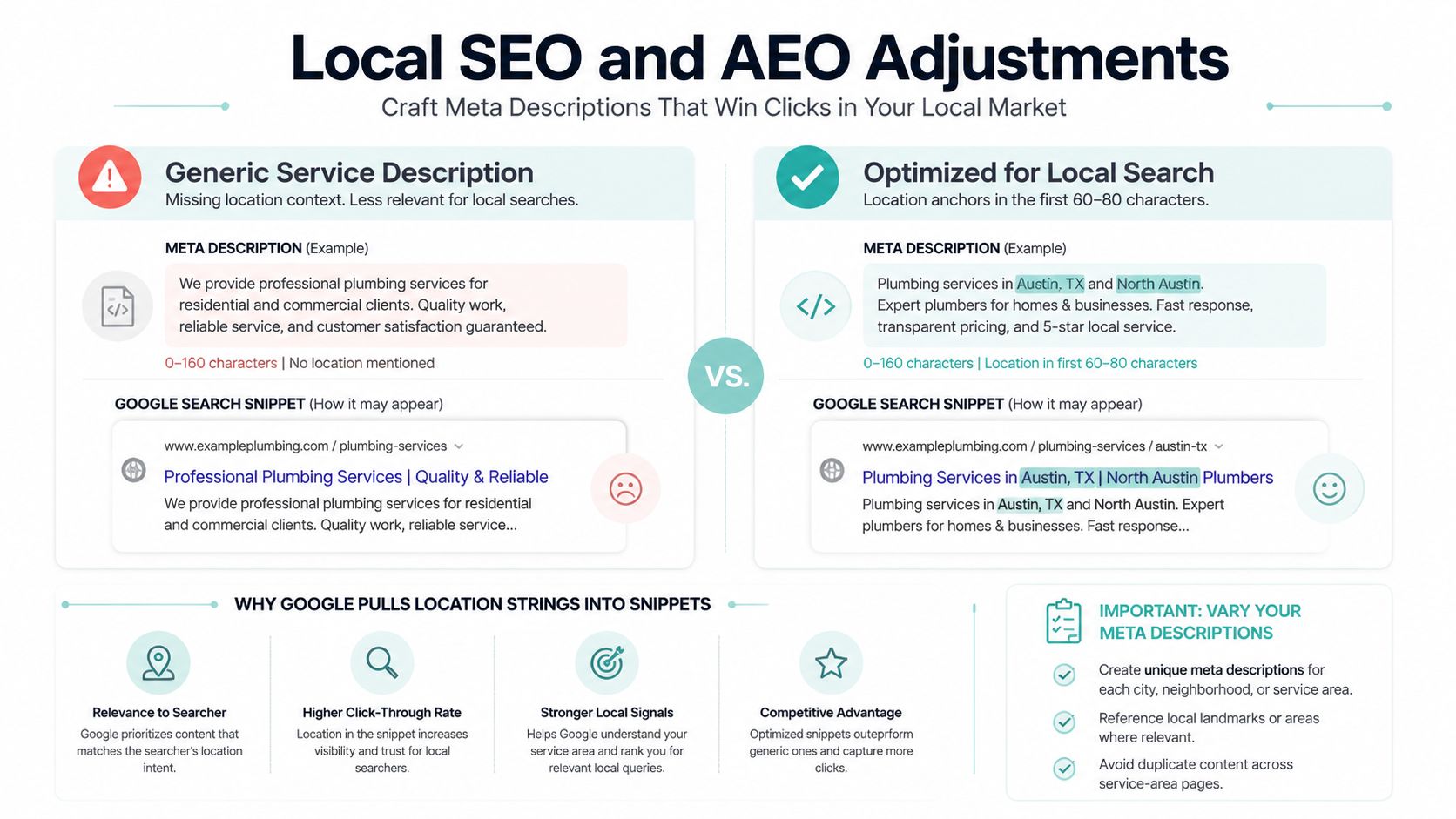
Don't copy the same description across every city page and replace only the city name. Add a localized hook tied to the actual page, such as a neighborhood, weather-related issue, property type, or service constraint. The page itself must support that local promise, or Google has more reason to replace your copy with on-page text.
Local SEO and AEO Adjustments for Service Area Pages
A service-area page has to answer a basic question quickly: Can this company help people in my location? Put the city or neighborhood anchor near the beginning, ideally within the first 60 to 80 characters, then name the service and the most relevant customer outcome.
Compare these two descriptions:
- “Professional emergency plumbing services for homes and businesses. Contact our experienced team today.”
- “Emergency plumbing in Mesa, helping homeowners handle leaks and burst pipes. Call for prompt service.”
The first could belong to any plumbing company in any market. The second establishes location, urgency, problem type, and action in a compact line.
Localize without duplicating
Use a shared structure, but give each page a distinct reason to exist:
Base structure: “[Location] [service] for [customer problem]. [Benefit or response]. [Action].”
Then vary the localized hook based on the page's actual content:
- “Scottsdale pool equipment repair for homeowners dealing with pump failures. Book a service visit.”
- “Tempe pool equipment repair for noisy pumps and filtration issues. Schedule an inspection.”
- “Chandler pool equipment repair with help for leaks, filters, and circulation problems. Call today.”
Each description names the service and location, but the problem language changes. That variation should reflect different page content, not artificial rewriting.
AEO favors direct answers
Answer engines and AI-generated search features often need a clear statement they can interpret. Start with a direct definition or answer-style sentence when the page addresses a straightforward question, then add the benefit.
“An emergency dentist treats urgent tooth pain, broken teeth, and dental infections. Find same-day care in Phoenix.”
That structure differs from a local commercial description, which may lead with service availability and booking. More guidance on this discipline appears in this answer engine optimization overview.
Keep the meta description, Google Business Profile description, and on-page H1 consistent. They don't need identical wording, but they shouldn't contradict each other on service areas, availability, insurance, emergency response, or pricing language.
A service-area page deserves its own description when it targets a distinct location and contains useful local content. A category page can cover the topic when nearby pages don't offer separate service areas, unique customer needs, or meaningful local relevance.
Testing, Measuring, and Iterating With Search Console
Search Console won't give you a simple “meta description score.” It will show whether the page earns impressions and clicks for the queries that matter. Use that information to test the promise, not just the wording.
Start by selecting a priority service page and recording its current query, impressions, average position, and click-through rate. Filter the performance report by the page, then review the queries separately. A description for “emergency HVAC repair” shouldn't be judged only by branded searches if the page is meant to attract non-branded demand.
A practical rewrite workflow
- Choose one page and query group. Separate branded and non-branded searches so a change in brand demand doesn't distort the result.
- Rewrite the description only. Leave the title, page copy, links, design, and call to action unchanged during the initial observation.
- Record the publication date. Save the old and new versions in a simple spreadsheet.
- Review the displayed snippet manually. Search the target query and check whether Google uses your submitted wording or pulls page text instead.
- Compare Search Console performance. Look at impressions, average position, and click-through rate for the same page and query group before and after the change.
- Check leads, not only clicks. Use a tagged landing-page URL, analytics landing-page views, calls, form submissions, or appointment completions to connect search behavior to business outcomes.
Without a dedicated testing platform, a manual comparison can still work. Use date-stamped versions and observation windows of 14 to 28 days, then compare like with like. Those windows aren't guarantees of statistical certainty. They provide a consistent operating rhythm for sites that don't have enough volume or tooling for formal experiments.
Don't treat every CTR change as a metadata result. Position changes, seasonal demand, impression growth, and the branded versus non-branded mix can move the number independently.
A position-one result may show a lower CTR as impressions expand into broader queries. A service page may also behave differently during a seasonal demand shift. Tighten the loop: rewrite, wait, measure, keep or revert. When the snippet changes but leads don't improve, the issue may be the landing page promise, form friction, or service fit rather than the description.
Common Mistakes and a Same-Day Implementation Checklist
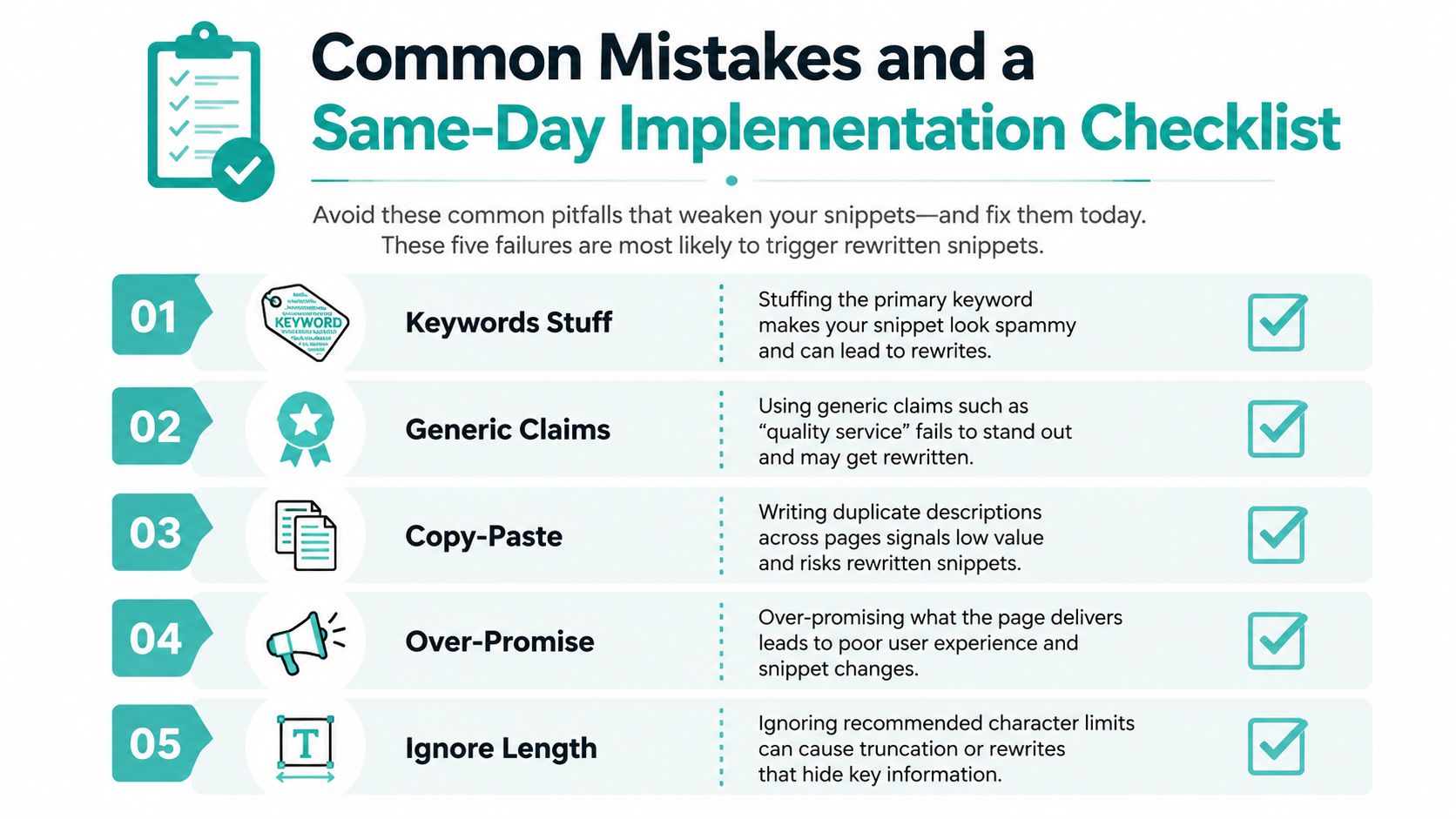
Five failures repeatedly weaken descriptions and make rewrites more likely:
- Stuffing the primary keyword: Repeating “Dallas dentist,” “dentist Dallas,” and “Dallas dental office” makes the sentence sound artificial.
- Using generic claims: “Quality service,” “trusted professionals,” and “customer satisfaction” don't explain what the visitor gets.
- Copying descriptions across pages: Identical metadata gives Google and searchers no reason to distinguish locations or services.
- Ignoring practical length: Long introductions can hide the service and benefit before the snippet reaches the truncation point.
- Over-promising the page: “Book today” is misleading when the page only provides general information or a contact form with no appointment path.
Audit and implement by priority
You don't need to export every URL before making progress. Start with indexed pages tied directly to revenue, then review service pages, location pages, and supporting content. Look for missing descriptions, duplicates, vague claims, and pages where the current copy doesn't match the visible content.
Use this page-level checklist:
- Identify the query: Write down the target phrase and search intent.
- Lead with relevance: Place the main service phrase naturally near the beginning.
- State one outcome: Explain the result or problem solved, not a list of features.
- Add location selectively: Include a city or neighborhood when the page serves a defined area.
- Check both surfaces: Review approximate display length on desktop and mobile.
- Match the action: Make sure “call,” “book,” “request a quote,” or “learn” matches the page experience.
- Confirm uniqueness: Compare the description with nearby service and location pages.
- Document the version: Save the final text and publication date for later comparison.
On WordPress, check the SEO plugin's output and confirm it isn't overwriting metadata through a template or duplicate plugin. On Shopify and Wix, review the page's search appearance fields and inspect the generated source or live result after publishing. In a custom CMS, verify that the description field maps to the meta description and doesn't overwrite the title tag. A page template should provide defaults, but important revenue pages need individually reviewed copy.
For a broader page review, use this on-page SEO checklist. After deployment, inspect the page in Search Console, then schedule a dated CTR review. Conversion changes may need longer observation than search metrics because calls, forms, and booked appointments fluctuate with demand and sales follow-up.
Digital Skyrocket plans and builds lead-generating websites, then connects technical SEO, local SEO, AEO, and conversion improvements so metadata supports real inquiries rather than isolated rankings. Visit Digital Skyrocket to discuss a website and ongoing SEO program for your service business.