
It's 9 p.m., the house is getting warmer by the hour, and your dispatcher is ready. Somewhere across town, a homeowner is searching on a phone for help tonight. If your site doesn't give that person a number, a service area, and a reason to trust you in seconds, you'll never hear the phone ring.
Table of Contents
- Why HVAC Websites Lose Calls Before Anyone Reads Them
- The Page Map Every HVAC Website Needs
- Mobile Speed Targets Homeowners Actually Feel
- Local Signals and AI Answers That Route Customers to You
- Pricing Clarity Without False Precision
- Lead Forms and Buttons That Get Completed
- Audit Your HVAC Site Before Buying More Traffic
Why HVAC Websites Lose Calls Before Anyone Reads Them
Say a homeowner's air conditioner quits at 9 p.m. They search on a phone, tap your result, and land on a homepage with a slow rotating slider. The phone number sits below the fold. They don't scroll, they don't read your history, and they don't wait. They go back and tap the next company.
That moment explains why good HVAC website design has to do three jobs at once. It isn't one brochure with three audiences squeezed together. It's three different decisions sharing one domain.

Three Jobs, Three Different Visitors
- Emergency rescue: A stressed homeowner needs a tap-to-call number, your hours, and a quick ZIP check. Nothing else matters yet.
- Planned upgrades: A replacement or heat pump shopper needs a sizing process, equipment options, financing terms, and a clear in-home estimate step.
- Long-term trust: A maintenance prospect needs plan terms, a tune-up checklist, renewal rules, and proof you'll show up as promised.
The market behind those jobs is broad, not seasonal. The U.S. Energy Information Administration FAQ reports that roughly 88.7% of U.S. homes had air conditioning in 2020, so repair, maintenance, and replacement needs recur across most households you serve.
Build each page around the one question that visitor is asking right now, not around everything your company can do.
What follows works in the order a homeowner experiences it. You'll get the page map first, then mobile speed targets, local signals, pricing content, lead form rules, and a one-afternoon audit that ties them together.
The Page Map Every HVAC Website Needs
Start with the map, ordered by urgency. Each page answers one visitor question and drives one primary action.
| Page | Visitor question | Must-have elements | Primary action |
|---|---|---|---|
| Emergency repair | Can you get someone here today? | Hours, emergency line, tap-to-call above the fold, ZIP check | Call now |
| AC repair | Why is my unit failing and what will it cost? | Symptom list, diagnostic fee policy, brands serviced | Call or short form |
| Furnace repair | Is my furnace safe to run? | Carbon monoxide safety guidance, gas and electric system notes, licensed technicians | Call now |
| Installation and replacement | Should I repair or replace? | Sizing process, equipment options, financing terms, in-home estimate step | Book in-home estimate |
| Heat pump service | Will a heat pump work in my climate? | Efficiency basics, rebate notes, electrification options | Request estimate |
| Maintenance plans | What does a tune-up include? | Checklist, plan terms, renewal rules, stating price range if you publish one | Enroll online |
| Indoor air quality | Do I need filtration or humidity control? | System options, testing approach, product brands | Book assessment |
| Service-area pages | Do you serve my neighborhood? | Towns and ZIP codes served, local technician details, local housing notes | Call or request service |
| Reviews and credentials | Can I trust this company? | License numbers, warranties, review feed, photos of real crews | Read reviews, then call |
| Contact and booking | How fast can I reach someone? | Hours, response time, short form under six fields | Submit request |
What To Build First
Build the emergency page first. It carries the highest urgency and the shortest attention span, so it gets the clearest number, the fastest load, and the shortest path to a human. Planned-work pages can carry more detail because those visitors are comparing, not sweating.
A two-truck company can combine related repair pages at launch if the content would otherwise be thin. Don't combine away the emergency page or the service-area pages. Those two answer the questions that decide the click.
Service-Area Pages That Earn Their Keep
A service-area page isn't one paragraph with a city name swapped in. Write real local content. List the ZIP codes you cover, say where your technicians are based, and name the housing and equipment patterns you see there, such as older gas furnaces, heat pumps in newer subdivisions, or attic air handlers in a particular neighborhood.
Practical rule: If you couldn't read the page aloud to a homeowner in that town without embarrassment, it isn't local yet.
Here's a clearly hypothetical example. Say a two-truck company in a town like Tyler, TX has one generic Heating and Cooling page. It splits that page into AC repair, furnace repair, and installation and replacement. Each new page answers one question, carries its own call to action, and links to the towns it serves. That's the structure working, not a promise about results.
Mobile Speed Targets Homeowners Actually Feel
Think of load time like a dispatcher whose phone rings and rings before anyone picks up. The caller doesn't leave a polite voicemail. They hang up and dial the next company.
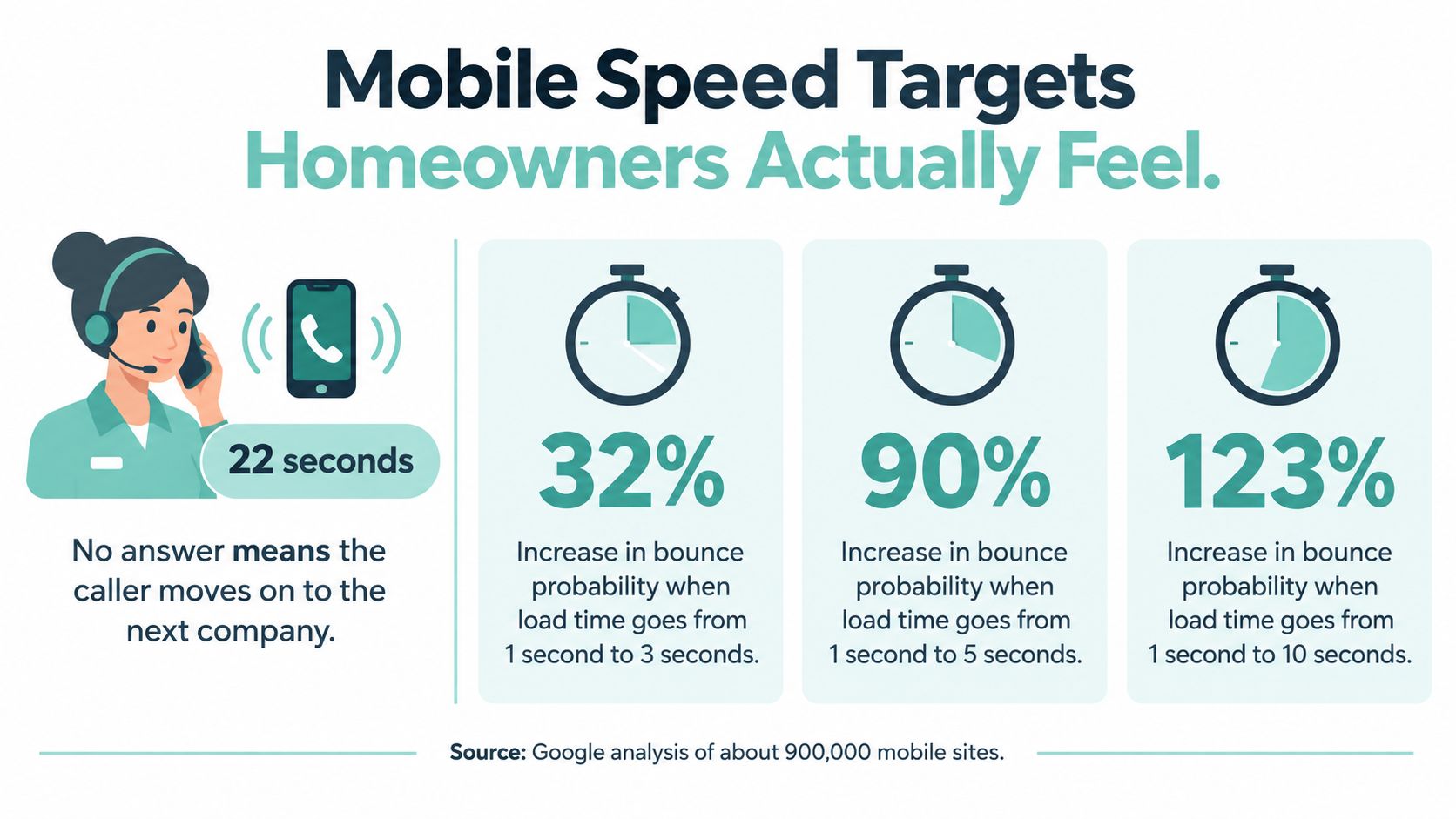
Google's analysis makes that concrete. Its Google Mobile Site Speed Playbook, covering approximately 900,000 mobile websites, found the average page took 22 seconds to fully load, against a roughly 3-second threshold for an acceptable experience. Pages loading in under 3 seconds had an average bounce rate of about 13%, while bounce rates approached 60% after 9 seconds. When load time rose from 1 second to 10 seconds, the probability of a visitor bouncing rose by 123%.
Speed isn't a vague goal. Google publishes three pass marks, measured at the 75th percentile separately for mobile and desktop. The Google Search Central guidance on Core Web Vitals sets the Good thresholds at Largest Contentful Paint at or below 2.5 seconds, Interaction to Next Paint at or below 200 milliseconds, and Cumulative Layout Shift at or below 0.1.
| Metric | Good threshold | HVAC failure to watch |
|---|---|---|
| Largest Contentful Paint (LCP) | 2.5 seconds or less | Technician hero photo loads after the phone number |
| Interaction to Next Paint (INP) | 200 milliseconds or less | Menu lags when a stressed homeowner taps it |
| Cumulative Layout Shift (CLS) | 0.1 or less | Review widget shifts the call button under a thumb |
What Fails Each Metric
LCP fails when a large hero photo of a smiling technician loads slowly and pushes your service promise and phone number out of the first screen. INP fails when menus, chat widgets, or scheduling scripts make the page pause after a tap. CLS fails when a review feed, map, or banner loads late and moves the call button just as a thumb lands on it.
Fixes Worth Doing First
- Compress and size images: Resize technician and equipment photos to the dimensions they'll display at, instead of uploading full-resolution camera files.
- Prioritize the first screen: Load the hero, headline, and tap-to-call button first, and defer chat and scheduling scripts until after.
- Reserve space: Set fixed dimensions for images, review widgets, and map embeds so nothing jumps.
- Cut render-blocking code: Minimize CSS and JavaScript that must load before the page paints.
Test representative service and location pages, not only the homepage, because heavy map embeds, sliders, and form scripts fail page by page. Run the test on a real phone over cellular data, since that's how an emergency search happens. If you want the technical sequence, this guide on how to improve site speed walks through the order of operations.
Local Signals and AI Answers That Route Customers to You
Many homeowners decide before they visit your site at all. One analysis of local search and AI reported that Local Packs appeared for 93% of traditional local-intent queries, while AI Overviews appeared for only 15%. It also reported that individual business websites represented about 93% of domains cited for local businesses.
Read those two findings together. Google-controlled surfaces get the first look, but your website still supplies much of the evidence those surfaces extract. Build for the click and for accurate extraction when there's no click.
Google states three local ranking factors. Its Google Business Profile help on local ranking names relevance, distance, and prominence as the factors that determine how a business ranks locally.
| Local factor | What Google measures | What the website must show |
|---|---|---|
| Relevance | How closely a page matches the search | Dedicated pages for each service and town, with specific service details and eligibility or system context |
| Distance | How close the business location is to the searcher | Real service locations, accurate service areas, and no city pages for towns you do not serve |
| Prominence | Links, directories, review count and ratings | Consistent name, address and phone, a clear link to the verified profile, and a legitimate review request after each job |
Distance deserves plain talk. You can't write your way closer to a searcher. Publishing pages for towns you don't serve doesn't create proximity, it creates doorway pages that mislead homeowners and waste your dispatcher's time.
Keep The Profile And The Site In Agreement
Discovery starts on a phone. A Google Business Profile statistics compilation reports that 73% of local searches start on a mobile device, and that customers are 70% more likely to visit and 50% more likely to consider buying from a business with a complete profile. Treat that compilation as directional market evidence, since it's a secondary source, not a primary Google publication.
- Matching facts: Keep hours, emergency availability, services, and service areas identical on the site and the profile.
- Credentials in text: Publish licensing, technician qualifications, and warranty terms as crawlable copy, not only inside images or badges.
- Review workflow: Ask for a review after a completed job through a legitimate post-service message, and link to your verified profile.
- Useful FAQs: Answer diagnosis and safety questions in plain sentences an AI answer can quote accurately.
For a deeper buildout, this guide to local SEO for HVAC companies covers profile and page alignment in more detail.
Pricing Clarity Without False Precision
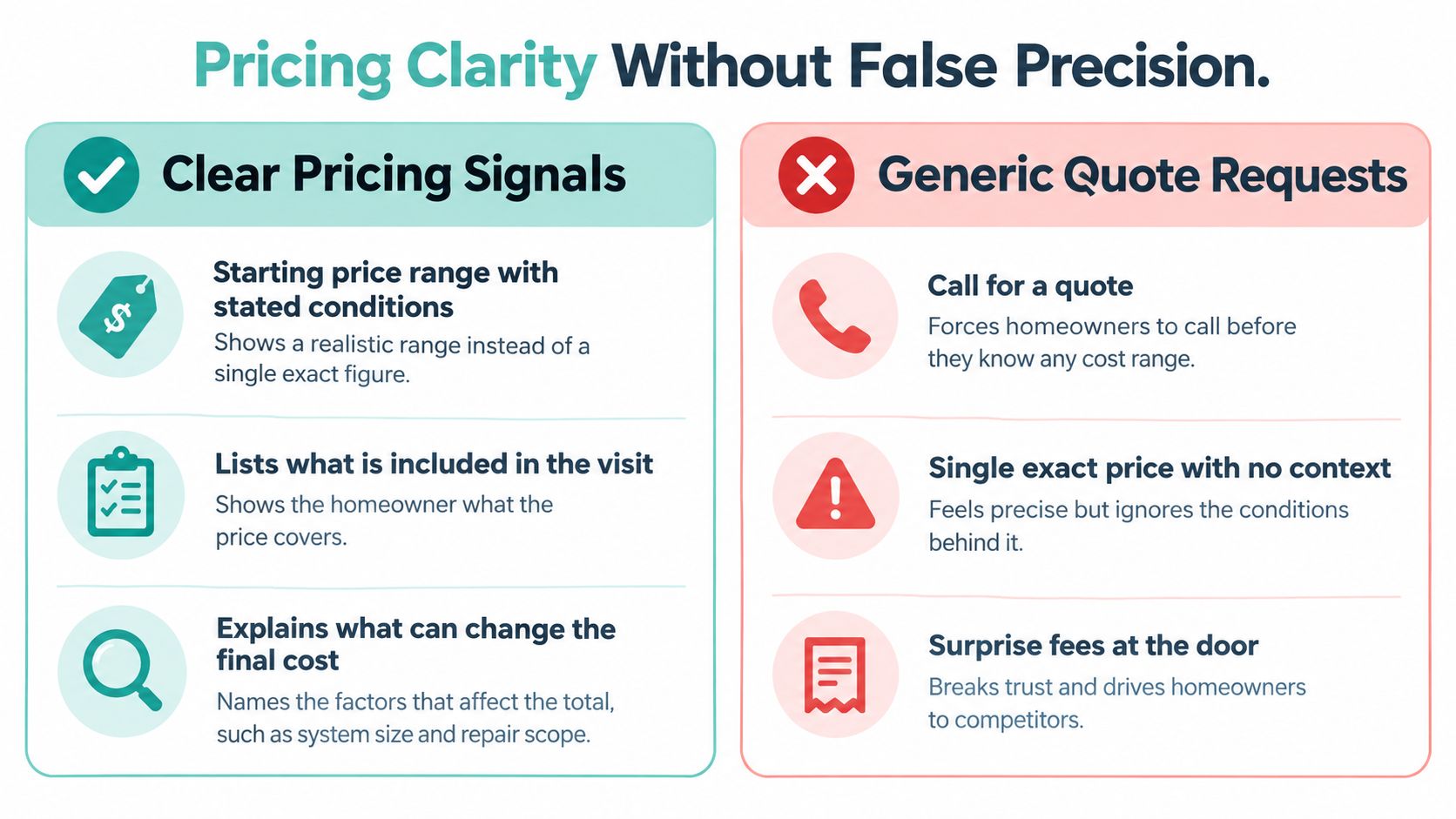
A homeowner with a failing air conditioner may need help now. Someone planning a replacement may be comparing options, while another visitor is checking whether your company is trustworthy. Each needs an answer to a different question. For pricing, the question is often simple: “Can I afford to call?” A page that says only “call for a quote” leaves it unanswered.
Homeowner research on the HVAC buyer journey found that 97% of homeowners expect transparent pricing before deciding, and 70% of HVAC homeowners are more likely to call a contractor whose website shows pricing. These figures support showing pricing information, though they do not specify what price or format works best for every HVAC business.
Both Sides Of The Choice
A quote-only page can bring in people who want a number, and a skilled dispatcher may turn some calls into jobs. But it also leaves qualified homeowners without enough information to decide whether to contact you. They may keep shopping without ever appearing in your call log.
A single exact price creates the opposite risk. It can look reassuringly precise while overlooking diagnosis, equipment capacity, access, or code requirements. If the in-home estimate differs, the homeowner may question the gap.
The Middle Ground That Works
Give pricing clarity without false precision. Share useful guidance, then explain what could change the final amount:
- A range or a rule: Use your verified service-specific price range, a starting-at figure with conditions, or a clear diagnostic-fee policy.
- What changes the price: Name relevant factors, such as diagnosis, equipment capacity, efficiency rating, access, code requirements, and geographic labor costs.
- Two kinds of economics: Explain repair and replacement separately. This helps homeowners understand when comparing a repair with replacement makes sense.
- Financing assumptions: If you display a monthly figure, state its term and conditions, and explain when an in-home assessment is needed.
A range with stated conditions reads as honest. A single number with no context reads as a setup.
Add three practical FAQs to the relevant service pages: Is the diagnostic fee credited toward repair? What is included in a replacement estimate? When is repair no longer economical? Answer each in two or three sentences, near the pricing information it clarifies, rather than burying the answers on a general FAQ page.
Lead Forms and Buttons That Get Completed
When a homeowner needs help, the form should match the moment. Someone with a broken system wants a fast route to a call. A homeowner planning an upgrade may be ready to share more detail, while someone comparing options first needs a clear next step. Keep each form focused on the single question that person is trying to answer.
Ecommerce research offers useful evidence about form friction, but it does not predict HVAC conversion rates. Baymard Institute checkout usability research found that 17% of U.S. online shoppers had abandoned an order during the previous quarter because the checkout process was too long or complicated.

The number of fields matters. Baymard's cart abandonment research indicates that an effective checkout can be reduced to roughly 12 to 14 total form elements, compared with an average of 23.48 displayed elements in its U.S. benchmark. It also reports that 14% of users abandon checkout when a phone number is required. These are ecommerce findings, not HVAC benchmarks, but they show why every required field should earn its place.
| Form field | Require when | Reason |
|---|---|---|
| Name | Every form | Needed to greet the caller and confirm identity |
| Phone number | Emergency and quote requests | Dispatch needs a way to respond; explain the reason beside the field |
| ZIP or service address | Every form | Confirms the service area and dispatch route |
| Service need dropdown | Every form | Routes the request to the right technician or estimator |
| Preferred time | Scheduled work only | Leave it off emergency forms, where speed matters more |
| Equipment age or brand | Replacement quotes only | Ask on the call instead of making it a barrier |
| Email address | Optional | Useful only if you send written estimates |
| Photo upload | Optional | May help diagnosis, but should never block submission |
Ask For The Phone Number Like A Dispatcher
A required phone number can feel like an unexplained demand. Add a brief reason under the field, such as, “We call to confirm your arrival window.” That makes the next step clear, especially for someone requesting emergency help. For planned work, keep the booking path focused too. A request an electrical service appointment page is an example of a dedicated scheduling route, separate from general browsing.
Forms need attention after launch. Baymard's checkout usability research reports an average global cart-abandonment rate of approximately 70.19% and found only 2% of benchmarked checkout experiences were rated good. These figures describe ecommerce checkout, not HVAC leads. They are a reason to review your forms regularly rather than assume the first version is finished.
Consider a booking form that requires 14 fields, including equipment brand, serial details, and a written problem description. A shorter version keeps six fields, offers a phone-first option, and moves equipment questions to the confirmation call. Put a mobile-sticky tap-to-call button beside the form so an emergency visitor can choose the faster route. Then A/B test the six-field form against the longer one and keep the version that performs better.
Audit Your HVAC Site Before Buying More Traffic
Run this audit in one afternoon before you spend on more traffic. Each step checks one fix.
- Load your emergency page on a phone over cellular data and time how long the phone number takes to appear.
- Open the mobile Core Web Vitals report in Google Search Console for your top service pages and compare each result with the three thresholds.
- Match the address, phone number, hours, and services on your site against your Google Business Profile and fix every mismatch.
- Count the fields on your main quote and booking forms and mark each one required, optional, or cut.
- Confirm each core service page states what changes the price or gives your diagnostic fee rule.
- Ask two AI assistants about your company and compare their answers with the facts published on your site.
- Pick your top three fixes, test each for 30 days, and track movement with a rank tracker before changing anything else.
Use this website audit checklist to record what you find. If you'd rather have the gaps mapped for you, Digital Skyrocket offers a discovery audit for HVAC companies, and you can start from its web design in Tyler, TX homepage to see how pages, speed, and local signals are evaluated together.
Your site doesn't need more traffic until it can handle an emergency call, give a straight answer to the pricing question, and turn a completed repair into a maintenance customer. Digital Skyrocket plans and builds lead-generating websites for HVAC and other service companies, combining custom web design with local SEO and conversion optimization so rankings turn into calls and booked jobs. Start with a discovery audit, see exactly where your pages, speed, and local signals fall short, and fix the gaps in the order a homeowner feels them.