If your site feels busy but leads are still thin, internal linking is usually part of the leak. I see this all the time on service-business sites, especially when a firm or contractor has strong pages on paper, but the important ones sit buried under weak navigation, thin blog pathways, and city pages that don't connect back to the money pages.
A roofing company can have a sharp storm-damage page, a solid repair page, and a polished contact form, then lose both rankings and calls because the pages are four clicks deep and barely supported by contextual links. The site looks complete to the owner, but to Google and to a prospect moving from research to inquiry, it feels disconnected.
Table of Contents
- Why Internal Linking Quietly Runs Your Site
- How Internal Links Actually Work
- Anchor Text, Link Depth, and Quantity Rules
- Hub-and-Spoke and Pillar-Cluster Architecture
- The Audit and Implementation Workflow
- Internal Linking for AI Search and Accessibility
- Industry-Specific Examples for Service Businesses
- Measuring Results and Your Next Steps
Why Internal Linking Quietly Runs Your Site
A Dallas roofer can spend thousands on design, launch clean service pages, and still get outranked by a competitor with a messier site that's easier to crawl. The difference usually isn't magic, it's site architecture. The stronger site keeps its commercial pages close to the homepage, supports them with related content, and doesn't leave important URLs stranded in the basement.
That's why internal linking best practices matter so much for lead-gen sites. They shape how search engines move through the site, but they also shape how a real prospect moves from a blog post to a service page to a form fill. A visitor reading about hail damage shouldn't have to hunt for the repair page. A person comparing dental implants shouldn't land on a blog island with no clear next step.
Practical rule: if a page matters to revenue, it should be reachable from multiple relevant pages, not just the menu.
For law firms, dentists, roofers, HVAC contractors, and similar businesses, this is less about “content interlinking” as a neat SEO concept and more about lead-flow engineering. A homepage should point to the core services. A service page should reinforce related subservices, city pages, and trust content. Blog posts should feed into those money pages instead of sitting off to the side collecting dust.
The rest of this guide stays practical. It focuses on what search engines can follow, how depth changes discovery, how to build a hierarchy that supports inquiries, and where teams waste time by over-linking the wrong things. It also covers AI retrieval, accessibility, and industry-specific patterns that make sense on real service-business sites instead of generic blogs.
How Internal Links Actually Work
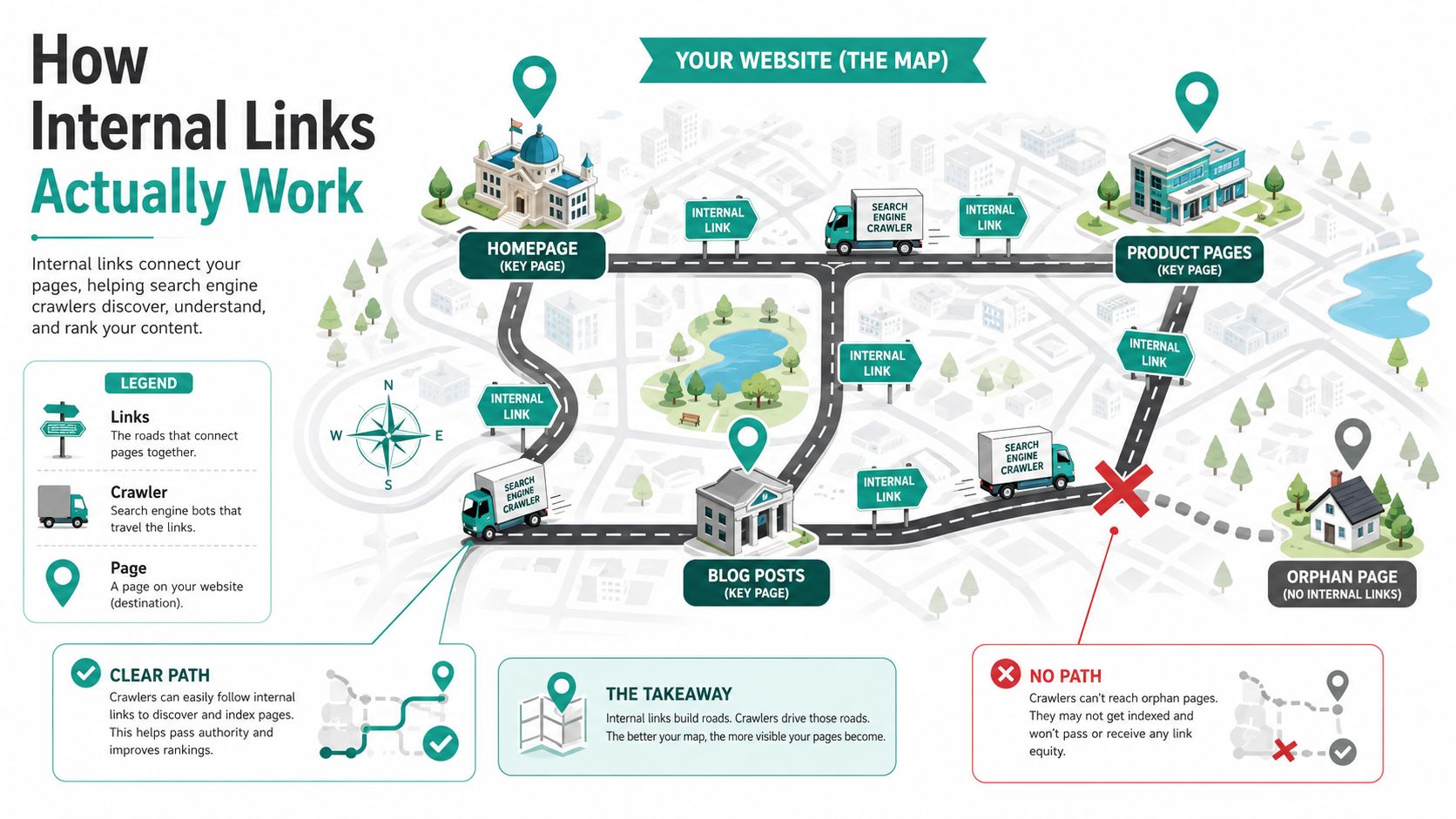
Think of a website like a city. The pages are addresses, the internal links are roads, and the crawlers are delivery trucks trying to reach every important location without getting stuck. If the roads are clear, the truck gets where it needs to go. If the road ends in a dead end, or the address sits out in the weeds with no route in, that page becomes hard to find and even harder to value.
Crawl paths and authority flow
When Google discovers pages through internal links, it follows those routes to understand structure and importance. Internal links also pass authority flow, often called PageRank in SEO conversation, from stronger pages to weaker ones. That doesn't mean every link is equal, but it does mean a homepage, a major service page, or a well-linked pillar can support pages that need help.
Orphan pages are the opposite problem. They're pages with no internal links pointing at them, which makes them easy to miss and difficult to prioritize. A page that no other page references is a page the site is effectively hiding from crawlers and users.
The three jobs internal links do
Internal links serve three separate jobs at once. First, they help navigation, which means guiding visitors toward the next useful page. Second, they create structure, which tells search engines what belongs together and what matters most. Third, they add context, because anchor text and surrounding copy help search engines understand what the destination page is about.
A clean internal link map makes a site easier to crawl, easier to trust, and easier to convert.
If you can look at a sitemap and predict which pages are central, which ones are supporting content, and which ones are likely to struggle, you already understand the basics. Pages linked from the homepage and major hubs usually get found faster. Pages with no route in, vague anchors, or buried placement usually need help.
Anchor Text, Link Depth, and Quantity Rules
A service page that says “Dallas personal injury attorney” tells Google and the reader far more than “click here.” A page that repeats the exact same anchor in every link starts to look manufactured, and that is a bad fit for a site that needs to win trust and convert calls. Internal linking works best when the wording sounds natural, but still makes the destination page obvious.
What the rule-of-thumb numbers actually mean
Teams often use 2 to 5 contextual internal links per 1,000 words and 3 to 5 contextual links per article as a starting point, then adjust based on page purpose. That gives editors a practical floor without turning the site into a link farm. Google has said there is no fixed optimal number, and links should be added where they help users, which is the better standard for service-business sites. SEO guidance from Semrush and Google's position, as discussed in Neil Patel's internal linking article, both point in that direction.
Bottom line: count links only when they help a prospect take the next step or make the topic clearer.
The trade-off is simple. Too few links leave important service and city pages buried. Too many links on a thin page dilute the signal and distract the reader from the call to action.
Where depth and placement matter most
Critical links belong high on the page, ideally above the fold or within the first quarter of the content. Users see them sooner, and crawlers encounter them earlier in the document flow. A buried service link in the final paragraph rarely does as much as a relevant link placed near the opening, especially on lead-gen pages that need to move people toward a call, form fill, or quote request.
Page type changes the target mix. A homepage should push toward core services and contact paths. A service page should reinforce related services, FAQs, and trust pages. City pages should point back to the core service and the most relevant location or proof pages. Blog posts should support the commercial pages they exist to help, not just send people to other articles.
That matters even more on sites with layered navigation and filter-heavy product or service catalogs. The sample structure in sample sitemap for website planning shows how a site can stay organized without making every page do the same job. If you also need to index key pages on Shopify, the backlink structure around filters and collections has to stay tight, because weak pathways leave money pages too far from the homepage.
Orphan pages need at least one incoming internal link, and ideally two or three. One route in is better than none, but it is still fragile. If that single source page gets edited later, the page can slip back into isolation, which is the last thing you want on a service site where every important page should help generate leads.
Hub-and-Spoke and Pillar-Cluster Architecture
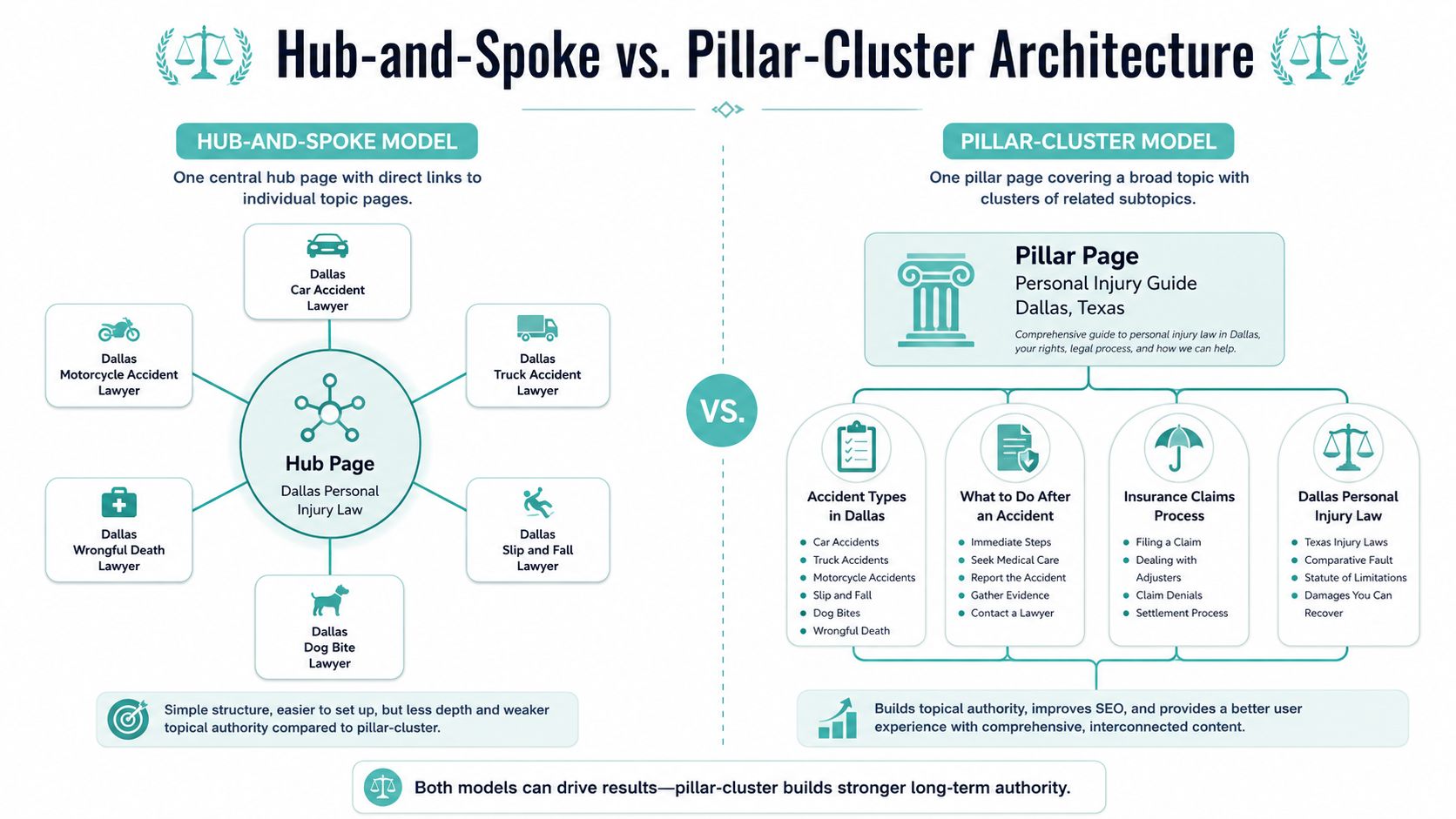
A lead-gen site works best when the structure points visitors toward the pages that make calls and form fills happen. A flat site scatters that path. A clear hub-and-spoke or pillar-cluster setup keeps the commercial pages in charge and gives supporting content a job instead of letting it drift.
Build the hierarchy first
Start with the pages that drive revenue or qualified leads, the homepage, core service pages, pricing or contact pages, and a blog hub. Then map the support pages beneath them, including articles, guides, FAQs, and landing pages. That hierarchy keeps a service site from turning into a page pile where every URL links everywhere for no strategic reason.
For a Dallas personal injury firm, the pillar page for personal injury can point to car accidents, truck accidents, and slip-and-fall pages. Each spoke should point back to the pillar, and it should also connect to closely related spokes when that helps the reader choose the right service. The result is a cleaner path for users and a clearer signal for crawlers.
Yoast's internal linking framework lays out that structure well in practice. Yoast's internal linking framework
Keep cornerstones and clusters talking both ways
The broad page carries the main topic and should link down to the narrower pages under it. The narrower pages should link back up to the broad page. That two-way pattern helps search engines identify the page that sits at the center of the topic and the pages that support it.
For service businesses, the hierarchy has to match the funnel. The homepage should send traffic toward commercial pages. City pages should reinforce the core service they support and the most relevant proof pages or nearby location pages. Blog posts should help the money pages, not compete with them for attention.
A good sitemap makes that easier to see. A sample sitemap for website structure shows how page groups can stay organized without forcing every URL to do the same job. Use it as a reference for grouping content, not as a rigid template.
Shopify stores with filters and collection paths need the same discipline. If you need to index key pages on Shopify, the internal structure around collections, filters, and supporting pages has to stay tight so the money pages do not sit too far from the homepage.
The Audit and Implementation Workflow
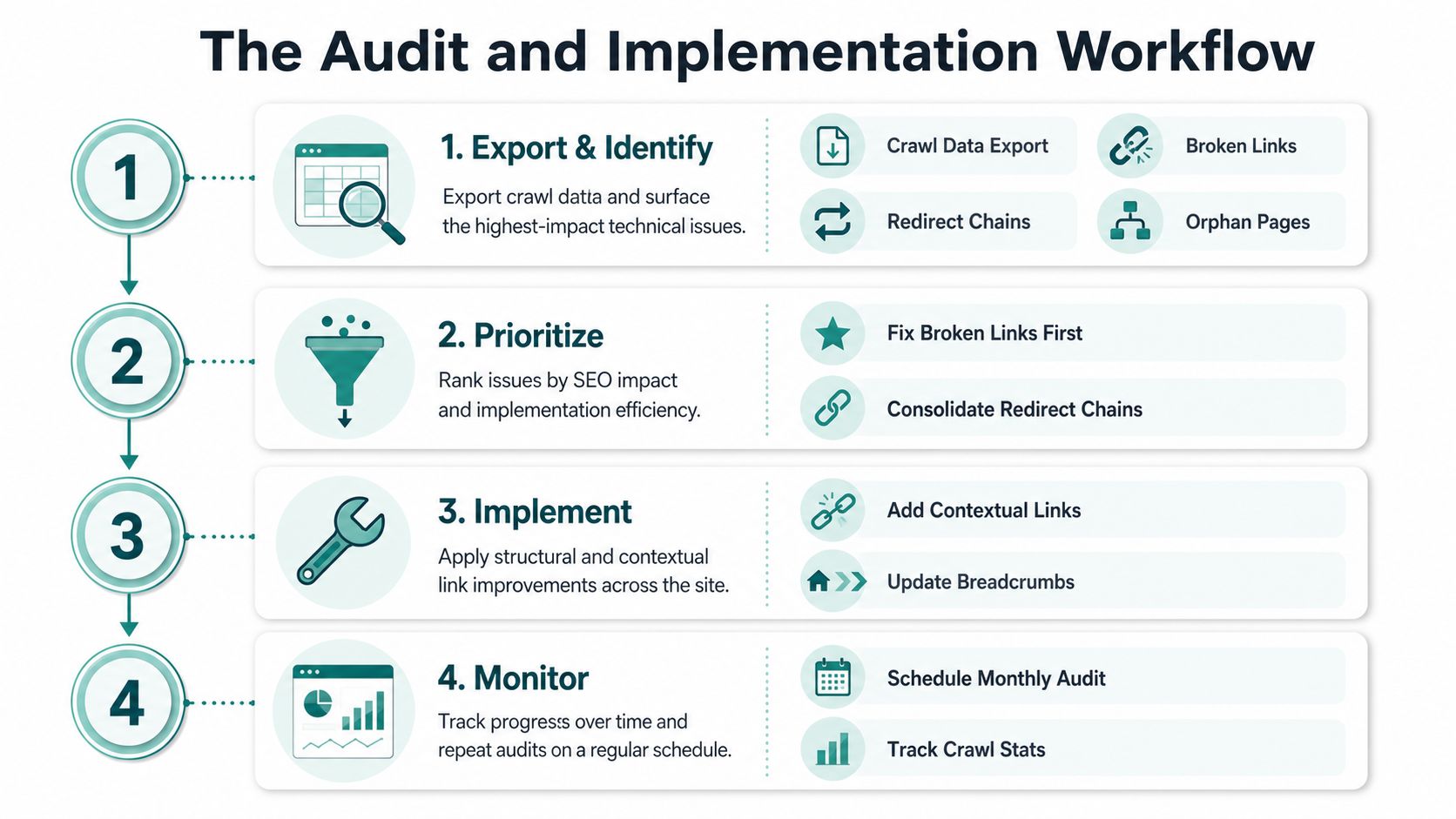
Internal linking gets easier when the work is routine instead of reactive. A marketing manager doesn't need a developer for the whole process, but they do need a repeatable workflow that catches the obvious leaks before they spread.
Start with the crawl
Export a site crawl and look first for broken links, redirect chains, and orphan pages. That gives you the fastest picture of where the structure is failing. Broken links waste equity. Redirect chains create unnecessary friction. Orphan pages are easy to overlook until they stop performing.
Fix high-value targets first. If a broken or weak link points toward a service page that generates calls or form fills, that gets priority over low-value informational content. A link pointing to a money page matters more than a link pointing to a secondary blog article.
Use the new-content rule immediately
A useful workflow target appears in Linkbot's 2026 guidance, every new article should receive links from at least 3 to 5 existing related posts within 48 hours of publishing. The point isn't just freshness. It keeps new content from sitting alone with no route in, which is how a site slowly creates more orphan-like pages. Linkbot's internal linking workflow is one of the few sources that turns the process into an operational habit instead of generic advice.
Keep the review cadence tight enough to matter
Several industry sources recommend regular audits, monthly in enterprise workflows and quarterly in smaller ones, then allowing about 4 to 8 weeks for search engines to recrawl and reassess after updates. That cadence is useful because internal linking changes don't pay off the same day. Semrush's guidance reflects that operational rhythm.
If older pages stop linking to newer content, that's link decay. It happens when a site keeps publishing but never revisits its older authority pages. One smart fix is to update the strongest pages first, then move outward from there.
Audit the site like a living sales asset, not a one-time SEO task. If the link map changes with every new page, the review cadence has to keep up.
You can also use a practical reference on how to publicize a blog post effectively, then fold the strongest new post back into the site through internal links instead of leaving it isolated.
Internal Linking for AI Search and Accessibility
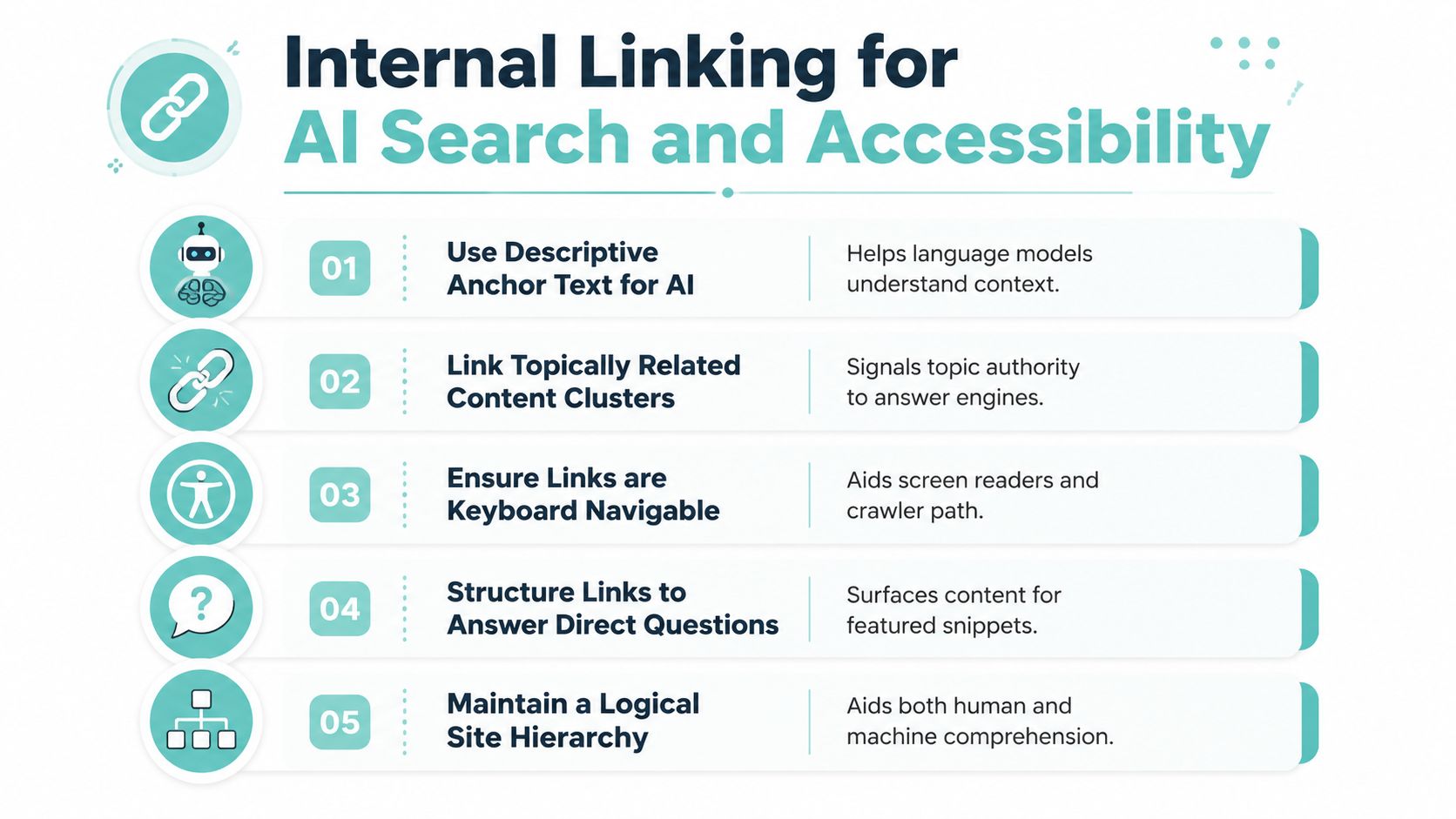
Internal links now do more than help rankings. They help answer engines, language models, screen readers, and keyboard users understand what belongs where. That makes anchor text and link placement do triple duty, they support crawling, retrieval, and access all at once.
Make links readable to machines and people
Descriptive anchors help models infer the destination topic, but they also help users who rely on assistive technology know what comes next. A vague link creates ambiguity for both groups. A descriptive one reduces it. Accessibility guidance also favors clear anchor text, breadcrumb navigation, identifiable link styling, and not overloading pages with too many links, while SEO guidance still rewards contextual clusters and authority flow. Search Engine Land's accessibility-focused discussion of internal linking is one of the few pieces that connects those dots.
Keep the mechanics crawlable
If a link only works through JavaScript interaction, you're asking too much of crawlers and many retrieval systems. Internal links should be real HTML <a href> elements so they can be followed reliably. Breadcrumbs help both users and bots understand location, while a logical hierarchy helps answer systems infer which page is the main source and which pages support it.
Strong link architecture is not just about equity. It's about being easy to parse, easy to navigate, and easy to trust.
A recent SEO guide for growth operators from Cyndra is useful here because it treats search visibility as a systems problem, not a single-page optimization problem. That's the right lens for answer engines too. Pages are easier to surface when their internal relationships are explicit, relevant, and easy to traverse.
The modern question isn't just how to pass value. It's which links make a page easiest for both humans and machines to retrieve without friction.
Industry-Specific Examples for Service Businesses
The same internal linking logic plays out differently depending on the business. A law firm doesn't need the same pattern as a roofer, and a dentist shouldn't copy an HVAC content map just because both have service pages. Service intent changes the link strategy.
Law firms, dentists, roofers, and HVAC need different routes
A personal injury practice should connect practice-area pages to city pages and case-result content, so prospects can move from a problem to a local solution to proof. That structure helps a searcher who starts with a broad injury query and needs confidence before calling.
Dentists usually need service pages for implants, cosmetic work, and family dentistry connected to condition-specific posts and back up to a treatments pillar. That keeps educational content from floating away from the booking path. A post about missing teeth should point toward implants, not just another article about oral health.
Roofers need storm-damage, residential, and commercial pages tied to city pages and a recent-projects hub. That gives local relevance and proof in one loop. An HVAC site works best when repair, installation, and maintenance pages link to seasonal content and emergency-service landing pages, because urgency changes the path a prospect takes.
Outbound links need restraint
Outbound links to relevant blog posts on other sites are fine when they support the reader. What you don't want to do is send visitors to competitor conversion pages. That creates trust leakage and can hand over a lead who was already close to inquiry. Link to useful educational resources when they improve the page, but keep commercial attention on your own site.
A practical content hub, such as a content marketing for leads resource, can fit naturally into this thinking because the goal is the same across trades and professional services, move the reader from information to action without making them work for it.
The test is simple. If a page brings in research traffic, does it have a clear path into a money page, a city page, or a contact step? If not, the site is asking the prospect to do the architecture work for you.
Measuring Results and Your Next Steps
Good internal linking work should show up in both SEO and lead flow. Watch organic traffic to pages that were previously orphaned or underlinked, crawl coverage in Google Search Console, average crawl depth, and assisted conversions when you want to see whether links are helping people move through the funnel. Ranking movement matters, but inquiry lift matters more.
Start this week with a crawl export, then fix broken links and redirect chains first. Add at least one incoming internal link to every orphaned page that matters. Apply the 48-hour linking habit to every new post, then schedule the next review on a monthly or quarterly rhythm depending on site size and publishing pace.
Internal linking doesn't have to be glamorous to move the business. It just has to be deliberate.
If you want a site architecture that supports rankings, call volume, and form fills instead of just looking organized, reach out to Digital Skyrocket and get a lead-gen plan built around the pages that matter.