
Technical SEO isn't merely behind-the-scenes maintenance. For a service business, it determines whether an important service or location page can be found, understood, loaded, and acted on by a potential customer. Google's mobile-first indexing milestone made that especially clear. Google announced the shift in 2018 and reported that, by December of that year, mobile-first indexing applied to over half of the pages shown in search results globally. The mobile version of your site is no longer a secondary experience. It's the version search systems expect to evaluate. Google's mobile-first indexing documentation explains why content, links, rendering, and usability must remain consistent on smaller screens.
The ten technical SEO best practices below follow the order I'd use when evaluating a law firm, roofer, HVAC company, contractor, dental practice, or other service business. They separate crawl and index controls from performance, mobile usability, site architecture, structured data, security, and conversion-related implementation.
Don't treat the list as a collection of isolated fixes. A fast page that's blocked from crawling can't generate organic inquiries. A well-indexed service page that shifts around on mobile can lose the visitor before the phone number is tapped. Validate every major change in Google Search Console, page testing tools, and lead reporting, then connect technical improvements with calls, forms, bookings, and other inquiry activity.
Table of Contents
- 1. Site Speed and Core Web Vitals Optimization
- 2. Mobile Responsiveness and Mobile-First Indexing
- 3. Crawlability and Indexing Control
- 4. XML Sitemaps and Robots.txt Configuration
- 5. Canonical Tags and Duplicate Content Resolution
- 6. URL Structure and Site Architecture Optimization
- 7. Internal Linking Strategy and Authority Distribution
- 8. Schema Markup and Structured Data Implementation
- 9. Structured Data for Local Business and Service Pages
- 10. HTTPS Implementation and SSL Certificate Management
- 10-Point Technical SEO Comparison
- Turn the Checklist Into a Revenue-Page Audit
1. Site Speed and Core Web Vitals Optimization
A service page can rank well and still waste the opportunity if it loads slowly or responds poorly. Someone searching for emergency HVAC repair, a personal injury attorney, or a roofer after a storm usually wants a clear answer and an immediate next step. Heavy galleries, oversized hero images, third-party scripts, and slow hosting can bury the phone button beneath a frustrating loading experience.
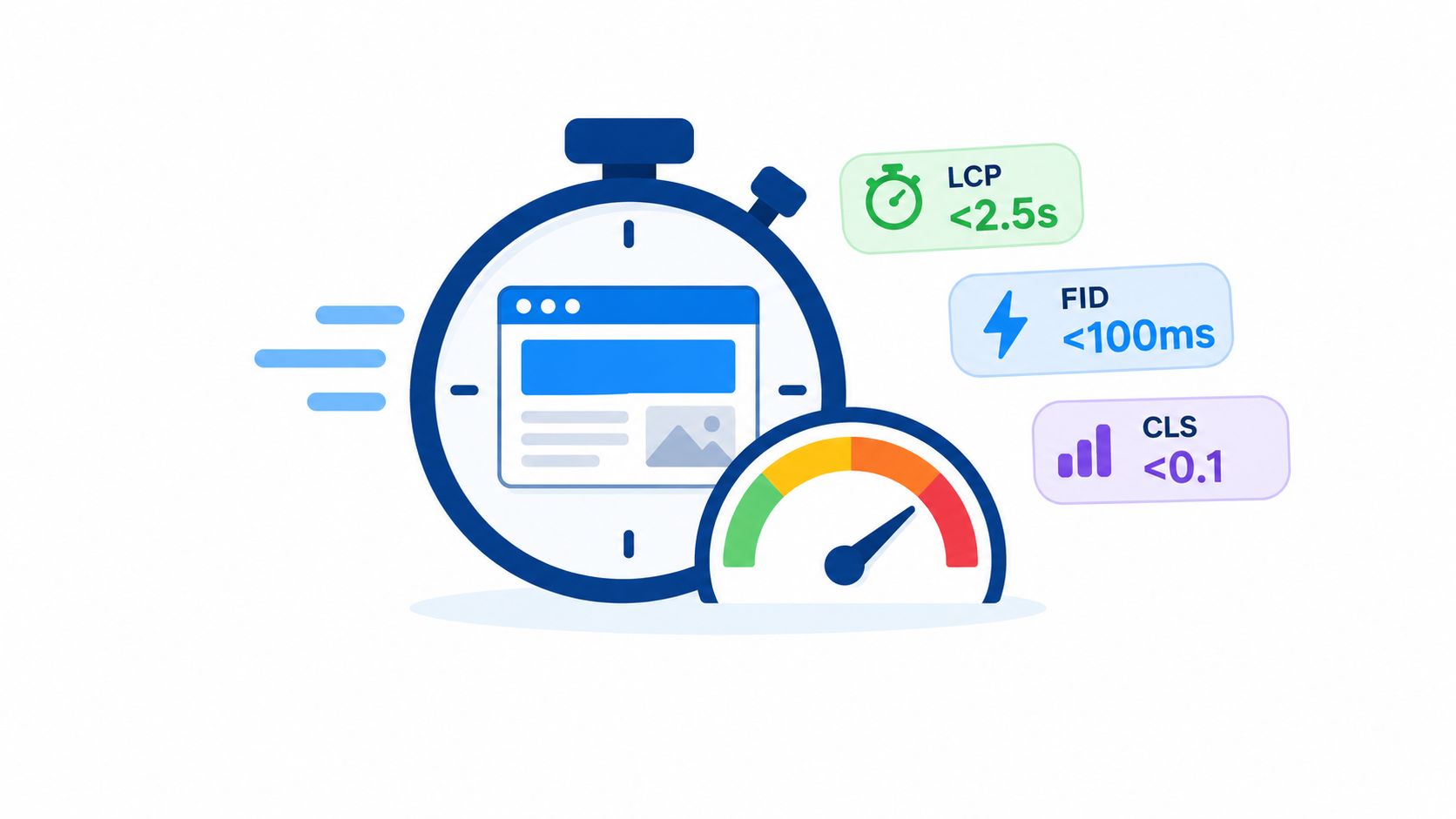
Google's Core Web Vitals provide specific performance targets. A “good” experience means LCP at or below 2.5 seconds, INP at or below 200 milliseconds, and CLS at or below 0.1, evaluated at the 75th percentile of real user visits. Google's Core Web Vitals documentation explains how these metrics reflect loading, responsiveness, and visual stability.
Fix the largest obstacle first
For a law firm, start with the largest image or video on a case-results or practice-area page. For a roofer, compress before-and-after photos and lazy-load images below the initial viewport. For a multi-location HVAC company, remove unnecessary JavaScript from location templates instead of manually optimizing a few pages.
Use PageSpeed Insights, Lighthouse, and GTmetrix to identify bottlenecks, but don't rely on lab results alone. Test real mobile devices and connections, review server response performance, and compare template-level issues in Search Console. Modern image formats such as WebP can reduce unnecessary transfer size, while deferred noncritical scripts and minified CSS can reduce browser work.
Practical rule: Improve the content that appears first, then remove the scripts and layout behavior that delay or disrupt the next action.
A faster site should support more than rankings. It should make the service, service area, trust signals, and contact path available before a prospective client gives up.
2. Mobile Responsiveness and Mobile-First Indexing
Google's mobile-first indexing rollout changed the baseline for technical SEO. Google said it was using the mobile version of a page for indexing and ranking, and later reported that mobile-first indexing had been applied to over half of pages shown in search results globally by December 2018. Google's explanation of mobile-first indexing makes the operational consequence clear. The mobile version needs the important content, links, structured data, and functionality.
A responsive layout is only the starting point. A law firm's mobile page should make calling easy and keep intake forms readable. An HVAC company should make service areas, emergency contact options, and operating hours easy to locate. A roofing company's project gallery should load progressively rather than forcing a visitor to wait for every image before seeing the request-estimate button.
Test the experience customers actually use
Begin design with the narrowest practical viewport, then expand the layout for tablets and desktops. Confirm that buttons and links are comfortable to tap, form fields don't trigger awkward zooming, and sticky headers don't cover important content. The viewport declaration should be present as width=device-width, initial-scale=1.
Use responsive image delivery with srcset and picture elements where appropriate. Test on actual phones and variable networks, not only through Chrome DevTools emulation. Check whether the mobile page contains the same meaningful service descriptions and internal links as the desktop version.
- Simplify forms: Ask only for information needed to begin the conversation.
- Protect the first screen: Put the service, location, credibility signal, and next step where mobile visitors can find them quickly.
- Verify interactions: Test click-to-call links, appointment systems, maps, menus, and form submissions on real devices.
- Review rendered content: Use Search Console URL Inspection to see whether important mobile content is available to Google.
A responsive site that hides the service area or buries contact options may pass a basic layout check and still lose qualified inquiries. Mobile SEO and conversion usability need to be reviewed together.
3. Crawlability and Indexing Control
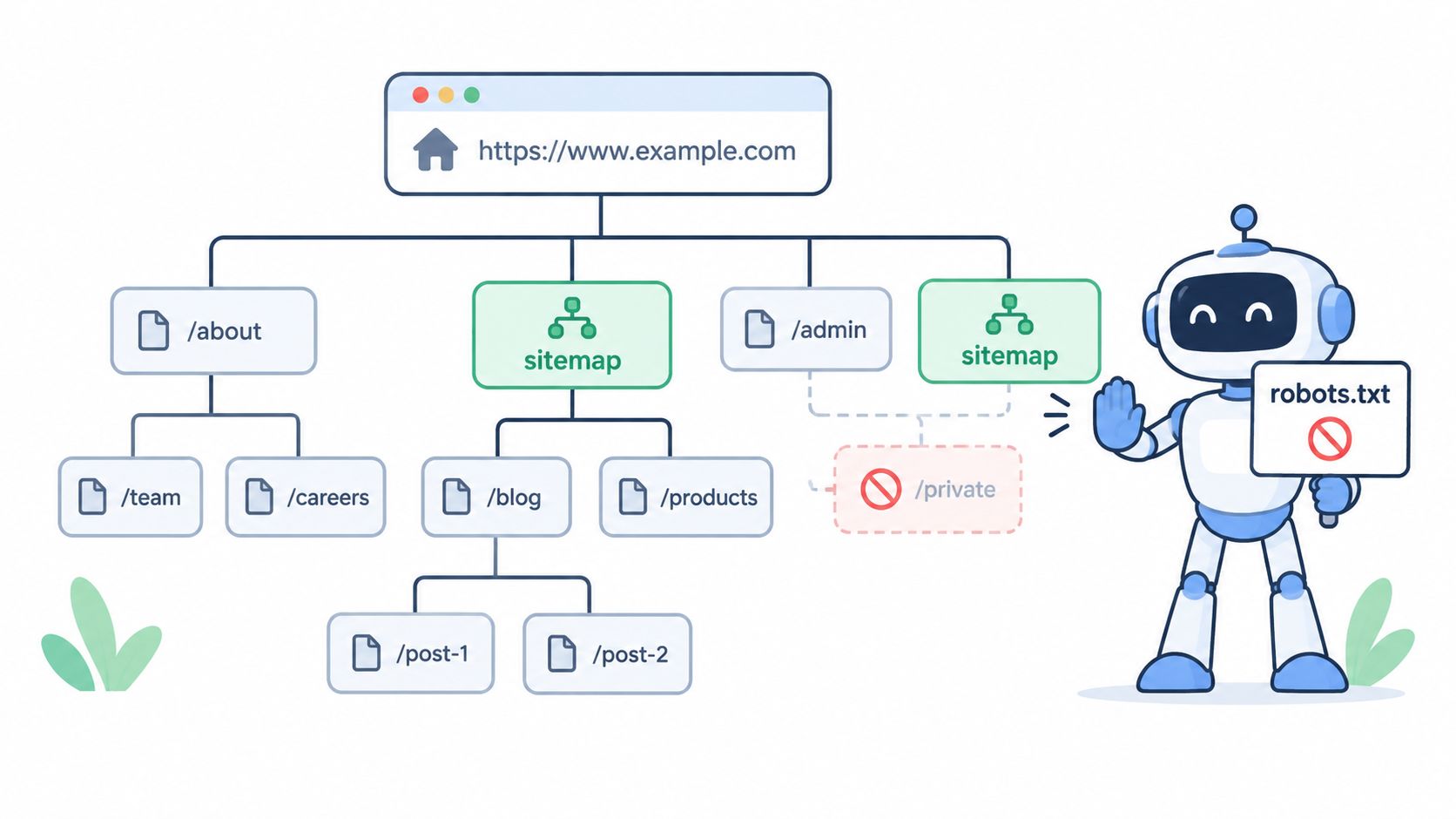
Crawlability and indexability solve different problems. Robots.txt controls crawling, while a noindex directive tells a search engine not to include a page in its index. A page can be reachable but not indexable, or it can be indexable in theory but inaccessible because a rule blocks the crawler.
Revenue pages should normally return a successful response, remain crawlable, and have clear internal links. Thank-you pages, staging environments, administrative areas, duplicate parameter URLs, and thin utility pages often need different treatment. A thank-you page can be set to noindex so it doesn't compete with a service page or appear as a search destination, but robots.txt shouldn't block the page if Google needs to crawl it to see the directive.
Use each control for the job it solves
Robots.txt is useful for reducing access to low-value URL patterns, such as faceted filters and internal search results. It isn't a reliable way to hide sensitive information, and it doesn't replace authentication. A noindex directive requires crawling, so blocking the same URL in robots.txt can prevent Google from seeing the instruction.
Canonical tags can help identify the preferred version of similar URLs, while redirects should handle pages that have permanently moved. nofollow also needs a precise purpose. It shouldn't be added mechanically to every external link or internal link.
Search Console URL Inspection can help confirm whether a law firm's intake page, a roofer's storm-damage service page, or an HVAC location page is accessible and eligible for indexing. Review crawl activity after significant rule changes, and use a focused crawl budget optimization guide when a large site produces many redundant URLs.
The most expensive indexing error is often a page that looks fine in a browser but is blocked, rendered incompletely, or marked with an accidental directive.
Audit noindex tags after redesigns and plugin changes. A single template setting can affect an entire group of location or service pages, so check patterns rather than inspecting only one URL.
4. XML Sitemaps and Robots.txt Configuration
An XML sitemap should help search engines discover the URLs you want considered. It shouldn't function as a warehouse for every URL your CMS has generated. For a service business, that usually means canonical, indexable service pages, location pages, core informational pages, and worthwhile articles. Exclude redirects, duplicates, blocked URLs, and pages that return errors.
A law firm with many geography pages may use a sitemap index to organize URLs by region or content type. An HVAC company can keep dynamic filter URLs out of the sitemap while using robots.txt to reduce unnecessary crawling. A dental practice with a scheduling system should prevent calendar parameters from becoming an uncontrolled collection of crawlable URLs.
Build a clean discovery system
WordPress plugins such as Yoast SEO and Rank Math can generate sitemaps, but automatic generation doesn't remove the need for review. Inspect the output after publishing new templates, changing taxonomies, or migrating domains. Submit the sitemap in Google Search Console and Bing Webmaster Tools, and make sure the lastmod value reflects meaningful content changes rather than every routine database update.
Robots.txt should disallow low-value patterns carefully. Avoid blocking CSS, JavaScript, images, or directories that Google needs to render important pages. Test changes before deployment, then inspect representative URLs after release.
- Include canonical URLs: List the preferred URL, not alternate versions.
- Segment logically: Separate service, location, article, or image content when the site's size and structure justify it.
- Review dynamic systems: Check filters, search pages, booking tools, and tracking parameters.
- Monitor changes: Compare sitemap URLs with indexed URLs and crawl diagnostics.
A sitemap can improve discovery, but it can't force indexing. The page still needs useful content, a sound status code, crawlable rendering, and a place in the site's architecture. A related site navigation guide for CPAs offers another example of how structured navigation supports discoverability.
5. Canonical Tags and Duplicate Content Resolution
Duplicate URLs make it harder for search engines to identify the page a business wants to rank. Common causes include HTTP and HTTPS versions, www and non-www variants, tracking parameters, printer-friendly pages, category filters, and overlapping location templates.
A rel="canonical" tag tells search engines which version is preferred when multiple URLs contain identical or substantially similar content. For example, a law firm might have two URLs serving the same personal injury service page. A roofer may have parameter combinations attached to a materials page. A multi-location company might have both an office URL and a city URL describing the same location. Each situation requires a deliberate preferred URL.
Canonicalization needs consistency
Place the canonical in the page head and use an absolute URL. Point it directly to the most complete, indexable version. Don't point a canonical to a redirect, a missing page, or a page carrying noindex. Avoid chains where one canonical points to another canonical rather than to the final destination.
Canonical tags are signals, not commands. Google may select a different canonical if the site sends conflicting clues through internal links, sitemaps, redirects, or page content. That's why implementation must be coordinated across the entire site.
Check canonical selections in Search Console and compare them with the URLs included in your sitemap. If a duplicate page serves no user purpose, a redirect or controlled exclusion may be more appropriate than leaving it available indefinitely. If two location pages target different markets, don't canonicalize them together merely because their layouts look similar. Give each page distinct service-area information and customer value.
A canonical strategy protects ranking signals, reduces index noise, and makes reporting easier. It also keeps callers and form submissions pointed toward the page that best represents the business.
6. URL Structure and Site Architecture Optimization
A clean URL tells users and crawlers what they're about to open. /practice-areas/personal-injury/car-accidents/ communicates more than a string of query parameters, just as /services/ac-repair/commercial/ separates a commercial HVAC need from a residential one.
Architecture matters more than cosmetic URL neatness. A service business should group related services, locations, and supporting content so that important pages are easy to discover from the homepage, primary navigation, and relevant informational pages. A dentist may organize /locations/dallas-tx/cosmetic-dentistry/, while a roofer may separate roofing materials from installation services.
Plan before the site grows
Use lowercase letters and hyphens between words. Keep the hierarchy as shallow as practical, often around the domain, category, and page relationship. Don't force every page into an arbitrary folder structure, and don't add keywords repeatedly just to make a URL longer. The URL should make sense to a person who sees it in a search result or referral.
A clean architecture also reduces migration risk. Changing URLs after years of publishing creates redirect work, internal-link updates, canonical changes, sitemap revisions, and reporting complications. Plan service and location relationships before building a large site.
If a URL must change, use a direct permanent redirect to the closest relevant replacement. Update navigation, internal links, canonicals, and sitemaps rather than relying on redirects forever. Avoid sending an old service page to a generic homepage when a more specific replacement exists. The closer the destination matches the original intent, the better the experience for both searchers and crawlers.
7. Internal Linking Strategy and Authority Distribution
Internal links decide how visitors move through a site and how search engines discover relationships between pages. A homepage can pass context to major service pages. A detailed roofing article can point to roof-replacement and material pages. An HVAC maintenance article can guide readers toward seasonal service and city pages.
The best internal links feel useful, not inserted for decoration. A law firm's page about car accidents might link to its personal injury practice page and a relevant location page. A dental practice can connect an educational page about implants with the implant service page, using descriptive anchor text that tells the visitor what they'll find.
Link important pages from strong contexts
Start with the homepage, primary service pages, navigation, and articles that already attract attention. Use natural descriptive anchors instead of repeated “click here” language. Breadcrumbs can support both orientation and structural understanding, especially where services sit inside categories or locations.
A page doesn't need links to everything. Link to pages that deserve discovery, authority, and a clear place in the customer journey. Remove links to outdated services, discontinued locations, and thin pages that no longer support the business.
- Create topic clusters: Connect related educational content to the service page that answers the commercial need.
- Support locations: Link city pages from relevant services and from local proof such as projects, testimonials, or service-area explanations.
- Find orphan pages: Use a crawler to identify important URLs with no meaningful internal path.
- Review anchor context: Make sure the surrounding sentence explains why the destination matters.
Use this internal linking best-practices resource when auditing link paths at scale. Internal linking won't repair a page that lacks useful content or has an indexing barrier, but it can make a strong service architecture far easier to discover and explore.
8. Schema Markup and Structured Data Implementation
Structured data helps search engines interpret what a page represents. A business page may describe an organization, a service, a person, an article, or a combination of related entities. That context can support eligibility for enhanced search appearances, but markup doesn't guarantee a rich result and it shouldn't be treated as a substitute for visible, accurate content.
Google's structured-data guidance changes over time. Google removed support for several rich result types in June 2025 and removed documentation for the practice problem structured data type in September 2026, as recorded in Google's Search updates. The practical lesson is important for service businesses. Don't add every schema type a plugin offers and assume implementation completeness creates visibility.
Maintain markup that supports real eligibility
Start with the business entity and the page's actual subject. A law firm can describe its organization and services. A roofing page can identify the service being offered. An HVAC location page can connect the business, location, operating details, and service context where the markup is supported and accurate.
Keep structured data synchronized with visible content. Don't add ratings that aren't supported by actual reviews, prices that aren't presented to users, or service areas the company doesn't serve. Validate JSON-LD with Google's Rich Results Test and Schema.org tools, then check Search Console for detected enhancements and errors.
A plugin such as Yoast SEO or Rank Math may provide a useful foundation, but automated schema should be reviewed. Templates often produce generic or incomplete entities, especially on multi-location sites. Selective, accurate markup is more valuable than a large block of decorative code. A practical structured data playbook from SemDash provides additional implementation context.
9. Structured Data for Local Business and Service Pages
LocalBusiness and Service markup can clarify the relationship between a company, its locations, and what it offers. For a personal injury firm, that may include the business identity, phone number, address, and relevant services. For a roofing company, the service page may describe roof repair or replacement, while the local business entity identifies the provider. A multi-location HVAC business needs to avoid collapsing distinct offices into one vague entity.
Schema should reinforce local relevance, not manufacture it. The business name, address, phone number, hours, and service-area details need to match the information customers see elsewhere, including the Google Business Profile. If a company serves an area without a staffed office there, describe the service area accurately rather than presenting a misleading address.
Treat each location as an entity, not a duplicate page
A useful location page should explain the services available, the area served, local operating details, and the reason a customer should contact that office or team. Markup can support those details, but it can't compensate for copied city pages with no local substance.
Define service types clearly and use separate Service entities when the page covers distinct offerings. Include opening hours only when they're accurate. Add review and rating properties only when the reviews meet Google's requirements and are visible to users.
Use Schema.org validation and Google's Rich Results Test before publishing. Review every location after changes to hours, phone numbers, service offerings, or office details. The local business schema markup guide can help teams coordinate entity information across local and service pages.
The objective isn't to insert as much code as possible. It's to make the business, service, location, and customer-facing details easier for search systems to interpret without creating conflicting signals.
10. HTTPS Implementation and SSL Certificate Management
HTTPS protects the connection between a visitor's browser and the server. That matters whenever a law firm collects information through an intake form, an HVAC company receives an emergency request, or a dental practice accepts appointment details. Browsers also use security warnings and connection behavior to shape user trust, so an insecure form can damage inquiries even when the page ranks.
Google announced HTTPS as a ranking signal in 2014. Google's original HTTPS ranking announcement established the SEO relevance, but the business case extends beyond rankings. HTTPS helps protect submitted information and supports browser features that require secure connections.
Migrate the whole site, not only the form
Use a valid SSL/TLS certificate and serve every page through HTTPS. A Domain Validated certificate may be sufficient for many small businesses, while certificate selection should reflect the site's security and organizational needs. The important implementation work is consistency.
Set direct HTTP-to-HTTPS permanent redirects. Update internal links, canonical tags, XML sitemaps, analytics settings, and references in structured data. Then resolve mixed-content warnings caused by images, stylesheets, scripts, fonts, or other resources still loading over HTTP.
Monitor renewal and configure automatic renewal where the hosting environment supports it. An expired certificate can make a functioning website appear unsafe or unavailable. Consider HSTS after confirming that every required resource and subdomain works correctly over HTTPS, because a poorly planned HSTS policy can make recovery more difficult.
A secure connection won't fix weak service content or poor architecture. It does remove an avoidable trust barrier from the moment a prospective client opens the page.
10-Point Technical SEO Comparison
| Item | 🔄 Implementation Complexity | ⚡ Resource Requirements | 📊 Expected Outcomes | ⭐ Key Advantages | 💡 Quick Tips |
|---|---|---|---|---|---|
| Site Speed and Core Web Vitals Optimization | 🔄 High, requires front‑end and server changes, ongoing audits | ⚡ Moderate→High, dev time, hosting improvements, performance tools | 📊 Faster load times, better ranking potential, higher conversions | ⭐ Direct ranking signal; measurable UX and conversion gains | 💡 Prioritize LCP, compress images, defer non‑critical JS |
| Mobile Responsiveness and Mobile-First Indexing | 🔄 Medium, responsive design and cross‑device QA | ⚡ Moderate, design/dev time, device testing | 📊 Improved mobile rankings and higher mobile lead conversion | ⭐ Essential for mobile-first indexing; single-site maintenance | 💡 Design mobile‑first, use viewport meta, test on real devices |
| Crawlability and Indexing Control (Noindex/Nofollow/Robots) | 🔄 Medium, policy planning + precise implementation | ⚡ Low→Moderate, config changes, Search Console monitoring | 📊 More efficient crawl budget; fewer unwanted indexed pages | ⭐ Fine-grained control over what search engines index | 💡 Don't block pages with robots.txt that use noindex; test in Search Console |
| XML Sitemaps and Robots.txt Configuration | 🔄 Low→Medium, generate sitemaps and maintain robots rules | ⚡ Low, plugins/tools and periodic updates | 📊 Faster discovery and improved indexing for deep content | ⭐ Ensures discovery of important URLs; aids crawl budget | 💡 Submit canonical-only sitemaps to Search Console; update on changes |
| Canonical Tags and Duplicate Content Resolution | 🔄 Medium, sitewide template changes and audits | ⚡ Low→Moderate, template/dev updates, validation | 📊 Consolidated ranking signals; fewer duplicate-content issues | ⭐ Preserves link equity and clarifies preferred URLs | 💡 Use absolute URLs, avoid canonical chains, verify in Search Console |
| URL Structure and Site Architecture Optimization | 🔄 High, planning, possible migrations and redirects | ⚡ Moderate→High, architecture design, 301 redirects, dev time | 📊 Better crawlability, topical authority, and UX/navigation | ⭐ Clear hierarchy improves internal linking and local org. | 💡 Keep depth shallow (~3), use hyphens, plan before building |
| Internal Linking Strategy and Authority Distribution | 🔄 Medium, strategic planning and content updates | ⚡ Low→Moderate, editorial time and audits | 📊 Improved discovery and ranking distribution to priority pages | ⭐ Cost‑effective way to pass authority and guide users | 💡 Link from high‑authority pages, use descriptive anchor text |
| Schema Markup and Structured Data Implementation | 🔄 Medium, technical JSON‑LD implementation and testing | ⚡ Moderate, developer time and validation tools | 📊 Potential rich snippets, higher CTR, clearer SERP presence | ⭐ Enables rich results and voice/answer engine eligibility | 💡 Use JSON‑LD, validate with Rich Results Test, keep data current |
| Structured Data for Local Business and Service Pages | 🔄 Medium, per‑location schema and synchronization | ⚡ Moderate, per‑location data maintenance | 📊 Better Local Pack visibility, higher local CTR and AEO readiness | ⭐ Improves local discovery and displays business details/reviews | 💡 Mirror Google Business Profile, use OpeningHoursSpecification, update often |
| HTTPS Implementation and SSL Certificate Management | 🔄 Medium, server config, site migration, mixed‑content fixes | ⚡ Low→Moderate, certificate costs or free CA, monitoring | 📊 Improved security and trust signals; small SEO benefit | ⭐ Encrypts data, enables HTTP/2 and browser trust indicators | 💡 Implement site‑wide HTTPS, 301 redirect HTTP→HTTPS, enable HSTS, monitor expiry |
Turn the Checklist Into a Revenue-Page Audit
Technical SEO produces better results when the work follows dependency order instead of a random list of warnings. Start by securing the site and testing the mobile experience. A business shouldn't spend time refining schema on a page that presents browser warnings, hides the primary service content on mobile, or makes a visitor struggle to call.
Next, remove crawl and index barriers. Inspect important service and location URLs in Search Console, review status codes, check noindex directives, and confirm that robots.txt isn't blocking resources or pages that matter. For JavaScript-heavy sites, compare the HTML available before and after rendering. A page that works for a browser but fails to expose its main content to crawlers needs a rendering solution, not merely another metadata edit.
Then confirm canonical URLs and sitemaps. Every important URL should have a consistent place in the site's preferred URL system, appear in the appropriate sitemap when eligible, and connect to related pages through internal links. Resolve redirect chains, duplicate variants, broken internal links, and orphaned service pages before expanding the content library.
Architecture and internal linking come next. Put high-value services and locations close to the site's main navigation and connect them to useful supporting content. For a roofer, that might mean linking storm-damage education to inspection and replacement pages. For a law firm, it could mean connecting practice-area explanations with local intake paths. For an HVAC company, seasonal content should point to the service pages and locations that can handle the request.
Performance deserves continuous attention rather than a one-time launch task. Monitor LCP, INP, and CLS using real user data at the 75th percentile, and use lab diagnostics to identify the code, image, server, or template issue behind the field result. Industry benchmarking remains difficult. One cited industry statistic reports that only 18% of eCommerce sites pass Core Web Vitals across all pages, while another industry summary reports that 73% of site owners check Core Web Vitals monthly through Search Console. These figures appear in industry coverage of Google Search Console statistics, and they support an operational approach. Review templates, devices, and geographies instead of treating performance as a page-by-page cosmetic exercise.
Finally, validate structured data and local signals. Use current Google documentation, keep business information synchronized, and remove markup that no longer supports a meaningful search appearance. Document every change, including the affected URLs, implementation date, expected outcome, and validation result. Compare technical work with calls, forms, booked appointments, and other lead activity so the audit stays connected to revenue rather than ending with a green tool report.
Digital Skyrocket is relevant for service businesses that need technical SEO, local SEO, WordPress development, answer engine optimization, and conversion optimization coordinated around a lead-generating website. Its work includes site planning, responsive WordPress development, technical implementation, search optimization, reporting, and CRO for law firms, dentists, roofers, HVAC companies, and other service businesses. The agency has offices in Tyler and Dallas, Texas, and works with businesses that want a new website together with ongoing SEO.
Digital Skyrocket helps service businesses plan, build, and optimize lead-generating websites with technical SEO, local SEO, AEO, WordPress development, and conversion optimization working together. Visit Digital Skyrocket to discuss a website and SEO approach built around qualified inquiries, not just rankings.