
You've got a service page that ranks, a Google Business Profile that gets calls, and a developer asking whether the site needs “one more script.” The practical question isn't whether a validator turns green. It's whether local business schema markup helps Google understand which business serves which market, which phone number belongs to which branch, and whether the page describes a real entity rather than a generic service.
For law firms, dentists, roofers, and HVAC companies, schema works best as entity architecture. It connects the business name, location, services, staff, hours, profiles, and site pages into a consistent machine-readable model. It can support clearer local search interpretation and retrieval, but it won't compensate for weak service content, an inaccurate Google Business Profile, or a business that can't legitimately serve the searcher's location.
Table of Contents
- What Local Business Schema Markup Actually Does for Your Business
- The Fields That Matter and the Ones You Can Skip
- Ready-to-Use JSON-LD Templates for Service Industries
- Adding the Markup to WordPress and Custom Sites
- Testing and Validation You Can Trust
- Multi-Location and Review Markup Done Right
- Common Pitfalls and How to Maintain Schema Over Time
What Local Business Schema Markup Actually Does for Your Business
A local business owner doesn't need structured data because a validator enjoys complete fields. They need it because search systems must distinguish one real business from similarly named companies, old directory records, and pages describing a service without a clear provider. Google's documentation instructs site owners to define each location as a LocalBusiness and represent its physical address as a PostalAddress object in Google's LocalBusiness structured data documentation. That makes location-level markup part of Google's documented local search implementation, not a decorative SEO add-on.
The useful mental model is an entity record. A law office at 412 Maple Street should be identifiable as the same organization answering its published phone number, receiving reviews on its Google Business Profile, and publishing the location page on its website. The markup doesn't create that identity by itself. It gives crawlers an explicit representation they can compare with visible page content and other business signals.
Three practical outcomes
Eligibility is the first outcome. Accurate structured data can help a page qualify for supported search enhancements and provide clearer information for systems that build business profiles. It doesn't guarantee a map pack placement, a knowledge panel feature, or an answer-engine citation.
Disambiguation is the second. A stable @id, exact address, telephone number, URL, and specific business type help separate your Dallas dental office from another practice with a similar name. That distinction matters more for multi-location companies and businesses with common brand names.
Signal consolidation is the third. Consistent entity details give search systems a cleaner way to reconcile the website, Google Business Profile, directories, social profiles, and location pages. The same principle applies to the supporting content covered in this guide to location landing pages.
Practical rule: Treat schema as a structured description of facts already visible and verifiable on the page. Don't use it to introduce services, locations, ratings, or claims that users can't find.
Schema won't rescue a thin service page. It can't fake proximity, create legitimate relevance for a city you don't serve, or repair a suspended Google Business Profile. Google's structured data policies also make clear that markup must represent the page's visible content, and Google decides whether any eligible enhancement appears.
The Fields That Matter and the Ones You Can Skip
A validator can reward completeness while a local search strategy gains very little. Prioritize fields that resolve identity, location, contact access, service context, and operating availability. Google's formal guidance identifies the business name and physical address as the core requirements, while telephone, URL, geo data, hours, reviews, and ratings are recommended or conditional. Google also supports multiple structured data formats and recommends JSON-LD in its structured data policies.
Start with @context, a specific @type, name, telephone, address, and url. The values should match the live Google Business Profile and the page itself. For the address, use PostalAddress with streetAddress, addressLocality, addressRegion, postalCode, and addressCountry, following the field-level checklist in this LocalBusiness schema reference.
Prioritize context over decoration
geo helps clarify the physical point for a location-based business, while areaServed is more useful for a roofing or HVAC company that travels across counties and cities. Hours should reflect actual customer availability, not an idealized schedule. Schema.org requires weekly ranges with two-letter day abbreviations and 24-hour times for the openingHours property, as documented in the Schema.org LocalBusiness vocabulary. For detailed markup, use openingHoursSpecification as an array so separate weekday, evening, and weekend schedules remain explicit.
| Priority | Field | Why It Matters | Format Note |
|---|---|---|---|
| Core | name, address, telephone, url |
Establishes the business entity and contact path | Match the live page and Google Business Profile |
| High | geo |
Helps distinguish nearby or similarly named locations | Use decimal latitude and longitude |
| High | openingHoursSpecification |
Describes when customers can reach or visit the business | Use an array with valid weekly ranges |
| High | areaServed |
Clarifies service territory for mobile providers | List cities, counties, or a suitable GeoCircle |
| Medium | image |
Connects the entity to a real visual representation | Use a genuine photo URL on the page |
| Medium | priceRange |
Gives broad commercial context | Use a string such as $ or $$ |
| Low | hasMap |
Usually adds little beyond an already visible map | Include it only when the page actually presents that map |
| Conditional | review, aggregateRating |
Can describe eligible genuine review content | Don't mark up self-serving testimonials |
| Low | sameAs chains |
Can become noisy and difficult to maintain | Link only to authoritative profiles |
| Low | Logo dimensions | Rarely changes local interpretation | Keep logo data accurate, but don't overinvest |
Keep NAP details synchronized across the website and listings. A focused NAP consistency process is more valuable than adding every available property. The fields that satisfy a validator but don't clarify the business should come after the fields that make the entity unmistakable.
Ready-to-Use JSON-LD Templates for Service Industries
Templates are useful only when they describe the actual page. Replace the marked business name, telephone, and street address in every example, then verify that each service and service area appears visibly on the page. Google's documentation supports JSON-LD, but it doesn't make unsupported or invisible claims acceptable.

Law firm template
{
  "@context": "https://schema.org",
  "@type": "LawFirm",
  "@id": "https://example.com/#lawfirm",
  "name": "CUSTOMIZE BUSINESS NAME",
  "telephone": "CUSTOMIZE TELEPHONE",
  "url": "https://example.com/",
  "address": {
    "@type": "PostalAddress",
    "streetAddress": "CUSTOMIZE STREET ADDRESS",
    "addressLocality": "Dallas",
    "addressRegion": "TX",
    "postalCode": "CUSTOMIZE POSTAL CODE",
    "addressCountry": "US"
  },
  "areaServed": [
    "CUSTOMIZE COUNTY",
    "CUSTOMIZE CITY",
    "CUSTOMIZE NEARBY CITY"
  ],
  "practiceArea": [
    "Personal Injury",
    "Family Law"
  ],
  "employee": {
    "@type": "Attorney",
    "name": "CUSTOMIZE ATTORNEY NAME",
    "jobTitle": "Attorney",
    "sameAs": "CUSTOMIZE BAR PROFILE URL"
  }
}
Use a LawFirm type when the page describes a law firm, and narrow the practice areas to services the firm offers. The three mandatory edits are name, telephone, and streetAddress. Don't copy the county and city list without checking the firm's legitimate service territory.
Dentist template
{
  "@context": "https://schema.org",
  "@type": "Dentist",
  "@id": "https://example.com/#dentist",
  "name": "CUSTOMIZE BUSINESS NAME",
  "telephone": "CUSTOMIZE TELEPHONE",
  "url": "https://example.com/",
  "address": {
    "@type": "PostalAddress",
    "streetAddress": "CUSTOMIZE STREET ADDRESS",
    "addressLocality": "CUSTOMIZE CITY",
    "addressRegion": "CUSTOMIZE STATE",
    "postalCode": "CUSTOMIZE POSTAL CODE",
    "addressCountry": "US"
  },
  "medicalSpecialty": [
    "General Dentistry",
    "Cosmetic Dentistry",
    "Orthodontics"
  ],
  "availableService": [
    "Dental Cleaning",
    "Dental Exam",
    "Teeth Whitening"
  ]
}
A dentist should use medicalSpecialty and availableService only when the visible content supports those descriptions. Don't label a practice as offering orthodontics if the site only mentions referrals or general consultations.
Roofing template
{
  "@context": "https://schema.org",
  "@type": "RoofingContractor",
  "@id": "https://example.com/#roofing-contractor",
  "name": "CUSTOMIZE BUSINESS NAME",
  "telephone": "CUSTOMIZE TELEPHONE",
  "url": "https://example.com/",
  "address": {
    "@type": "PostalAddress",
    "streetAddress": "CUSTOMIZE STREET ADDRESS",
    "addressLocality": "CUSTOMIZE CITY",
    "addressRegion": "CUSTOMIZE STATE",
    "postalCode": "CUSTOMIZE POSTAL CODE",
    "addressCountry": "US"
  },
  "areaServed": [
    "CUSTOMIZE COUNTY",
    "CUSTOMIZE SECOND COUNTY"
  ],
  "hasOfferCatalog": {
    "@type": "OfferCatalog",
    "name": "Roofing Services",
    "itemListElement": [
      "Roof Inspection",
      "Roof Replacement",
      "Storm Damage Roofing"
    ]
  }
}
For roofers, counties may describe the operating territory more accurately than a single radius. The catalog should mirror actual service pages, not every job the company might accept.
HVAC template
{
  "@context": "https://schema.org",
  "@type": "HVACBusiness",
  "@id": "https://example.com/#hvac",
  "name": "CUSTOMIZE BUSINESS NAME",
  "telephone": "CUSTOMIZE TELEPHONE",
  "url": "https://example.com/",
  "address": {
    "@type": "PostalAddress",
    "streetAddress": "CUSTOMIZE STREET ADDRESS",
    "addressLocality": "CUSTOMIZE CITY",
    "addressRegion": "CUSTOMIZE STATE",
    "postalCode": "CUSTOMIZE POSTAL CODE",
    "addressCountry": "US"
  },
  "availableService": [
    {
      "@type": "Service",
      "name": "Heating System Installation"
    },
    {
      "@type": "Service",
      "name": "Air Conditioning Repair"
    }
  ]
}
Two details cause frequent breakage. Geo coordinates must use decimal degrees, not degrees-minutes-seconds, and priceRange uses strings such as $ or $$, not numeric values. Validate every customized block before publishing.
Adding the Markup to WordPress and Custom Sites
The insertion method matters less than the final HTML. Google's crawler must be able to retrieve a valid JSON-LD script that matches the visible page, and the site must avoid generating multiple conflicting business entities.

WordPress implementation
For a standard WordPress site, place the JSON-LD in a site-specific mechanism such as Code Snippets or WPCode, hooked to wp_head with priority 10. A child theme's header.php can also output the script immediately before </head>, but avoid editing a parent theme because updates can overwrite the change.
Block themes using Full Site Editing need extra care. header.html doesn't execute raw PHP, so use a wp_head action from a small must-use plugin when the markup needs dynamic values. A plugin-generated block can work, but inspect the rendered source to confirm that another SEO plugin hasn't already published a conflicting LocalBusiness node.
Custom-site implementation
Custom builds should inject JSON-LD server-side through the shared layout:
- Next.js: Render
<Script type="application/ld+json">with the page's entity object. - PHP: Store the builder in an include and call it from the layout template.
- Static HTML: Add the JSON-LD script directly to the page source.
Don't rely on a client-side tag manager for this core entity. A server-rendered script provides a more dependable initial HTML representation and makes location-level output easier to test.
The scalable pattern is a shared builder function. Each location page passes its address, telephone, coordinates, opening hours, and service territory into that builder, which merges those values with the page-specific LocalBusiness node. Conditional output then prevents the homepage, contact page, and location page from publishing duplicate or contradictory versions.
Implementation check: View the rendered source, not only the page editor. If the JSON-LD isn't present in the initial response, your deployment process needs attention.
Testing and Validation You Can Trust
Use separate checks for Google eligibility, Schema.org relationships, and the entity rendered on the live page. Start with Google's Rich Results Test because it reflects Google's eligibility logic and can surface issues later reported in Search Console. A missing required field on a LocalBusiness node may not prevent parsing, and eligibility still does not guarantee that Google will display an enhancement.
Run the Schema Markup Validator at validator.schema.org as a second check. It examines Schema.org syntax, types, and relationships that Google's tool may not emphasize. This practical schema markup guide helps connect those results to deployment decisions.
A repeatable inspection routine
After every release, test the template and inspect high-value live location URLs with Search Console's URL Inspection tool. Confirm that the intended entity appears on the intended page, its @id remains stable, and its details match the customer-facing content. A passing score alone does not confirm a coherent local entity graph.
For scheduled spot checks, fetch each page and inspect the script output with a cron-friendly shell workflow:
curl URL | grep -oP '(?<=<script type="application/ld+json">).*?(?=</script>)' | jq '.["@type"]'
The command confirms the type stack in the live response. Add assertions for the location's address, telephone, and hours when the site supports automated checks. These fields expose template drift faster than repeatedly running a validator by hand.
| Tool | Best For | Limitation |
|---|---|---|
| Google Rich Results Test | Google eligibility and parsing | Doesn't validate every Schema.org relationship |
| Schema Markup Validator | Vocabulary, syntax, and type relationships | Doesn't determine Google rich result eligibility |
| Search Console URL Inspection | Live indexed URL review | Not a substitute for testing the template before deployment |
curl with grep and jq |
Scheduled source-level spot checks | Requires a reliable implementation and command-line access |
If Schema.org validation passes but Google's test fails, the JSON may parse while the business data conflicts with the visible page or local profile. Check the NAP values, opening hours, page-specific @id, and linked entity relationships before adding more properties. A validator can confirm structure, but only a live-page review confirms that the published graph represents the correct business.
Multi-Location and Review Markup Done Right
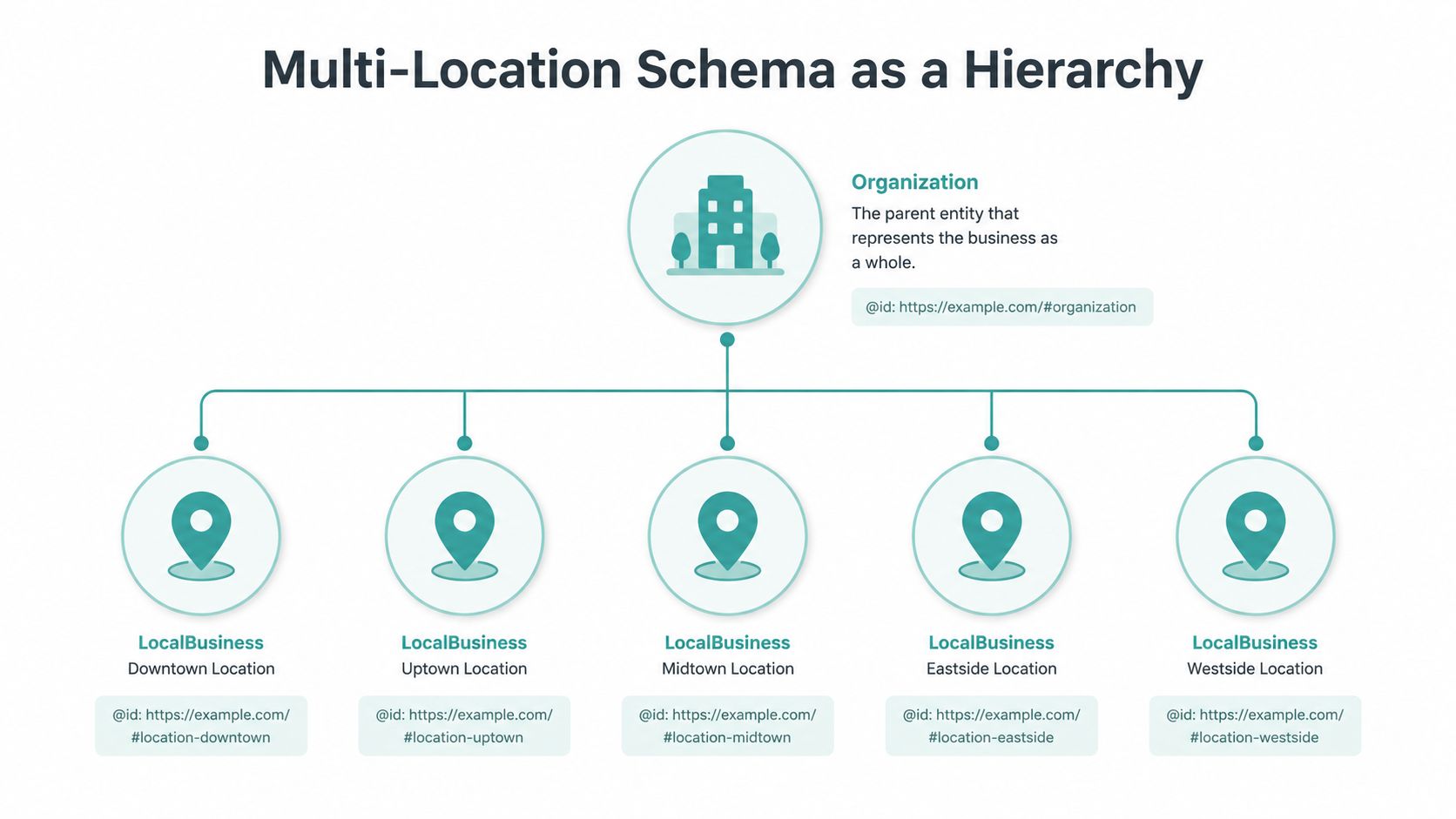
A multi-location site shouldn't publish a pile of nearly identical blocks. Build a graph. Put one Organization node at the root URL with a stable identifier such as then give every location its own identifier, such as
Each location node should point back to the organization through parentOrganization. If a clinic contains a legally distinct department, use department to describe that nested relationship rather than creating another parent organization. The exact relationship should follow the business structure and the content users can verify on the site.
Make the source of truth operational
Keep one authoritative record for each branch in a spreadsheet, CMS collection, or location database. Generate the page's entity node from that record so the address, phone, coordinates, hours, and services don't drift between the footer, Google Business Profile, and markup.
This architecture becomes especially important when a company expands across different markets. The location page SEO framework should give each real branch a distinct page and entity, rather than treating city names as interchangeable keywords.
Keep reviews attached to the right entity
Reviews belong on the location node when they describe that location. aggregateRating should be used only where the marked-up entity collects and displays the underlying feedback. A business shouldn't add self-authored testimonials or ratings to pursue stars, and it shouldn't place branch-specific feedback on a parent organization that customers never reviewed.
Google's documentation is the controlling reference for eligibility. Schema can describe a genuine review system, but it can't turn a testimonials section into independent third-party evidence.
Common Pitfalls and How to Maintain Schema Over Time
The most dangerous schema errors aren't always syntax errors. They're quiet factual changes that leave the code valid while making the business representation stale.
Hours change, a suite number disappears from one template, and a call center replaces the local number. Holiday schedules may differ from weekly hours, yet the markup continues publishing the old schedule. A roofing company may also change its service territory while its areaServed list remains frozen.
Replace shortcuts with maintenance
Homepage-only markup is often too narrow for a multi-location business. Give each real location page its own entity, connect it to the organization graph, and keep the branch details specific. Repeating the same generic block across every page is also weak architecture because it blurs which location and services the page describes.
FAQPage markup shouldn't contain marketing questions written only to create more search surface. Use it for genuine questions and answers that are visibly present. Likewise, don't add aggregateRating to first-party testimonials when the implementation doesn't meet the applicable review requirements.
A simple monthly checklist can sit with the owner or junior marketer:
- Compare NAP: Check name, address, telephone, and URL against the Google Business Profile.
- Review hours: Confirm regular, seasonal, and holiday schedules.
- Inspect locations: Open each branch page and verify its
@id, address, services, and service area. - Run validation: Use the Rich Results Test and Schema Markup Validator on changed templates.
- Spot-check source: Run the
curlandjqinspection against live pages. - Reset catalogs: Remove discontinued services and add newly published offerings.
- Review ratings: Confirm that any marked-up review data remains genuine, visible, and attached to the right entity.
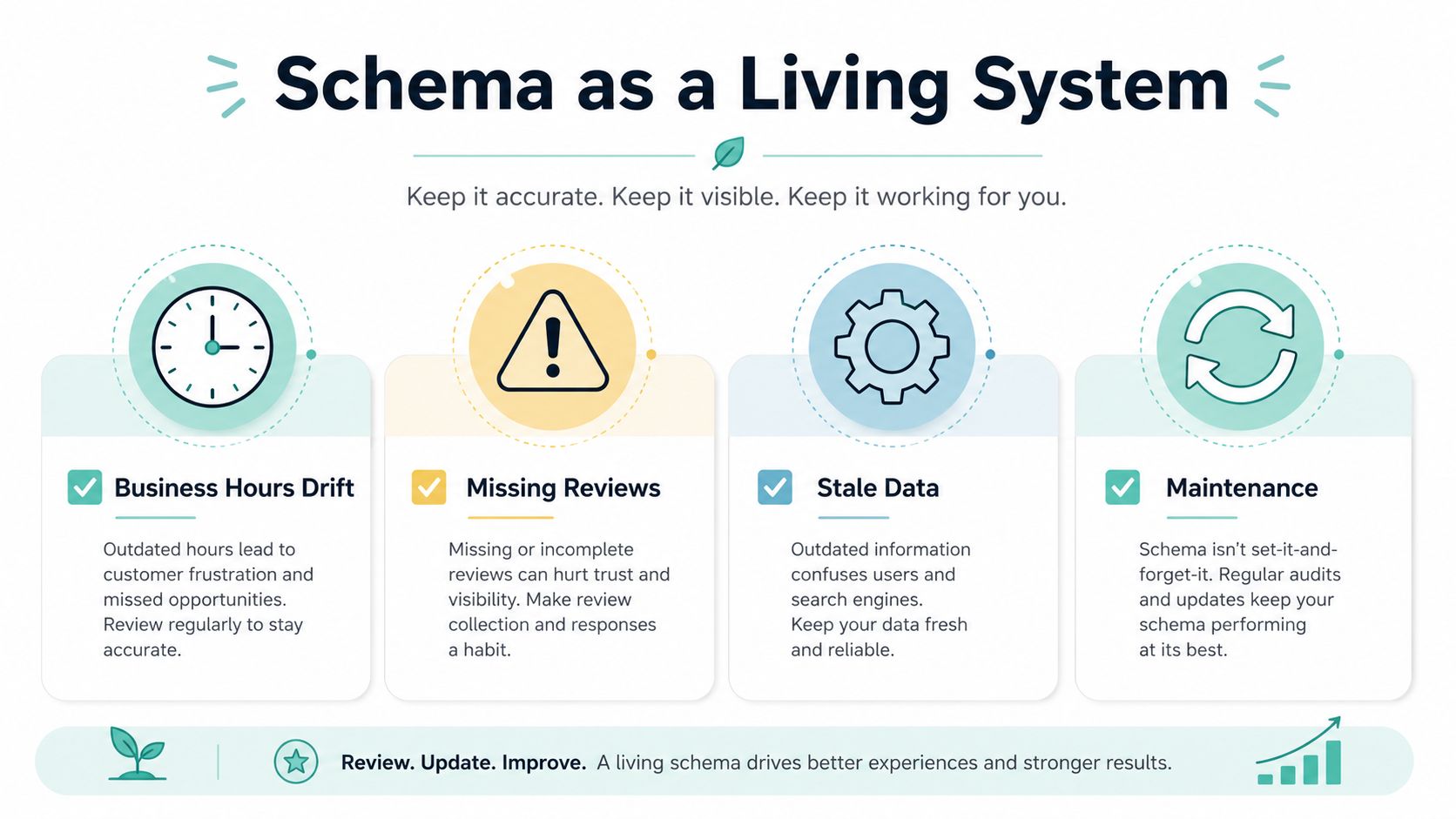
Schema is a living system because the business changes. Assign one person to own the monthly check, and require a review whenever a location moves, a phone route changes, or a service page is rewritten.
Digital Skyrocket plans and builds lead-generating websites for law firms, dentists, roofers, HVAC companies, and other service businesses, including location-level schema, local SEO, and answer engine optimization. Visit Digital Skyrocket to discuss a website and ongoing SEO plan that keeps your business entities, local pages, and conversion paths aligned.