
A homeowner searches “water heater repair near me” from a phone after a cold shower. One result opens a page for a nearby branch, showing the team's address, service hours, local reviews, repair options, and a button to call. Another result opens a page that says the same thing as every other page on the website, except “Riverside” has replaced “San Diego.” The first page feels useful. The second feels like a search-engine trick.
That difference explains why location landing pages need more than a city name and a stock paragraph. A strong page connects a real local entity, whether that's a staffed branch or a legitimate service area, with a clear path to a call, form submission, booking, or directions request. It also gives search engines and answer engines enough consistent information to understand who serves the area, what they offer, and why the page deserves attention.
Table of Contents
- Understanding Location Landing Pages
- Choosing the Right Location Strategy
- Building a Conversion Focused Page
- Strengthening Local SEO and AEO
- Turning Local Traffic Into Leads
- Avoiding Common Location Page Pitfalls
- Using Practical Page Templates
- Measuring and Improving Performance
Understanding Location Landing Pages
A location landing page is a dedicated URL for a specific city, branch, or genuine service area. It's built to match local search intent and serve as the conversion endpoint for that geography. For a plumbing company, that might mean a page for a physical Riverside branch. For a mobile HVAC company, it could mean a page for a documented service area handled by a nearby dispatch hub.
The page sits between two realities. On one side is the business entity, including its address, team, service area, hours, and reputation. On the other is the visitor's next action, such as calling for emergency help, requesting an estimate, or checking whether the company serves a neighborhood. Treating the page as only an SEO container separates those realities and usually creates a poor user experience.
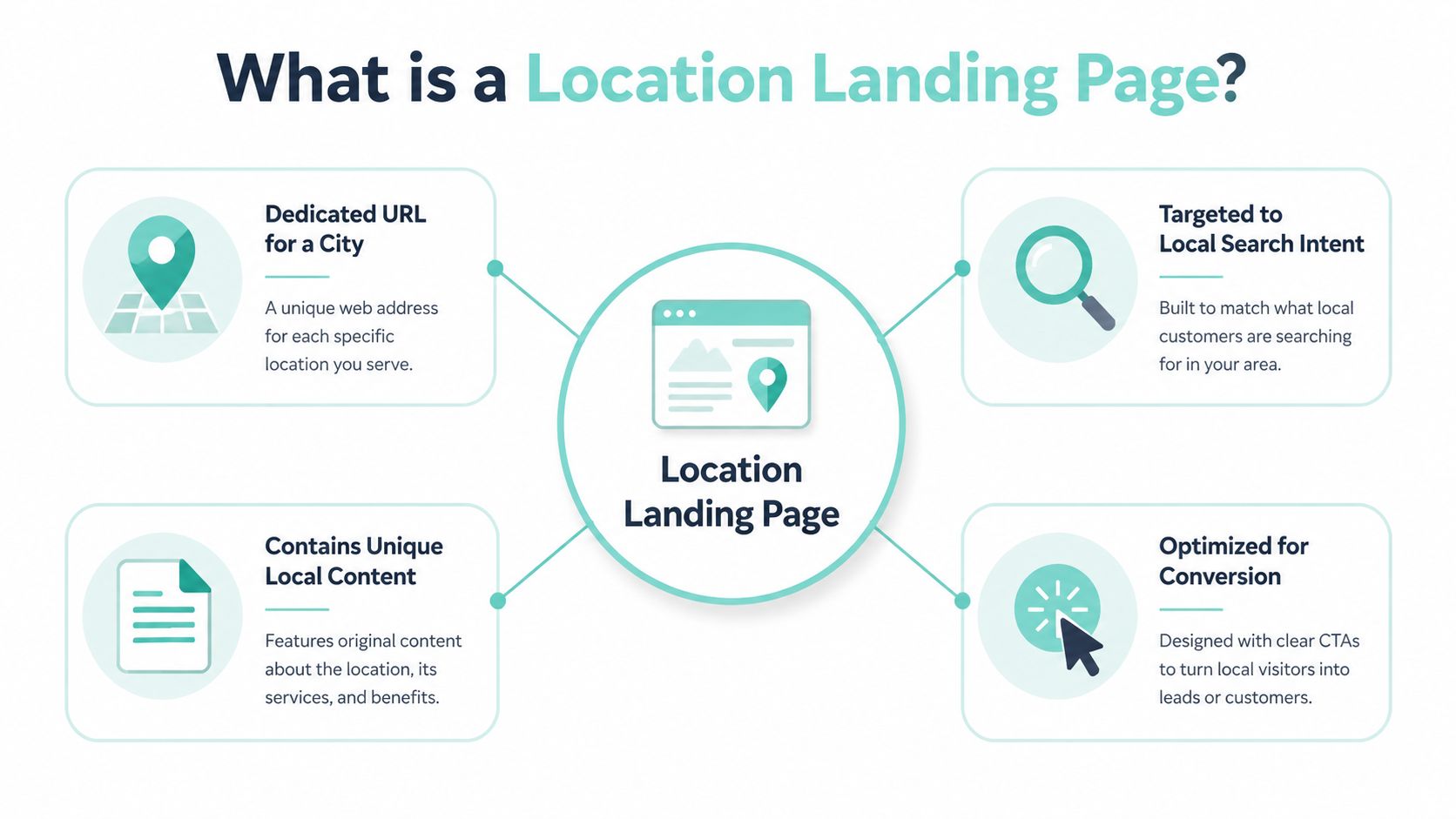
Why city swaps disappoint visitors
A template that changes only the city name doesn't answer the questions behind a local query. Someone searching for water heater repair in Riverside may want to know whether the company handles tankless systems, how quickly technicians usually respond in that market, whether the branch has the right licensing, or whether the business has completed nearby work.
A generic page also weakens trust. Google's guidance says pages using LocalBusiness structured data should contain unique, useful content and shouldn't exist only to target keywords. Google's LocalBusiness guidance reinforces the practical standard: the page should help a person, not merely repeat a keyword with a different place name.
The page's role in a multi-location site
A multi-location website needs an architecture that helps users and crawlers move from broad services to relevant markets. The main plumbing service page can link to a locations hub, the hub can link to Riverside and other legitimate markets, and each city page can link back to the applicable services.
The page becomes valuable when it combines local relevance, verifiable proof, technical clarity, and conversion readiness. That's why a dedicated location URL should represent an actual branch or meaningful service area, not every town within driving distance.
Choosing the Right Location Strategy
Before writing copy, decide what the page represents. Multi-location businesses usually face three choices, but only two are defensible: a verified branch page or a genuine service-area page. The third, a keyword-only city variant, may create a large URL inventory, but it gives visitors little reason to trust or contact the business.
A verified branch page represents a real office, storefront, or staffed location. It should align with the branch's Google Business Profile, display accurate name, address, and phone details, and explain what customers can expect there. A business with physical offices can support the page with staff information, local photos, opening hours, directions, and reviews tied to that market.
A genuine service-area page represents crews that work in a defined area without maintaining a public office there. The page should explain how service is delivered, identify the dispatching hub where appropriate, and use only areas the business can operationally support. Service-area pages shouldn't imply a storefront, walk-in service, or local address that doesn't exist.
A keyword-only city variant targets a town because its name has search demand, even though the company has no meaningful operational footprint there. These pages often repeat the same service claims, lack local proof, and funnel visitors to a general contact destination. They're fragile because they create expectations the business may not meet.
The distinction matters for businesses expanding across regions. A practical guide to local SEO for multiple locations can help teams plan the relationship between branches, service areas, and the wider site before publishing URLs.
Comparing the three location page approaches
| Approach | Operational Proof | Best Use Case | Main Risk |
|---|---|---|---|
| Verified branch page | Real address, staffed team, matching Google Business Profile, local hours | Offices, storefronts, and branches with direct customer operations | Incorrect or inconsistent business details |
| Genuine service-area page | Real dispatch coverage, documented operating area, local work evidence | Mobile crews serving customers from a hub | Implying a physical office that doesn't exist |
| Keyword-only city variant | Little or no local presence, proof, or differentiated service | No legitimate use as a standalone local asset | Thin content, doorway-page concerns, weak conversion value |
Decision rule: Build a page only when the business can explain what it does in that market and prove that it does it.
Building a Conversion Focused Page
A useful location page follows a clear path from site architecture to local action. Consider a water heater company building a Riverside page. The page shouldn't float alone. A /locations/ or /service-areas/ hub should link to it, the main water heater service hub should link to it, and the Riverside page should link back to relevant service pages.
Start with the page's primary promise. A natural H1 might be “Water Heater Repair in Riverside, CA.” The title tag should communicate the same service and location without stuffing additional city variations. The opening copy should quickly clarify the company's service scope, response approach, and the type of customer the page serves. Don't make visitors search through several paragraphs for the answer to whether the company works in Riverside.
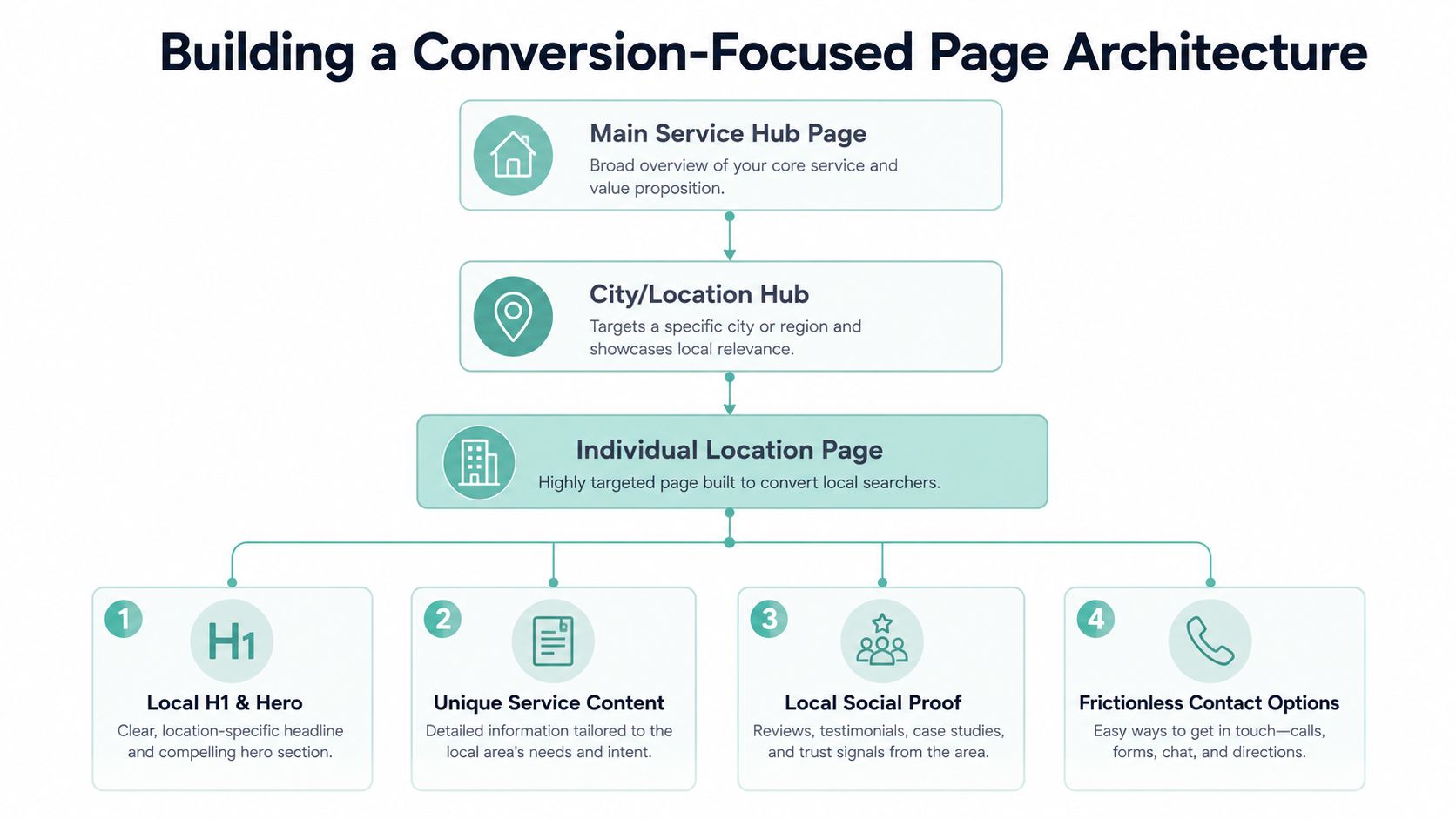
Build the page in layers
The service section should describe the work available in that market, not every service offered by the company. If Riverside technicians repair tank-style and tankless units, explain those services. If they don't install a particular system there, don't list it just to broaden keyword coverage.
Local proof should appear where it supports a decision. Use real crew photographs, actual licensing information where relevant, neighborhood project examples, and reviews that can be attributed to genuine customers. A map can help visitors understand the branch or service area, but it shouldn't substitute for useful text or local evidence.
The FAQ block should answer questions people ask before contacting the business. Examples might include whether the company serves a particular Riverside neighborhood, whether emergency repair is available, what information a customer should provide during a call, and whether the business handles a specific water heater type. Keep each answer direct enough for a visitor to scan and for answer engines to interpret.
End with several easy actions
The final page elements should remove practical friction:
- Click-to-call button: Use a phone link that works immediately on mobile.
- Short quote form: Ask only for information needed to qualify or respond to the inquiry.
- Embedded map: Show the verified branch location when a public office exists.
- Hours block: Display accurate business or dispatch hours near the contact options.
- Service links: Send visitors to detailed service pages when they need more technical information.
A page can provide several contact paths without becoming aggressive. The design should make the next step obvious while still allowing visitors to review services, proof, and practical details. For broader context on building service-company websites, see web design for professional services.
Strengthening Local SEO and AEO
A location page needs a technical foundation that supports the content rather than hiding it. Start with a readable URL, such as /locations/riverside-water-heater-repair/ or a simpler structure that clearly identifies the market and service. Keep the URL stable, use one clear H1, and link to the page from the parent service page and the relevant locations hub.
Internal links help search engines discover pages and help visitors move through the site without returning to a generic navigation menu. A shallow path from the homepage is useful in large location systems. Nearby pages can also be connected where that navigation helps users. In one documented test, SearchPilot evaluated links between regional pages and their six nearest neighboring pages, illustrating how local page relationships can be tested rather than assumed.
Make the entity unambiguous
NAP means name, address, and phone number. The business name, address, and phone number shown on the location page should match the applicable Google Business Profile and major directories. For a branch page, use that branch's information. For a service-area page without a public office, don't fabricate an address to make the page look local.
A page-level LocalBusiness schema block should describe the entity represented by that URL. Practical markup commonly includes the business name, address, telephone number, and opening hours or openingHoursSpecification. For service-area businesses, areaServed helps communicate the markets the business covers. This LocalBusiness schema implementation guide outlines these properties and the need to mark up each location on its own page.
Connect signals to outcomes
| Signal | Implementation | Impact |
|---|---|---|
| Clean URL | Use a stable, descriptive service and location path | Clarifies page purpose for users and crawlers |
| Internal links | Link from service hubs, location hubs, and relevant nearby pages | Improves discovery and topical relationships |
| NAP consistency | Match business details across the page and business profiles | Reduces ambiguity about the local entity |
| LocalBusiness schema | Include the applicable business identity, contact details, hours, and service area | Makes location facts easier for search systems to interpret |
| Core Web Vitals | Deliver a fast, responsive mobile experience | Reduces friction for urgent local visitors |
| FAQ formatting | Use direct questions with concise, complete answers | Makes answers easier to scan and interpret |
| Image descriptions | Add descriptive alt text and use genuine local images | Supports accessibility and reinforces local context |
Mobile performance deserves special attention because local visitors may be searching while standing outside a property, waiting for a technician, or dealing with an urgent problem. Compress images, avoid unnecessary scripts, keep buttons easy to tap, and test the page on real mobile connections. For the answer-engine side of the work, this guide to answer engine optimization provides useful context on making content easier for systems to understand and use.
Turning Local Traffic Into Leads
A visitor converts when the page answers the right question, establishes enough trust, and makes contact easy. A page for emergency roof repair shouldn't lead with a general company biography. Its hero should identify emergency roof repair in the relevant market and point toward the action the visitor likely needs.
Scheduled work requires a different message. A page for a planned HVAC replacement might emphasize consultation, equipment options, and an estimate request. A legal page may need to focus on case type, eligibility, and confidential intake. The city modifies the context, but search intent determines the page's first message.
Use proof that belongs to the market
Local proof is more convincing when it's specific and verifiable. A technician photographed at the branch, a real project in a named neighborhood, a license number that applies to the operating entity, or a review that mentions the city can reduce uncertainty. Don't add local landmarks or customer stories merely to make the copy sound regional. If the business can't verify the detail, leave it out.
Calls to action should reflect the next step:
- Urgent service: “Call for emergency roof repair in Riverside.”
- Scheduled work: “Request a water heater estimate.”
- Consultation: “Book a local case evaluation.”
- Directions-driven visit: “Get directions to the Riverside office.”
Mobile visitors need a tap-to-call number, a form that asks for essential information only, and a visible contact option near the hero. Chat or SMS can help when the business has staff prepared to respond through those channels. A form that promises a fast response but sits unmonitored creates a worse experience than a simpler, honest option.
Relevance earns attention. Local proof earns confidence. A low-friction CTA earns the opportunity to respond.
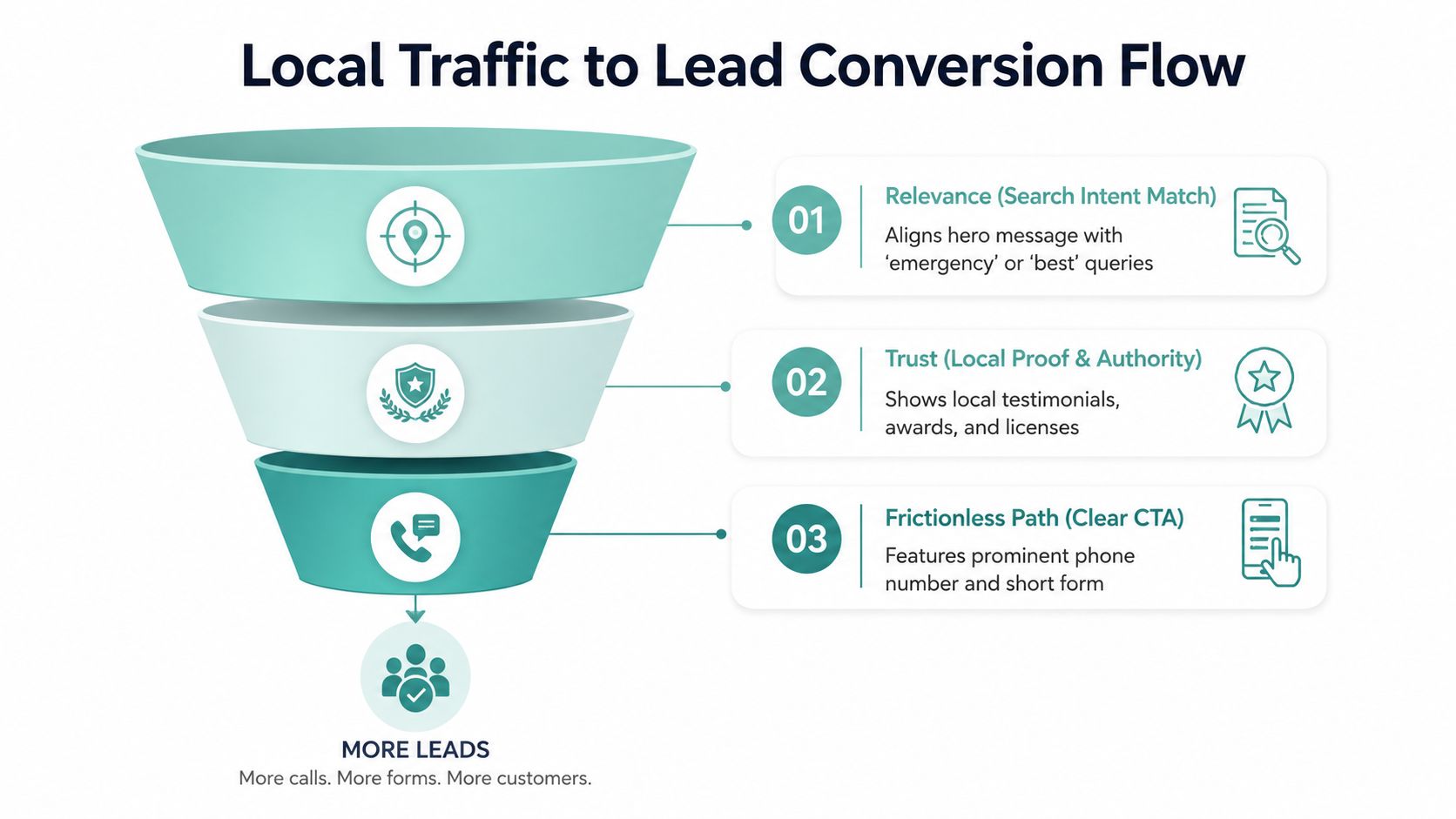
Aggressive pop-ups and repeated forms can increase pressure without improving lead quality. Test offers that make sense operationally, such as same-day booking or a free on-site estimate, only when the business provides them. The sequence is straightforward: match the query, show credible local evidence, simplify contact, and follow up quickly.
Avoiding Common Location Page Pitfalls
Many businesses publish location pages because a competitor has dozens of them. That's the wrong reason. A page that swaps “Plano” for “Frisco” while leaving the rest of the copy unchanged doesn't create local relevance. It creates a set of URLs competing with one another for the same broad service message, while visitors receive no meaningful information about the market.
Overlapping service areas create another problem. If three pages claim the same crew, same neighborhoods, and same service promise without explaining the difference, users can't tell which page applies. Search engines also receive weak signals about which URL should rank. A service-area page should define coverage, while a branch page should describe the actual branch.
Pages without a real address, staff, service operation, or differentiated local proof deserve particular scrutiny. Independent guidance warns that thin duplicate pages can raise doorway-page concerns and may be removed from the index. BrightLocal's location page guidance recommends making more than half of the page content unique to the location and presents a 40% to 60% uniqueness margin as a practical range for supporting a distinct URL.
Prelaunch review
Before publication, check each page for:
- Unique local content: Confirm that the copy describes actual services, coverage, questions, and proof for that market.
- Accurate NAP data: Compare the page with the appropriate Google Business Profile and directory listings.
- Distinct reviews: Use reviews from genuine customers connected to that location or service area.
- Unique schema: Mark up the entity represented by the individual page, not a different branch.
- Clear operational claims: Remove promises about offices, hours, response times, or services that aren't documented.
After launch, review index status, organic queries, qualified leads, and overlap with parent service pages. If a page earns visits but produces inquiries from outside the company's operating area, the targeting may be too broad. If it produces no useful engagement and offers no unique proof, consolidation or removal may be more responsible than adding more copy.
For professional-services teams trying to minimize marketing waste in legal, the same discipline applies: every page should support a defined audience, service, and intake path.
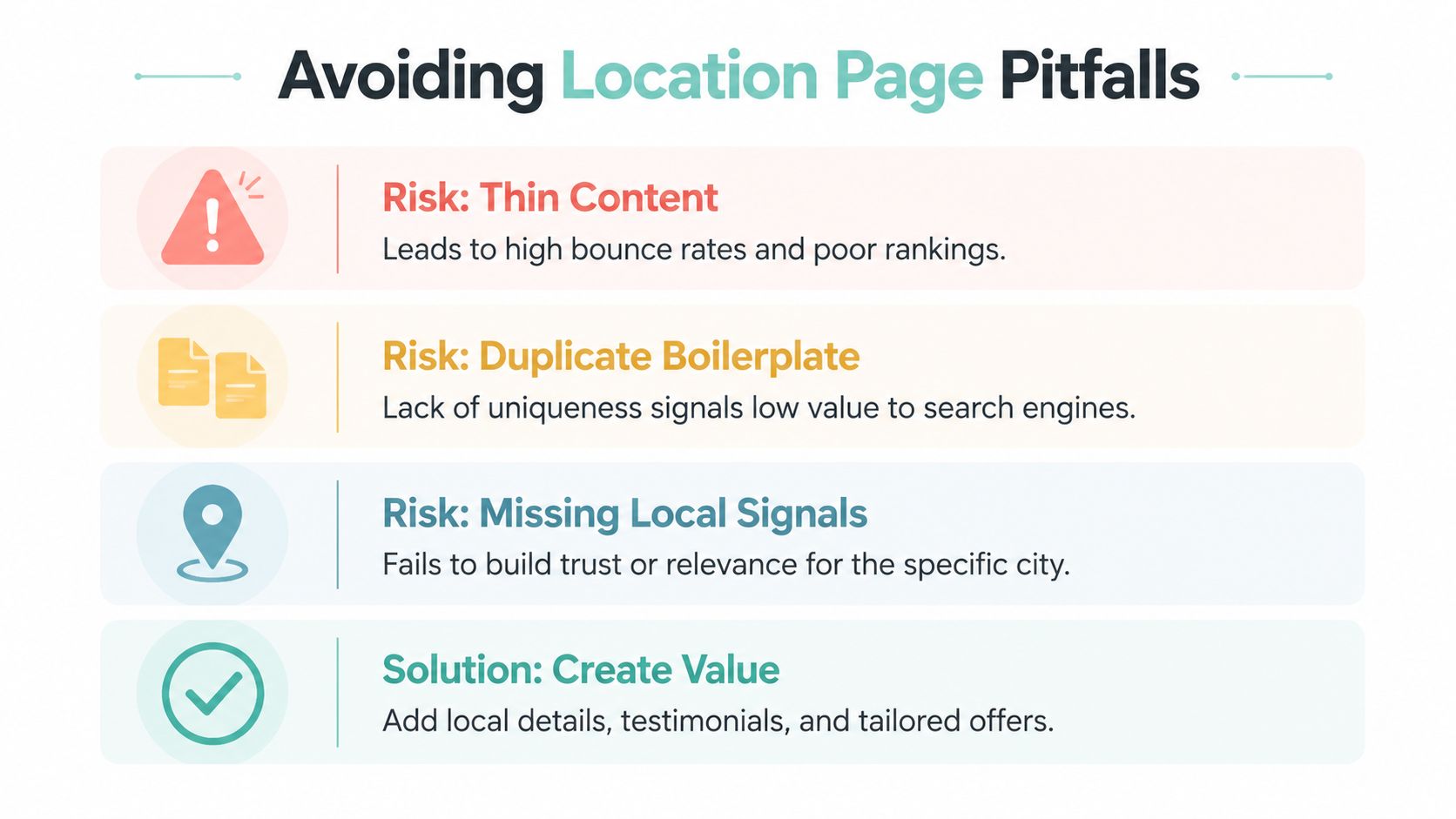
Removal test: If a page can't offer proof, a real presence, or a differentiated service, it shouldn't exist as a separate location asset.
Using Practical Page Templates
Templates help teams keep page architecture consistent. They don't create local substance. Every field must be filled with facts from the business's actual operations.
Verified branch page outline
- Hero: Service and city in the H1, with a branch-specific call to action.
- Branch details: Exact name, address, phone, hours, parking or access information where relevant.
- Services: Work that the branch performs.
- Local proof: Named team members, genuine branch photography, applicable credentials, and reviews tied to the market.
- Nearby work: Real neighborhood projects, only when the business can verify them.
- FAQ: Questions about the branch, services, booking, and local customer needs.
- Contact block: Tap-to-call, short form, map, directions, and hours.
A stranger should be able to verify the address, see who works there, and understand how to contact the branch.
Genuine service-area page outline
- Hero: Service and service area, without implying a storefront.
- Coverage explanation: Describe where crews operate and how dispatch works.
- Service list: Include only work available in that area.
- Operational proof: Real vehicles, crew photographs, permits, project evidence, or customer feedback where available.
- Area FAQs: Answer questions about neighborhoods served, scheduling, travel coverage, and service limitations.
- Contact path: Use a call, form, or booking flow that confirms the customer's location.
A template saves time on headings, modules, and design patterns. It can't supply a permit number, a local review, a named technician, or a completed project. Those details must come from the company. Never invent local color to fill a blank section.
Measuring and Improving Performance
A location page should be judged by business outcomes, not only impressions. Track qualified calls, form submissions containing valid ZIP codes, booked appointments, and assisted conversions associated with the city or service area. A page that attracts broad traffic but sends few relevant inquiries may need tighter coverage language or a more specific offer.
Search Console can segment queries containing city-modified service terms, while Google Business Profile reporting can help separate actions such as calls, directions, and website visits from broader organic behavior. Review local pack visibility separately from standard organic clicks when the available reporting supports that distinction. Compare each page with other pages for the same service line, rather than relying on a sitewide average that mixes different intents.
Conversion context matters. A 2026 analysis covering 41,000 landing pages, 57 million conversions, and 464 million pageviews reported a 6.6% median conversion rate across industries. The same 2026 landing page conversion benchmark also reports about a 10.76% global average across 18 industries, showing why teams should treat broad benchmarks as reference points rather than promises for a particular local page.
Location Page KPI Dashboard
| Metric | Why It Matters | Source |
|---|---|---|
| Qualified calls | Shows whether local visitors are reaching a real intake path | Call tracking and CRM |
| Valid form submissions | Separates relevant inquiries from incomplete or out-of-area leads | Form analytics and CRM |
| Booked appointments | Connects page activity to an operational outcome | Scheduling system |
| Assisted conversions | Captures pages that influence a lead before the final contact | Analytics platform |
| City-modified queries | Reveals the local language and intent producing visibility | Google Search Console |
| Local pack impressions | Indicates visibility in map-oriented results | Google Business Profile and rank tracking |
| Index status | Confirms whether search engines can include the page | Search Console |
| Page-level conversion rate | Helps compare pages within the same service line | Analytics platform |
Use a recurring review rhythm. Start with an inventory audit, prune pages that lack a defensible purpose, refresh useful pages when services or seasonal needs change, and validate schema after site changes. Lead-quality reporting should sit beside traffic reporting, since call-center reporting and metrics can reveal whether more calls are producing better operational results or merely increasing intake noise.
Digital Skyrocket plans and builds lead-generating websites, including location architecture, local SEO, answer engine optimization, technical performance, and conversion paths for service companies. If your business needs location landing pages connected to real branches or service areas, visit Digital Skyrocket to discuss a website and ongoing SEO strategy built around qualified inquiries.