

Your phone rings less than it should. Not because your work is bad, and not because your market is weak. It's usually because a homeowner searched for help, landed on two or three electrician websites, and picked the business that looked easier to trust and easier to contact.
That's the frustrating part of modern lead generation for trades. A contractor can do clean panel work, show up on time, carry the right licensing, and still lose jobs to a competitor with a faster site, clearer messaging, and a better mobile experience. In residential service especially, the website often decides who gets the first call.
That's why web design for electricians can't be treated like an online brochure. It has to function like a dispatcher, estimator, trust signal, and sales assistant at the same time. It needs to help aging homeowners who need urgent repairs, and it needs to capture newer high-intent work like EV charger installation, where people often want pricing clarity before they ever speak to someone.
Table of Contents
- Why a Great Electrician Needs More Than a Basic Website
- The Anatomy of a High-Converting Electrician Homepage
- Must-Have Pages and Content to Attract High-Value Jobs
- Dominating Local Search with SEO and Answer Engines
- Technical Performance That Turns Visitors into Leads
- DIY vs Hiring a Specialist Agency
- Budgeting and Timelines for Your New Website
- Your Action Checklist for a Powerful Web Presence
Why a Great Electrician Needs More Than a Basic Website
A basic website usually says, “We exist.” A strong electrician website says, “We're the right company to call right now.”
That difference matters more than ever. The U.S. electrical industry is projected to reach a market value of over $350 billion by 2027, and nearly 94% of business first impressions are based on website design quality, according to WebFX's electrician industry statistics. If you're competing in a growing market, weak presentation costs real jobs.
Most electrician sites fail in predictable ways. They hide the phone number. They use generic stock photos. They lump every service onto one vague page. They talk about the company instead of answering the visitor's immediate question, which is usually, “Can you help me at my house, in my area, and can I trust you?”
Practical rule: If a homeowner has to hunt for your phone number, verify your license, or guess whether you serve their neighborhood, the site isn't doing its job.
A lead-generating site works differently. It handles the first screening step for you. It shows service area, core services, contact options, credibility markers, and next steps without forcing the visitor to think too hard. That's what turns web traffic into calls.
Accessibility also matters more than many contractors realize. If your site is hard to read, low-contrast, or awkward on mobile, you're not just making it inconvenient. You're pushing away legitimate customers. If you want a practical framework for checking those issues, this guide for web accessibility audits is worth reviewing before a redesign.
The Anatomy of a High-Converting Electrician Homepage
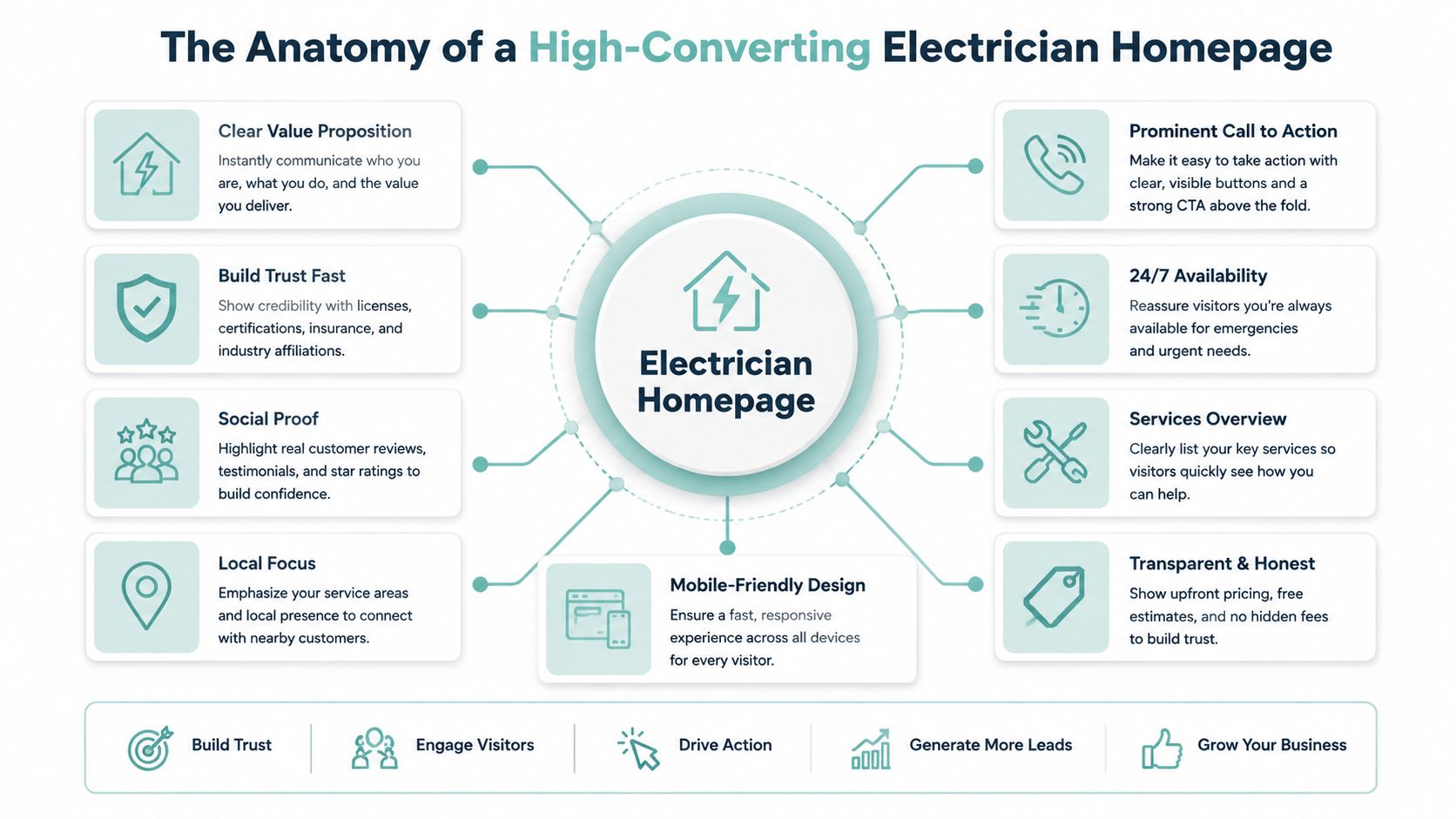
The homepage carries more weight than most business owners think. It doesn't need to explain everything. It needs to remove doubt fast.
What must appear before a visitor scrolls
Above the fold, your homepage should answer four questions immediately.
Are you legitimate
Put your licensing and insurance status where people can see it. Don't bury it in a paragraph on the About page.Do you serve my area
Name the city, region, or service radius in plain language. “Serving homeowners in Plano, McKinney, Allen, and nearby communities” is clearer than “North Texas service experts.”How do I contact you
Your main phone number should be prominent and clickable. A clear secondary option like “Request Quote” or “Book Service” helps visitors who aren't ready to call.Why should I trust you
Add real project photos, review highlights, manufacturer certifications if relevant, and a simple promise about response time or workmanship.
A homepage that opens with a slideshow, a slogan, and no contact path is wasting prime screen space. Residential customers don't arrive in a patient, research-heavy mood. Many are anxious, short on time, or trying to compare options quickly from a phone in the kitchen or driveway.
Design for the homeowner who needs help now
One of the most overlooked issues in web design for electricians is who the buyer is. 40% of U.S. homeowners are over 55, yet few electrician sites use high-contrast typography and large 44x44px tap targets, despite 68% of urgent electrical calls originating from homeowners over 50, according to Built Right Digital's electrician web design guide.
That changes how the homepage should be built.
Use larger type. Keep the layout simple. Avoid tiny menu links and cramped forms. A single-column mobile layout with a sticky call button is often more effective than a flashy design with layered animations and small touch targets.
The best homepage for a residential electrician often feels a little plain to the designer and extremely easy to use for the customer.
A strong homepage usually includes these blocks in this order:
- Hero section with service area, core offer, and phone CTA
- Trust strip with license info, insured status, and review signals
- Service highlights such as panel upgrades, troubleshooting, rewiring, and EV chargers
- Why choose us with concrete reasons, not generic slogans
- Recent work or proof using original photos
- FAQ preview for common concerns
- Contact section with repeated CTA
Small details matter. If the button says “Submit,” rewrite it. “Call Now,” “Request Estimate,” or “Book Emergency Repair” gives the visitor clarity. If the hero image shows a smiling stock model instead of your actual crew, replace it. Generic visuals weaken trust in a trade where people are inviting someone into their home.
Must-Have Pages and Content to Attract High-Value Jobs
A homepage gets attention. The rest of the site decides whether you rank well and whether the lead is worth having.
Build pages around intent, not around your org chart
The simplest site structure that works usually includes a homepage, About page, contact page, FAQ page, individual service pages, and location pages. That's the core.
The mistake is making everything too broad. “Services” by itself is rarely enough. A homeowner searching for panel replacement has different concerns than someone searching for an electrician to install a Level 2 charger in the garage. Your site should reflect that difference.
Here's the practical page set I'd build for most residential electricians:
Homepage
Use it to present the business, service area, and immediate next step.About page
Show who owns the company, what kind of work you specialize in, and why people should feel safe hiring you.Service pages
Create separate pages for work like troubleshooting, panel upgrades, rewiring, lighting installation, surge protection, generator connections, and EV charger installation.Location pages
If you serve multiple cities, give each important market its own page with unique local copy, not duplicated boilerplate.FAQ page
Answer licensing, insurance, emergency availability, estimate process, and common homeowner concerns.Contact page
Keep it simple. Phone, service area, short form, and clear urgency options.
That structure helps people and helps search engines. It also supports the kind of contractor lead generation strategy outlined in this contractor lead generation guide, where service intent and local relevance work together instead of fighting each other.
Why EV charger pages need pricing context
High-value jobs usually come from high-intent searches. EV charger installation is the clearest example right now.
Google Business Profile data shows 73% of EV charger inquiries include price in the search query, yet only 8% of electrician websites display transparent pricing, causing over half of users to bounce, according to Dreamcode Labs' review of electrician website design patterns.
That doesn't mean you need to publish a one-size-fits-all exact quote. It does mean vague “call for pricing” copy leaves money on the table.
A better EV charger page includes:
- A clear service description that explains home charger installation in plain language
- Pricing context such as starting ranges, factors that affect cost, or package tiers
- Scope notes covering panel capacity, permit considerations, charger brand compatibility, and wiring distance
- Photos of real installs in garages, carports, or exterior walls
- A short intake form asking vehicle, charger model, panel size if known, and installation location
If your team struggles to produce consistent numbers for estimate-ready content, tools like Exayard electrical estimating software can help standardize quoting inputs before you turn them into website pricing guidance.
Customers don't expect perfect pricing online. They expect enough transparency to decide whether it's worth contacting you.
The same principle applies to other profitable services. Panel upgrades, generator connections, and emergency diagnostics all benefit from specificity. Don't write broad paragraphs about “quality electrical solutions.” Write pages that match what the homeowner is searching for.
Dominating Local Search with SEO and Answer Engines
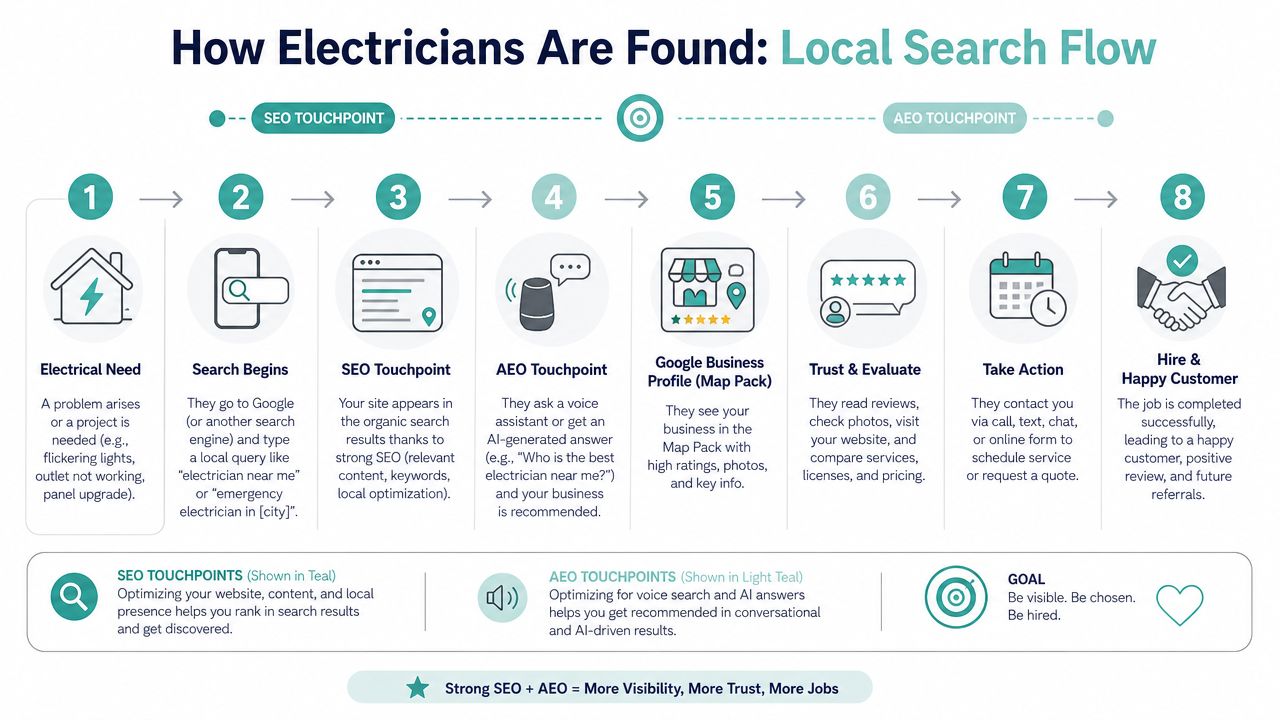
Most electricians think of search visibility as “ranking on Google.” That's only part of the job now. Customers also use map results, voice search, and AI-generated answers that summarize local options before a click ever happens.
How search visibility actually works for electricians
Local visibility comes from alignment. Your Google Business Profile, your website pages, your reviews, and your location signals all need to tell the same story.
The strongest electrician sites usually do three things well:
They define services clearly
Search engines can match “panel upgrade,” “EV charger installation,” or “emergency electrician” to the right page.They define geography clearly
The business shows exactly where it works, down to city and neighborhood level when appropriate.They reinforce credibility
Reviews, consistent contact details, and clear business information reduce ambiguity.
Dedicated pages matter a lot here. Websites with dedicated service pages and locational pages achieve 2.3x higher organic visibility in Google's local pack compared to generic single-page sites, according to Scorpion's guide on high-converting electrician websites.
That's why a single-page electrician site often hits a ceiling. It can look decent, but it doesn't give Google enough structured relevance for different services in different places.
If you've ever moved offices or changed your service address, don't ignore that either. Inconsistent business details weaken trust signals. This practical walkthrough on changing your Google business address is useful if your website and profile need to stay aligned.
What answer engines need from your website
Answer engines don't reward vague marketing copy. They reward clarity.
When someone asks a device or AI tool, “Who installs EV chargers near me?” or “Do licensed electricians in my area handle panel upgrades?” the system looks for structured, confident answers. Your website should make those answers easy to extract.
A site built for answer visibility tends to include:
| Element | Why it matters |
|---|---|
| Clear H1 and H2 headings | They help define the page topic quickly |
| FAQ content | It matches conversational searches |
| Service-specific pages | They separate intent cleanly |
| Location-specific pages | They connect service to geography |
| Consistent business details | They reinforce local trust |
| Schema markup | It helps machines interpret the business and its services |
Search engines aren't looking for cleverness. They're looking for unambiguous relevance.
Reviews also play a supporting role here, even when the visitor never reaches a review platform first. Strong review language often confirms the same patterns your pages are trying to establish, such as emergency responsiveness, professionalism, and service quality in a specific area.
The contractors who win local search don't usually “hack SEO.” They organize information better than competitors do.
Technical Performance That Turns Visitors into Leads
A lot of contractors think technical website work is back-office stuff. It isn't. It directly affects whether someone calls you or leaves.
Speed is a sales issue, not a developer issue
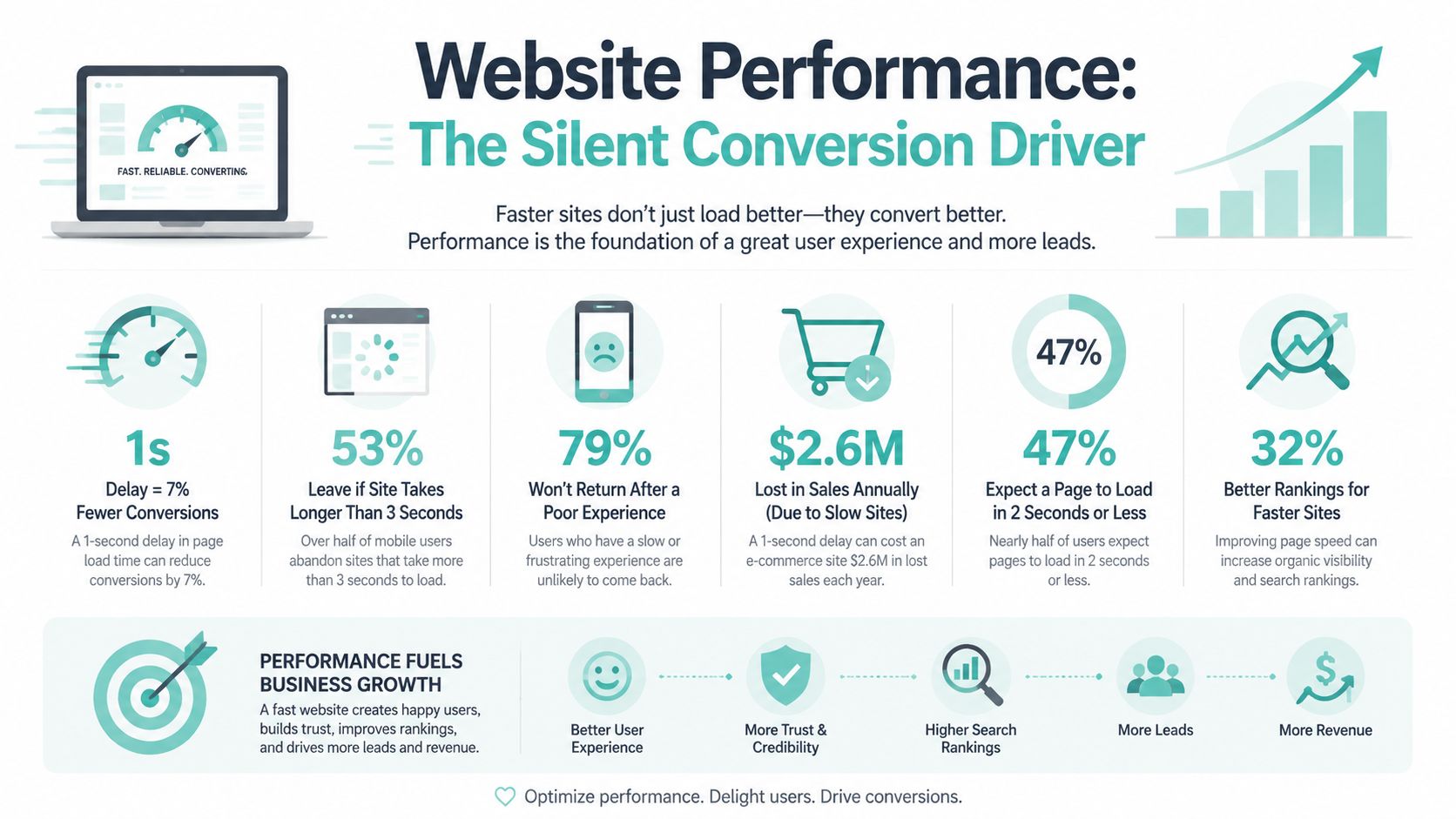
If your site loads slowly, the user often never sees the message you worked so hard to write. That's especially expensive for emergency service searches.
Websites loading in over 3-5 seconds see mobile bounce rates exceed 70%; optimizing load time to under three seconds is essential for retaining potential clients, according to Slate Rock Automation's guidance on electrician web design.
That's why I treat speed as a lead quality issue. The slower the site, the more likely you lose the urgent, ready-to-hire searcher and keep only the lower-intent browsers who are willing to wait.
Here's what usually slows electrician sites down:
- Oversized photos from phones or cameras uploaded without compression
- Heavy page builders stacked with effects that add visual flair but hurt mobile usability
- Too many plugins handling tasks the site doesn't need
- Autoplay video or sliders that delay the first useful screen
A fast site feels more trustworthy. It also gets the visitor to the phone button faster, which is the whole point.
The technical basics that protect conversions
Technical performance isn't just speed. It's the full under-the-hood system that supports visibility and lead flow.
A solid electrician website should have:
- Responsive layout that works cleanly on phones, tablets, and desktops
- SSL security so the site loads securely with HTTPS
- Clean form handling with CAPTCHA to reduce junk submissions
- Semantic page structure with proper titles, descriptions, headings, and alt text
- Clear mobile CTAs that stay easy to tap
The trade-off is simple. Extra animations, oversized galleries, and clever interactions can make a mockup look impressive. They often make the live site harder to use. For a local service business, I'd take fast and obvious over flashy every time.
A homeowner with a dead outlet or burning smell isn't admiring your transitions. They're deciding whether they can trust your site enough to press call.
If you want to improve performance, start with the pages that drive leads first. Homepage, top service pages, top location pages, and contact page. Shaving friction off those pages usually matters more than polishing low-traffic content.
DIY vs Hiring a Specialist Agency
This decision doesn't need drama. Some electricians should build the first version themselves. Others shouldn't touch it.
When DIY is reasonable
DIY makes sense when your needs are small, your market is simple, and you're willing to spend your own time learning the platform.
A Wix or Squarespace site can be enough if all of these are true:
- You only need a basic local presence and you're not relying heavily on organic search yet
- You can write your own content without sounding generic or vague
- You have real photos ready and won't default to stock imagery
- You'll maintain it regularly instead of launching and forgetting it
- You accept limits on customization, page strategy, and deeper SEO control
That route is often better than having no site at all. It's also useful for a very early-stage contractor who needs a clean placeholder while building reviews and collecting project photography.
What a specialist should do that a template cannot
A specialist earns the fee by doing more than assembling pages. The value is in the thinking.
A strong agency or specialist should handle content structure, conversion paths, local page strategy, technical performance, mobile UX, form flow, analytics, and how the site supports ongoing search growth. If they're only talking about colors and layouts, they're not solving the actual problem.
Here's a practical comparison:
| Factor | DIY builder | Specialist agency |
|---|---|---|
| Upfront cost | Lower | Higher |
| Time required from owner | Higher | Lower after kickoff |
| Design flexibility | Limited | Broad |
| SEO structure | Basic unless you know what you're doing | Built intentionally |
| Conversion planning | Usually minimal | Should be part of the build |
| Long-term scalability | Often constrained | Better foundation |
A quick self-check helps. If you're considering DIY, ask yourself:
- Can I produce clear copy for each service and service area?
- Can I source strong photos of my work and team?
- Will I keep reviews, FAQs, and service details updated?
- Can I recognize when a page layout hurts conversions?
- Do I want to spend evenings learning web tools instead of running jobs?
If the answer is no to most of those, outsourcing is probably cheaper than it looks.
Before hiring anyone, ask these five questions:
- How do you structure service and location pages for local search
- What will you need from me for content and photos
- How do you handle mobile-first design and call-to-action placement
- What happens after launch if the site needs changes
- How do you measure whether the website is producing qualified leads
The wrong partner builds a prettier brochure. The right one builds an asset that helps book jobs.
Budgeting and Timelines for Your New Website
Electricians hate vague pricing talk, and they should. Website projects do vary, but the cost range usually follows scope, not mystery.
A template DIY site costs less in cash but more in owner time. A freelancer or generalist agency can land in the middle if the scope stays focused. A specialist build costs more because it includes strategy, stronger content planning, technical setup, and a better foundation for search and conversions.
Here's a simple planning table.
Electrician Website Investment and Timeline Ranges (2026)
| Approach | Typical Investment | Estimated Timeline |
|---|---|---|
| DIY website builder | Lower investment | Shorter timeline |
| Freelancer or generalist agency | Mid-range investment | Moderate timeline |
| Specialist lead-generation website | Higher investment | Longer timeline |
What drives cost?
- Content needs such as service copy, FAQs, and location pages
- Design depth from a modified template to a custom interface
- Photography and media especially if the current visuals are weak
- Technical work including form setup, analytics, speed improvements, and structured SEO elements
- Revision volume because faster decisions usually reduce project drag
Timelines usually stretch for one reason. The business owner is busy, and the raw materials aren't ready. Missing photos, unclear service lists, old licensing details, and delayed feedback can stall even a simple build.
If you're planning a redesign, this service company website redesign guide for local growth is a useful way to think through scope before you start getting quotes.
A realistic timeline includes discovery, sitemap planning, copy development, design, development, revisions, and launch prep. The clearer your inputs are at the beginning, the faster the project moves and the better the end result usually is.
Your Action Checklist for a Powerful Web Presence
Most electrician websites don't need a total reinvention. They need sharper decisions in the right places.
Use this checklist to audit your current site or shape the next one.
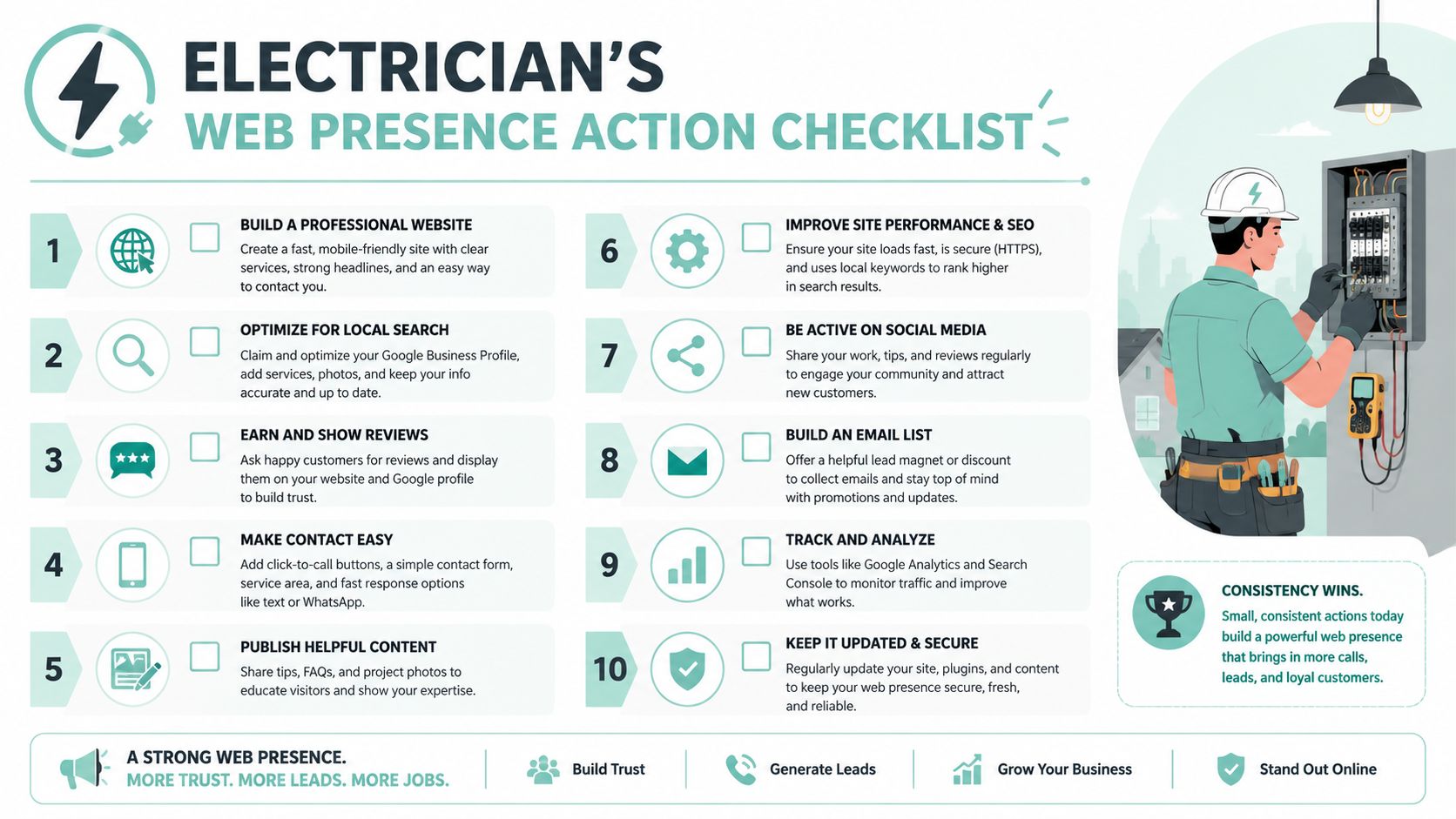
- Put your phone number in the header so mobile users can act immediately
- Show license and insurance details clearly where first-time visitors can verify credibility
- Name your service area plainly instead of assuming people know where you work
- Create a separate page for each core service rather than cramming everything onto one page
- Build city or area pages for important markets with unique local content
- Use original job photos instead of generic stock images
- Make the site easy for older homeowners to read and tap with high contrast and larger touch targets
- Add pricing context for EV charger installation so high-intent visitors don't bounce from uncertainty
- Tighten mobile speed and simplify forms to reduce friction
- Keep your Google Business Profile and website details aligned so local trust signals stay consistent
A strong website should make it easier for the right customer to choose you. That's the standard.
If your current site looks fine but isn't producing enough qualified calls, Digital Skyrocket helps service companies rebuild around what drives leads: clear page strategy, local SEO, answer engine visibility, technical performance, and conversion-focused design.