
Your phone rings, but the caller hangs up before your team can answer. On the other side, a homeowner just searched for help on a cramped mobile screen, landed on a slow, generic site, and never found the number fast enough. That's the cost of weak website design for HVAC, lost urgency, lost trust, and lost jobs.
A strong HVAC site isn't a digital brochure. It's a 24/7 intake system built for local intent, emergency repairs, maintenance requests, and replacement quotes. The best ones make it easy to call, easy to scan, and easy to believe, especially when someone's air conditioner or furnace is failing and they're deciding within seconds who gets the job.
Table of Contents
- Introduction
- Understanding HVAC Website Design Fundamentals
- Crafting Target Audience Messaging
- Designing Service Page Architecture
- Optimizing Conversion Paths and CTAs
- Ensuring Technical Performance and Mobile UX
- Leveraging Local SEO Reviews and Continuous Optimization
- Conclusion and Choosing the Right Partner
Introduction
An HVAC owner can do everything right in the field and still lose work online. The site might look dated, the phone number might sit too low on the page, and the homepage might read like it was built for every trade company on earth instead of for local heating and cooling customers. When that happens, urgent visitors don't wait around, they move on to the contractor who feels faster and closer.
That's why website design for HVAC has to solve a business problem, not just a visual one. It has to help a homeowner with a broken system, a property manager scheduling maintenance, and a replacement shopper comparing options, all without making any of them hunt for the next step.
The good news is that the same site can do all three jobs if it's organized correctly. Clear messaging, service-specific pages, mobile speed, and local proof turn a static website into a lead-generation engine. This guide walks through that system in plain language, from homepage structure to analytics and partner selection, so you can see where calls are being lost and how to fix the leaks.
Understanding HVAC Website Design Fundamentals
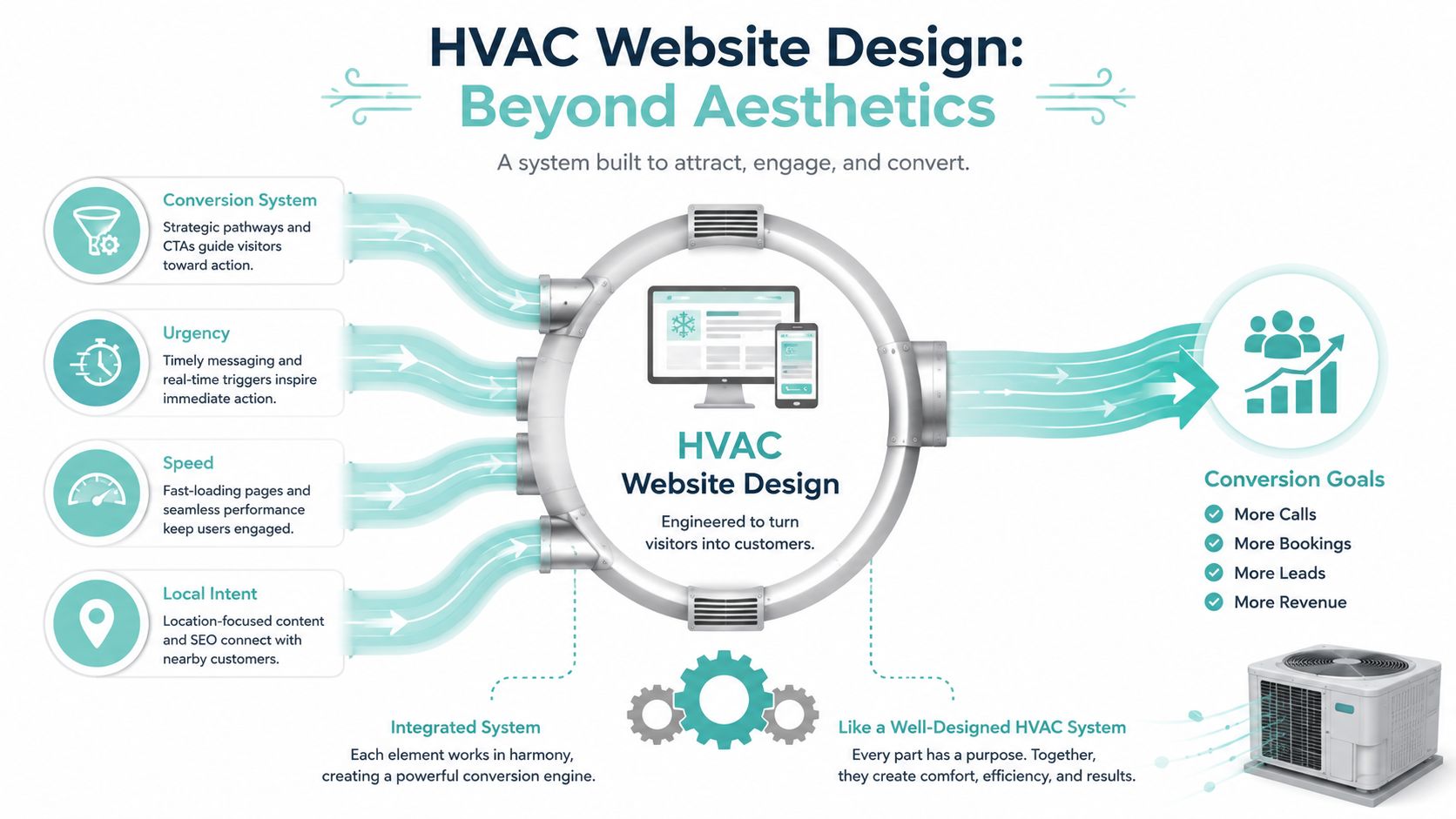
HVAC website design works best when designed as ductwork, not decoration. Every page, button, and message has to move a visitor toward one destination, a call, a form fill, or a booked appointment. If the paths are confusing, air gets trapped, and the same thing happens with traffic.
The site has to carry urgency
HVAC visitors often arrive with a problem already in progress. They're not browsing for fun, and they're usually not reading every paragraph. They want to know if you serve their area, whether you can help now, and how fast they can reach someone.
That's why the most useful homepage elements are the ones that reduce friction immediately. The phone number, click-to-call action, service area, and trust proof should be visible right away, especially on mobile. A generic brochure site delays that information, and delay is expensive when the visitor is standing in a hot house or a cold one.
Practical rule: If a homeowner has to scroll to find your phone number, the page is already doing less than it should.
The site has to map intent
A seasonal maintenance shopper and an emergency repair caller don't behave the same way. One may want education, pricing context, and reassurance. The other wants a fast answer and a direct path to a technician.
That's where homepage hierarchy matters. Emergency messaging can sit at the top for urgent visitors, while maintenance, installation, and tune-up paths still stay visible for calmer searchers. The homepage should act like a dispatcher, not a billboard.
The site should connect every page
The strongest HVAC sites don't leave pages floating on their own. The homepage links to service pages, service pages link to city pages, and every path leads back to a contact option. That connected structure makes the site easier for people to use and easier for search engines to understand.
A useful example is the service company website redesign guide for local growth, which aligns design with lead flow instead of treating design as a standalone task. That mindset matters because an HVAC site has to earn attention quickly, then direct it with as little resistance as possible.
When the structure is tight, the site feels calm even during urgent searches. When it's loose, visitors feel the friction. For HVAC companies, that friction usually shows up as missed calls, weak engagement, and pages that never get the chance to prove credibility.
Crafting Target Audience Messaging
The copy on an HVAC site should sound like it was written for the person who's searching. Emergency repair seekers, maintenance schedulers, and replacement shoppers all need different reassurance, and each group notices different words first. If the messaging stays generic, no one feels directly understood.
Write for the job being searched
Emergency callers care about speed, availability, and direct contact. Scheduled maintenance customers care about reliability, consistency, and convenience. Replacement shoppers care about options, trust, and whether your team will explain the process without pressure.
That means the homepage headline can't try to say everything at once. A stronger approach is to make the main promise clear, then let subheads and supporting text speak to separate visitor groups. For example, a headline can focus on rapid help, while a subhead adds local service, financing, or same-day response if that's true for your company.
Match benefits to the buyer mindset
Good messaging doesn't just describe services, it reduces doubt. A phrase like 24/7 emergency support works for someone with a broken system at night. A phrase like free estimates can help a replacement shopper feel safer about starting the conversation. A maintenance page can emphasize dependable tune-ups and long-term system care instead of hard-sell urgency.
Here's a simple way to think about it:
- Emergency repair pages: Lead with speed, direct contact, and local response.
- Maintenance pages: Lead with prevention, seasonal readiness, and predictable service.
- Replacement pages: Lead with trust, clarity, and guidance.
Generic copy vs persona-driven copy
A generic headline like “Professional HVAC Services” says almost nothing. It could fit any contractor in any city. A persona-driven headline such as “Fast AC Repair in Your Area” tells the visitor what problem you solve and how quickly they can act.
“If your headline could belong to a plumber, roofer, or electrician, it's too vague for HVAC.”
The same principle applies to subheads. Instead of filling space with broad claims, use short, useful statements that answer the next question a visitor is likely to have. That might be service area coverage, emergency availability, or a promise of clear estimates. When the wording feels specific, the site feels safer to use.
Designing Service Page Architecture
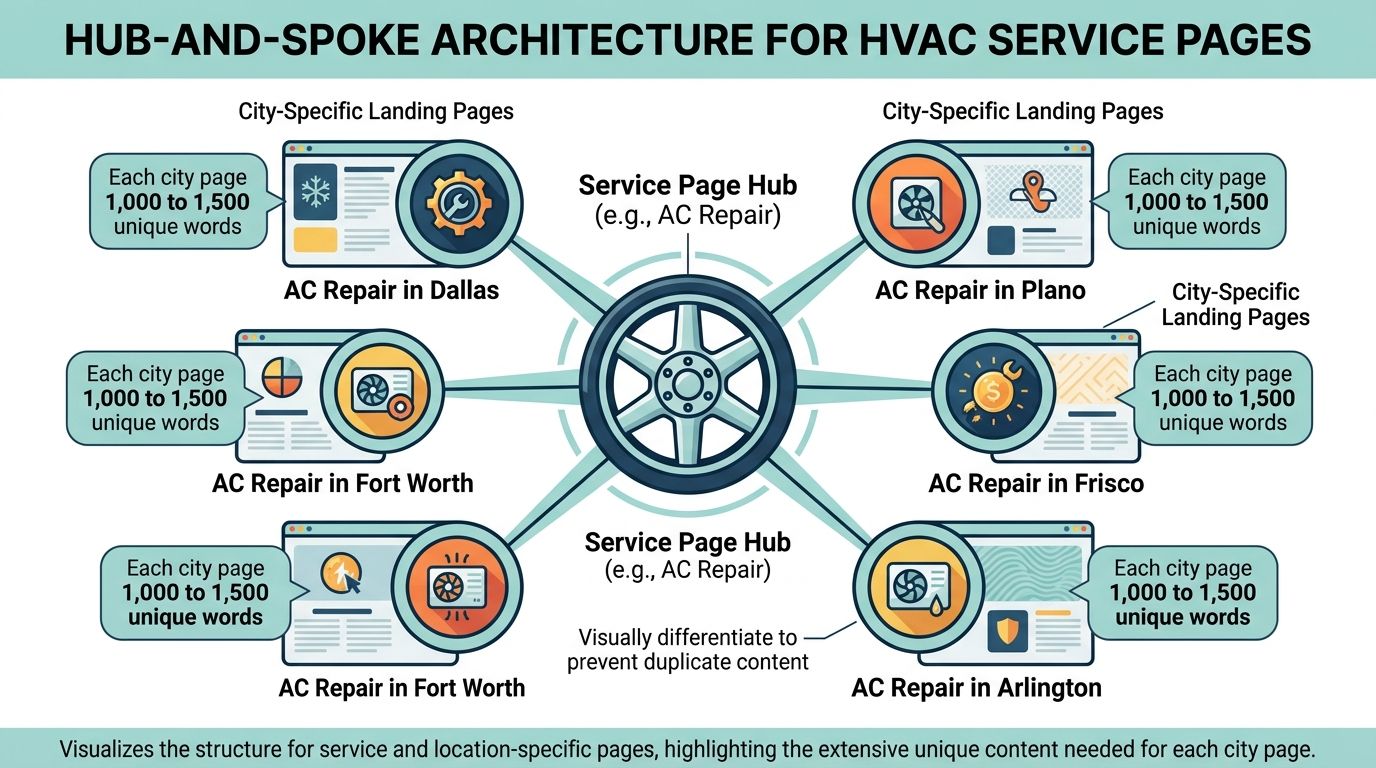
A service site works better when it's organized like a map, not a closet. HVAC visitors search by problem first, then location, so the architecture should reflect both. That means separate pages for core services, separate pages for cities or service areas, and clear links between them.
Build the hub before the spokes
Start with a service hub for each major offering, such as repair, maintenance, or installation. Then create supporting city pages for each location you serve. A visitor looking for AC repair in one city should land on a page that feels built for that city, not a copied template with a swapped-out name.
The structural framework requires a serious approach. Recent HVAC guidance recommends 1,000 to 1,500 words of unique content per city page rather than repeating the same template across locations, and it ties modern HVAC architecture to four parallel parts, technical foundation, on-page content, Google Business Profile optimization, and ongoing content strategy, all of which support local search visibility. HVAC web design guidance shows how much the field has moved beyond simple brochure sites.
Give each page a real job
A service page should explain the problem, the solution, the signs a visitor might notice, and the next action to take. A city page should prove locality, mention relevant neighborhoods or service coverage where appropriate, and keep the contact path visible. If every page tries to do every job, the result is clutter.
One useful planning tool is a simple sitemap. The sample sitemap for website resource can help you visualize how pages connect before anyone starts writing. That makes it easier to avoid accidental duplication and weak internal linking.
Use search intent to decide page priorities
Not every keyword deserves its own page, but the profitable ones usually do. Separate pages for repair, maintenance, installation, and service areas help you align with how people search. That alignment supports navigation too, because a visitor can move from a broad service page to a local page without starting over.
Schema markup can support that structure by making service and location signals clearer to search engines. Internal links do the rest. When the architecture is clean, the site becomes easier to crawl and easier to trust, which matters in competitive local markets where many contractors are fighting for the same inquiry.
Optimizing Conversion Paths and CTAs
A good HVAC site doesn't make people think hard about the next step. It gives them a button that feels obvious, a form that doesn't ask too much, and a path that matches their urgency. That's why conversion design has to be treated like a workflow, not just a graphic choice.
Put the fastest action first
For urgent visitors, click-to-call should be front and center. A sticky Call Now bar can stay visible while the user scrolls, and the phone number should appear above the fold on mobile. Those details matter because people in a heating or cooling emergency often want the shortest possible route to a human.
Industry guidance recommends a mobile-first layout with a maximum of three form fields, sticky “Call Now” bars, and click-to-call actions to reduce friction and improve high-intent lead capture. Nopio's HVAC website design guidance matches what many contractors see in practice, forms need to be short, and calls need to be easy.
Use button language that matches intent
“Contact Us” is polite, but it's vague. “Get Emergency Help Now” tells the visitor what happens next. “Request a Free Estimate” works for a replacement shopper who isn't in a panic. “Schedule Maintenance” suits a less urgent visitor who's ready to plan.
A simple conversion path often looks like this, homepage hero, service page, short form or tap-to-call, then thank-you page or booked appointment. The fewer decisions a visitor has to make, the less likely they are to abandon the process. That's especially important on mobile, where even a well-meaning form can feel like work.
Tie the path to business value
If you're trying to understand how websites make money, the logic is the same across industries. A lead-generating site captures intent and turns it into inquiry volume, which is the whole point behind how to make money from websites. HVAC just adds urgency and local geography to that model.
A practical page should also separate emergency flows from non-emergency flows. Emergency visitors should be able to call immediately. Planned service visitors can be offered a form, quote request, or scheduling option without slowing down the urgent path.
how to increase conversion rate on website is worth reviewing when you're refining button copy, placement, and form flow. The best conversion improvements usually come from removing confusion, not adding more features.
Ensuring Technical Performance and Mobile UX
Speed is not a nice-to-have in HVAC. It's part of the experience. If someone needs help right now, a slow page makes your company feel less available before they've even read a sentence.
Track the right mobile thresholds
For HVAC discovery, the mobile experience has to be strong enough to support both visibility and action. One industry guide says 84% of HVAC discovery happens on mobile and another notes that 70%+ of HVAC traffic comes from mobile local search, which makes mobile usability essential. PipelineOn's HVAC website design guide captures why the mobile version has to carry the whole lead flow.
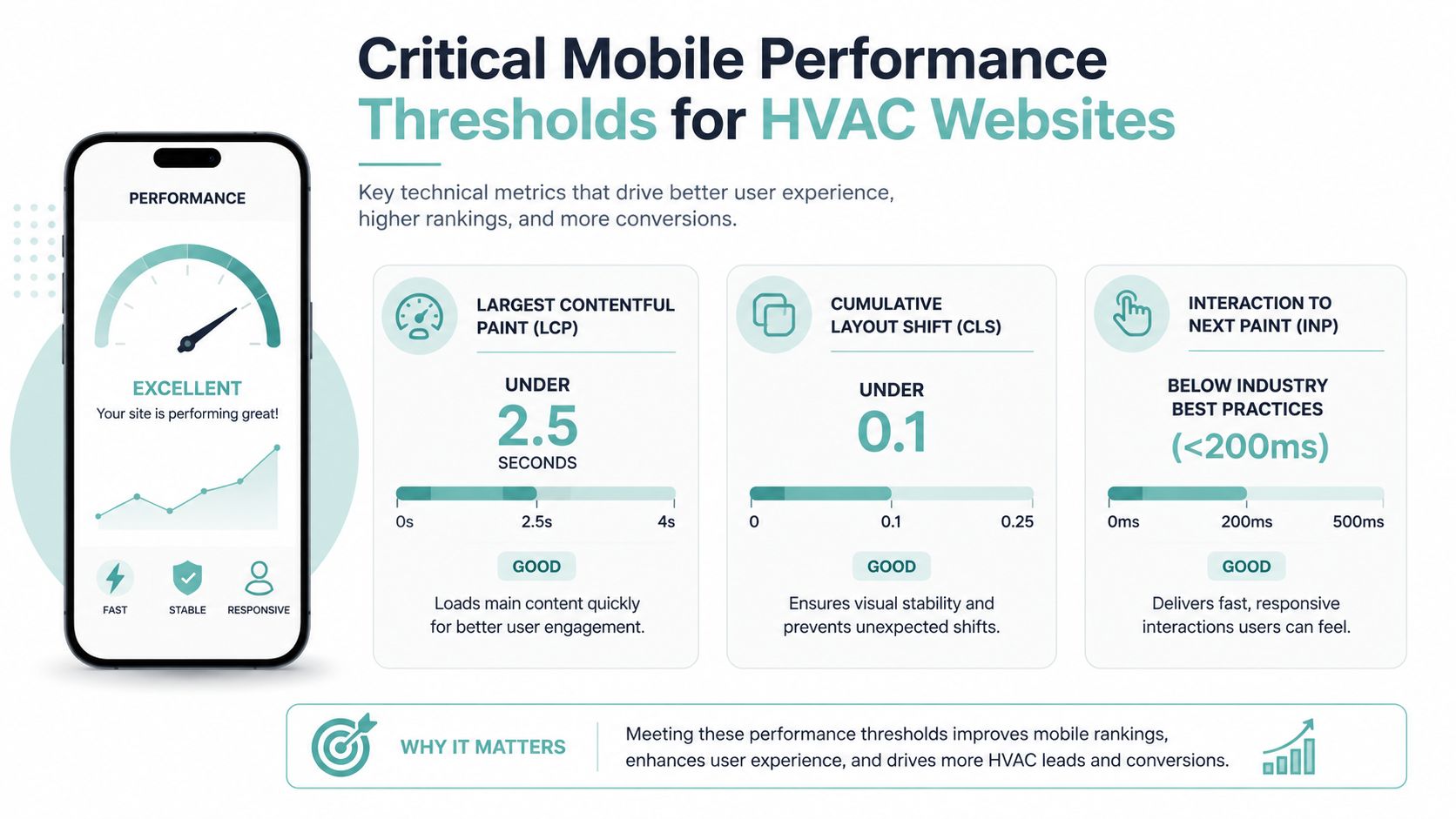
The same verified guidance points to these performance targets, Largest Contentful Paint under 2.5 seconds, Cumulative Layout Shift under 0.1, and Interaction to Next Paint under 200 ms. Those numbers matter because they shape how long a visitor waits, how stable the page feels, and how fast the site responds when someone taps a button.
Fix the most common performance problems
Start with images. Compress them, size them correctly, and avoid loading huge files just because they look sharp on a desktop monitor. Then clean up the code, remove unnecessary scripts, and use responsive layouts so the page adapts well on phones and tablets.
A fast site feels like a technician who shows up ready to work. A slow site feels like a truck stuck at the end of the block. Visitors notice that difference, even if they can't explain it in technical terms.
Practical rule: If a page shifts while the user is trying to tap a button, the design is hurting conversions.
Make the phone experience obvious
Mobile UX for HVAC should keep tapping simple. The phone number needs to be visible, forms need to be short, and buttons need enough spacing that someone can tap without frustration. That's especially important for older visitors or those who need to access information quickly.
When speed and usability improve together, the site earns more chances to convert. When one is weak, the other has to compensate. For HVAC businesses, that usually means the difference between a missed call and a booked service visit.
Leveraging Local SEO Reviews and Continuous Optimization
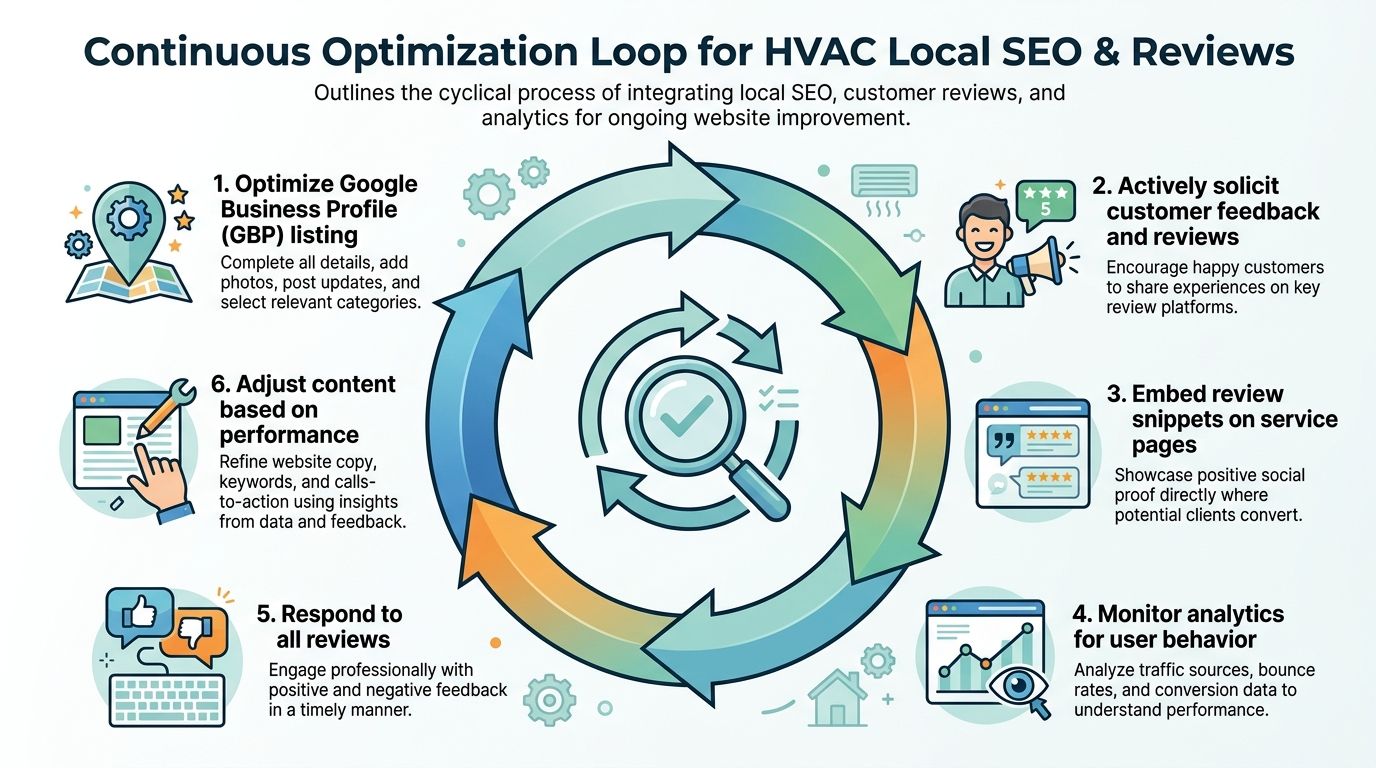
A good HVAC site keeps working after launch. The strongest systems connect local SEO, reviews, analytics, and ongoing edits into one loop, so the site gets sharper instead of stale. That matters because customer behavior changes with season, urgency, and location.
Make local proof visible
Your Google Business Profile should align with the website, and your reviews should support the pages people land on. Review snippets on service pages can reinforce trust at the exact moment someone is deciding whether to call. Structured data can also help search engines understand your service and location signals more clearly.
The key factor is placement. Reviews don't belong in a hidden footer if they're supposed to help conversion. They need to appear where a skeptical visitor is asking, “Can I trust this company in my house?”
Use analytics to spot the difference between visitor types
Track phone clicks, form submissions, and page speed together. That tells you not only whether people are visiting, but whether they're acting. If emergency CTA clicks are strong but maintenance inquiries are weak, the site may be over-focusing on urgency. If seasonal pages get views but no calls, the message or layout probably needs work.
Emergency-intent segmentation is one of the least discussed parts of HVAC design. Guidance on urgent visitors shows emergency CTAs should be pinned at the top of mobile pages, with dedicated emergency sections alongside standard service flows, while still testing trade-offs so you don't hurt general conversion paths. Hibu's HVAC website guidance makes the case for urgency-aware layouts without pretending every market should behave the same way.
Treat optimization as an ongoing loop
A useful workflow looks like this:
- Update the Google Business Profile: Keep hours, services, and coverage accurate.
- Add review snippets to key pages: Place social proof where decisions happen.
- Watch analytics monthly: Look for clicks, calls, and drop-off points.
- Adjust content by performance: Strengthen weak pages, trim clutter, and improve clarity.
- Respond to reviews: Good or bad, replies show that a real team is paying attention.
Dedicated emergency sections can help, but they shouldn't crowd out every other user path.
For contractors working with a specialized partner, structure matters. A firm like Digital Skyrocket focuses on web design, local SEO, and reputation management for service businesses, so the site, the search strategy, and the review flow can be managed as one system instead of three disconnected projects. That kind of coordination is useful when your leads depend on both urgency and local trust.
Conclusion and Choosing the Right Partner
A high-converting HVAC site combines targeted messaging, service and city page structure, strong CTAs, mobile performance, local SEO, and continuous optimization. The partner you choose should understand that web design for HVAC is really lead generation, not decoration. Ask whether they can explain discovery, service hierarchy, performance targets, reporting, and how they handle exclusivity in your service area.
Look for a team that can show HVAC-specific work, explain its process in plain language, and connect design decisions to actual inquiries. You'll get better results from a partner that treats the site like a revenue tool and not a one-time art project. If the first conversation sounds vague, the final website usually will too.
If you're ready to turn your site into a clearer, faster lead source, start with a discovery session and ask for a plan built around your services, your service area, and your most urgent calls. A CTA for Digital Skyrocket.