
A polished homepage isn't proof that a dental website is working. If visitors can't find the treatment they need, reach the office easily, or complete an accessible appointment request on a phone, the visual design won't turn search traffic into real inquiries. Dentist website development works best as one acquisition system, where architecture, content, local SEO, performance, accessibility, and conversion tracking are planned together.
That connection matters at every stage. A page can rank for emergency dentistry and still fail a patient if its phone button disappears while scrolling. A scheduler can offer convenient booking but undermine the experience if it loads slowly or excludes people using assistive technology. The build should connect what patients search for to clear, usable ways to contact the practice, then measure whether those actions lead to qualified appointments.
Table of Contents
- Why Most Dentist Websites Fail to Generate Real Inquiries
- Discovery, Goals, and the Foundation Every Build Needs
- Information Architecture, Page Templates, and Copy That Converts
- On-Page SEO and Local SEO Working Together
- Technical SEO, Performance Budgets, and CRO Foundations
- Launch, Analytics, and the Ongoing Optimization Loop
- A Dentist Website Development Checklist You Can Hand to a Team
Why Most Dentist Websites Fail to Generate Real Inquiries
A dentist website can look polished and still fail to produce inquiries. The usual gap is between the pages a practice wants to showcase and the tasks a patient needs to complete.
The signs often sit below the homepage: treatment pages are buried in navigation, mobile call options disappear during scrolling, oversized photography slows high-intent pages, or a booking widget prevents the rest of a page from loading. Analytics may report visits and rankings without showing whether patients called, submitted a form, or booked. The practice is left with a finished-looking site and little clarity about its results.
Practical rule: Build for the patient's next action, not the screenshot in a design presentation.
Treat the site as a connected acquisition system. Discovery informs the information architecture; page structure shapes the copy and contact options; accessibility and performance determine whether patients can use those options; tracking shows which pages produce qualified inquiries. Phone and form intake should work together, so patients can choose how to contact the office. The same connection applies to search: pages need to answer the questions patients ask and give them a clear next step, rather than attract visits the practice cannot convert. Making these decisions separately often creates rework. A scheduling tool added late can slow a page, while a service page without a defined contact path can miss its opportunity.
Speed matters in practical terms: a nearby patient may leave a slow treatment page before its phone number or appointment option appears. The impact depends on the page and the patient's situation, but an inaccessible contact path or delayed call option can cost the practice an inquiry.
Test the site by following one patient journey. Search for a service, open its page on a phone, find the office location and insurance details, then contact the practice. Check whether the page works with assistive technology and whether both the phone and form routes are easy to use. Any unclear, slow, or inaccessible step can prevent a visit from becoming an inquiry. For local context, Paul L. Gregory, DDS's family dental care reviews in NYC show how patient feedback can help prospective patients assess a practice.
Discovery, Goals, and the Foundation Every Build Needs
A wireframe is not a discovery process. Before a designer decides where a button goes, the team needs to know which services the practice wants to grow, how patients currently contact the office, and what the site's existing search and lead data can tell them.
Start with the operational facts. Gather Google Search Console and analytics access, existing call and form tracking, Google Business Profile information for each location, current search visibility, treatment mix, insurance networks, office hours, emergency protocols, brand assets, and feedback from front-desk staff. Front-desk conversations matter because staff hear recurring questions and objections that rarely appear in a keyword report.
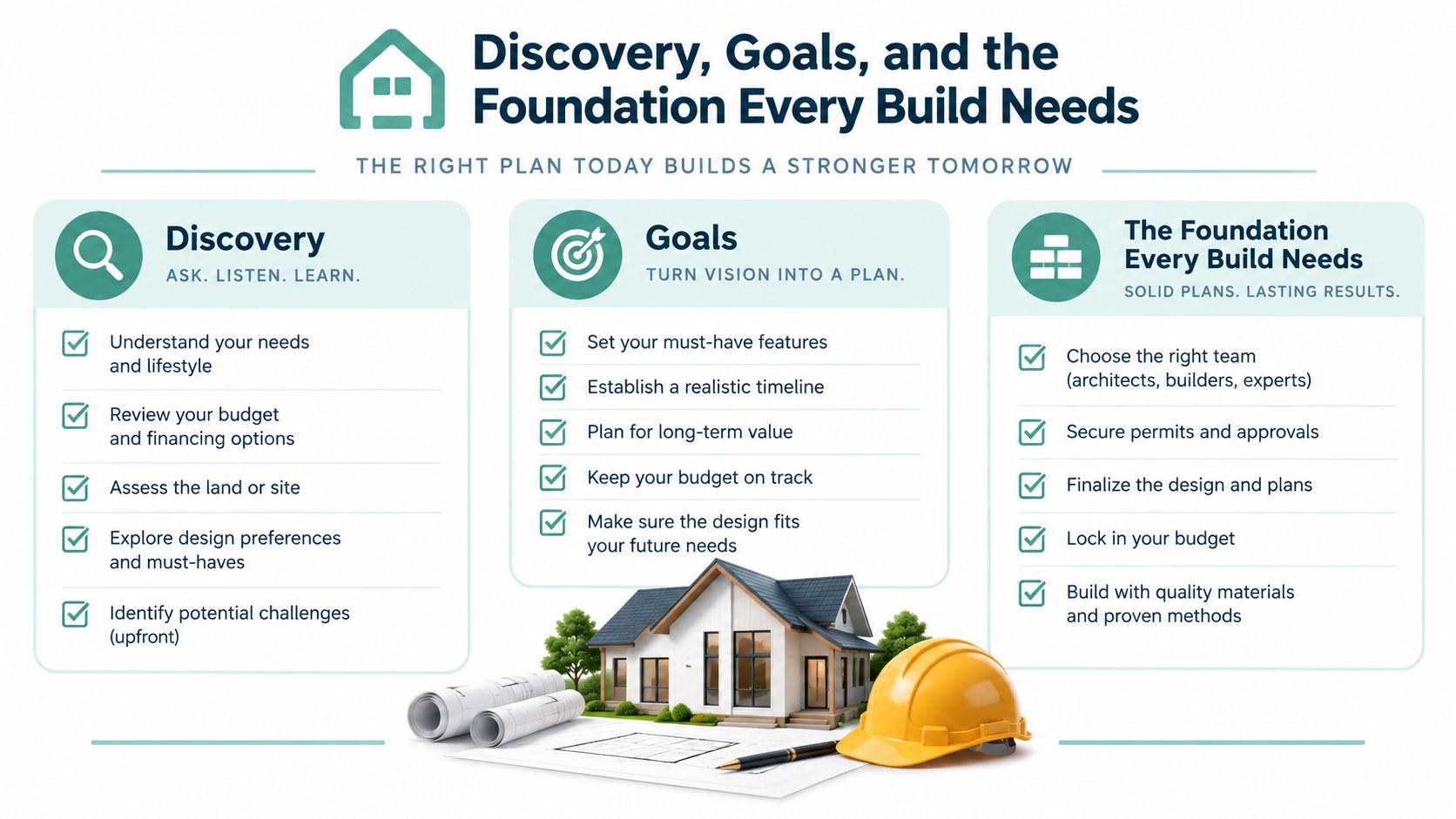
Turn those inputs into working documents, not a presentation that gets filed away:
- Service-area matrix: Record each office, the areas it serves, its hours, and the treatments available at that location.
- Search and page map: Assign primary and supporting search intent to service and location pages. Separate emergency, preventive, cosmetic, restorative, specialty, insurance, and location intent rather than forcing them into one generic page.
- Page-goal inventory: Give each page a primary action, such as calling, requesting an appointment, getting directions, or checking insurance.
- Lead baseline: Document organic landing-page sessions, call activity, form completions, scheduler activity, and qualified outcomes before launch.
- Content briefs: Specify the page topic, patient intent, proposed headline, proof points, conversion action, and structured-data needs.
Keep approvals clear, too. The dentist or clinical lead should approve treatment accuracy and limitations; the office manager should verify hours, insurance, and intake operations; and the marketing lead should own search priorities, analytics, and content coordination. The designer and developer then build to those decisions rather than reconciling conflicting requests during production.
A discovery deliverable is useful even when the practice already knows it wants “a better website.” It turns that general ambition into page-level decisions the team can review, build, and measure.
Before development starts, confirm that the baseline is accessible and that the practice agrees on what qualifies as a meaningful inquiry. A call click isn't necessarily a completed conversation, and a form submission isn't necessarily an appointment. This distinction prevents a new site from appearing successful on traffic reports while leaving the front desk with no increase in suitable patient inquiries.
Information Architecture, Page Templates, and Copy That Converts
A dental website should help patients move from a concern to a relevant page and then to a clear next step. A hub-and-spoke structure usually does that better than a collection of generic pages: the homepage introduces the practice, service pages explain specific care, location pages give office details, and supporting pages answer questions about providers, insurance, reviews, and appointments.
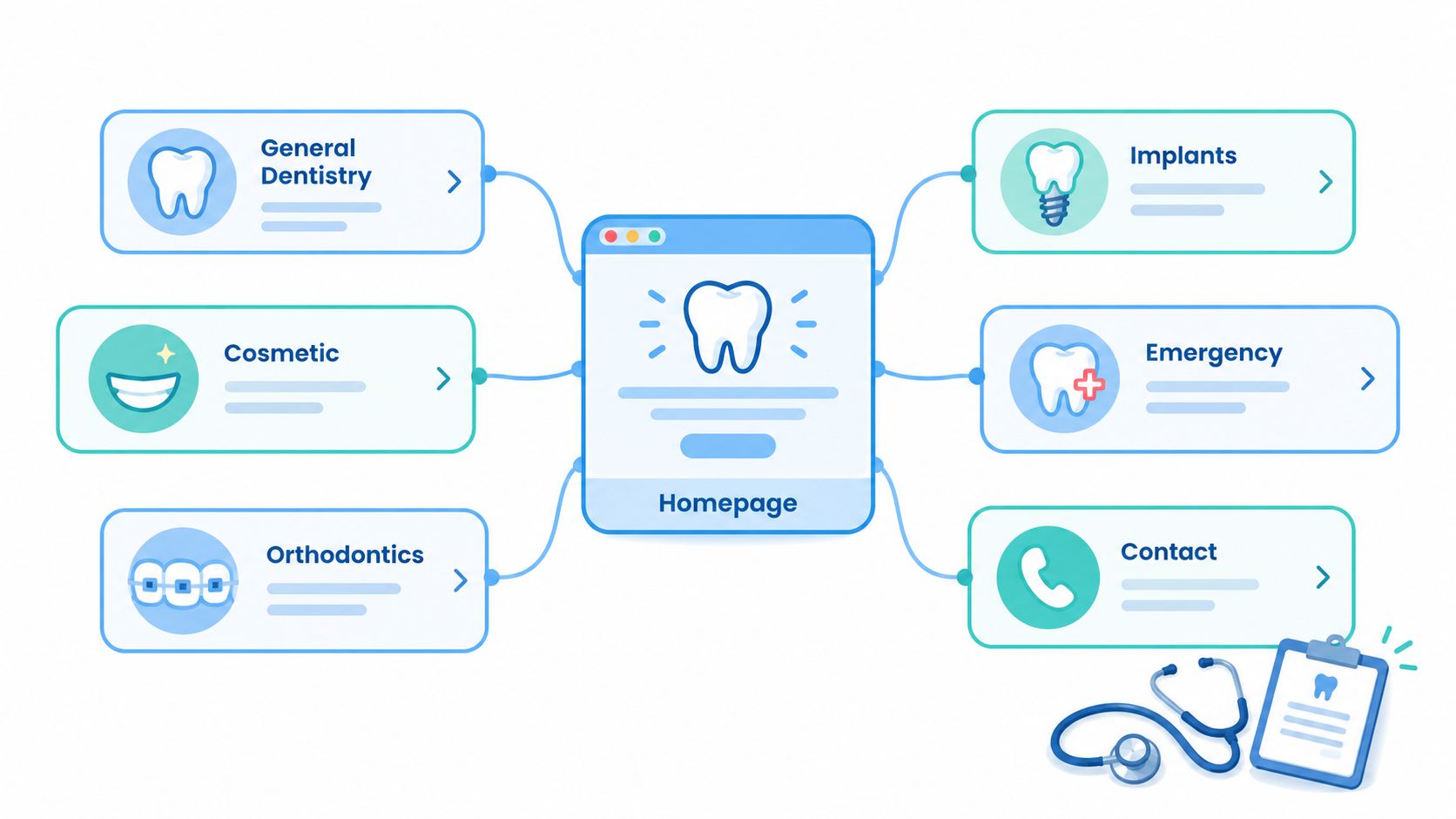
Build distinct pages where the patient's intent or the practice's offering is distinct. General dentistry, cosmetic care, restorative treatments, emergency dentistry, orthodontics, implants, pediatric care, and sedation may each deserve a page when the practice provides those services and can explain them accurately. A multi-office practice should also provide useful information for each location rather than swapping city names into otherwise identical copy.
Give each page a job
A service page needs one clear H1, a plain-language introduction, and a benefit-led subhead that explains the care without promising a particular result. Put useful trust information near the beginning, such as provider credentials, relevant experience, accepted insurance, or authentic patient reviews. Support decisions with a concise explanation of treatment, its limitations, financing or insurance details where applicable, patient questions, and a next step.
A location page should make the office practical to visit. Include accurate address and hours, directions, available services, office-specific contact information, and the appropriate appointment path. Provider profiles should explain qualifications and areas of focus in language patients can follow. A reviews or case-gallery area should use consented material and avoid implying that an individual outcome is guaranteed.
Copy should speak to the patient, not to a search crawler. Explain what a procedure involves, what the practice can and can't determine online, and how someone can discuss their options with the care team. Patient education resources such as Amanda Family Dental's smile confidence materials can be useful examples of how practices organize learning content for patients.
Match the call to the reason for visiting
Keep phone and form paths visible, with an online scheduler where it fits the practice's workflow. Emergency visitors may need a prominent call option and clear instructions for urgent situations; someone exploring cosmetic care may benefit from educational content and a consultation request. Don't force every visitor through one booking widget. The right page structure should let patients choose the channel that suits their need, while the front desk can manage what happens after submission.
Structured data belongs to the page types it describes. Use appropriate markup for the practice and location, breadcrumb navigation, and eligible page content, then validate it rather than assuming that adding schema guarantees search enhancements. For planning the hierarchy, the sample sitemap for a website provides a reference for organizing pages before design begins.
On-Page SEO and Local SEO Working Together
A service page's job is to match a real search need and make the practice's relevance clear. That's why dentist SEO shouldn't be reduced to inserting a city name into headings. A page about emergency care needs emergency-specific information and a suitable contact path; an implant page needs treatment information and credible clinical context; a location page needs accurate details about that office.
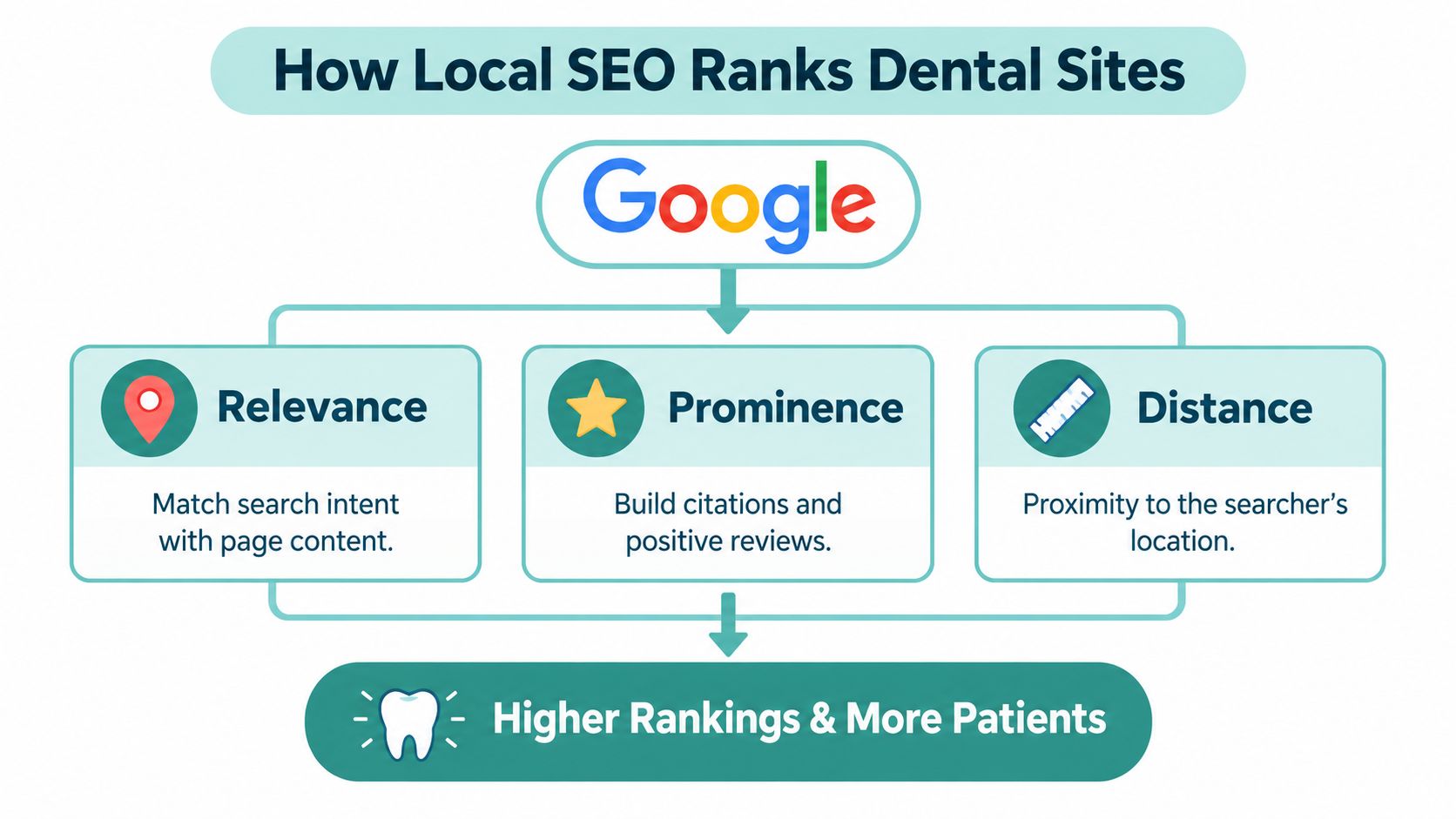
Google identifies relevance, distance, and prominence as the primary factors in local search ranking. Relevance is how well a profile matches the search, distance reflects how far the business is from the person searching, and prominence reflects how well-known the business is. Google also notes that prominence can be influenced by information such as links and reviews, and that more reviews and positive ratings can help local ranking (Google's explanation of local ranking).
Make the page match the query
Choose a primary topic for each service page and use related patient questions to shape its supporting copy, headings, and FAQs. Write page titles and descriptions to explain the service and the practice clearly, not to cram in repeated variations of the same keyword. Internal links should help visitors and search engines move naturally from a broader service or location page to relevant treatments, providers, and contact options.
For local visibility, keep the practice name, address, and phone details consistent across the website and relevant listings. Maintain each Google Business Profile with accurate categories, services, hours, and location information. Ask for authentic reviews through a consistent, non-coercive process, and respond professionally to feedback without exposing private patient information or trying to manipulate ratings.
Location affects what a patient sees. A practice can rank differently across neighborhoods because proximity is part of the local-results system, so one citywide landing page can't guarantee visibility everywhere in a service area. Multi-location pages should offer useful office-specific details; copying the same text and changing only the neighborhood name creates pages with little value to patients.
For prospective patients comparing nearby providers, Aspiring Smiles Dental and Braces' guide to choosing local dental care is a helpful example of content built around that decision. A connected approach to SEO for dental practices keeps page relevance, local information, and patient proof working toward the same goal.
Technical SEO, Performance Budgets, and CRO Foundations
A dental website can attract search traffic and still lose inquiries through slow pages, inaccessible forms, or untracked booking actions. Build performance, accessibility, and conversion measurement into one acquisition system, so the pages patients find also give them usable ways to contact the practice.
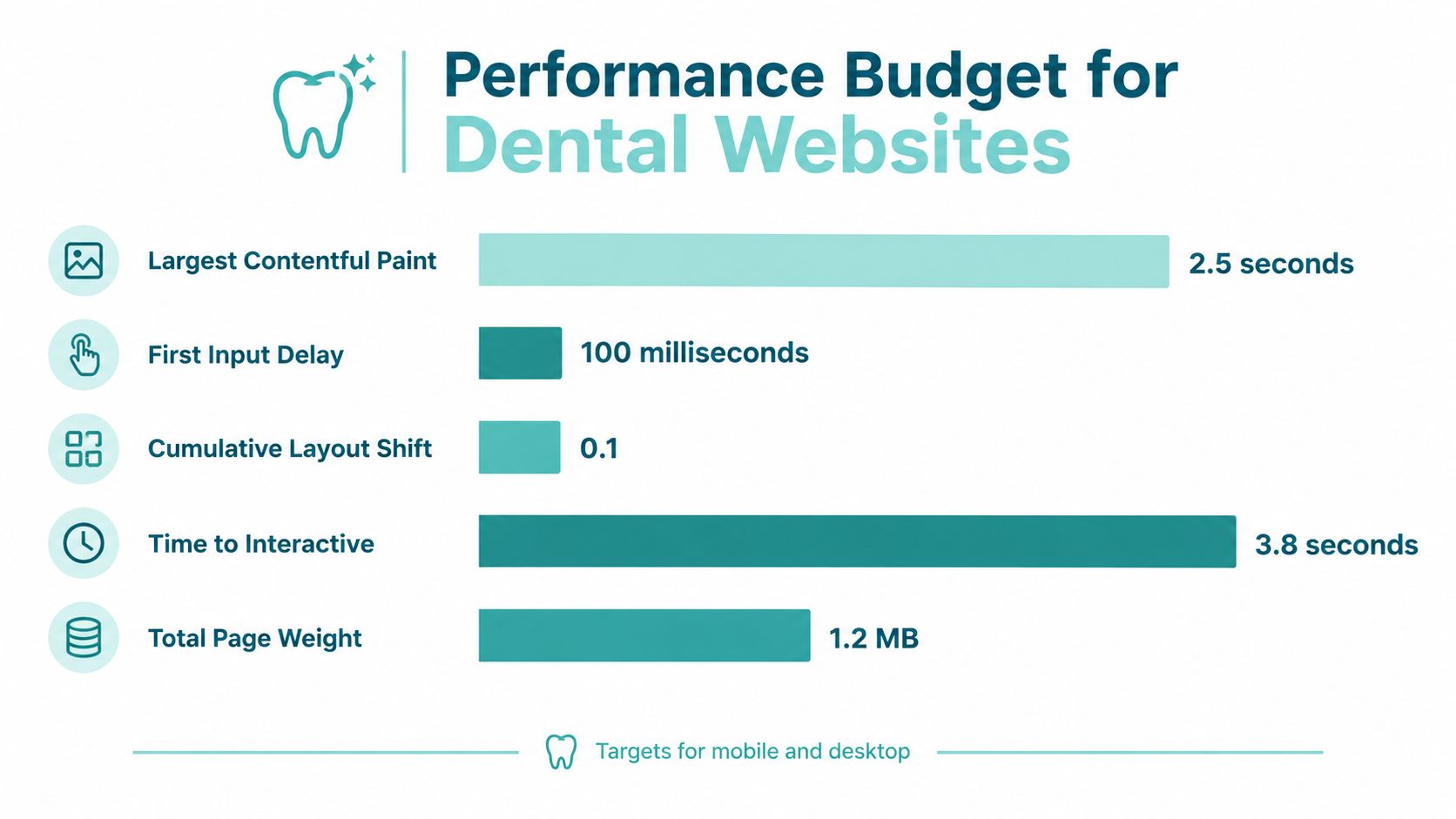
Set Core Web Vitals targets early: LCP under 2.5 seconds, INP under 200 milliseconds, and CLS below 0.1. Make design and development choices against those budgets. Compress images and serve responsive sizes in modern formats, preload only the main above-the-fold asset, defer noncritical JavaScript, minimize render-blocking CSS, and use caching and CDN delivery. Test key service and location pages on mid-tier mobile hardware over throttled networks. Compare field data before and after launch rather than relying on Lighthouse alone.
Oversized treatment photos, autoplay video, unoptimized WordPress plugins, synchronous chat or booking scripts, and late-loading banners can all slow the patient journey. A SOASTA-cited study reported that pages loading one second faster produced up to a 27% increase in conversion. The study was not specific to dental websites, but the lesson applies: delay can interrupt a call, form submission, or appointment request.
Make the intake usable for more patients
WCAG 2.2 organizes accessibility around four principles: perceivable, operable, understandable, and technically sound for assistive technology (WCAG 2.2 guidelines). For dental intake, provide labeled fields, meaningful error messages, visible focus states, keyboard access, and form data that remains available when validation fails. Caption treatment videos and write useful text alternatives for images. Test third-party schedulers directly; an accessible WordPress page does not make an embedded tool accessible.
Build accessibility into the conversion path from the start; an overlay added afterward cannot reliably fix an inaccessible booking workflow. If a patient cannot use the scheduler or understand a form error, that route to an appointment is closed to them.
Measure actions, not just visits
Keep a mobile click-to-call option visible and place a concise form near relevant page content. Ask only for what the team needs to start a conversation, and avoid collecting unnecessary medical details before contact. Load scheduling tools without blocking the page, and offer a fallback request route when real-time booking is unavailable. Phone and form options should remain clear throughout the journey, including for patients who cannot or prefer not to use one of them.
Track phone clicks, form starts and completions, scheduler launches, directions clicks, and qualified bookings as separate events. Review organic landing-page sessions alongside call-duration thresholds, form and booking completions, and qualified-lead outcomes. Rankings and traffic indicate whether the site earns attention. Completed calls and appointments show whether the intake system is working.
Launch, Analytics, and the Ongoing Optimization Loop
A launch isn't complete when the homepage appears online. Before switching over, check that analytics and Search Console properties work, call tracking and number insertion behave as intended, Google Business Profile links point to the right pages, structured data validates, and the sitemap is ready for submission. Test redirects from the old site, monitor missing pages, and submit every form and appointment request end to end.
Include an accessibility review of representative page types and confirm that the published content still matches the approved service and location briefs. Test the actual mobile experience, especially the pages patients are most likely to reach from local search. A site can pass a desktop review and still fail when an embedded scheduler, sticky call button, or validation error appears on a phone.
Use a feedback loop, not a launch-and-leave mindset
After launch, review traffic and lead quality regularly. Check priority service and location visibility, revisit service content when the practice changes its offering, and test conversion changes one variable at a time. When testing a new CTA or form, watch whether the resulting inquiries are suitable, not just whether submissions increase.
Front-desk feedback provides useful evidence for updates. If patients repeatedly ask whether a treatment is covered by insurance, improve the insurance information. If callers misunderstand an emergency policy, make the instructions clearer. Patient praise can become a testimonial only with appropriate consent and careful handling of private information.
Answer-engine readiness belongs in this same system. Present services, providers, locations, hours, and scheduling options in clear, consistent language that search systems can interpret. Google Cloud's discussion of emerging AI agents describes appointment scheduling as a potential agent task (Google Cloud's healthcare discussion). That makes accurate, structured information useful beyond traditional search results, while the practice still needs to make availability and clinical boundaries clear.
For reporting, bring rankings, organic landing pages, calls, forms, and qualified outcomes into one view rather than separate dashboards. A practical Google Analytics guide for website visitors can help teams think through how to interpret site activity alongside lead actions.
A Dentist Website Development Checklist You Can Hand to a Team
- Discovery: Document services, locations, search intent, intake operations, and a qualified-lead baseline.
- Architecture: Give each service and location page a clear purpose, patient-focused copy, and appropriate proof.
- SEO and local: Align page content and practice listings with service intent and accurate location details.
- Performance and access: Validate Core Web Vitals targets, keyboard use, form labels, and third-party scheduling.
- CRO and launch: Track calls, forms, scheduler activity, directions, and qualified bookings; test redirects and end-to-end submissions.
The useful measure of success is not a redesign that looks finished. It's a site that connects visibility to accessible, trackable patient intake and continues to improve as the practice learns what generates qualified appointments.
Digital Skyrocket plans and builds WordPress websites for dentists, combining local SEO, answer-engine optimization, and conversion improvements with ongoing support. If your practice is planning a new site and ongoing SEO, visit Digital Skyrocket to discuss whether the approach fits your goals.