Say a dental practice spends a weekend customizing a sharp new website template. The hero photo looks warm, the typography feels clinical yet approachable, and the team bios read cleanly on a desktop monitor. Three weeks after launch, though, the front desk phone is quiet and the inbox has barely a handful of inquiries.
That gap between visual polish and booked chairs is common across U.S. practices. A 2026 Suff Digital analysis of 522 U.S. dentist websites listed through Google Business Profiles found that 52.9% did not offer online appointment booking, and 10.7% provided none of four basic contact routes (online booking, tap-to-call, a contact form, or live chat). Even social proof and lead paths tend to rise or fall together: 58.6% of sites displaying reviews or testimonials offered online booking, compared with 35.5% of sites displaying none.
When patients compare providers, they aren't grading your color palette in isolation. Whether someone is researching routine cleanings or reading cosmetic dentistry insights from Manhattan, they judge how fast they can confirm you take their insurance, read about a procedure, and book on a phone.
The ten dentist website templates below are evaluated on what happens after launch. I'm looking at mobile booking flow, form privacy boundaries, ongoing maintenance burden, and readiness for local search, rather than just how the demo screenshots look on day one.
Table of Contents
- 1. Wix Dentist Templates
- 2. Squarespace Dental Templates
- 3. Oralux on Webflow
- 4. Dentalist on Webflow
- 5. Caliora on Webflow
- 6. Cusp on Framer
- 7. SimpleDentist on Framer
- 8. Dentalia for WordPress
- 9. Dentist WP for WordPress
- 10. Dental Care by Stronghold Themes for WordPress
- Dentist Website Templates at a Glance
- Choosing a Dentist Website Template That Earns Appointments
1. Wix Dentist Templates
The Wix Dentist Templates library gives solo dentists and small practices a fast way to get online without setting up separate hosting or hiring a developer. Styles range from crisp, structured clinical layouts to warmer family-focused designs, with built-in sections for services, staff bios, and patient testimonials.
Here is a look at the dental template gallery inside Wix before customization.

Where Wix Works and Where It Stalls
Because 77% of individuals reported using the internet to make a health-care appointment in 2024 (up from 60% in 2016 and 62% in 2019), according to HealthIT.gov QuickStats, having Wix Bookings or Wix Services baked into selected templates saves real setup time. An office manager can adjust hours, swap clinician headshots, and publish new announcements through the visual editor without touching code.
Before committing to a Wix design, review the post-launch trade-offs carefully. Studying strong dental website examples first helps you spot what a starter layout leaves out.
- Verify Included Apps Early: Features vary by design, so confirm whether your chosen template ships with Wix Bookings before investing hours in copywriting.
- Plan Around Platform Lock-In: Hosting stays inside Wix, which keeps server maintenance off your plate but limits custom server configurations if your practice expands later.
- Build Real Service Pages: Most Wix demos group procedures onto one overview page, so you'll still need dedicated treatment pages and a deliberate local search structure to compete in crowded cities.
2. Squarespace Dental Templates
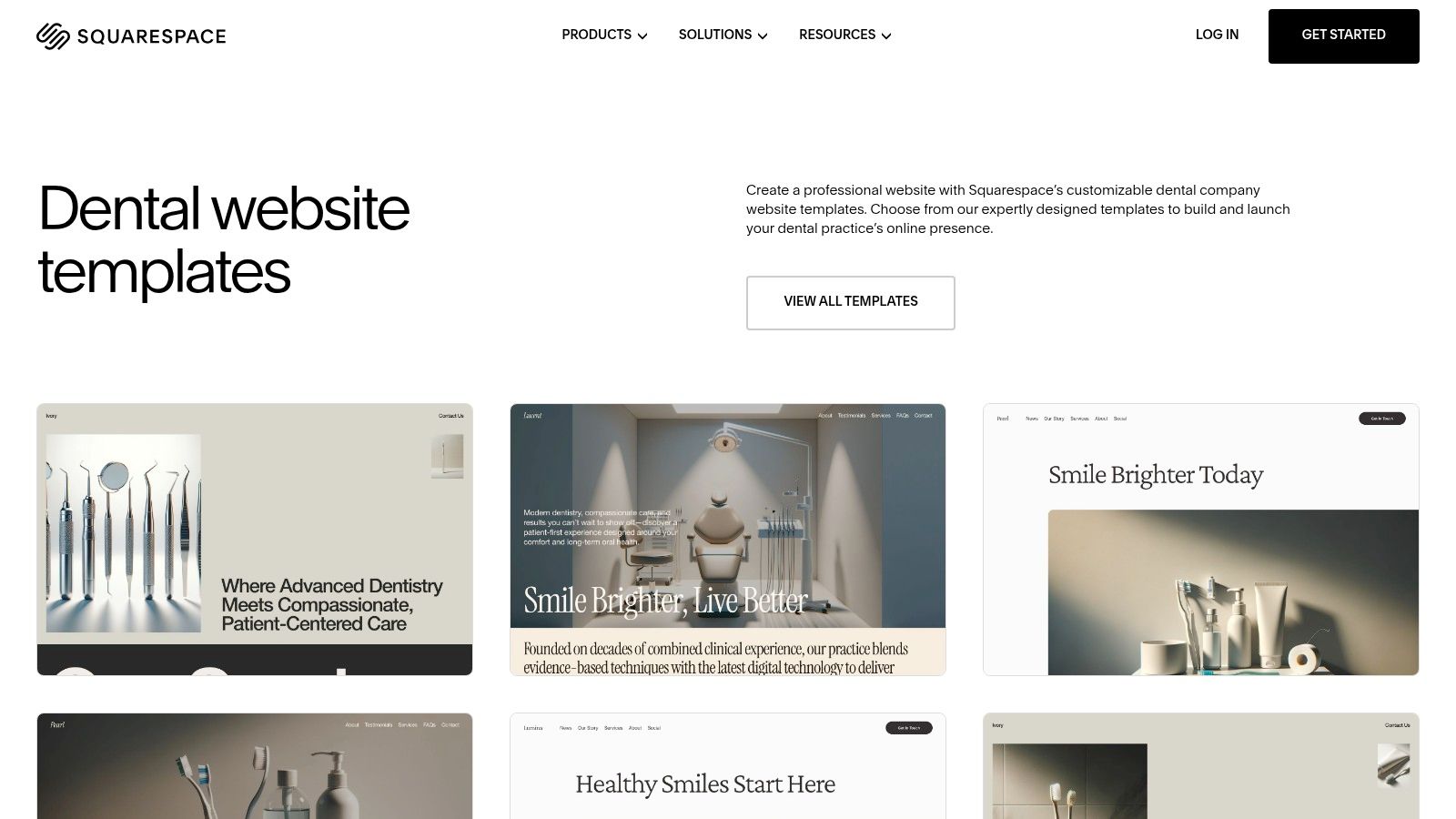
Squarespace Dental Templates trade open-ended layout tinkering for disciplined typography and predictable spacing. The catalog covers general, pediatric, orthodontic, oral surgery, and cosmetic practices, making it easy to launch a cohesive site that doesn't break when a staff member updates a paragraph.
You can browse the specialty layouts directly in the Squarespace dental template catalog.
Mobile readiness is where managed templates earn their keep. The International Telecommunication Union reported that approximately 6 billion people (about 74% of the world's population) used the internet in 2025, with internet use reaching 94% in high-income countries and more than 96% of the global population covered by a mobile broadband network. Squarespace's responsive grid keeps tap targets, FAQs, and testimonials readable across phones and tablets with minimal manual tweaking.
After-launch reality: Built-in SEO fields in Squarespace let you edit title tags and URL slugs cleanly, yet those settings won't earn local map pack visibility without city-specific copy, citation consistency, and ongoing SEO for dental practices.
For scheduling and intake, Squarespace relies on integrations such as Acuity Scheduling, which depends on your chosen plan tier. That works well for straightforward new-patient consultations, though multi-provider practices needing bespoke page architecture or specialized dental software workflows often hit Squarespace's ceiling within a year or two.
3. Oralux on Webflow
Think about a nervous patient searching for a crown replacement at nine o'clock at night. They want plain answers about the procedure, a reassuring look at the doctor who'll treat them, and a quick way to request a visit without waiting until morning. Oralux is built around that exact sequence, giving treatment details, dentist profiles, FAQs, patient stories, and booking calls to action front-row placement.
The template pairs a calm clinical aesthetic with structured page layouts across desktop, tablet, and mobile screens.

Keeping clinic details accurate after launch matters more than most practices realize. A 2024 MyAdvice survey of 450 U.S. dental patients cited by SchedulingKit found that 51% view easy contact or appointment-making as a website trait that increases trust, while 49% said they were more likely to pick another dentist when online information was inaccurate, even though only 19% booked their most recent visit through an online scheduler.
CMS Flexibility Versus Scheduling Limits
Oralux uses Webflow CMS for its blog and core sections, which helps practices publish educational articles and keep office details current. Still, three operational limits require planning before launch.
- Webflow Learning Curve: Unlike drag-and-drop builders, Webflow exposes CSS-level layout controls, so non-technical office staff may need training or a designer on retainer.
- Request Forms Only: Oralux's booking forms capture appointment requests rather than syncing live chair availability or tying into practice-management software.
- Location Page Effort: You'll still need to customize layouts and write original location pages if you want search traffic across nearby neighborhoods.
4. Dentalist on Webflow
Dentalist moves beyond a thin brochure layout by giving you 13 pages out of the box, including dedicated treatment pages, a gallery, patient testimonials, an appointment-request page, and CMS collections for treatments, blog posts, and blog categories. That structure lets your team explain procedures like implants, clear aligners, or root canals on separate URLs without rebuilding page templates from scratch.
Here is how Dentalist organizes its visual hierarchy and patient-facing sections.

Accessibility deserves close inspection on every template's contact and booking forms before you publish. Federal web guidance from ADA.gov points to properly associated form labels, keyboard navigation, clear instructions, color contrast, captions, text alternatives, and issue-reporting mechanisms as core requirements for accessible sites.
Privacy and Form Hand-Offs
Dentalist's built-in appointment-request form is convenient for capturing basic contact details, yet it does not manage clinician calendars, store patient records, or handle protected health information compliantly on its own. If you launch this template, keep the form limited to non-clinical basics (name, phone, preferred time window) or swap the embed for a compliant patient-portal scheduler.
You should also budget time for original clinical copy. Placeholder treatment descriptions won't earn patient confidence or stand out in local search results.
5. Caliora on Webflow
A dental group with several locations needs more than a brochure layout. Caliora is built for that scale, with 25 pages and 13 CMS collections listed on its Webflow template page. That structure is useful when each office, provider, and treatment needs its own page without turning every update into a manual copy job.
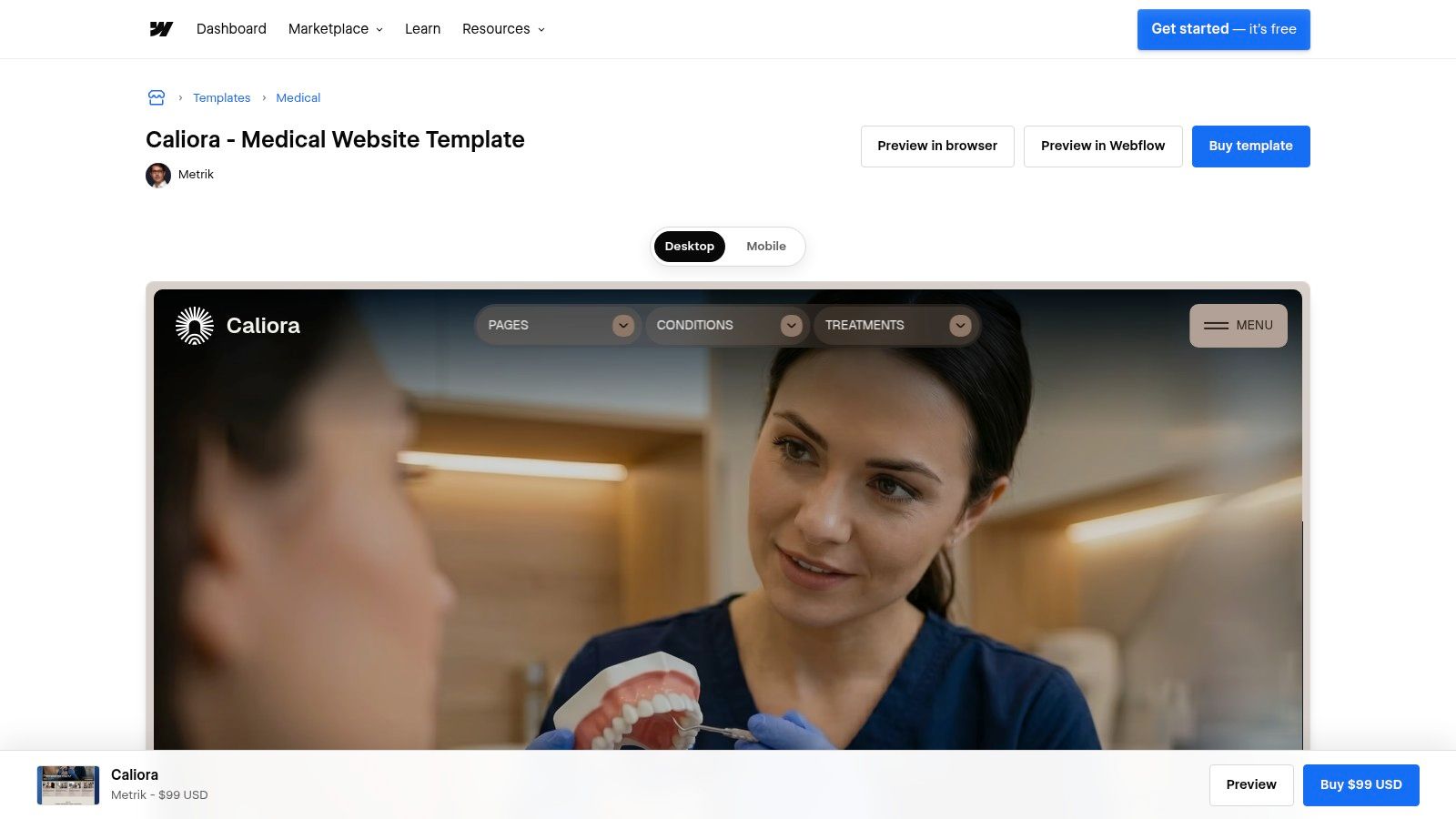
The design uses generous whitespace, but the true value is in the content model. Prebuilt collections cover treatments, team members, testimonials, clinic locations, and blog posts. A native locations collection gives each office room for its own hours, directions, providers, and local search signals. The trade-off is overhead. A single-dentist family practice may spend more time maintaining pages and fields it does not need.
That larger structure also raises the cost of accessibility mistakes. The WCAG framework summarized in federal ADA rulemaking evaluates sites across four principles: perceivable, operable, understandable, and resilient, and three conformance levels: A, AA, and AAA. On a dental site, that means checking form labels, button names, keyboard focus states, contrast, and nontext alternatives before launch.
Mobile booking deserves the same scrutiny. A polished layout means little if patients cannot book on a phone or if the form asks for more health information than the practice can responsibly handle. I would keep the first request short, then move clinical details into a secure system built for that purpose.
More prebuilt pages do not create a search strategy. Without keyword targeting, clean internal linking, and a content plan, a 25-page template gives the practice more unfinished pages to maintain after launch.
6. Cusp on Framer
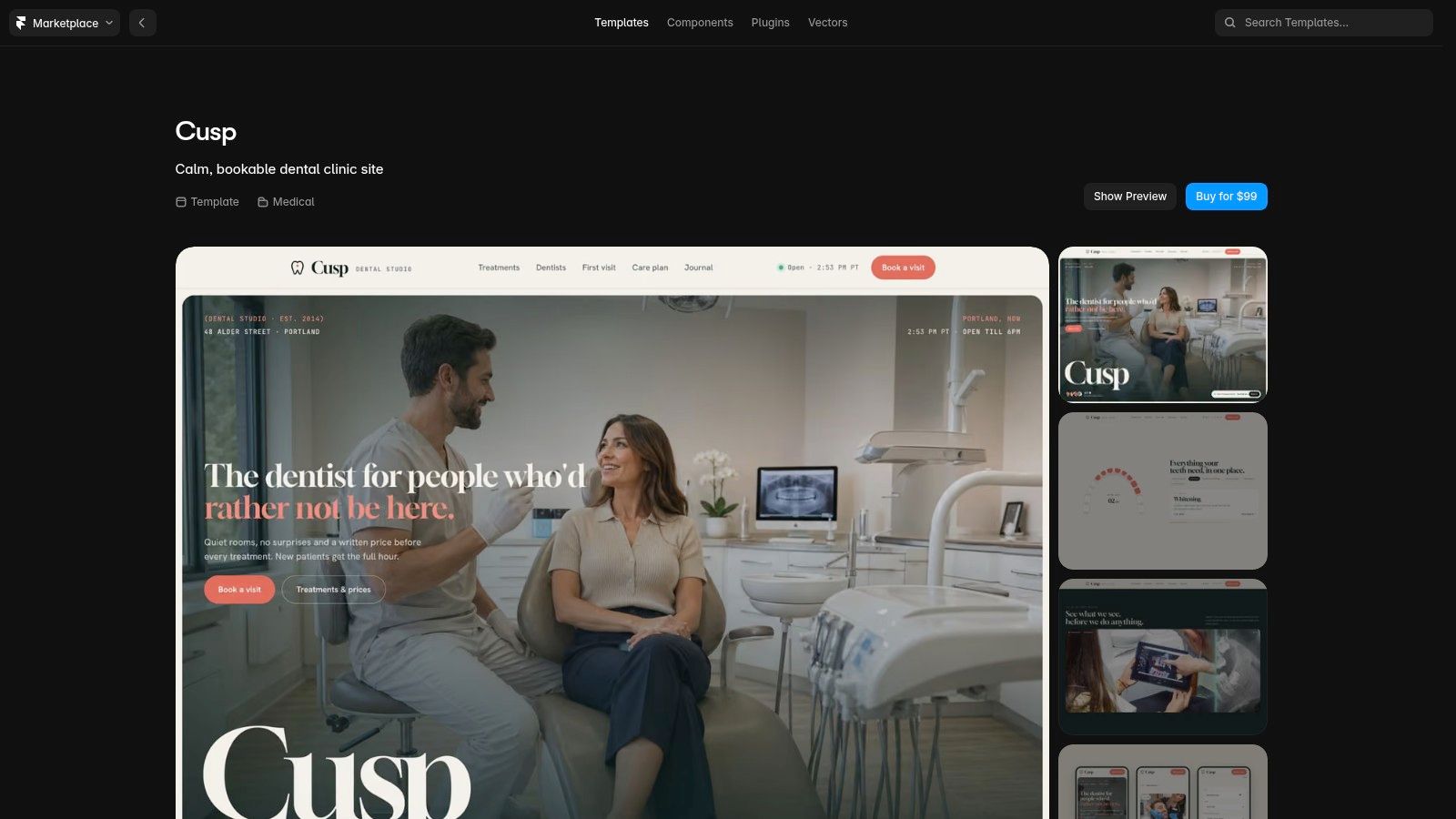
Cusp breaks away from sterile stock-photo clinic design with a warm, editorial aesthetic built on Framer. Beyond standard treatment, dentist, first-visit, and booking pages, it includes a dedicated care-plan page that helps practices explain in-house membership plans or financing options to uninsured patients.
The preview below shows Cusp's distinctive layout style and clear typographic contrast.
Two thoughtful technical details stand out here: built-in reduced-motion support and a booking form explicitly designed not to ask for health details. That attention to accessibility matters especially for clinics that accept federal funding. Guidance from the U.S. Department of Health and Human Services states that its accessibility obligations apply to covered recipients of federal financial assistance, including doctors and dentists, identifying WCAG 2.1 Level AA as the baseline technical standard for covered web content and mobile apps (subject to applicable exceptions).
Form Boundaries and Brand Fit
Keeping medical questions off Cusp's contact form is a smart starting point, though I never treat a template's field list as a substitute for a formal privacy and security review. Confirm where form submissions route, how long data sits in third-party inboxes, and whether your compliance lead approves the workflow.
Also weigh brand fit. Cusp's expressive styling suits boutique cosmetic or modern neighborhood clinics, whereas traditional oral surgery or multi-specialty groups may find its look too stylized.
7. SimpleDentist on Framer
Paying zero dollars up front for a template sounds appealing, yet the actual price of any website is the time spent customizing, connecting forms, and publishing accurate copy. SimpleDentist is a free Framer template aimed at family practices, dental clinics, and orthodontists that want to test Framer's editor before spending money on a premium layout.
You can see its clean page structure and pricing-friendly layout in the demo preview.
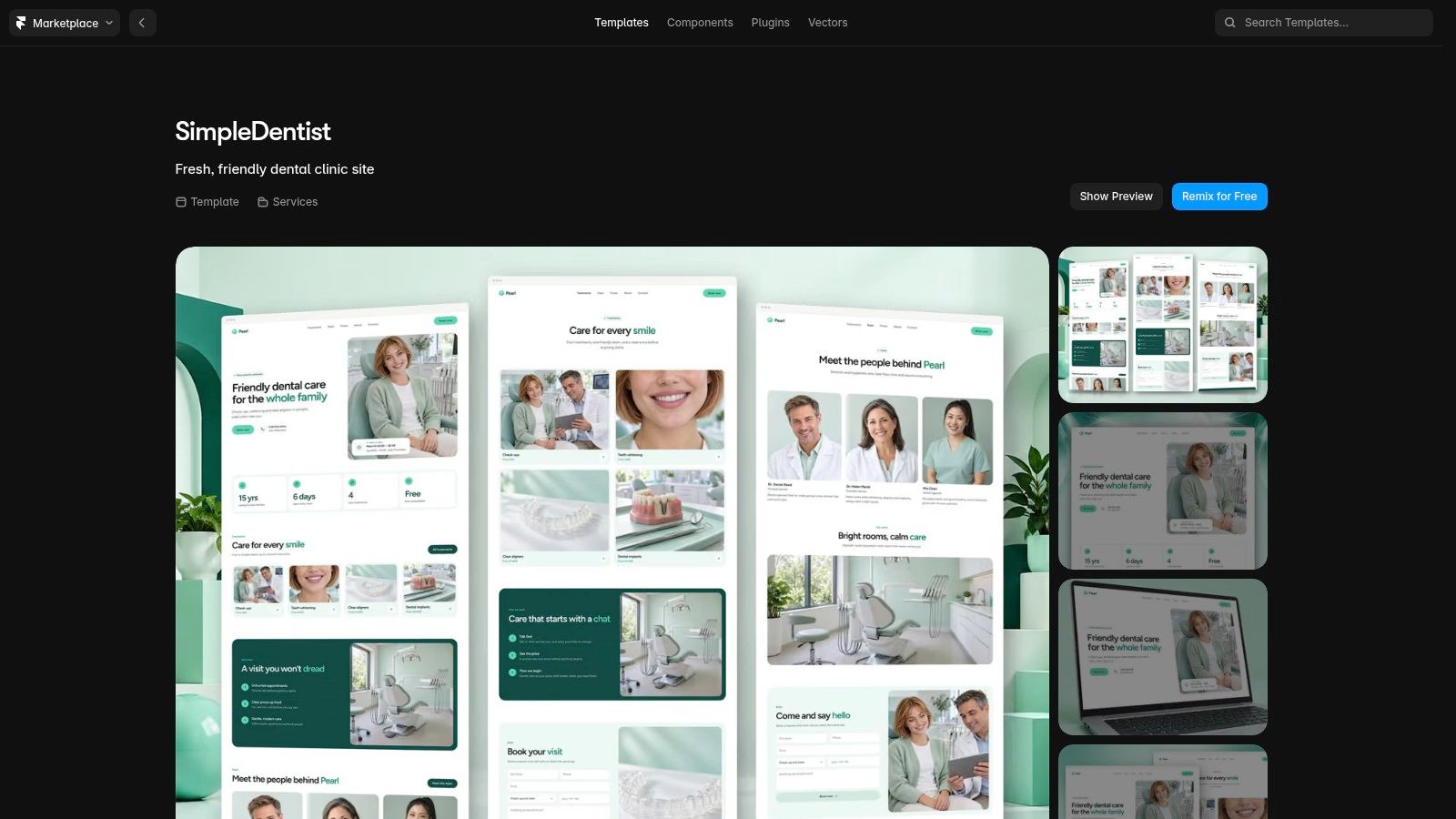
Even as a free download, it moves past a single landing page by wiring core practice info into Framer CMS collections.
- Transparent Treatment Details: CMS-driven treatment pages include fields for prices and durations, which helps answer common cost and scheduling questions upfront.
- Core Practice Pages: Prebuilt team, pricing, booking, about, and contact pages cover the basics a small clinic needs without custom code.
- Date and Treatment Booking Fields: The included booking form captures a preferred date and treatment type, so review your form destination and privacy wording carefully before going live.
SimpleDentist is a practical sandbox if you want to validate Framer's workflow on a lean budget. If your roadmap includes deep WordPress plugin integrations, advanced technical SEO controls, or custom third-party practice tools, moving straight to WordPress saves a painful migration later.
8. Dentalia for WordPress
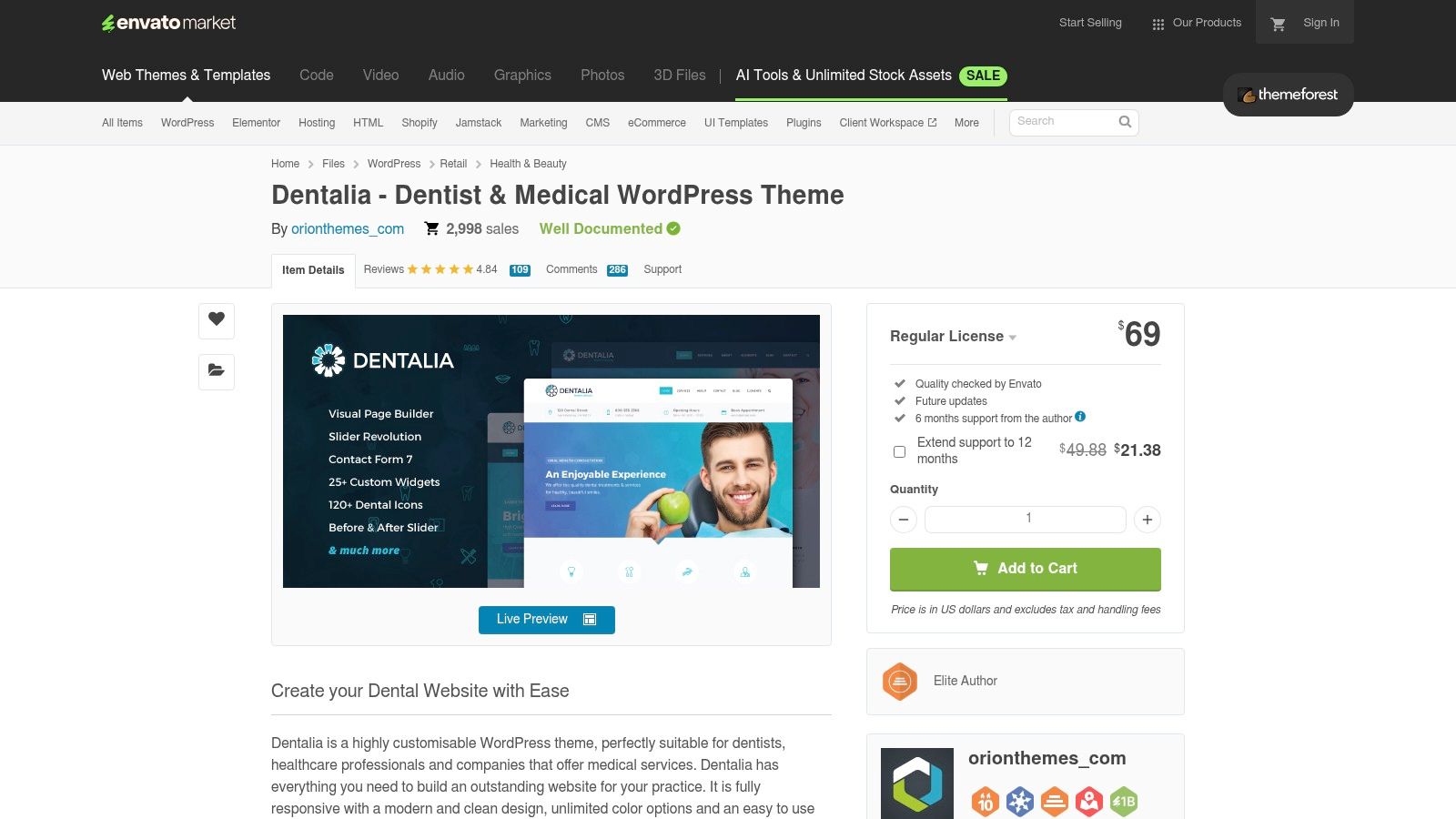
With 2,992 sales and a 4.84/5 rating from 109 reviews on ThemeForest, Dentalia has a longer track record than most niche healthcare themes. It pairs responsive design and color controls with one-click demo import and the SiteOrigin page builder, giving practices a quick launchpad inside WordPress without starting from an empty canvas.
Here is Dentalia's demo presentation for general and medical dental practices.
The Maintenance Bill Behind Demo Imports
Running WordPress gives you full freedom over hosting providers, SEO plugins, analytics, and custom integrations that closed builders restrict. In exchange, your practice owns every piece of maintenance: hosting renewals, SSL monitoring, backups, plugin updates, and security patching.
Check the update log before buying Dentalia. Its ThemeForest listing shows a last update of May 13, 2024, so I'd verify compatibility with the latest WordPress core and PHP versions on a staging site before committing a live clinic domain to it.
Plan on cleanup work after running the one-click demo importer, too. Demo installers drop unused pages, stock imagery, and extra SiteOrigin widgets into your database, and stripping out what you don't need keeps the site lean, fast, and distinct from every other clinic using the same theme.
9. Dentist WP for WordPress
Cosmetic and restorative practices rely heavily on visual proof, and Dentist WP leans directly into that need. The ThemeForest listing reports 1,218 sales, a 4.56/5 rating from 16 reviews, a 2026 update, and six months of author support, along with bundled access to WPBakery, Revolution Slider, and a before-and-after presentation feature.
The theme screenshot below highlights its dental-specific layout structure.

Bundled visual plugins come with a performance tax that shows up fast on phones. According to Pracxcel healthcare website speed benchmarks, only about 42% of mobile website experiences pass all three Core Web Vitals thresholds, and each additional 100 milliseconds of load time can reduce conversions by roughly 1%. Solid dentist website development trims heavy scripts, compresses images into WebP or AVIF, and tests pages on throttled mobile connections rather than office Wi-Fi.
Speed check before launch: Disable Revolution Slider on mobile hero sections if a static, properly sized image delivers the same message and headline call to action faster.
Keep three practical details in mind if you evaluate Dentist WP for a cosmetic practice.
- Verify Builder Fit: WPBakery works differently from the native WordPress block editor or Elementor, so confirm your team or developer is comfortable maintaining it.
- Secure Patient Consent: Before-and-after smile galleries demand written patient release documentation and responsible, realistic presentation.
- Weigh Review Volume: With 16 reviews on the marketplace listing, test the live demo thoroughly on real phones to verify spacing, tap targets, and form behavior.
10. Dental Care by Stronghold Themes for WordPress
Practices often struggle to adapt a generic medical layout to pediatric, orthodontic, or cosmetic branding. Dental Care by Stronghold Themes lowers that friction by shipping four ready-made dental demos designed for family, cosmetic, and orthodontic directions, powered by Elementor and one-click demo import.
The theme listing reports more than 1,200 sales and 29 reviews, making it an established option for WordPress teams already familiar with Elementor.

Turning a Specialty Demo Into a Local Site
Elementor lowers the barrier for office staff or marketing coordinators who want to tweak headlines, swap doctor photos, or add seasonal whitening offers without writing CSS. That convenience still carries a maintenance responsibility: confirm current WordPress and Elementor compatibility before installing the theme, and audit active add-ons so page weight doesn't creep upward over time.
Just like any multi-demo theme, importing the orthodontic or family starter site only gives you a frame. You still need to replace every placeholder block with authentic clinic photography, accurate insurance notes, verified office hours, and locally focused treatment pages that reflect the neighborhoods you serve.
Dentist Website Templates at a Glance
| Item | Platform | Best for | Booking or intake | Maintenance burden |
|---|---|---|---|---|
| Wix Dentist Templates | Wix | Practices wanting editable dental-specific designs and basic site features | Some templates include Wix Services or Bookings; check the selected template | Low; hosted platform, with template-dependent features |
| Squarespace Dental Templates | Squarespace | Practices seeking polished designs for different dental specialties | Scheduling and intake forms available through integrations such as Acuity | Low; hosted setup, though integrations may need configuration |
| Oralux, Webflow | Webflow | Clinics wanting treatment, team, FAQ and blog content | Booking forms; not appointment-management software | Moderate; requires Webflow learning and ongoing content work |
| Dentalist, Webflow | Webflow | Practices needing treatment pages and structured educational content | Appointment-request form; review privacy and data handling | Moderate; requires Webflow skills and form review |
| Caliora, Webflow | Webflow | Larger or growing clinics with many content types or locations | Booking details not specified | Moderate to high; extensive CMS structure requires Webflow familiarity |
| Cusp, Framer | Framer | Practices wanting detailed treatment and clinician pages, plus care-plan content | Appointment form designed to avoid health details; review privacy and security | Moderate; check publishing and integrations against practice needs |
| SimpleDentist, Framer | Framer | Practices seeking a free starting point with treatment and team pages | Booking form includes treatment and date fields; review privacy wording | Moderate; customization and publishing take time |
| Dentalia, WordPress | WordPress | Practices wanting a customizable theme with demo import | Booking or intake details not specified | High; buyer manages hosting, updates and maintenance |
| Dentist WP, WordPress | WordPress | Cosmetic or restorative practices interested in showcasing outcomes | Booking or intake details not specified | High; WordPress and bundled tools require ongoing management |
| Dental Care, WordPress by Stronghold Themes | WordPress | Practices seeking family, cosmetic or orthodontic demo designs | Booking or intake details not specified | High; WordPress, plugins and page-builder need maintenance |
Choosing a Dentist Website Template That Earns Appointments
Picking among dentist website templates comes down to matching the tool to your practice's daily operations, not chasing the flashiest demo animation. A solo office with limited technical staff often fares best on a managed builder like Wix or Squarespace, where hosting and basic updates stay simple. Practices with larger treatment catalogs or multiple locations benefit from structured CMS collections in Webflow or Framer, while clinics wanting complete ownership over hosting, plugins, and local SEO architecture usually land on WordPress.
Whatever platform you select, run four checks before pointing your domain live. First, test the entire mobile booking flow on a real phone to make sure tap-to-call and appointment requests sit within effortless reach. Second, review form privacy with your compliance advisor so basic lead forms don't collect sensitive medical details over unsecured email. Third, verify accessibility across form labels, keyboard focus, and contrast. Fourth, assign clear ownership for ongoing maintenance, because outdated plugins, broken forms, or stale office hours erode patient trust.
Patients weigh far more than visual design when selecting a provider, as patient guides like choosing a dentist with Seven Oaks make clear. A template is only one piece of a website built to win local search visibility and turn visitors into booked appointments.
For small- to medium-sized business owners and marketing directors who want a site engineered around search rankings and lead generation from day one, we take a different approach at Digital Skyrocket. Rather than slapping copy onto a generic demo, we strategize, design, build, write, and optimize custom WordPress websites paired with local SEO, off-site citations, and conversion rate optimization. We also offer maintenance plans so your site stays healthy long after launch, and once you've paid for your website, it belongs to you and stays live even if you cancel ongoing service (though rankings and conversions naturally slip over time without continual SEO work).
Whether you're searching for web design in Tyler, TX, partnering with a web design agency in Longview, TX, or expanding across any of our Texas web design service areas and beyond, the goal stays the same: a fast, accessible dental site that keeps your chairs full.
Digital Skyrocket plans, designs, builds, and optimizes lead-generating WordPress websites with local SEO, content strategy, and conversion rate optimization for dental practices and service businesses. If you're ready to move beyond a basic template to a website engineered for local search visibility and steady appointment inquiries, visit Digital Skyrocket to explore how our team builds sites that perform after launch.