
“Design the new site first, then handle SEO before launch” is the wrong advice. By that point, someone may have deleted a valuable service page, replaced crawlable navigation with a script, or approved a mobile layout that leaves out the content customers need.
An SEO website redesign should protect the pages that already generate business while making the inquiry process easier. For a roofer, dentist, law firm, or HVAC company, that means checking mobile content, speed, accessibility, calls, and forms together. A better-looking homepage isn't proof that the redesign worked.
Table of Contents
- Redesign Phases and the SEO Work in Each
- Audit the Current Site Before Changing Anything
- Map Every Old URL to Its Closest New Page
- Keep Content and Mobile Signals Equal Across Devices
- Protect Local Search Signals Through the Redesign
- Core Web Vitals Targets to Build Into the Redesign
- Launch Checks for Rankings, Accessibility and Forms
- Measure the First 90 Days and Decide What to Fix Next
Redesign Phases and the SEO Work in Each
An SEO-safe redesign needs six phases, with search requirements built into each one rather than added at launch. Agree on the work and its owner before design approval.
SEO tasks and outputs by redesign phase
| Phase | SEO task | Output |
|---|---|---|
| Discovery | Record rankings, organic landing pages and leads as a baseline | Baseline report |
| Architecture | Map every current URL to a new destination | URL map spreadsheet |
| Content | Keep or rewrite pages around target keywords and headings | Content brief for each page |
| Build | Preserve mobile content, structured data and speed budgets on staging | Staging QA sign-off |
| Launch | Deploy 301 redirects, submit the sitemap and request recrawl | Launch checklist complete |
| Post-launch | Track rankings, crawl errors and leads for 90 days | Monthly comparison report |
The sequence protects useful pages and makes their content requirements clear before development. Discovery identifies what needs protection. Architecture assigns each current URL a destination, while content briefs specify the search intent and useful details each page must retain. Developers can build from approved requirements instead of guessing what the finished pages will contain.

Assign ownership before design starts
Set mobile requirements during the build, not as finishing touches. Google increasingly used the smartphone version of pages as a basis for understanding and ranking them. Treat the mobile experience as the primary search-facing build, but don't assume that a polished mobile layout alone will protect rankings. Check content parity, performance and accessibility on each important landing page, then judge them alongside that page's calls and completed forms. A single homepage score cannot show whether service pages work for both searchers and prospective customers.
Digital Skyrocket strategizes, designs, builds, writes and optimizes a client's website rather than only optimizing a site built by another team. That approach keeps content decisions, design and technical SEO connected throughout the project.
- Discovery and architecture: The SEO lead owns the baseline and URL map.
- Content: The strategist and client approve service accuracy and each page's purpose.
- Build: Design and development own responsive templates and technical acceptance.
- Launch: The developer deploys changes; the SEO lead checks them.
- Post-launch: The analyst and business owner review visibility and qualified inquiries.
Audit the Current Site Before Changing Anything
Start with the live website, not the proposed navigation. A page that looks outdated may still bring in valuable inquiries, while a polished page may contribute very little.

Build an evidence-based inventory
Export organic landing pages. Use Google Search Console to export the top 100 pages over the last 12 months, recording clicks, impressions, and average position as your working audit scope. Don't rely on a short recent window that could reflect seasonality rather than the pages' usual contribution.
Match visits to inquiries. Pull calls, completed forms, and email activity by landing page from Google Analytics and any connected call-tracking or CRM system. Separate an email-link click from a confirmed email inquiry, and don't treat a form-start event as a completed lead.
Crawl the entire website. Use Screaming Frog or a comparable crawler to record response codes, redirect chains, titles, meta descriptions, H1 headings, canonicals, and indexing directives. Crawling only the homepage misses the service, location, and article templates where migration problems can hide.
Record links and citations. Export referring domains for high-value pages and inventory directory listings that send visitors to specific URLs. Include Business Profile website links and local citations, because an old directory destination can remain active long after the rebuild.
Capture template-level field performance. Record available real-user speed information for the homepage, service pages, location pages, and articles. Keep laboratory tests separate, and mark missing field data rather than substituting a homepage score for every template.
Collect the actual business material. Gather the services overview, benefits, logos, photography, and video before design starts. Otherwise, designers create layouts around placeholder claims and media that the client may never supply.
Make the baseline usable
Our technical SEO audit checklist provides a practical framework for organizing the technical checks. Keep the resulting inventory accessible to the writer, designer, developer, and person approving the launch.
After discovery questions, our clients provide their services and benefits overview plus media files, then we develop the content and design strategy together. That prevents attractive layouts from dictating incomplete service descriptions.
Finish with a one-page baseline summary supported by the detailed landing-page sheet. Include traffic, leads, links, and speed for the priority pages, with clear labels for anything you couldn't measure.
Map Every Old URL to Its Closest New Page
Redirecting every deleted page to the homepage isn't migration planning. It gives someone looking for a specific service a generic starting point and removes the topical match between the old address and its destination.
Keep useful URLs unchanged where possible. When an address must change, follow Google's site-move guidance: map it to its closest equivalent and use a permanent server-side redirect, such as a 301; Google also notes that recrawling and reindexing medium-sized sites can take weeks or longer.
How to handle each old URL case
| Situation | Action | Why it matters |
|---|---|---|
| Old page with a matching new page | 301 redirect to the new page | Carries page signals and visitors to the relevant successor |
| Two old pages merged into one | 301 redirect from each old URL to the merged page | Consolidates signals in one place |
| Page removed with no replacement | Return an appropriate 404 or 410 status | Avoids an unrelated destination that search engines can treat as a soft 404 |
| Redirect chain (A to B to C) | Point A directly to C | Removes extra hops that slow crawling |
| Old URL with external links | 301 to the closest equivalent page | Preserves a useful destination for referring links |
Build a map developers can test
Give every old URL a row with its new destination, redirect status, canonical target, sitemap inclusion, internal-link references, and post-launch crawl result. Include URLs found through analytics, backlinks, and old sitemaps, not just pages reachable through the current menu.
Say a roofing company combines separate roof-leak inspection and repair pages. The merged page needs to address both subjects before either old address points to it; a redirect can't compensate for deleted service information.
Migration rule: Choose the destination by the visitor's original task, not by whichever new page is easiest to select.
Google documents that permanent redirects don't lose PageRank. That isn't a promise that every migration preserves rankings: missed redirects, inconsistent canonicals, orphaned pages, and stale internal links remain operational risks.
Update internal links to the final destinations instead of relying on redirects indefinitely. Complete and test the map before launch, then crawl the deployed rules rather than assuming the spreadsheet and server implementation match.
Keep Content and Mobile Signals Equal Across Devices
A cleaner mobile layout doesn't require less useful content. Removing service explanations, internal links, or structured data to shorten the screen can change what search engines understand about the page.
Google's mobile-first indexing guidance recommends responsive design, which serves the same HTML at the same URL while adapting the presentation. Content parity, not visual sameness, is the acceptance test.

Check the content beneath the layout
- Service copy: Preserve equivalent information across devices. Accordions and tabs are acceptable presentation choices when their content is available in the rendered HTML, rather than fetched only after interaction.
- Headings: Retain a logical hierarchy and equivalent page topics. Don't replace a descriptive service heading with a vague mobile slogan.
- Internal links: Keep important destinations reachable through mobile navigation and contextual links, not only a desktop megamenu.
- Structured data: Preserve accurate service, location, and relevant review markup where appropriate. Its presence doesn't guarantee a special search appearance.
- Metadata and robots directives: Keep equivalent titles and descriptions, and eliminate accidental mobile-only
noindexornofollowinstructions. - Images: Retain meaningful alternative text and explicit dimensions.
- Contact controls: Test phone links, labels, buttons, and form completion using a thumb, including when the keyboard is open.
Test rendering rather than appearance alone
Consider a service page whose desktop version explains eligibility, process, and service coverage. If the mobile rebuild loads those details only after a user taps an accordion, the initial rendered page may no longer contain the information that supported its relevance.
That failure comes from implementation, not from accordions themselves. Don't force every paragraph into an expanded mobile layout because someone assumes Google can't understand collapsed content.
Use Search Console's URL Inspection to inspect Google's mobile rendering, then compare its content with desktop browser rendering. Search Console's former Mobile Usability report is no longer available, so use browser tools and real-device checks for the interaction review.
Resolve missing text, links, or directives before publishing the production sitemap. A screenshot comparison alone won't expose these gaps.
Protect Local Search Signals Through the Redesign
Local visibility depends on more than putting a city name into a title. Google's explanation of local ranking identifies relevance, distance, and prominence as the main factors and notes that links, review counts, and positive ratings can contribute to prominence.
A redesign can strengthen relevance and preserve useful local information. It can't change the distance between a business and the searcher.
Carry local details into the new site
- Preserve location destinations. Keep useful location and service-area pages at their existing addresses, or map them to relevant successors. Check where Business Profiles, directories, and externally linked reviews send visitors.
- Make each city page specific. Use the service and city naturally in the H1 and opening copy. Explain actual coverage, services, and local proof rather than swapping place names into otherwise identical pages.
- Align business information. Keep the business name, phone number, legitimate address information, and service coverage accurate across the website, Business Profile, and citations. Don't invent storefront addresses for service-area businesses.
- Retain discoverable pathways. Link important location pages through navigation and relevant content. Internal pathways help visitors and crawlers, but they aren't interchangeable with the external links Google describes as prominence signals.
- Keep reviews usable. Continue appropriate review requests and display useful reviews on mobile without requiring a heavy carousel. Never promise that adding a review widget will improve rankings.
Validate by city and page
For businesses serving East Texas or DFW, maintain a city-to-page worksheet alongside the URL map. Our guide to improving local SEO can help organize the broader profile, citation, and website work.
Check each city's relevant searches and inspect which landing page receives impressions in Search Console. A manual search is a spot check, not proof of universal ranking, because location and search context vary.
The practical question is whether a visitor reaches a page that accurately matches the service and place they searched for.
Core Web Vitals Targets to Build Into the Redesign
Core Web Vitals targets and typical redesign causes
The good and poor thresholds below come from Google's Core Web Vitals documentation, with LCP at 2.5 seconds or less, INP at 200 milliseconds or less, and CLS at 0.1 or less defining the recommended good targets.
| Metric | Good | Poor | Typical redesign cause |
|---|---|---|---|
| Largest Contentful Paint (LCP) | 2.5 seconds or less | Above 4 seconds | Oversized hero image or video and render-blocking CSS |
| Interaction to Next Paint (INP) | 200 milliseconds or less | Above 500 milliseconds | Heavy JavaScript, sliders and chat widgets |
| Cumulative Layout Shift (CLS) | 0.1 or less | Above 0.25 | Images or embeds without reserved space and late-loading banners |
Use these as engineering acceptance criteria, not a decorative scorecard. Oversized media and render-blocking resources delay the main content; heavy JavaScript makes interactions wait; late-loading elements move controls after visitors have started using them.
Set the budget before adding effects
Give each template an agreed media and script budget based on testing. There's no universal image-weight allowance that guarantees passing, so the developer should measure the proposed layout under realistic mobile conditions before approving hero videos, animation libraries, or additional widgets.
- Test representative templates on mobile and desktop. Include service and location pages with their actual media and integrations, not an empty demonstration layout.
- Optimize the largest above-the-fold asset. Resize and compress the hero image, serve responsive formats, and avoid delaying a critical image with inappropriate lazy loading.
- Defer noncritical JavaScript. Remove unused components and inspect scripts that interfere with taps or form input.
- Reserve space for media. Set image dimensions and stable containers for embeds and banners.
- Challenge third-party widgets. Delay or remove chat, review carousels, maps, and other integrations when their cost outweighs their usefulness.
Measure the inquiry path
Google's guidance on Core Web Vitals and search states that its ranking systems use these signals, while clarifying that good results don't guarantee top rankings. Content relevance and quality still matter.
A fast homepage doesn't excuse a slow service page where customers actually try to contact you.
Report the share of priority templates passing in available field data, then connect those templates to organic entrances and completed inquiries. Staging laboratory tests help diagnose problems, but they don't establish how the eventual production audience will experience the site.
Test accessibility alongside speed. A promptly loaded form still fails its business purpose if visitors can't read its labels, operate it with a keyboard, or understand an error message.
Launch Checks for Rankings, Accessibility and Forms
Treat launch as a verified release, not the moment someone publishes the new theme. The live environment can behave differently from staging, especially around caching, redirects, analytics, and email delivery.
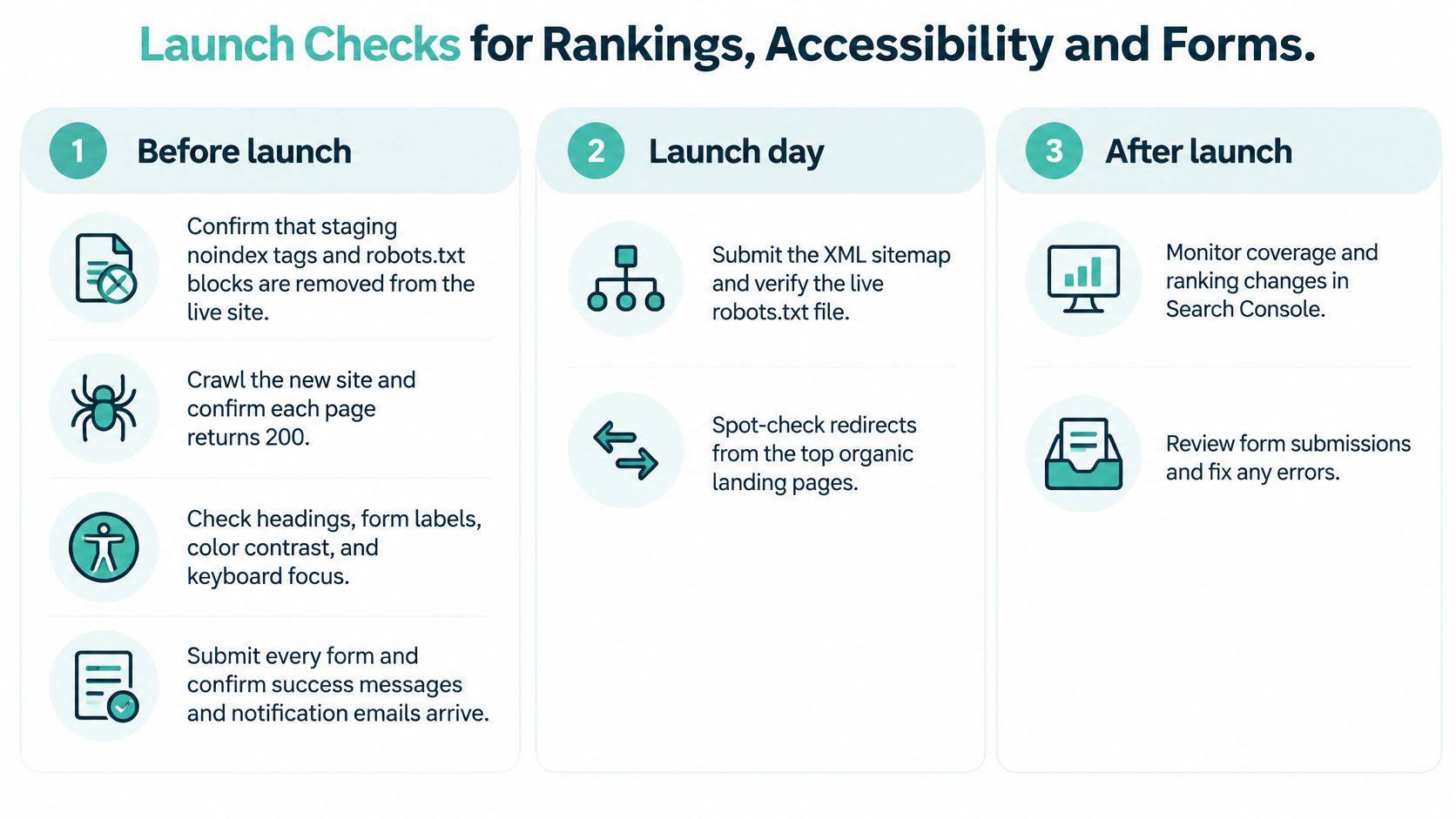
Before launch and on release day
- Check production crawl access. Remove staging indexing restrictions from live pages and verify the production robots.txt file. Keep the staging environment appropriately protected.
- Crawl intended destinations. Confirm live content returns successful responses, retired pages follow their planned handling, and no unexpected server errors appear.
- Test the old URL inventory. Verify each mapped redirect reaches its final destination directly, without loops or irrelevant landing pages.
- Inspect canonical tags. They should identify the intended final URLs, not staging addresses or old destinations.
- Validate and submit the sitemap. Include intended indexable canonical pages, not redirects or deleted content.
- Review template signals. Check titles, descriptions, headings, structured data, and analytics after deployment.
Accessibility and inquiry delivery
WCAG 2.2 defines testable criteria at A, AA, and AAA conformance levels and applies conformance to complete pages, including responsive variations. Aim for AA across the whole experience, rather than treating an automated scan as a complete accessibility assessment.
- Readable content: Check contrast, text resizing, and zoom without losing instructions or contact controls.
- Operable navigation: Test keyboard access, visible focus, menu behavior, and adequately sized tap targets.
- Understandable forms: Provide visible labels, useful error messages, and a clear success state.
For a service-business example of visitor-facing accessibility information, review Aloha Window Bros.’ accessibility features for site visitors. Such information can help explain available support, but an accessibility page doesn't establish that every interaction works.
Submit a test inquiry from a phone and desktop, confirm receipt in the inbox or CRM, and verify completion tracking. Test tap-to-call links too, without counting a click as proof that a conversation occurred.
During the first week
Check Search Console daily for indexing and crawl problems, recheck redirects, and investigate unexpected missing-page spikes. Review incoming inquiries with the person responsible for answering them.
Release standard: Launch is complete when the technical checks and real inquiry tests agree, not when the homepage looks finished.
Measure the First 90 Days and Decide What to Fix Next
Use a 90-day review window as an operating plan, not a promise that Google will finish processing every change by a deadline.
- Week one: Prioritize crawl access, indexing problems, redirect failures, and broken inquiry delivery.
- Weeks two to four: Review impressions and average position for the baseline's top 100 pages, allowing for recrawling fluctuations without dismissing clear technical faults.
- Days 30 to 60: Compare calls, forms, and confirmed emails by landing page, device, and traffic source.
- Day 90: Choose the next improvement from the evidence, and retain unresolved items with named owners.
Diagnose the pattern before changing the page
If rankings held but leads fell, verify tracking first. If measurement is intact, inspect the conversion path: a buried phone number, longer form, unclear call to action, or intrusive overlay may explain the decline better than a search problem.
If particular pages lost visibility, inspect their redirect destinations, rendered content, canonicals, and internal links. Compare the affected service and query groups rather than rewriting the whole website because aggregate traffic moved.
If a template fails field performance, repair the shared component before optimizing unrelated pages. A slow review embed repeated across location pages deserves more attention than a minor homepage animation that few inquiry journeys encounter.
Use Google Analytics SEO reports to connect organic landing pages with meaningful actions. Keep Search Console's search-performance measures distinct from Analytics sessions and CRM inquiries, because those systems measure different events.
Choose improvements by business effect
At Digital Skyrocket, we study actual visitor behavior after launch and make changes intended to increase how often visitors get in touch. That's conversion rate optimization, and it requires testing layouts and forms against real behavior rather than assuming the launch design is final.
Review lead quality with the people handling intake. A page that produces fewer but better-qualified inquiries may be more valuable than one generating frequent irrelevant submissions.
For owners and marketing directors evaluating web design in Tyler, TX, or a redesign for another service market, the same decision rule applies: prioritize the fix that protects or improves the baseline landing pages' contribution to business. Don't let a preference for new visuals outrank evidence that customers can't complete an inquiry.
Digital Skyrocket offers content strategy, website design, SEO, and conversion rate optimization for service companies that need a new website and ongoing search support. Visit Digital Skyrocket to discuss a redesign that connects URL migration, mobile performance, accessibility, and inquiry tracking from planning through post-launch improvement.