A managing partner discovers the problem during a routine search. The firm has invested in a polished website, published practice-area pages, and made its phone number easy to find. Yet when a prospective client searches “personal injury lawyer near me,” three competitors appear in Google's map pack, while the firm sits below the organic results. The searcher may never reach the website.
That's the practical reality of Google Business Profile for lawyers. Local clients often make their first comparison on Google Search or Google Maps, where they can call, read reviews, check hours, and visit a website without scrolling through traditional results. A website remains essential, but it can't compensate for an incomplete, inaccurate, or poorly positioned profile.
Google's local listing product has changed names over time. It began as Place Pages in 2009, became Google+ Local in 2012, Google My Business in 2014, and Google Business Profile in November 2021, with the transition continuing through 2022, as documented in this Google Business Profile history for law firms. The name changed, but the strategic point is current: your firm's core business information now lives on the same Google surfaces where local-intent clients search.
Table of Contents
- Why Most Law Firms Lose the Map Pack Before Clients Even Click
- Claiming and Verifying Your Law Firm Profile
- Choosing Categories, Services, and a Description That Don't Waste Real Estate
- Photos, Posts, and Profile Activity That Actually Matter
- Building Reviews the Right Way and Responding Without Ethics Trouble
- What Actually Drives Local Rankings, and What Is Just Noise
- Measuring Results and Wiring the Profile Into Your Intake System
Why Most Law Firms Lose the Map Pack Before Clients Even Click
A strong website and a strong local profile solve different problems. The website explains your services, demonstrates authority, and converts visitors who arrive. The Google Business Profile determines whether your firm appears in the local results that many searchers inspect first.
BrightLocal's 2025 consumer research found that 45% of consumers defaulted to Google for local searches, rising to 53% when Google and Safari were combined, while its 2026 research found that 52% began their most recent local search on Google and 71% used Google Search at some point during that search (BrightLocal's local search statistics). Those figures matter more for legal services because a search for a criminal defense lawyer, family lawyer, or personal injury attorney often reflects an immediate need and a comparison between several firms.
Your website isn't the map pack
Google Business Profile gives searchers decision-making information before they visit your site. They can see the firm's category, address or service area, hours, phone number, photos, reviews, and website link directly in the listing. If those details are missing or inconsistent, the searcher has less reason to choose your firm, even if your website looks excellent.
Google's own cited research says customers are 2.7 times more likely to consider a business reputable when they find a complete Business Profile on Google Search and Maps. Customers are also 70% more likely to visit and 50% more likely to consider purchasing from businesses with a complete profile, according to the same Google-backed data cited by BrightLocal.
Practical rule: Treat the profile as your public front desk. If a client can't quickly understand who you serve, where you work, and how to contact you, the profile isn't finished.
For lawyers, the map pack isn't a vanity placement. It's a competitive intake surface. The firm that fixes eligibility, category relevance, accurate location information, and review credibility usually has a better foundation than the firm that only adds more website content.
Claiming and Verifying Your Law Firm Profile
Start by searching Google Maps for the firm's real name, address, phone number, and website. Google may already have a listing created from public information or user submissions. If it exists, claim it rather than creating another profile. A duplicate can divide reviews and create conflicting information.
If no listing exists, create one through Google Business Profile using the firm's actual business name. Don't add practice-area keywords to the name unless they're part of the firm's real-world branding. Keyword-stuffed names create policy risk and can make ownership disputes harder to resolve.
Verification depends on eligibility
Google may offer postcard, phone, email, or video verification, depending on the profile and business details. A postcard can work for a legitimate staffed office that receives mail. Phone or email verification may be more convenient when Google makes those options available. Video verification can require evidence that the business exists at the represented location, such as the building, signage, workspace, and access to business materials.
Service-area firms need particular care. Google's business eligibility and representation guidelines require an accurate address and/or service area, and many law-firm guides still fail to explain how firms without a true client-facing office should handle service-area representation. A virtual office, mailbox, UPS Store address, or coworking address that doesn't function as a real client-facing office can trigger suspension.
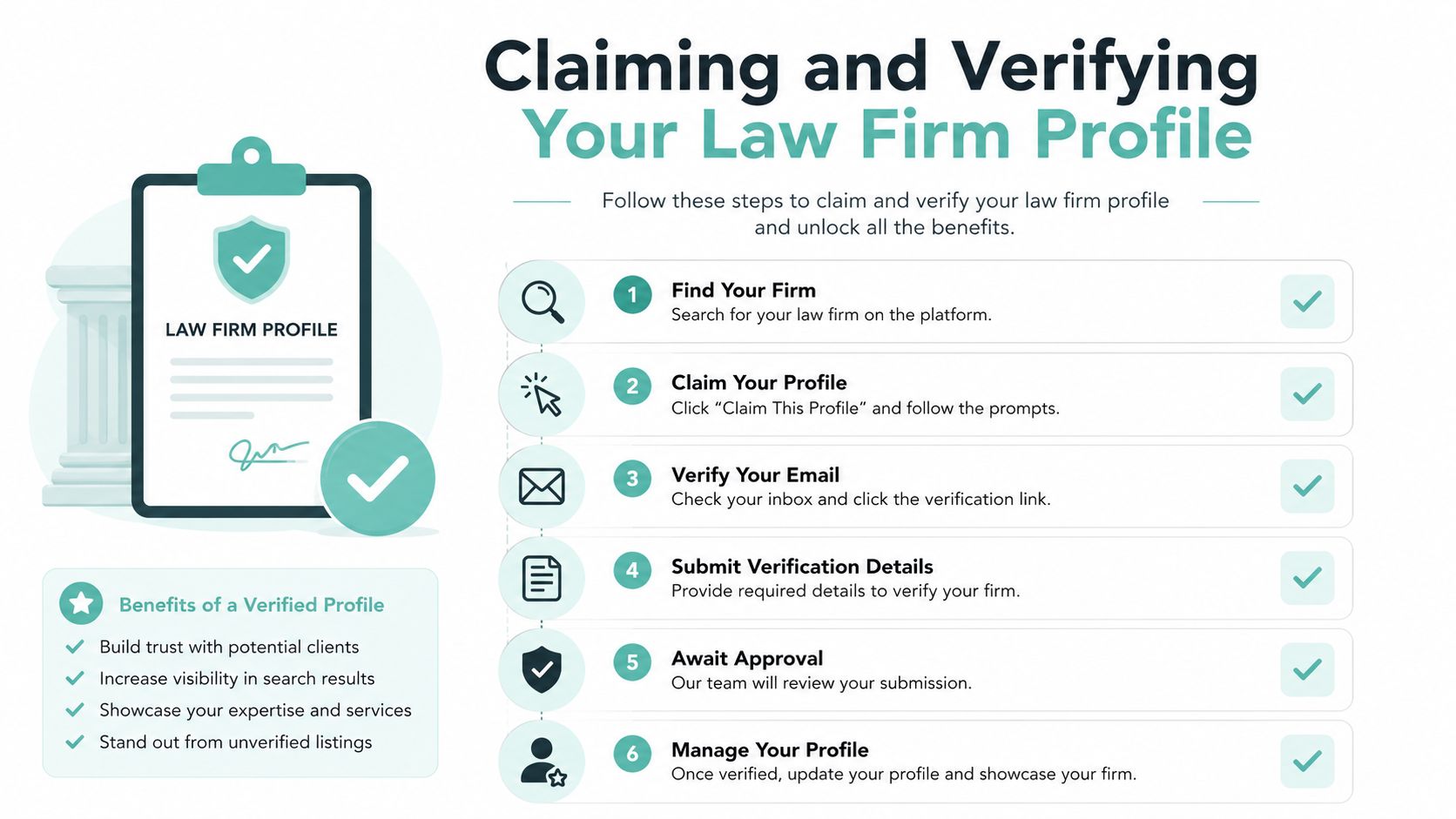
Use this order of operations
- Search first: Look for existing listings, duplicates, old addresses, and profiles controlled by former vendors.
- Claim the correct listing: Request access through Google if another owner manages it.
- Create only when necessary: Build a new profile only when no eligible listing represents the firm.
- Choose the offered verification method: Use the method that accurately proves the firm's presence.
- Wait for review: Don't create replacement profiles because verification takes time.
If Google rejects verification or suspends the profile, don't keep submitting random changes. Review the business information, remove virtual-location signals, gather documentation showing the firm's real operations, and use Google's appeal process. Before that work, clean up the firm's name, address, and phone consistency across its website and directories with a structured NAP consistency audit.
Choosing Categories, Services, and a Description That Don't Waste Real Estate
Google needs to understand what kind of legal help the firm provides. The primary category carries the clearest classification signal, so choose the most precise category that matches the firm's central practice. “Personal injury attorney” communicates more relevance for injury searches than the generic “Law firm.”
Secondary categories can represent legitimate additional practices, but they shouldn't become a wish list. A firm that handles family law and estate planning can use relevant categories for both. A firm that occasionally accepts an unrelated matter shouldn't add every category available.
Build the profile around actual services
The services section should reflect what the firm really handles, using client-facing language. “Car accident representation,” “wrongful death claims,” and “divorce representation” are more useful than a vague entry such as “legal services.” Add concise descriptions that clarify the issue, the audience, and the geographic area without stuffing keywords.
The business description should read like a clear introduction, not an advertisement written by a keyword generator. Name the primary practice areas, identify the service area naturally, describe the firm's approach, and include a straightforward next step. Avoid guarantees, claims that imply superiority, and promises about outcomes. Legal advertising rules vary, so have counsel review statements about results, fees, specialties, and credentials.
| Practice Area | Primary Category | Useful Secondaries |
|---|---|---|
| Personal injury | Personal injury attorney | Workers' compensation attorney, Attorney |
| Criminal defense | Criminal justice attorney | DUI attorney, Trial attorney |
| Family law | Family law attorney | Divorce lawyer, Child custody attorney |
| Estate planning | Estate planning attorney | Elder law attorney, Probate attorney |
| Immigration | Immigration attorney | Immigration lawyer, Attorney |
The category names available in your account can vary by market and Google's interface. Choose from the categories Google presents rather than inventing a custom label.
Keep the message specific and supportable
A personal injury firm can describe car accidents, premises liability, and wrongful death if those services are offered. A family firm can explain divorce, custody, and support matters without promising a favorable result. Clarity improves the match between the profile and the searcher's intent, while restraint protects the firm from overclaiming.
The profile should also agree with the website. If the profile says the firm focuses on criminal defense but the linked page is a generic homepage with no corresponding service information, the user experience weakens. Relevance comes from alignment, not repetition.
Photos, Posts, and Profile Activity That Actually Matter
Law-firm profile activity is often sold as a ranking shortcut. It isn't. Posts and photos can improve understanding and engagement, but they won't repair an ineligible address, a wrong primary category, or inconsistent firm information.
Start with a complete visual set. Use the firm logo, a clear cover image, exterior and interior office photographs, attorney headshots, conference rooms, and team images. A professional photographer makes sense when the office, people, and brand need a coordinated presentation. A well-lit phone photograph is perfectly adequate for a timely community event or office update, provided it accurately represents the firm.

Publish useful updates, not filler
Google Posts work best when they give a prospective client a reason to learn more. Suitable topics include:
- Educational guidance: Explain what someone should consider after a collision, arrest, or family-law dispute.
- Firm news: Share attorney hires, speaking engagements, community involvement, or office changes.
- Ethically approved results: Publish case results only when the firm can do so accurately, with required disclaimers and without exposing confidential information.
- Relevant website content: Point users to a service page or article that answers the question raised in the post.
Skip generic holiday greetings, recycled motivational language, and posts that exist only to satisfy a calendar. Google's policies emphasize accurate representation and compliance, not guaranteed ranking lifts. Recent legal-marketing advice often recommends weekly posts and regular photo uploads, but those cadences are operating habits, not proven ranking guarantees.
The Q&A area deserves more attention. Seed it with genuine intake questions such as whether consultations are available, which counties the firm serves, what documents a prospective client should bring, and which cases the firm accepts. Answer from the business account, keep the language general, and avoid giving individualized legal advice.
A realistic monthly routine might include a profile accuracy check, a small photo refresh, a few useful Q&A answers, and posts only when the firm has something relevant to say. A virtual assistant for lawyers can help organize drafts, approvals, and monitoring without turning the profile into an assembly line.
Building Reviews the Right Way and Responding Without Ethics Trouble
Reviews influence prominence and client trust, but legal firms can't treat solicitation like a retail promotion. The safest system asks every appropriate client neutrally, without steering the client toward a positive review or offering anything in exchange.
A closing letter can include a simple request for honest feedback. A post-matter email can provide the direct Google review link. Staff can use a standard signature line after a matter concludes. The request should not depend on whether the client reports satisfaction, and the firm shouldn't send unhappy clients to a private form while sending satisfied clients to Google.
Legal-marketing guidance consistently warns against incentives, pressure, and review gating because these practices violate Google policy and can create ethics issues for lawyers. Firms also need to respond professionally without revealing confidential client information.

Use a disciplined response framework
- Thank the reviewer: Acknowledge the time they took to write.
- Avoid confirmation: Don't publicly confirm that the person was a client or discuss a case.
- Address the concern generally: State that the firm takes concerns seriously and will review appropriate details privately.
- Offer a private channel: Provide a general office contact path, without asking the reviewer to reveal sensitive information publicly.
A response such as “We're sorry we lost your criminal case, but the court's ruling was outside our control” creates several problems. It confirms the representation, identifies the matter type, and sounds defensive. A safer response would thank the person for the feedback, avoid confirming the relationship, and invite them to contact the office privately.
Google allows profile owners to report inappropriate reviews from the profile interface. Open the review, select the flag or report option, and choose the applicable reason. Google may remove reviews that violate its policies, but a low rating alone isn't necessarily a policy violation. Preserve screenshots, dates, correspondence, and the reason for the report so the firm has a record if the issue continues.
For a neutral request, give clients a direct path rather than instructions about what to write. A firm can make that process easier with a Google review link workflow, provided the request remains voluntary, non-gated, and free of incentives.
What Actually Drives Local Rankings, and What Is Just Noise
Google's local results primarily reflect relevance, distance, and prominence. Those three concepts are more useful than a checklist of profile activity.
- Relevance: Does the category, service list, description, website, and content match the legal issue searched?
- Distance: How close is the eligible business location or service area to the searcher?
- Prominence: Does the firm have signals of recognition, including reviews and links from other websites?
Google's guidance also indicates that complete and verified profiles are more likely to be considered for local visibility. That makes setup a prerequisite, not a decorative exercise.
Put activity in its place
The Local Search Ranking Factors survey assigns 32% of local pack ranking weight to Google Business Profile signals, compared with 17% for on-page SEO, 16% for reviews, and 13% for links (the local ranking factors breakdown). The figures support a practical conclusion: GBP is a high-impact local asset, but its value depends on accurate classification and credible prominence signals.
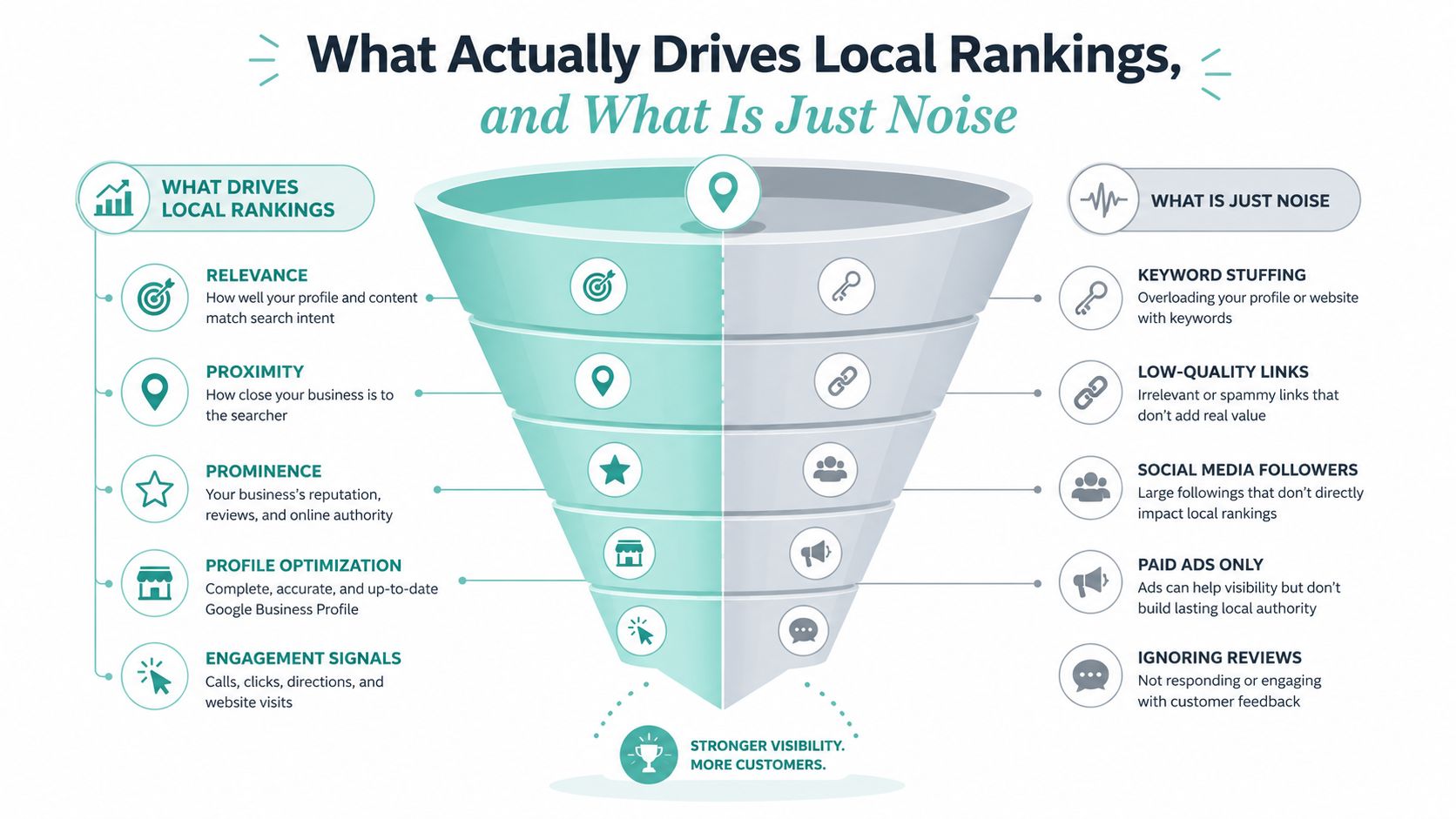
If the firm's category is generic, the address is ineligible, or citations conflict, another weekly post won't solve the core problem. If the profile is already relevant and accurate, photos, posts, Q&A, and thoughtful responses can support user confidence and keep information current. The distinction matters because Google doesn't promise a ranking lift for any particular activity.
A useful decision sequence is simple. Fix eligibility and category accuracy first. Then resolve NAP inconsistencies and build legitimate prominence through reviews and relevant links. Only after those foundations are sound should the team spend meaningful time on recurring content.
Quarterly audits prevent quiet damage. Check the business name, address, service area, phone number, hours, categories, services, website destination, reviews, user-suggested edits, and duplicates. A detailed Google Maps ranking factors review can help organize that audit without confusing busyness for progress.
Measuring Results and Wiring the Profile Into Your Intake System
A profile that ranks but produces unqualified calls isn't doing enough. Measurement should connect Google actions to the firm's intake process, while preserving a clean experience for people who need help quickly.
Use a dedicated call-tracking number only if the setup preserves accurate business information and gives the firm a reliable way to attribute calls. A website link can include UTM parameters so analytics distinguishes profile visitors from other referral traffic. The destination should match the searcher's intent. Someone who taps a personal injury listing should land on a useful injury page, not a generic homepage that forces another search.
Track the actions that affect intake
- Profile calls: Record calls from the listing and separate genuine consultations from spam, vendors, and existing clients.
- Website visits: Use tagged links and analytics events to identify profile-driven sessions.
- Forms: Ensure the form loads on mobile, names the relevant practice area, and routes submissions to the correct intake owner.
- Booking or messaging: Turn these features on only when someone can respond consistently.
- Call quality: Review recordings or intake notes in accordance with applicable privacy and consent requirements.
A well-run profile won't produce the same outcome for every practice area, city, or office. Early performance should be judged against a documented baseline, including current visibility, calls, website clicks, review status, and profile completeness. Over time, compare qualified inquiries and retained matters, not just impressions.
A workable 30-day rollout
Days one through five: Find and claim the correct listing, confirm eligibility, complete verification, and capture baseline screenshots.
Days six through ten: Correct the firm name, address, phone, hours, service area, and website destination. Audit major directories for conflicting information.
Days eleven through fifteen: Tighten the primary category, add legitimate secondary categories, and build the services list around actual matters.
Days sixteen through twenty: Add office and attorney photographs, review the Q&A area, and prepare ethically approved educational posts.
Days twenty-one through thirty: Send a neutral review request to appropriate clients, publish the first useful post, test click-to-call behavior, and confirm every profile-linked page has a visible phone number and clear intake path.
Firms that need operational help can also evaluate law firm intake services for growth as part of a broader process review. The profile gets attention, but the intake system determines whether that attention becomes a qualified conversation.
Digital Skyrocket helps law firms align Google Business Profile setup with local SEO, conversion-focused websites, reputation management, and measurable intake paths. If your firm needs a cleaner profile, stronger service-page alignment, or a website that turns local visibility into inquiries, visit Digital Skyrocket to discuss the next step.