You've probably seen this pattern: a service business invests in a polished redesign, traffic rises, and the owner still waits for the phone to ring. The homepage looks modern, the animations are smooth, and the navigation is tidy. Yet the inquiries that arrive are sparse, poorly qualified, or unrelated to the services and locations the company wants to sell.
That gap exists because lead generation website design isn't primarily a visual exercise. A productive site has to attract the right searcher, answer the questions that create hesitation, make contact easy, and give the sales team enough context to act quickly. It should function as a qualification engine, not a digital brochure.
Table of Contents
- Why Most Service Business Websites Still Fail to Generate Leads
- What Lead Generation Website Design Actually Means
- Core Principles That Make a Site Convert Visitors Into Inquiries
- SEO and AEO Foundations for Local Service Pages
- A Practical Build Roadmap From Discovery to Launch
- Designing for Lead Quality, Not Just Lead Volume
- Choosing Between In-house, Freelancer, and Agency Partners
- Measurement, CRO, and What Real Results Look Like
Why Most Service Business Websites Still Fail to Generate Leads
A plumbing company owner in Phoenix spent $18,000 on a redesign. After launch, organic sessions climbed from 4,000 to 9,000 per month, but qualified phone calls stayed flat for a quarter. The owner had more visitors, more page views, and almost no improvement in the pipeline.
The problem wasn't necessarily the color palette or the CMS. The site had three structural weaknesses that appear across service industries:
- The brochure problem: The homepage explained who the company was but didn't guide visitors toward a service, estimate, or call.
- The buried-action problem: Calls to action appeared below the fold or existed only on a generic contact page.
- The trust problem: Badges and broad testimonials offered little reassurance about price, project scope, arrival time, workmanship, or reliability.
The business had accepted the false assumption that traffic equals pipeline. It doesn't. Traffic creates an opportunity, but the page has to convert that opportunity into a useful conversation.
Practical rule: Every important page should make it obvious who the business serves, what it does, where it works, and what the visitor should do next.
A service website also has to handle different levels of intent. Someone searching for emergency water damage needs a fast phone path. Someone comparing commercial roofing providers may need project examples, qualifications, service-area confirmation, and a consultation form. Treating both visitors as if they want the same contact experience creates friction for one group and weak qualification for the other.
Use a structured website audit checklist to identify whether the site's pages, calls to action, technical performance, and tracking support actual inquiries. The important question isn't whether the redesign looks more expensive. It's whether the design earns contact from buyers who fit the business.
What Lead Generation Website Design Actually Means
Lead generation website design means building every page, layout decision, form field, and line of microcopy around a specific next action from a specific visitor. That action might be a phone call, booked estimate, form submission, or live chat handoff.
A brochure site usually behaves like a digital business card. It prioritizes general awareness, company history, and visual presentation. Those elements can support trust, but they rarely provide enough direction for a visitor who's ready to compare providers or request service.
| Dimension | Brochure Site | Lead Generation Website Design |
|---|---|---|
| Primary purpose | Present the company | Create qualified inquiries |
| Page structure | Broad information | Service and intent-focused paths |
| Calls to action | Often limited or generic | Matched to visitor intent |
| Forms | One general contact form | Contextual forms with useful qualification |
| Messaging | Company-centered | Buyer problem, outcome, and proof |
| Measurement | Sessions and page views | Calls, forms, appointments, and lead quality |
Every lead-generating page has three jobs.
- Capture attention quickly. The first screen should identify the service, location, and value proposition without forcing the visitor to interpret a slogan.
- Resolve the main objection. The page should address concerns about cost, scope, availability, insurance, licensing, process, or reliability before the visitor has to ask.
- Remove friction from the next step. The phone number, estimate button, booking path, or form should be visible and understandable at the moment intent appears.
This isn't generic conversion rate optimization. A form submission from someone outside the service area or looking for work the company doesn't provide may inflate the conversion rate while wasting staff time. Qualified conversion matters more than raw conversion.
Messaging and offer structure are inseparable from design. A beautiful estimate page with a vague headline still underperforms. A plain page with a clear service promise, relevant proof, transparent expectations, and an easy contact path can produce better commercial results.
Core Principles That Make a Site Convert Visitors Into Inquiries
Decorative design creates an impression. Conversion-focused design creates a decision path. The following principles connect page choices to behaviors such as form completion, phone calls, appointment bookings, and call duration.
Give every page one primary job
The homepage should introduce the business and route visitors to core services. A service page should explain one service and drive one relevant action. A location page should establish local relevance and help the visitor confirm that the company serves their area.
A menu with ten competing buttons creates decision fatigue. Use a dominant action such as “Request an Estimate” for planned work, then support it with a secondary phone option where appropriate.
Put the offer and proof before the credentials
Most agency templates lead with an abstract brand statement, a stock image, and a long list of company values. A stronger hierarchy states the service and outcome first, adds local or project-specific proof, then handles objections and credentials.
For a roofer, “Roof replacement for homeowners in Plano” is more useful than “Building better futures.” Add project photos, service-area context, and the next step near that message. Visitors should understand the offer before they reach the company history.
Make trust specific
Generic badges are weak evidence. Real project photography, named neighborhoods, license details, insurance information, relevant review excerpts, and service-specific testimonials give visitors something concrete to evaluate. The Stanford credibility study found that users rated websites more credibly when they conveyed a real-world presence, were easy to use, and appeared updated, while errors and technical problems reduced credibility.
A testimonial about punctual arrival belongs near a scheduling or emergency-service section. A review about clean job sites belongs near the service where that concern matters.
Match the form to intent
Emergency visitors shouldn't complete a long intake form. A planned estimate may need project type, property location, and preferred timing. A high-value consultation can justify more context, but each required field should support qualification or follow-up.
Benchmark data places mobile form conversion at 8.7% versus 12.8% on desktop for a normalized five-field B2B form, with mobile conversion trailing desktop by about 32% (Digital Applied form benchmarks). Use fewer required fields, tap-friendly controls, browser autofill, and layouts designed for the device in the visitor's hand.
Treat speed as part of the sales process
A slow page delays the moment when visitors see proof, pricing cues, and the contact path. Independent benchmark data reports mobile landing-page conversion at 4.1% versus 6.3% on desktop, with mobile load time at 3.1 seconds compared with 2.5 seconds for desktop (landing-page benchmark data).
Another performance benchmark reports that improving Largest Contentful Paint from 4 seconds to 2 seconds can increase conversion rate by about 15% (technical SEO performance statistics). Optimize images, critical CSS, caching, server response, and third-party scripts before adding visual effects.
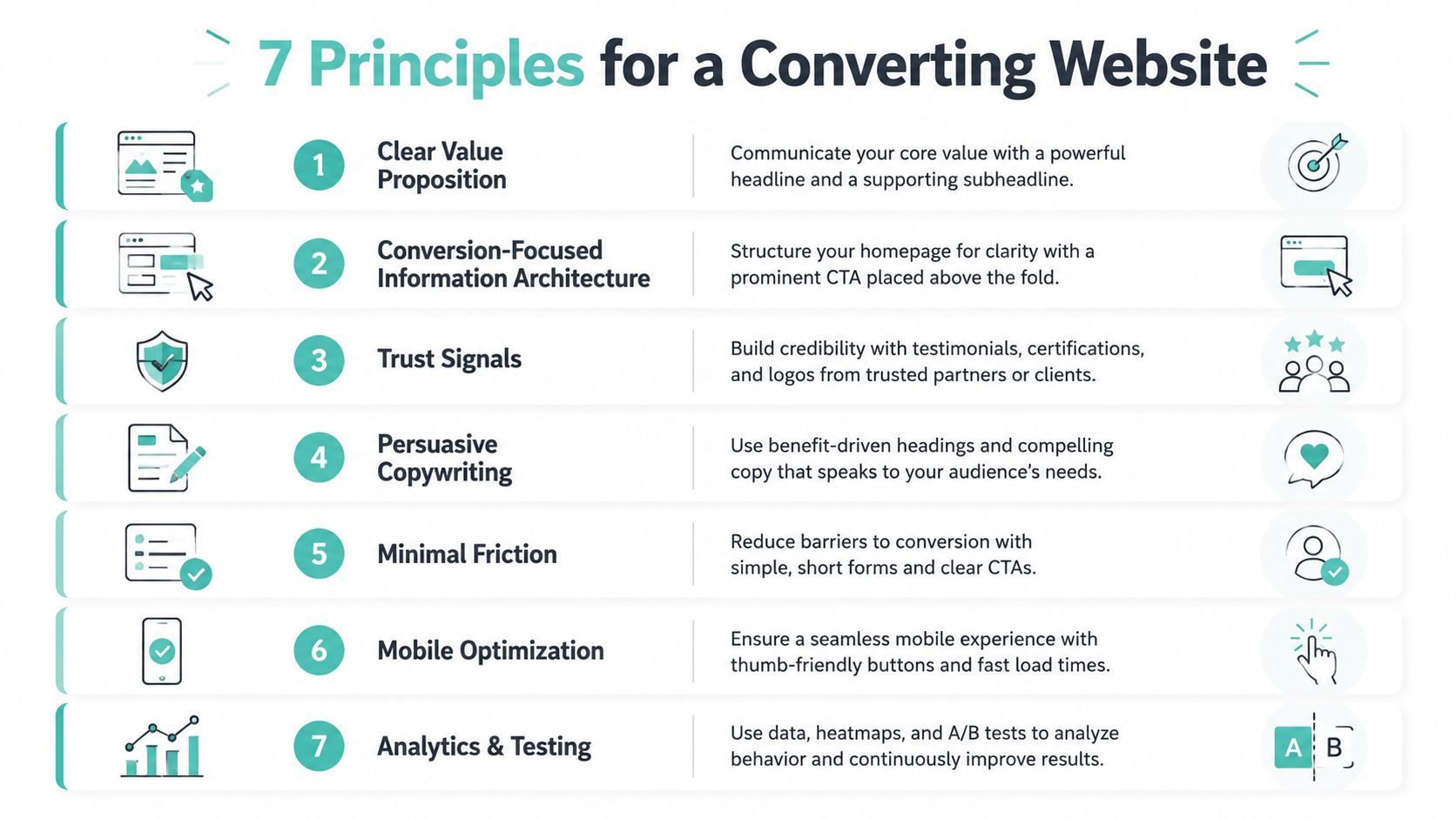
Design for thumbs and interruptions
Mobile visitors may be standing in a driveway, comparing providers from a job site, or trying to solve an urgent problem. Use large tap targets, sticky calls to action where appropriate, short sections, click-to-call phone numbers, and forms that don't reset when a visitor rotates the device.
The Google mobile speed benchmark reported that the average mobile landing page took about 15 seconds to fully load, and its modeling found that increasing load time from 1 second to 10 seconds increased the probability of a mobile visitor bouncing by 123%. Mobile UX affects whether the visitor stays long enough to become a lead.
Instrument behavior before judging the design
Track form starts and completions, phone clicks, calls by landing page, booking completions, and the quality of conversations. A page that generates fewer submissions but longer, better-fit calls may be doing its job more effectively than a page with a higher number of shallow contacts.
SEO and AEO Foundations for Local Service Pages
Local service pages need to satisfy two audiences at once. People want a fast, credible answer, while search systems and answer engines need clear relationships between the business, service, location, and supporting evidence.
Start with the page's subject. Give each page a keyword-mapped H1, a distinct service and location purpose, consistent name, address, and phone information, and internal links that connect city hubs to detailed service pages. Image alt text should describe the actual image and can include the service and city when that accurately reflects the image.
Build location pages around useful local facts
A plumber serving Phoenix might create a Phoenix plumbing page that explains the services available there, the neighborhoods or nearby areas covered, hours, emergency availability, contact information, relevant reviews, and links to water-heater, drain, and leak-repair pages. An HVAC company can use the same structure for heating repair, cooling installation, and maintenance, but the copy must reflect each service rather than swapping city names into a template.
Thin duplicate city pages create little value. Each location page needs unique service context, local proof, and a clear reason for the page to exist.
Format answers for people and machines
Answer-first writing places a direct response immediately beneath a question or heading, followed by explanation, evidence, and the next step. A page can answer “Do you provide emergency drain cleaning in Phoenix?” directly, then explain availability, common problems, what happens after the call, and how to request service.
Use relevant structured data such as LocalBusiness, Service, FAQPage, and Review where the page content supports it. Make the business entity clear through consistent naming and aligned information across the website, business profiles, and directories. JavaScript-rendered content that isn't available to crawlers can weaken both discoverability and machine understanding.
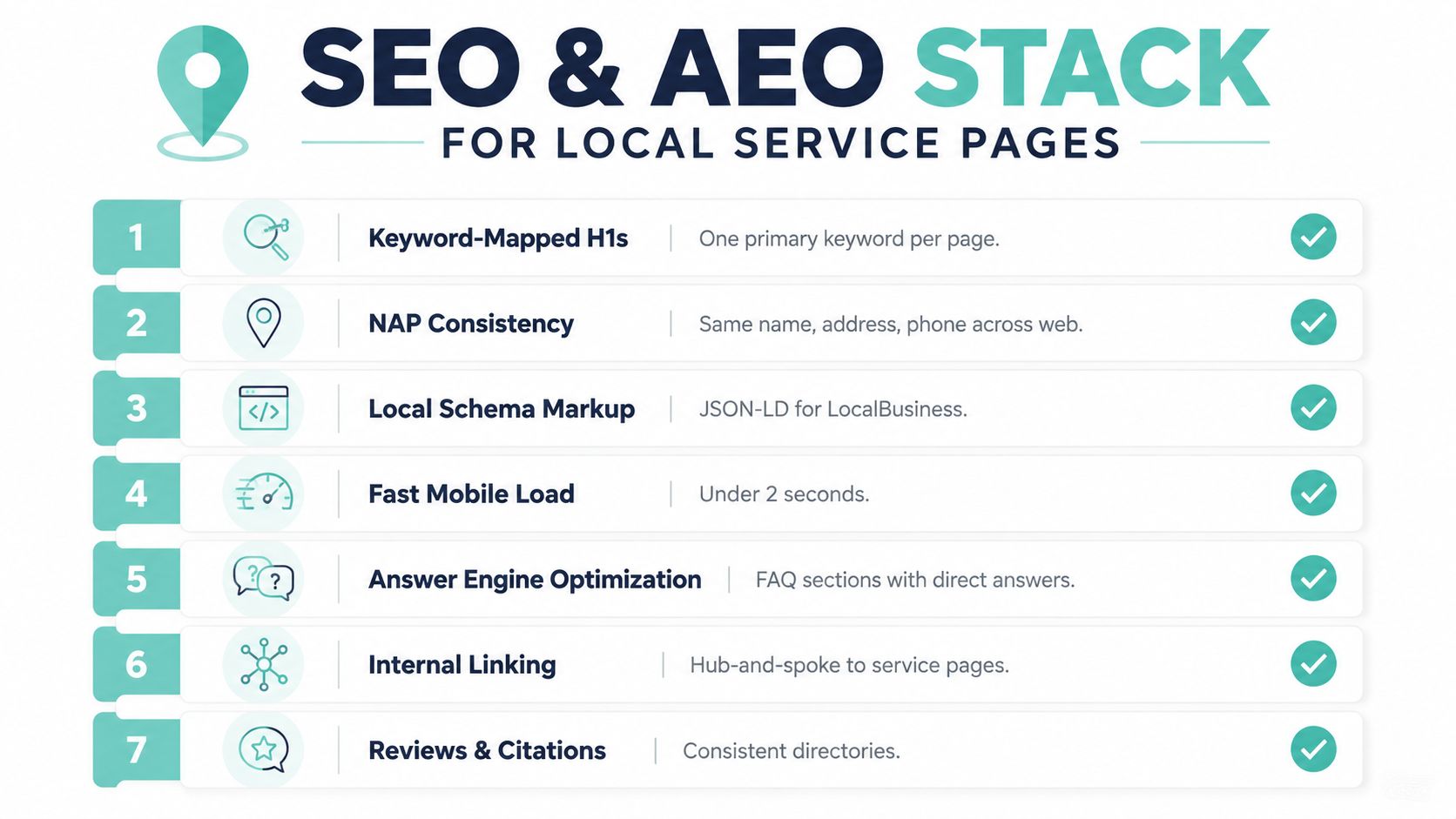
The practical AEO question isn't whether a page contains keywords. It's whether an answer engine can identify the business, service, location, qualifications, operating details, and next action without guessing. The guidance in what answer engine optimization means is useful when turning that principle into a content and technical workflow.
A Practical Build Roadmap From Discovery to Launch
A lead-generating website should move through a controlled sequence. Starting with homepage design before defining services, audiences, and conversion paths usually produces attractive rework.
Discovery establishes the commercial brief
Interview owners, sales staff, and customer-facing employees. Speak with customers when possible, review competitor pages, map the offers, and document the difference between an inquiry, a qualified lead, a booked appointment, and a closed job. The goals sheet should prioritize qualified demand, not just sessions.
Strategy turns the brief into architecture
Create the sitemap, service hierarchy, location structure, page templates, and conversion paths. Decide which pages need calls, estimates, booking, or education. The content outline should identify objections, proof requirements, internal links, metadata, and structured-data opportunities before visual design begins.
Design and content should develop together
Copywriters need to know the layout constraints, and designers need to understand the argument each page must make. Review wireframes, page copy, prototypes, and responsive states on a regular cadence instead of waiting for a complete site to reveal mismatches.
Development happens on a measurable staging site
Build forms, CRM handoffs, call tracking, analytics events, and booking workflows before launch. Test whether submissions arrive with the right source data and whether calls can be connected to landing pages or campaigns.
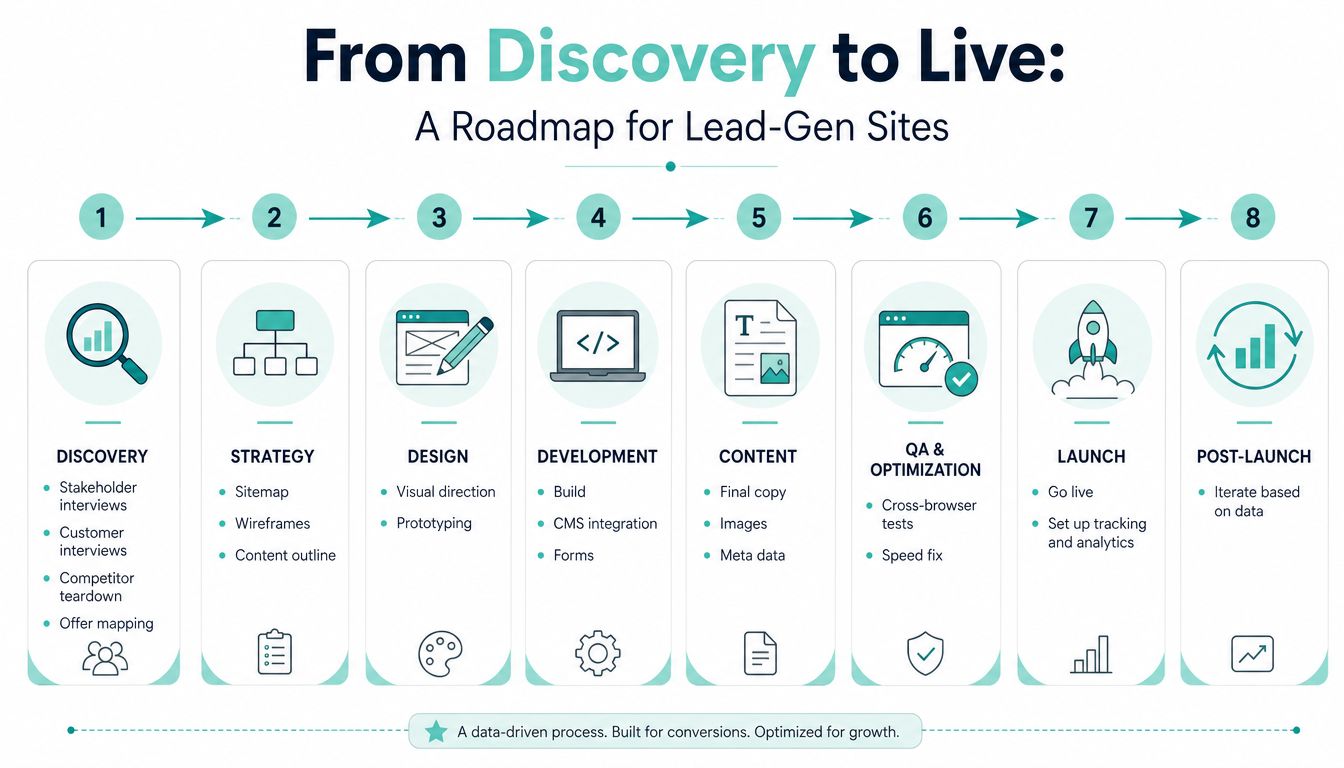
The launch checklist should include a 404 audit, schema validation, Core Web Vitals review, mobile-device testing, CRM integration testing, redirect checks, form notifications, and phone-number verification. A post-launch review cadence should examine search visibility, user behavior, qualified inquiries, and sales feedback rather than treating launch day as the finish line. Examples of how different site structures support inquiry paths are collected in these lead generation website examples.
Designing for Lead Quality, Not Just Lead Volume
A site that produces 50 qualified inquiries can be more valuable than one that produces 300 tire-kickers. The lower-volume site may give the sales team more time to respond, create better conversations, and produce more booked work.
Qualification begins with the questions the site asks. An estimate form might request project type, service address, urgency, property type, and a useful description of the job. A multi-step form can separate basic contact information from project details, allowing the visitor to make progress without facing a long wall of fields.
Other filters belong in the page content itself:
- Pricing cues: Explain whether the business offers fixed pricing, consultations, estimates, or project ranges when appropriate.
- Service-area gates: State the locations served before the visitor starts a form.
- Urgency routing: Send emergency requests to a phone-first path and planned projects to an estimate workflow.
- Proof-led case studies: Show the type of project, property, challenge, and result that the business wants more often.
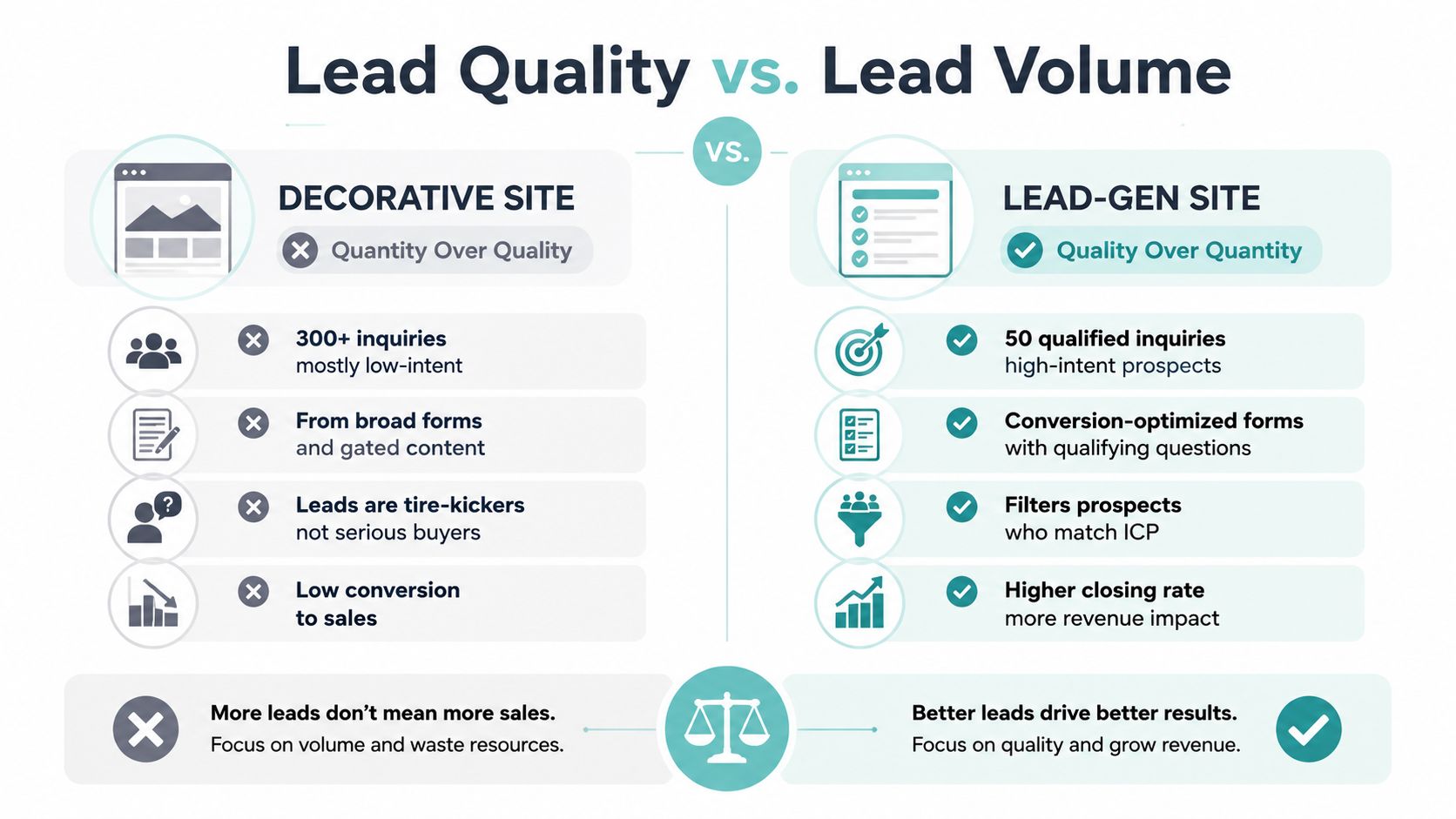
Every filter removes some volume. That's the trade-off, not a flaw. Introduce qualification incrementally, then compare lead quality against the prior baseline instead of assuming that every additional field helps.
Create a scorecard with budget, timeline, service fit, and geography. Have the sales team classify new inquiries and give feedback early in the post-launch period. If the form generates fewer contacts but a greater share of serviceable jobs, the design is acting like a first salesperson, politely deflecting poor fits while helping serious buyers move forward.
Choosing Between In-house, Freelancer, and Agency Partners
The right partner is the one that can install the system, measure it, and keep improving it. A homepage mockup alone doesn't demonstrate conversion strategy, local SEO knowledge, copywriting ability, or technical discipline.
| Criteria | In-house team | Specialist freelancer | Lead-gen agency |
|---|---|---|---|
| Strategic depth | Depends on internal experience | Often strong in a defined niche | Can combine research, strategy, design, SEO, and CRO |
| Industry focus | Requires hiring or training | Should be verified through relevant work | Should be verified through service-business outcomes |
| Iteration | Close access to sales feedback | Depends on availability | Often supported through an ongoing process |
| Technical delivery | Uses existing systems | May need outside specialists | Usually coordinates development and instrumentation |
| Main risk | Limited capacity or isolated expertise | Overdependence on one person | Process quality can vary widely |
An in-house team works well when it understands customer objections, has access to sales data, and can maintain the site after launch. A freelancer can be the right choice when the problem is narrow, such as copy, WordPress development, or a focused local SEO project, but generalist portfolio breadth shouldn't substitute for service-business lead-generation experience.
An agency should be able to explain its discovery process, baseline metrics, analytics setup, handoff, and post-launch testing plan. Warning signs include no defined intake process, no record of the current site's performance, and no agreement about what happens after launch.
If the business needs help expanding the sales function after improving its website, a resource such as Hire SDR can help frame that staffing decision separately from the website build.
Choose based on site complexity, available internal expertise, monthly traffic, and the lead volume the sales team can actually handle.
Measurement, CRO, and What Real Results Look Like
Sessions are useful context, but they don't tell an owner whether the site is producing revenue opportunities. The core measurement set should include qualified form submissions, calls, booked appointments, cost per qualified lead, and close rate by source.
Start with a baseline before changing the site. Record current organic landing pages, phone activity, form submissions, appointment bookings, service fit, geography, and sales outcomes. After launch, compare equivalent periods and avoid reacting to a few unusual days. A 60- to 90-day view gives the team more context for interpreting search movement, seasonality, sales follow-up, and conversion behavior.
Use a repeatable CRO loop
Begin with evidence. Call recordings may reveal that visitors repeatedly ask about insurance or arrival times. Form analytics may show abandonment at a particular question. Search-console data may expose a mismatch between the query and the page promise.
Turn that evidence into one hypothesis, then test a page-level change. Examples include rewriting the hero message, moving service-specific proof closer to the form, changing the call-to-action language, simplifying a qualification step, or clarifying the service area. Record the change, expected behavior, result, and decision in a learning log.
A useful case-study shape looks like this: a local service site rebuilt around qualification, reduced form volume by 30%, and tripled booked jobs. The lesson isn't that every redesign will produce those results. The important question is which changes created the shift, such as service-area gates, clearer pricing cues, intent-matched forms, stronger proof, and better sales follow-up.
Google's research also reinforces why small performance improvements deserve attention. A Google-commissioned study summarized by Think with Google associated a 0.1-second mobile speed improvement with an 8.4% increase in retail conversions and a 10.1% increase in travel conversions. Those sectors aren't service businesses, so the figures shouldn't be copied into a local lead forecast, but they support a practical conclusion: performance changes can affect commercial behavior.
Digital Skyrocket plans and builds websites for service businesses with content strategy, responsive WordPress development, technical SEO, AEO foundations, analytics instrumentation, form tracking, and ongoing conversion refinement. Visit Digital Skyrocket to evaluate whether your current site needs a qualification-focused redesign and a measurable search strategy.