You're looking at your roofing company's website on your phone, and the problem is obvious: the roof photos look good, but the phone number is buried. Meanwhile, a homeowner who just got your name from a neighbor is trying to confirm whether you handle their roof problem, serve their town, and are worth calling.
Good roofing website design makes that verification easy. Whether someone arrives through a referral, Google, or an AI assistant's recommendation, they should find credible evidence and a clear next step, not a slideshow they have to wait through.
Table of Contents
- Map the Pages Your Roofing Site Needs
- Put Trust Signals Above the Fold
- Structure Navigation and Local Pages Without Doorway Risks
- Earn Mentions From AI Assistants and Map Results
- Core Web Vitals Targets Your Roofing Pages Must Hit
- How to Build Each Page in Six Steps
- Set Your Baseline Before You Launch
Map the Pages Your Roofing Site Needs
Core roofing pages, intent and primary conversion
| Page type | Dominant intent | Primary conversion | Proof to include |
|---|---|---|---|
| Roof replacement | Planning a new roof | Estimate request with scope fields | Before-and-after project photos and warranty terms |
| Roof repair and emergency | Active leak or visible damage | Tap-to-call and rapid intake | Response times and an after-hours phone number |
| Storm damage | Hail or wind damage after a storm | Inspection booking | Examples of storm claims handled and insurance guidance |
| Roof inspection | Checking condition before a sale or purchase | Inspection booking | Sample inspection report and checklist |
| Commercial reroofing | Property owners and facility managers | Consultation request | Completed commercial projects and certifications |
| Financing and insurance help | Cost worries before signing | Estimate request | Financing terms where offered and claim process steps |
| City or service-area page | Local search by town | Call or estimate request | Local projects, service boundaries and local reviews |
Each page exists to help a particular buyer make a particular decision. In 2025, 62% of surveyed homeowners said they search the internet to find a roofing contractor, according to Roofing Contractor's Homeowner Roofing Survey, so your important services need findable destinations rather than a paragraph on a generic services page.
Treat every row as a commitment, not a demand to publish everything immediately. Don't advertise emergency coverage without someone available to answer, or financing without an actual offering.
Match the page to the decision
Replacement buyers need room to explain the property, material interests, and project scope. Someone with water coming through the ceiling needs a phone connection, not a lengthy qualification form.
Technical detail belongs where it helps buyers evaluate your work. A commercial project explanation might reference Contractor's Den truss head fasteners when discussing the components specified for that project, without implying that a product suits every roof assembly.
Use a sample website sitemap to organize these destinations before commissioning layouts. Add supporting pages for projects, credentials, reviews, and contact information, then check whether each page has a distinct job.
Page inventory rule: If you can't explain a page's primary conversion in a sentence, merge it into a stronger page.
City pages require an additional commitment: genuine local evidence. Don't multiply your page count just because you can generate town names. Start with the services you sell and the places where you can demonstrate that you perform them.
Put Trust Signals Above the Fold
A neighbor recommends your company. The homeowner types your name into Google, opens your website, and looks for a reason to trust that recommendation. They aren't necessarily shopping from scratch, but they still need verification.
In 2025, 67% of surveyed homeowners rated online reviews as very or extremely important when choosing a roofing contractor, according to Roofing Contractor. Hiding reviews and credentials beneath decorative content makes that verification harder than it needs to be.
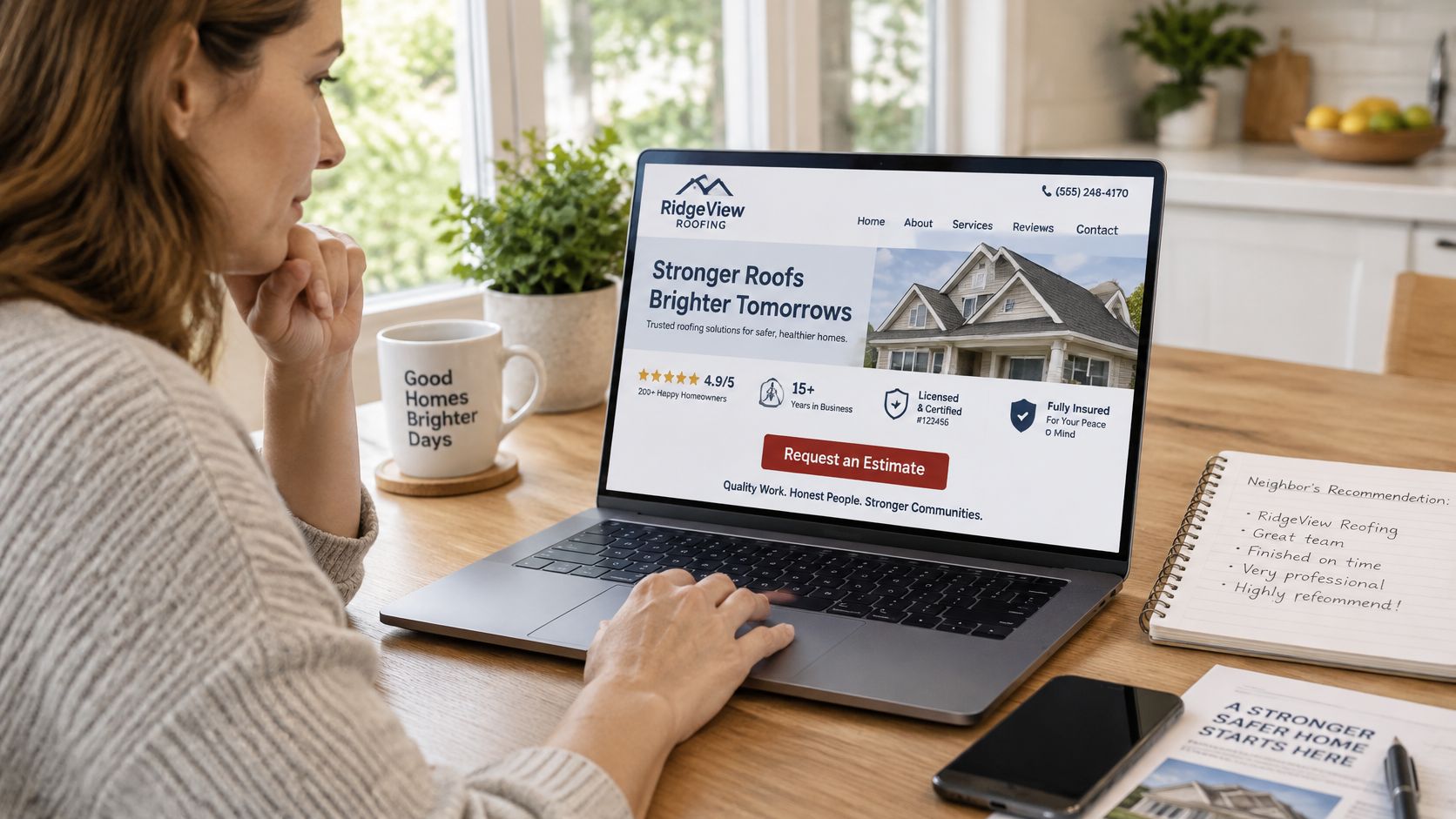
Give the first screen a clear order
The opening screen should establish the service and location before asking anyone to act. Build it around this sequence:
- Service and city: State what you do and where you work in the headline.
- Immediate contact: Keep a click-to-call button visible on phones without covering useful content.
- Estimate option: Offer a short request path for visitors who aren't ready to call.
- Verification row: Display applicable license information, insurance status, actual warranty length, and years in business.
Only publish claims you can substantiate. A manufacturer logo doesn't explain your workmanship coverage, and an insurance badge shouldn't replace clear business information.
Warranty explanations deserve plain language. As a cross-trade reference when planning what homeowners should be able to find, consider the Advanced Foundation Repair warranty information, then publish your own roofing terms rather than borrowing another contractor's promises.
Show patterns instead of isolated praise
Present the review count and average rating with their platform identified and a way to verify them. Include recent reviews that describe the work performed, not just vague praise.
Caption project photos with the city, roof type, and completed scope. A visitor should be able to distinguish a repair from a full replacement without guessing from the image.
Add a Recommended by a neighbor? option that opens an inspection request, with an optional referral-name field. Don't force referral visitors through a separate sales presentation.
Finish with a simple five-second usability test: show the opening screen to someone unfamiliar with the business, then ask them to name the service, area, and next step. If they can't, simplify the screen before adding more decoration.
Structure Navigation and Local Pages Without Doorway Risks
Google describes local ranking through relevance, distance, and prominence, and says prominence can reflect links, articles, directories, review counts, and ratings across the web in its local ranking guidance. Your website can clarify service relevance and demonstrate reputation, but a town page doesn't move your business closer to the searcher.
Build a shallow hierarchy that people can understand. The homepage leads to service pages; those pages connect to city-specific service pages where you have enough evidence to justify them.
Keep navigation practical
Use services, service areas, projects, reviews, and contact as the main navigation categories. Leave the phone number outside the menu so visitors don't have to open navigation to reach you.
Link a service page to its most relevant city pages, and link those pages back to the parent service. Descriptive anchors such as roof repair in Tyler, TX tell readers what they'll find, unlike repeated buttons labeled Learn more.
A service-area hub also needs explicit boundaries. Reviewing the organization of the areas served by Safeguard Roofing can help you think through how to present coverage, but your own page must describe where your crews travel.
Require local evidence before publishing
Every city page needs useful material that wouldn't fit unchanged on another town's page:
- Completed work: Describe a real local project, including the roof issue and finished scope.
- Coverage details: Identify the neighborhoods or surrounding communities you serve.
- Local procedures: Explain relevant permit or inspection considerations only after verifying them.
- Customer evidence: Include attributable feedback from customers in that area when available.
A location landing page strategy should establish these requirements before production starts. Otherwise, a large page inventory becomes a maintenance burden with little information for homeowners.
Remove the town name from a city page. If nothing useful remains, you haven't built a local resource.
For a practical audit, pick five city pages and apply that test. Merge weak pages into a stronger service or coverage page, then redirect retired URLs to the closest relevant destination.
Don't solve thin content by adding generic paragraphs about the town's history. Explain the roofing work you perform there and provide evidence that supports it.
Earn Mentions From AI Assistants and Map Results
AI recommendations and Google Maps positions aren't interchangeable. A 2026 study reported that AI tools named 199 roofers, but only 66 appeared in their city's Google Maps top 10, while about 85% of AI-mentioned roofers had at least 100 reviews, according to the published Overtake Marketing study report.
That finding shows an overlap gap, not a recipe for getting recommended. It doesn't establish that collecting a particular review count causes AI inclusion, or that an AI mention produces a qualified lead.
Answer the homeowner's real question
Why would an AI assistant recommend a roofer outside the leading map results? The recommendation may draw on a different mix of available information, and the answer can vary with the assistant, question, and location context.
Your job isn't to reverse-engineer an unexplained endorsement. It's to make the company easy to describe accurately and easy for a homeowner to verify afterward.
Align your website's business name, contact details, services, and coverage with your Business Profile. Publish licensing and insurance information in readable text, and associate project evidence with the actual service and city.
Review totals and ratings should identify their source and remain current. Don't scatter unsupported badges across pages or create credentials that exist only in an image.
Measure recommendations separately from inquiries
Use a repeatable observation log rather than occasional screenshots:
- Ask consistent questions: Test the same service-and-city requests across the assistants you monitor.
- Record the context: Save the question, date, assistant, named companies, cited pages, and any factual errors.
- Compare visibility: Record your map position separately rather than treating either channel as a substitute.
- Check business outcomes: Look for referral visits, branded searches, calls, and forms without assuming every change came from AI.
An answer engine optimization approach should prioritize accurate company information and useful supporting evidence, not a pile of mechanically generated FAQs.
A homeowner who arrives after an AI recommendation should find confirmation of the specific claim that brought them there. If the assistant says you offer commercial reroofing in a city you don't serve, correct the underlying business information rather than celebrating the mention.
A recommendation is visibility. A qualified inquiry is a business result. Keep those records separate.
Core Web Vitals Targets Your Roofing Pages Must Hit
Core Web Vitals targets and roofing-page fixes
| Metric | Good threshold | Typical roofing-page cause | First fix |
|---|---|---|---|
| Largest Contentful Paint (LCP) | 2.5 seconds or less | Oversized hero photo or project gallery | Compress and size the hero image and lazy-load the gallery |
| Interaction to Next Paint (INP) | 200 milliseconds or less | Third-party chat and tracking scripts | Defer noncritical scripts until after the main content loads |
| Cumulative Layout Shift (CLS) | 0.1 or less | Images without reserved dimensions and buttons that move | Set width and height on every image and reserve space for buttons |
The thresholds in this table apply at the 75th percentile of real visits, as described in Google's Core Web Vitals report guidance. Treat them as launch acceptance criteria, not optional improvements after someone complains.
Diagnose the template, not just the homepage
For loading performance, inspect the largest visible element. On a roofing page, that may be a full-width project photograph exported at its original camera dimensions. Deliver a properly sized image in a modern format, and don't lazy-load the hero that visitors need immediately.
For responsiveness, inspect JavaScript execution before removing useful content. Chat widgets, analytics integrations, and embedded review tools can compete with the controls people are trying to use. Keep essential measurement, but remove redundant tags and postpone nonessential features.
For visual stability, watch the page while it loads. A phone button that moves when a photo or banner appears is a functional problem, even if the final layout looks polished.
Performance decision: A decorative feature has to justify its loading and maintenance cost. Autoplay video rarely deserves priority over the contact controls.
Use PageSpeed Insights and browser developer tools to identify likely causes before launch. Laboratory tests help diagnose problems, but they don't replace field measurements from actual visitors.
After launch, inspect Search Console's Core Web Vitals report and available real-user data. A newly launched page may not have enough field data immediately, so keep testing while those observations accumulate.
When a template misses a target, fix the largest cause and retest that template under comparable conditions. Don't average a lightweight contact page together with a heavy replacement page and declare the whole site fast.
How to Build Each Page in Six Steps
Build around content and contact behavior before choosing visual effects. A desktop mockup with a dramatic hero can look impressive while leaving a phone visitor searching for the actual service.

Establish the content and action
Define the primary conversion. Assign each template a main action: call, estimate request, or emergency inquiry. Track those as separate analytics events, and distinguish a phone-link tap from a confirmed connected call.
Gather inputs before design. Collect the service list, benefits, service areas, credentials, FAQs, contact details, and examples of websites you like. After discovery questions, our client provides an overview of services and benefits plus logos, photos, and videos; we then work together on the content and design strategy. Sort project media by service and location so the designer isn't forced to fill gaps with unrelated stock images.
Design the mobile template first. Make the phone number a tap link, use persistent form labels, and ensure controls work without hover. WCAG 2.2 specifies a minimum pointer target size of 24 by 24 CSS pixels, with exceptions, and a contrast ratio of at least 4.5:1 for normal text. Treat those as minimum checks, not an excuse to make important buttons cramped.
Build and test the working page
Write for a single action. Arrange the opening content as headline, proof, and button. Use an action label such as Request a roof inspection rather than Submit, and explain what happens after the form is sent. Keep secondary information available without making every element compete for attention.
Prepare photographs before upload. Crop and compress the hero, generate responsive image sizes, and set image dimensions. Keep detailed gallery photos available on demand rather than forcing every visitor to download the entire project archive immediately.
Control scripts and validate the template. Defer noncritical chat, tracking, and below-the-fold media, then run performance and interaction tests. Add relevant breadcrumb structured data and preserve service information, location content, and equivalent structured data across mobile and desktop, consistent with Google's mobile-first indexing guidance.
Test replacement, repair, city, and contact templates on a mid-range Android phone. Confirm that the proposition and contact button appear before nonessential assets finish, then submit the forms and verify the notifications arrive.
Also test keyboard navigation, error messages, and the confirmation screen. A form that looks finished but sends inquiries nowhere isn't ready to launch.
Set Your Baseline Before You Launch
A neighbor's referral, a Google search, or an AI assistant's recommendation may bring someone to your roofing site. In that visit, the site has to verify that you offer the right service, work in the right area, and give the visitor a clear way to contact you. Record your current results before changing pages or tracking.
An average-size website goes live about two months after the project begins, provided the client supplies the information needed. Use that preparation period to collect missing content and establish measurement, not just approve colors.

Record what matters to the business
Before launch, save:
- Organic impressions and clicks: Export Search Console results by service page and query.
- Service and city rankings: Record the terms, tracked locations, and measurement method.
- Lead activity: Track calls, form starts, completed forms, qualified inquiries, and booked inspections.
- Tracking integrity: Test analytics events, source attribution, call routing, and CRM records.
Check submissions against the CRM so spam does not count as a qualified opportunity. Use source-specific call tracking where appropriate, while keeping your underlying business contact information consistent.
Review results at 30, 60, and 90 days. Separate mobile from desktop inquiries, and emergency requests from non-emergency ones. Change one page element or form flow at a time so you can connect a result to a specific adjustment.
Continue improving after launch
After launch, conversion rate optimization means monitoring how visitors use the site and making ongoing adjustments to generate more leads. Look for practical friction: abandoned forms, unclear service coverage, missed calls, or visitors who reach the estimate page but do not complete it.
“Our website traffic increased 540% in the first 9 months!”
Kat H., AVCO Roofing, website testimonial
That is one client's reported outcome, not a forecast for another roofer. Judge your progress by qualified inquiries and booked work as well as traffic.
Start by listing your three most valuable services and pulling current rankings, calls, and form records for each. If those records do not exist, establish them before launch.
Digital Skyrocket plans and builds roofing websites with service-focused content, local SEO, answer engine optimization, and ongoing conversion improvements. For a new website with ongoing SEO, visit Digital Skyrocket to discuss your page map, project evidence, and lead-tracking requirements.