
94.8% of the top one million homepages failed at least one WCAG accessibility test, according to a 2025 WebAIM-based benchmark reported by CaseLedge. For a law firm, an inaccessible website can prevent a prospective client from doing something as basic as requesting a consultation.
That changes how you should evaluate small law firm website design. A polished homepage isn't enough. The site needs to help people identify the right attorney, make an appropriately limited inquiry, and receive a timely response. Judge the redesign by accessible intake and qualified consultations, not by how impressive it looks in a presentation.
Table of Contents
- Core Pages Every Small Law Firm Website Needs
- Branding and Trust Signals That Win Clients
- Content Hierarchy for Google and AI Answers
- Local Pages and Business Data for Each City
- Conversion Layout and Fast Intake Response
- Speed, Accessibility and Technical Checks Before Launch
- Sample Law Firm Results and What They Show
- Confirm Your Redesign Plan Before You Commit
Core Pages Every Small Law Firm Website Needs
The American Bar Association's 2024 Websites and Marketing Technology Report found that 90% of surveyed law practices had a website, while solo practitioners' adoption rose from 61% in 2022 to 70% in 2024. Having a site is normal. Making it function as a receptionist, service guide, and credibility check requires deliberate page planning.
Core pages, visitor job and must-have elements
| Page | Visitor question it answers | Must-have elements | Common gap |
|---|---|---|---|
| Homepage | Does this firm handle my matter and serve my area? | Named practice areas, city in headline, phone number, tap-to-call button | Generic welcome message with no practice named |
| Practice area page | Is this lawyer experienced with my type of case? | Plain-language explanation, process steps, responsible attorney, one consultation action | Templated text copied across practice areas |
| Attorney biography | Can I trust this lawyer with my case? | Professional headshot, bar admissions, years in practice, education, client focus | Missing credentials or stock photo |
| Location page | Where is the nearest office and how do I get there? | Street address, hours, parking, embedded map, directions | Address only in the footer |
| Contact page | How do I start an inquiry? | Short form, direct phone number, expected response time, office hours | Long form with no phone number |
| Results and reviews | Is this firm reputable? | Client testimonials with consent and disclaimer, verified third-party reviews | Unlabeled results claims without disclaimers |
Give every page a distinct job
The homepage should establish fit before introducing the firm's history. A welcome message without a named practice forces visitors to investigate whether they've reached the right office. Lead with the legal services and geographic area, then offer clear routes into the relevant practice pages.
A practice area page should explain what the firm handles, what the initial process involves, and which attorney is responsible. Describe the client's problem in ordinary language rather than opening with statutory terminology. End with one clear consultation action instead of competing requests to subscribe, download, chat, and call.
An attorney biography needs more than a résumé pasted into a webpage. Connect verified credentials to the work that attorney performs, and distinguish current admissions from education or past employment. Don't make prospective clients infer who would handle their matter.
Remove dead ends before adding features
A location page helps someone plan a visit, not merely confirm that an address exists. Include practical arrival information and distinguish appointment-only availability from regular office access.
The contact page must accommodate people who want to call immediately. A long form with no direct phone number makes the firm's preferred workflow more important than the visitor's needs.
The results and reviews section should provide context, not imply a promised outcome. Have an attorney approve publication, supporting language, and applicable disclaimers before anything goes live.
Audit your current site against these six rows and mark each missing element before design begins. A compact site with complete, purposeful pages is a better starting point than an expansive site full of unanswered questions.
Branding and Trust Signals That Win Clients
Use a five-second test as a design exercise: show someone the homepage briefly, hide it, and ask what the firm does, where it works, and who it helps. If they remember only a courthouse image and a slogan, the branding hasn't communicated enough.
Branding starts with a clear positioning statement. A consistent logo, restrained color system, readable typography, and photographs of real attorneys should reinforce that statement rather than compete with it.
Put identifiable people before decorative imagery
Prioritize trust signals in this order:
- Attorney identity. Show current headshots alongside names, bar admissions, and accurately maintained years of practice. Visitors should know who's behind the firm.
- Relevant credentials. Use a short credentials block that distinguishes admissions, education, memberships, and recognitions.
- Documented outcomes. Where publication is appropriate, give results context, dates, and attorney-approved disclaimers.
- Authentic reviews. Preserve the meaning of the review, document permission where needed, and identify its origin.
Before commissioning photography, use AiHeadshots' resource to compare modern law firm portraits. Evaluate framing, lighting, expression, and background consistency. The goal is recognizable, accurate representation, not an image that makes the attorney look like someone else.
According to FindLaw's 2024 U.S. Consumer Legal Needs Survey, 82% of respondents who learned about an attorney online used online reviews in their decision-making, and nearly 40% identified reviews as their primary information source. Reviews deserve visible placement, but they don't replace substantive information about the attorney.
Govern claims after launch
Awards and “best” claims need a verifiable basis. Identify the awarding organization and relevant period, and obtain attorney approval for claims about results or specialization.
Under Google's review-snippet policy, a business's self-controlled reviews aren't eligible for star-review features through Organization or LocalBusiness markup, even when displayed through an embedded third-party widget. Ratings must come directly from users. Testimonials on your site serve visitors; they won't produce Google star snippets for the firm.
Assign a named attorney to approve each testimonial or result. Record consent and its date, attach the appropriate disclaimer, and review published claims on a fixed schedule, such as quarterly.
Before approving the homepage, confirm that its first screen contains:
- A specific positioning statement
- A recognizable attorney or team photograph
- An identifiable attorney name
- A concise, verifiable credential
- A clearly labeled review excerpt or reputation signal, where permitted
Don't compress these into unreadable badges. On mobile, clarity matters more than fitting every award into the opening view.
Content Hierarchy for Google and AI Answers
Organize the website around the decisions prospective clients need to make. A visitor looking for help with probate shouldn't have to interpret the firm's internal department structure or search through unrelated articles.
A useful hierarchy has three levels, with each level becoming more specific.
Separate broad services from specific matters
Level one is the homepage. It introduces the firm and links to its principal practice areas. For an estate planning firm, that means making estate planning and probate easy to distinguish rather than placing everything beneath a generic services label.
Level two is the practice hub. An estate planning hub can explain the overall service, introduce the responsible attorneys, and direct visitors to focused pages about wills, trusts, or related work the firm performs.
Level three is the specific matter page. A probate administration page should address that service directly. It shouldn't repeat the estate planning hub with a different heading.
The same structure works for personal injury and family law. A personal injury hub can lead to car accident and slip-and-fall pages; a family law hub can lead to divorce and custody pages.

Supporting city pages, FAQs, and articles should deepen this structure, not create disconnected publishing categories. For additional planning context, Wispra explains ways to organize website content for AI discovery. Treat clear organization as a usability practice, not a guarantee that an answer engine will recommend the firm.
Write an answer before the explanation
I recommend drafting an opening answer of roughly 40 to 60 words beneath each page's main heading. Use that as an editorial target, not a search-engine requirement. State the service, audience, geographic scope, and next step without forcing readers through a long introduction.
Then develop the questions clients ask. A heading such as “How long does a car accident claim take in Texas?” is more useful than “Our approach,” provided the answer is attorney-reviewed and explains relevant uncertainty without promising a timeline.
- Connect related services. Link each practice hub to its matter pages using descriptive anchors.
- Identify responsibility. Link matter pages to the attorney who handles that work.
- Publish visible answers. FAQ content belongs on the page, not only inside hidden markup.
- Keep local content substantive. Don't generate town pages by swapping place names in otherwise identical text.
If the first paragraph can't accurately describe the service on its own, adding more technical markup won't fix the writing.
As a diagnostic exercise, paste that paragraph into an AI tool and ask it to describe the firm using only the supplied text. If it invents services or can't identify the intended client, rewrite the paragraph.
Local Pages and Business Data for Each City
Keep the firm's business name, address, phone number, and hours consistent wherever they're published. Google can read these details from the website and location pages, while prospective clients may compare them with the Google Business Profile, Yelp, Avvo, or a state bar listing.
Choose a canonical version of each office's information and maintain it centrally. Differences in suite numbers, telephone routing, or appointment hours can create avoidable uncertainty for someone trying to contact the right office.
Publish useful office information
Each genuine office needs a dedicated page with local details:
- Office identity. Give the street address, direct contact information, and accurate hours.
- People at that office. Identify the attorneys or staff based there and the services available.
- Geographic context. Explain the counties, neighborhoods, or courthouses relevant to the office's work without implying a relationship that doesn't exist.
- Arrival instructions. Include parking, transit, building access, directions, and an embedded map.
- Appointment arrangements. Explain whether visitors need to schedule before arriving.
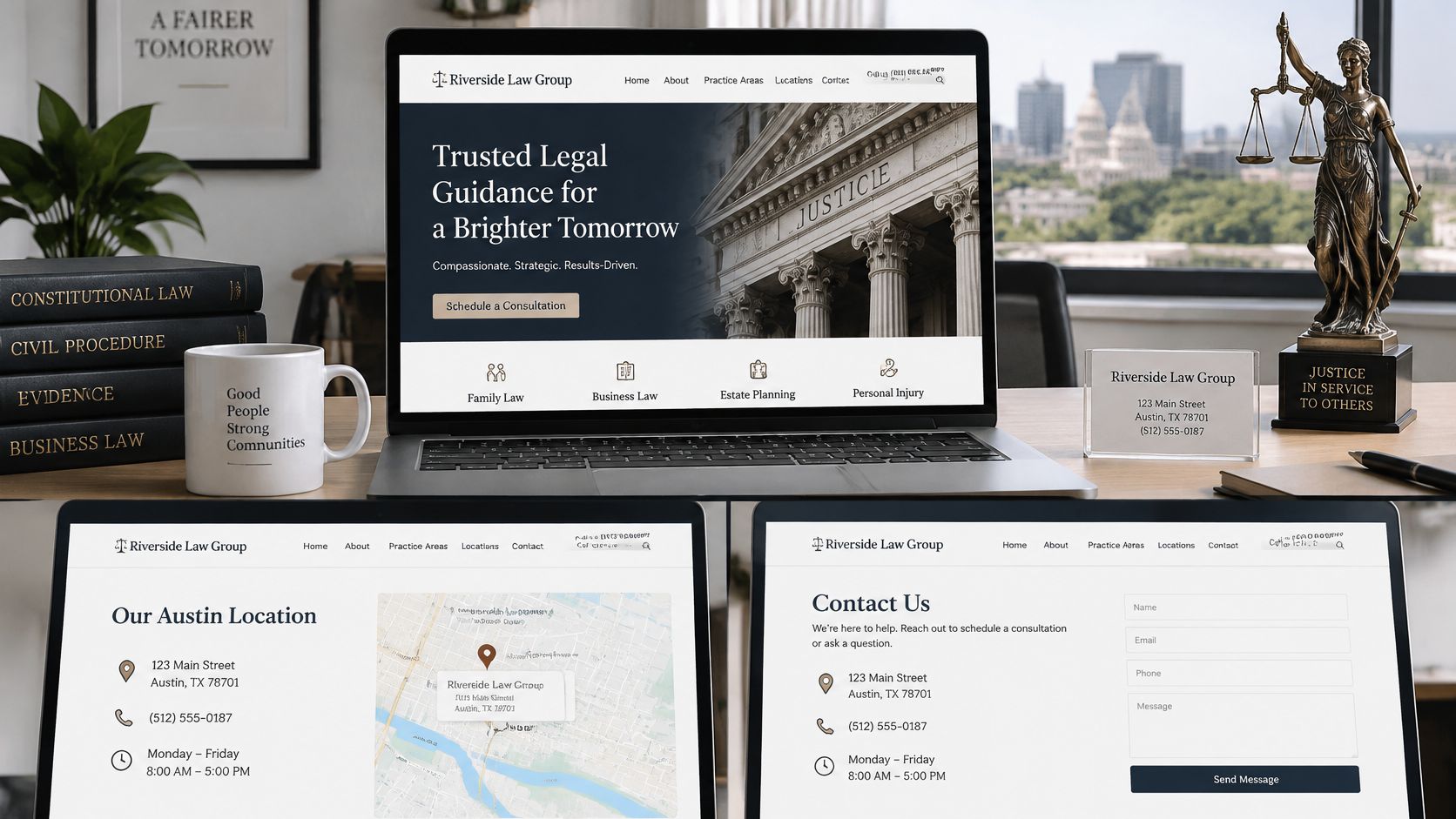
A multi-office firm shouldn't rely on a shared page containing only a list of cities. Give each office its own page and an appropriate business listing where eligible. A service area isn't automatically an office, so don't label a city as a staffed location merely because the firm accepts clients there.
Use the Google Business Profile guidance for lawyers to coordinate the website's office information with its public listing. Assign someone responsibility for updating both when hours, staffing, or addresses change.
Validate what search engines can access
Google's structured-data documentation explains that eligible LocalBusiness markup can communicate information such as business hours, directions, and appointment actions. Complete the relevant properties, validate with the Rich Results Test, and use URL Inspection to check the published page.
The page must be accessible to Google, not blocked through robots.txt, a noindex directive, or a login. Structured data should match visible information rather than introduce services or locations visitors can't verify.
For owners and marketing directors comparing implementation options, an in-house team, independent developer, or agency can all be reasonable choices. Our service area includes Irving and Richardson; firms evaluating web design in Irving, TX can include local coordination among their decision criteria.
The deciding issue isn't proximity alone. Establish who owns business-data updates, who approves location content, and who tests the implementation after publication.
Conversion Layout and Fast Intake Response
The American Bar Association's 2025 website guidance reports that 66% of legal consumers want a response within 24 hours, 71% of Gen Z and Millennials expect same-day communication, and nearly half want a callback within a few hours. The response process belongs in the website plan, not in an operational discussion postponed until after launch.
Response expectations from legal consumers
| Expectation | Share of legal consumers | Design response |
|---|---|---|
| Response within 24 hours | 66% of legal consumers | Auto-reply confirming next business-day callback and a named contact |
| Same-day communication | 71% of Gen Z and Millennials | Staffed inbox with same-day acknowledgment and office hours shown |
| Callback within a few hours | Nearly half of legal consumers | Phone number and callback request option on the contact page |
Only publish a callback commitment the firm can staff. A next-business-day promise also needs a separate plan for inquiries received before weekends or holidays.
Build the intake template at phone width
Pew Research Center found that 90% of U.S. adults owned a smartphone in 2023, while 15% were smartphone-dependent, meaning they owned a smartphone but lacked home broadband. Those figures don't establish your firm's device mix, but they make desktop-only planning indefensible.
Place the phone number and tap-to-call button above the fold. Stack form fields in a single column, use comfortable touch targets, and avoid overlays that cover the primary action.

Keep the initial form limited to name, phone, email, matter category, location, and a one-sentence description. Don't require every contact method if the intake team doesn't need it. Explain the privacy and conflict-check process before inviting sensitive case facts.
Place plain language near submission stating that sending a message doesn't create an attorney-client relationship. Offer an urgent-contact alternative where appropriate, and route inquiries by practice area, office, and staff availability.
Measure the handoff, not just submission
A confirmation screen should explain what happens next and identify the responsible contact. An automated acknowledgment confirms delivery; it isn't a substantive response.
When evaluating telephone coverage, Voicedial.ai's guide to legal call answering provides context for comparing answering workflows. Evaluate any arrangement against confidentiality, escalation, and human handoff needs.
Track time to first response, consultations booked, disqualified matters, and retained cases. Connect those outcomes to landing pages using a law firm lead-generation measurement plan, without sending confidential case descriptions into analytics tools.
Operational rule: A submission isn't a successful intake until someone owns the next action.
Intake requirements differ by jurisdiction. Have the firm's ethics counsel review disclosures, routing, data collection, and communication practices before launch.
Speed, Accessibility and Technical Checks Before Launch
Google reports that 53% of mobile visits are abandoned when a page takes longer than three seconds to load, while Google/SOASTA research found that increasing load time from one to ten seconds raises the probability of a mobile bounce by 123%. A slow contact page can lose the opportunity before anyone sees the firm's consultation options.
Technical quality is therefore part of intake. Compress and correctly size images, cache pages, defer noncritical JavaScript, and limit third-party scripts. Don't make visitors download a background video before they can reach the contact controls.
Test access as well as appearance
The Department of Justice's web accessibility guidance explains that ADA nondiscrimination and effective-communication requirements apply to websites of businesses open to the public. It identifies WCAG and Section 508 as useful technical references, while noting that the department hasn't established a detailed technical standard for private business websites.
The W3C's WCAG guidance organizes accessibility around perceivable, operable, understandable, and compatible content. In practical terms, visitors must be able to detect information, operate controls, understand instructions, and use the site with assistive technologies.
Automated scanners can't verify every criterion. Add keyboard-only and screen-reader testing rather than treating a passing scan as proof of complete accessibility.

Use explicit release conditions
Pre-launch technical targets and how to test them
| Requirement | Target | How to test |
|---|---|---|
| Mobile load speed | Under 3 seconds on representative mobile networks, as an internal project target | Field data in PageSpeed Insights on homepage, practice and contact pages, supplemented with device testing |
| Keyboard navigation | Every menu, link and form reachable without a mouse | Tab through homepage, practice page and intake form |
| Color contrast | Text meets applicable WCAG contrast ratios | Automated scanner on each template |
| Form labels and errors | Each field labeled, errors explained in plain language, entries kept after an error | Screen-reader pass on the consultation form |
| Downloadable PDFs | Tagged, readable intake and disclosure files | Accessibility checker before upload |
Start by measuring the homepage, high-value practice pages, and contact flow on representative mobile devices and networks. Use field measurements where available; a desktop laboratory result doesn't describe every visitor's experience.
Next, tab through navigation and intake without a mouse. Confirm visible focus, sensible order, usable menus, and the ability to escape dialogs. Run a screen-reader pass through form labels, required fields, validation errors, and the success message.
Scan template contrast, then check downloadable intake and disclosure PDFs for tagging, reading order, and usable form fields. Include captions or transcripts for media and a method for reporting accessibility problems.
Keep these checks in the technical SEO plan for the law firm, alongside crawlability and structured-data validation. Repeat them after every template or plugin change, because a successful launch test doesn't guarantee that later changes preserve access.
Sample Law Firm Results and What They Show
Published case studies give a redesign realistic benchmarks. In Digital Skyrocket's Attorney Mike Wallace case study, annual Google search visitors rose from 119 before the redesign to 898 afterward, a reported 645.62% increase in one year. A second attorney client reached 3,694.74 Google search visitors per year, a reported 3,694.74% increase, and described the marketing effectiveness as at a level the client had never experienced before.
Measured Google search visitor results in law firm case studies
| Case | Reported result |
|---|---|
| Attorney Mike Wallace | 119 to 898 Google search visitors per year, a 645.62% increase in one year |
| Attorney client, unnamed | Reached 3,694.74 Google search visitors per year after the engagement, a reported 3,694.74% increase |
Separate visibility from signed matters
Traffic volume and signed matters are different measures. A large percentage increase can begin from a small baseline, and the commercial value depends on whether visitors need the firm's services, fall inside its geographic scope, and reach an intake team that responds.
The unnamed client's percentage is less useful for planning because the baseline isn't published. Don't reconstruct missing visitor totals from an isolated percentage or compare it directly with another firm's results.
A credible case study states what it measured, over what period, and what it did not measure.
For a redesign evaluation, request distinct reporting categories:
- Search visibility. Which relevant pages and queries attracted visitors?
- Inquiry activity. Which calls and forms came from those visits?
- Qualification. Which inquiries matched the firm's practice and service area?
- Business outcome. Which consultations became retained matters?
Add response time to that list. The gap between a form submission and a reply often decides whether an inquiry becomes a consultation, and a redesign that speeds up intake can change outcomes without adding a single visitor.
Any firm publishing results needs attorney approval and appropriate disclaimers. Permission to describe an outcome doesn't settle what that outcome measures.
Extract the repeatable work
In a separate Houston engagement, Deep Space Robots subcontracted Chad to perform SEO and write copy for a law firm website. Within a calendar year, most of the firm's practice areas reached Google's first page for personal injury law in Houston.
That report doesn't isolate the effect of copywriting from every other influence on rankings, and first-page visibility alone establishes neither consultation volume nor revenue. Scope is part of the lesson. The Houston work added SEO and copy to a site another party built. Digital Skyrocket's engagements cover strategy, design, development, writing, and SEO together, which removes the ceiling that comes with optimizing a structure a different team created.
The transferable work is concrete: build dedicated pages for specific case types, assign clear attorney ownership, and track calls and forms from the start. Give each page a defined audience rather than treating a broad personal injury page as a substitute for every service.
Record your own baseline before judging any result. Without it, the firm can't distinguish a meaningful improvement from a persuasive screenshot.
Confirm Your Redesign Plan Before You Commit
Approve the redesign around decisions, responsibilities, and evidence, not a collection of visual references. An attractive mockup won't resolve missing content, unclear intake ownership, or an unmeasured starting point.
Make these decisions in order
Audit the existing site. Compare it with the core-page inventory and mark gaps in service clarity, attorney information, office details, contact options, and approved reputation content. Separate missing information from cosmetic preferences.
Gather the working materials. Assemble logos, brand colors, professional attorney photographs, and a service-and-benefit overview for each practice area. Collect written consent for client reviews or results intended for publication, plus any usable video files.
Set goals and record a baseline. Capture organic visitors, calls, form submissions, and consultations before work begins. Define what counts as a qualified inquiry so the team doesn't optimize for contact volume that the firm can't use.
Choose the work sequence. Resolve trust and intake problems first, then organize the content hierarchy, develop substantive location pages, and complete technical release checks. Assign an attorney reviewer and a staff owner for each approval.
Confirm fit before production
Our process starts with questions about goals, audience, and search opportunity. After the client supplies service details and media, we work together on the website's content and design strategy rather than expecting attorneys to hand over finished marketing copy.
We strategize, design, build, write, and optimize the new website instead of only optimizing a site someone else built. Our engagements pair a new website with ongoing SEO, so that working model should fit the firm's plans before either side commits.
An average-size website goes live two months after the project begins, provided we have the information needed from the client. Delayed credentials, images, or approvals can affect that schedule.
For firms considering web design in Tyler, TX, a discovery conversation can establish goals, audience, and search opportunity before production. Bring the current site's gaps and intake questions, not just examples of websites you like.
Digital Skyrocket plans, writes, designs, builds, and search engine optimizes law firm websites, with intake paths and ongoing measurement built into the work. Visit Digital Skyrocket to start a fit and discovery conversation about your firm's goals, qualified consultations, and search opportunities.