A polished website isn't automatically a productive one. A service business can have elegant typography, cinematic photography, and a carefully animated homepage, yet still lose high-intent prospects because visitors can't tell what the company does, whether it serves their area, or what happens after they make contact.
Effective service business website design treats the site as a credibility and conversion system. Every page should reduce a buyer's uncertainty, support the right search intent, load quickly on a phone, and make the next action obvious. The visual layer matters, but it serves the business goal rather than replacing it.
Table of Contents
- Why Beautiful Websites Fail at Lead Generation
- Discovery and Planning Before Design Begins
- Building Site Architecture That Converts
- Technical Implementation for Speed and Performance
- Integrating SEO, AEO, and Conversion Optimization
- Ongoing Reporting and Iterative Improvements
- Your Next Steps to Launch a Lead-Generating Site
Why Beautiful Websites Fail at Lead Generation
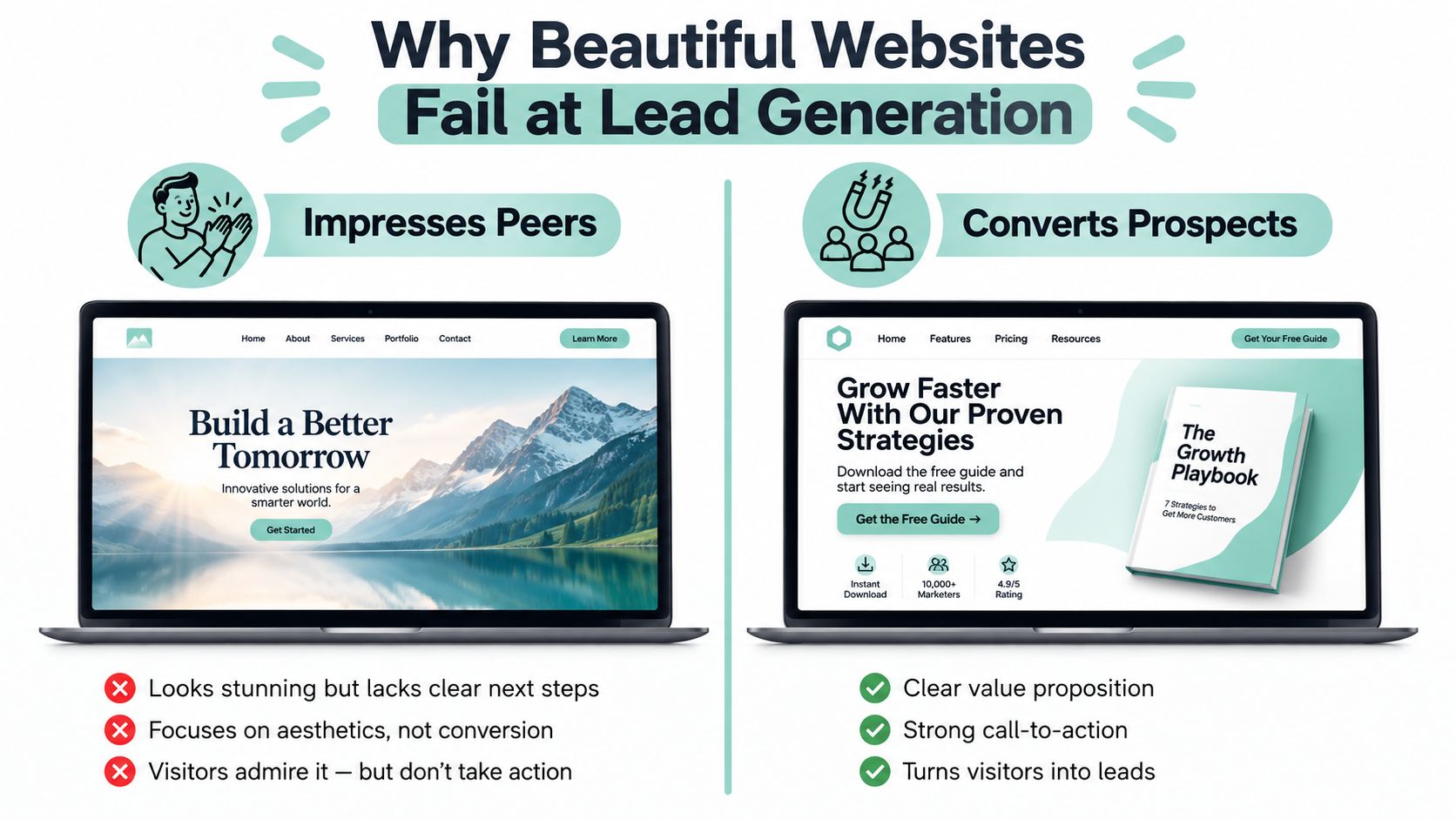
The popular advice says service businesses need a beautiful website to build trust. That's incomplete. A beautiful website can create a strong first impression while failing at the moment that matters, when a prospect decides whether to call, submit a form, or leave.
Many weak sites lead with brand atmosphere instead of a clear answer to three practical questions: What do you do, who do you help, and how can I contact you? A vague hero headline, an oversized video, or a rotating collection of slogans may impress colleagues, but it forces an urgent buyer to work for basic information. Navigation often follows the company's internal structure instead of the customer's intent, while contact options sit below long visual sequences.
The hidden cost of visual excess
Mobile behavior exposes the gap quickly. One widely cited 2026 benchmark reports that mobile traffic represents about 65% of website traffic, while mobile accounts for 42% of conversions, with conversion rates of 1.82% on mobile versus 3.14% on desktop. The same benchmark says the gap widened from 38% in 2024 to 42% in 2026, despite years of mobile-first investment, as reported in conversion rate benchmarks for 2026. Another 2026 benchmark reports 2.2% mobile conversion versus 4.4% desktop conversion, reinforcing that responsive layouts alone don't solve the problem.
The failure usually isn't a lack of taste. It's a lack of friction analysis. A service site must make calling easy, keep forms short, show service areas, surface reviews, and answer concerns about cost, timing, qualifications, and process before the visitor commits.
Practical rule: If an element doesn't clarify the offer, strengthen trust, answer an objection, or support a measurable lead action, it needs a clear reason to remain.
Audit the site like a buyer, not like a designer. On a phone, identify the first meaningful statement, the first contact action, the location signal, and the answer to the most likely pre-call question. Compare that experience with the principles illustrated in these lead-generation website examples, but judge the implementation by calls and qualified inquiries, not by visual novelty.
A conversion-oriented site may look restrained beside an award submission. That restraint often helps it perform. The strongest pages use design to direct attention toward evidence, relevance, and action.
Discovery and Planning Before Design Begins
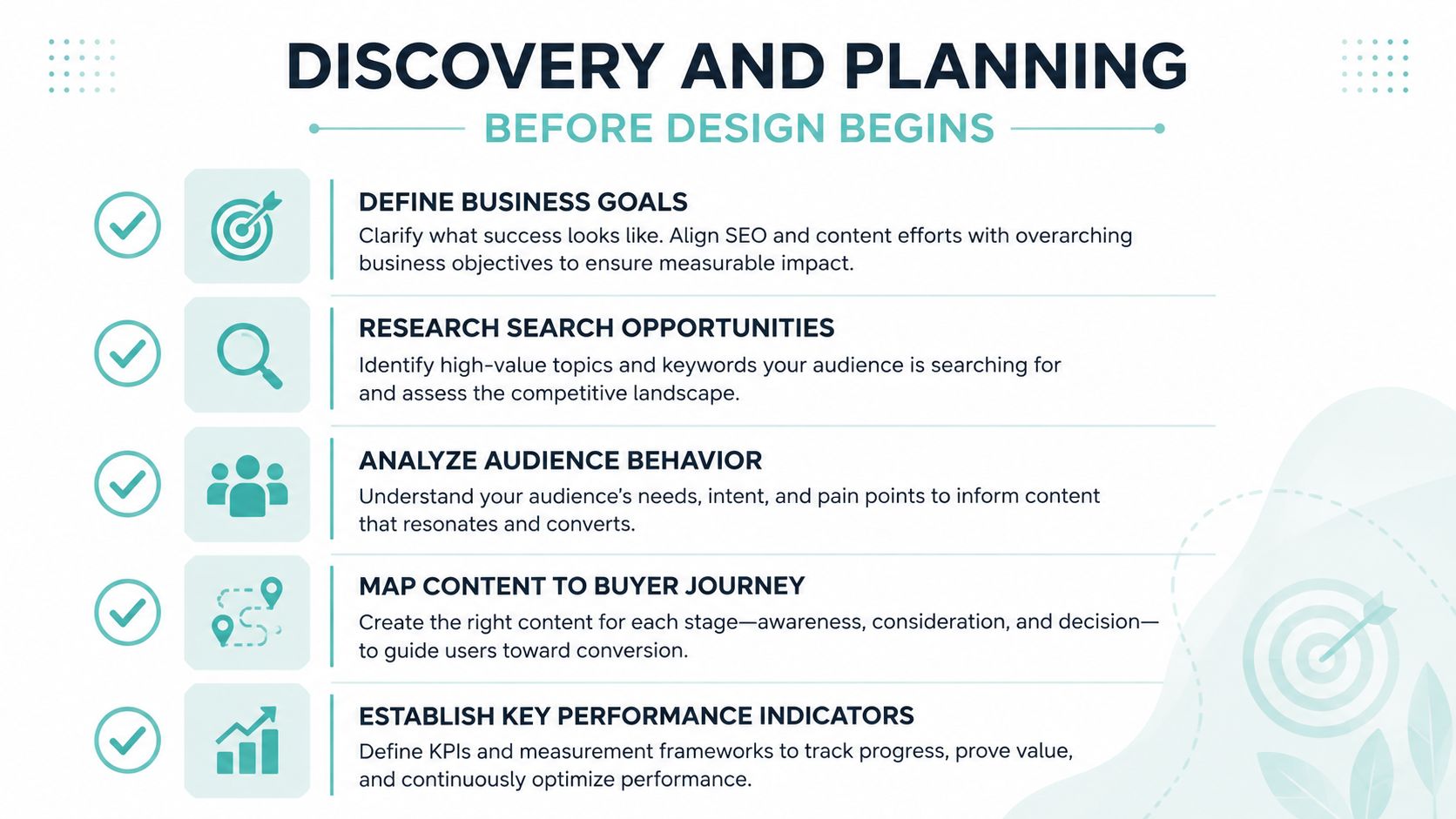
Design decisions become expensive when the team makes them before defining the commercial problem. A discovery phase should establish what the website must produce, who it must persuade, and which searches can bring qualified visitors to the right pages.
Start with a conversion goal matrix. Put phone calls, form submissions, booked consultations, quote requests, and other meaningful actions in the primary column. Secondary actions might include viewing reviews, checking service areas, downloading preparation information, or reading a process page. Assign each action to the pages where it naturally belongs, then document how the analytics system will record it.
Build the planning record
A practical discovery sprint produces several working documents:
- Business objective brief: Define the services, profitable customer types, geographic priorities, operational constraints, and response process.
- Search intent audit: Separate informational searches from commercial and transactional searches, then map each intent to a page type.
- Audience behavior profile: Record what prospects research before contacting a provider, including qualifications, urgency, location, price concerns, and logistics.
- Competitive gap analysis: Review rival service pages, local relevance, review visibility, calls to action, content depth, and unanswered buyer questions.
- Measurement plan: Establish primary lead events, channel tracking, call tracking, form attribution, and baseline performance before the redesign.
Search demand should shape the page plan, but it shouldn't dictate every business decision. A keyword with strong visibility potential is useful only if the company serves that customer, can fulfill the work, and has a credible path from search visit to inquiry. Use the market opportunity assessment to keep search opportunity connected to commercial reality.
Interview stakeholders without surrendering the strategy
Stakeholder interviews reveal valuable objections and language, but personal preferences can distort the build. A partner may want a large logo, a particular color, or a page named after an internal department. Those preferences should be recorded, then evaluated against user intent and business outcomes.
Ask customer-facing staff what prospects ask before booking. Ask operations which jobs are a good fit and which create avoidable friction. Ask sales what causes a lead to stall. The answers become page content, navigation labels, FAQs, proof points, and form prompts.
A clear planning record also gives the team something to revisit when opinions conflict. Instead of debating whether a hero video feels premium, the team can ask whether it improves comprehension without damaging speed or obscuring the contact path.
Building Site Architecture That Converts
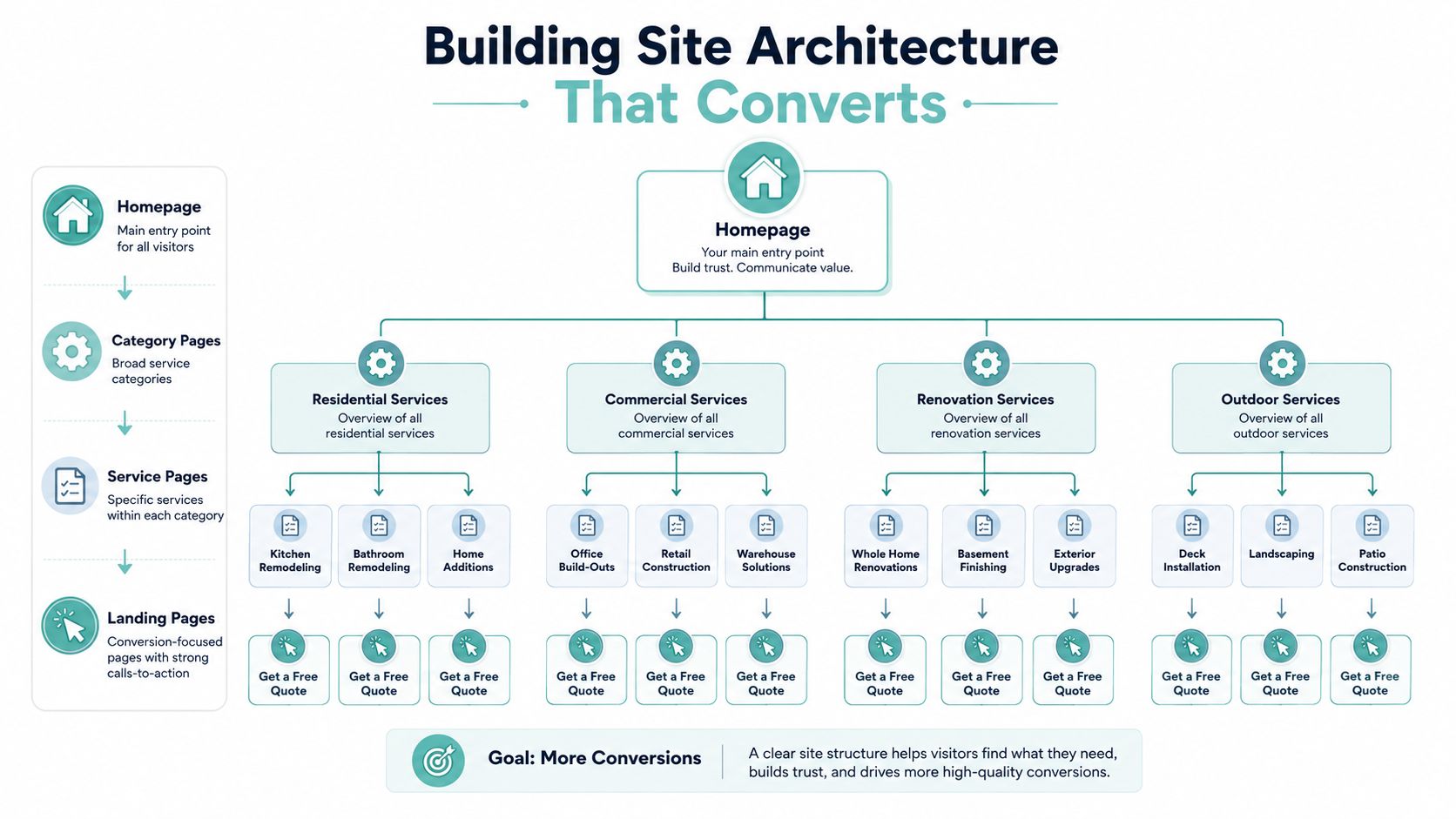
Site architecture should mirror how prospects make decisions. A visitor may begin with a broad service search, narrow the need to a specific problem, verify local availability, review evidence, and then contact the provider. The site should support that sequence without forcing every visitor through the same path.
A flat structure can work for a small firm with a focused offer. A company with multiple services needs clearer separation, otherwise a generic services page becomes a crowded index with weak relevance. A hub-and-spoke model usually provides better control: a service category introduces the area of work, individual service pages address specific intent, and supporting articles answer related questions while linking back to the commercial page.
Give every service page a job
A service page shouldn't merely describe an offering. It should help the visitor decide whether to take the next step.
A useful page typically includes:
- Specific opening statement: Name the service, customer, and location when relevant.
- Problem and fit explanation: Clarify who needs the service and what situation it addresses.
- Process detail: Show what happens before, during, and after the engagement.
- Trust evidence: Include qualifications, reviews, guarantees where applicable, project proof, and transparent limitations.
- Objection handling: Address pricing factors, scheduling, service boundaries, preparation, and expected response.
- Action path: Place a call, form, or booking option beside the information that makes the prospect ready.
Avoid labels such as “Services” when they hide meaning. A title like “Commercial Plumbing for New Construction Projects” tells users and search systems more than a generic navigation item. This specificity also helps people answer the immediate question, “Am I in the right place?”
Connect pages around intent
Internal links should guide qualified visitors toward the next useful decision. An article about preparing for a roof replacement can link to the relevant roofing service page. A location page can link to the services available in that area. A process page can link to the consultation form after explaining what the buyer should expect.
Location architecture requires discipline. Don't create near-identical pages for every town with swapped place names. Give each meaningful location page distinct service-area context, local proof, coverage details, and relevant calls to action. Keep the relationship between homepage, service categories, services, locations, FAQs, and conversion pages visible in a sample sitemap for a website.
The design trade-off is depth versus clarity. Deep navigation can support precise intent, but too many layers make important pages hard to reach. Keep primary navigation concise, use contextual links within content, and maintain a persistent contact option on mobile. The architecture should help search engines understand topical relationships while helping people reach a confident decision.
Technical Implementation for Speed and Performance
Mobile visitors abandon service pages when the page delays the answer, proof, or contact option they came to find. A polished interface cannot recover a lead lost before the first meaningful content appears. Performance therefore belongs in the design brief, alongside page structure and pre-call objection handling.
Google's mobile benchmarking guidance recommends load times of 5 seconds or less on 3G connections, while its speed research reports that reducing mobile load time by 0.1 seconds can increase conversion rates by 10.1%. The same analysis says mobile bounce probability rises 123% as load time increases. These figures from Google's mobile page-speed benchmarks make a heavy hero video a conversion decision, not merely a visual preference.
Set measurable experience targets
Google identifies these “good” Core Web Vitals thresholds in its Search documentation:
| Metric | Target Threshold | Impact on Conversions | Key Optimization Tactic |
|---|---|---|---|
| LCP | 2.5 seconds or less | Helps the main offer become visible quickly | Prioritize hero content, compress images, improve server response |
| INP | Less than 200 milliseconds | Keeps forms, menus, and buttons responsive | Defer nonessential JavaScript and reduce script work |
| CLS | Less than 0.1 | Prevents buttons and form fields from shifting | Reserve image dimensions and stabilize layout components |
Core Web Vitals use real-user field data and are assessed at the 75th percentile over a rolling 28-day window, according to Core Web Vitals field-data guidance. A page must meet all three thresholds at that percentile to pass. A fast developer laptop cannot confirm that prospective customers receive the same experience.
Build for the actual device
Begin with the delays customers will encounter on their phones:
- Compress visual assets: Use correctly sized images, modern formats, responsive delivery, and restrained video.
- Prioritize visible content: Keep page weight under 1 MB and visual completion under 5 seconds, following the Google mobile-speed playbook cited by the benchmark guidance above.
- Control scripts: Defer noncritical JavaScript, remove unused plugins, and audit analytics and chat tools.
- Improve delivery: Use caching, efficient hosting, and server-side optimization so the first response arrives quickly.
- Test field conditions: Check service pages, location pages, and contact forms with Lighthouse and real-user testing on a near-market mobile connection.
Heavy page builders shorten production time and offer visual flexibility, but they can add markup, styles, and scripts that a focused custom theme avoids. Lightweight development requires more planning and technical skill. Choose based on who will maintain the site, how often content changes, and which integrations the business needs. Either approach can perform well when scripts, media, and templates receive deliberate technical review.
Integrating SEO, AEO, and Conversion Optimization
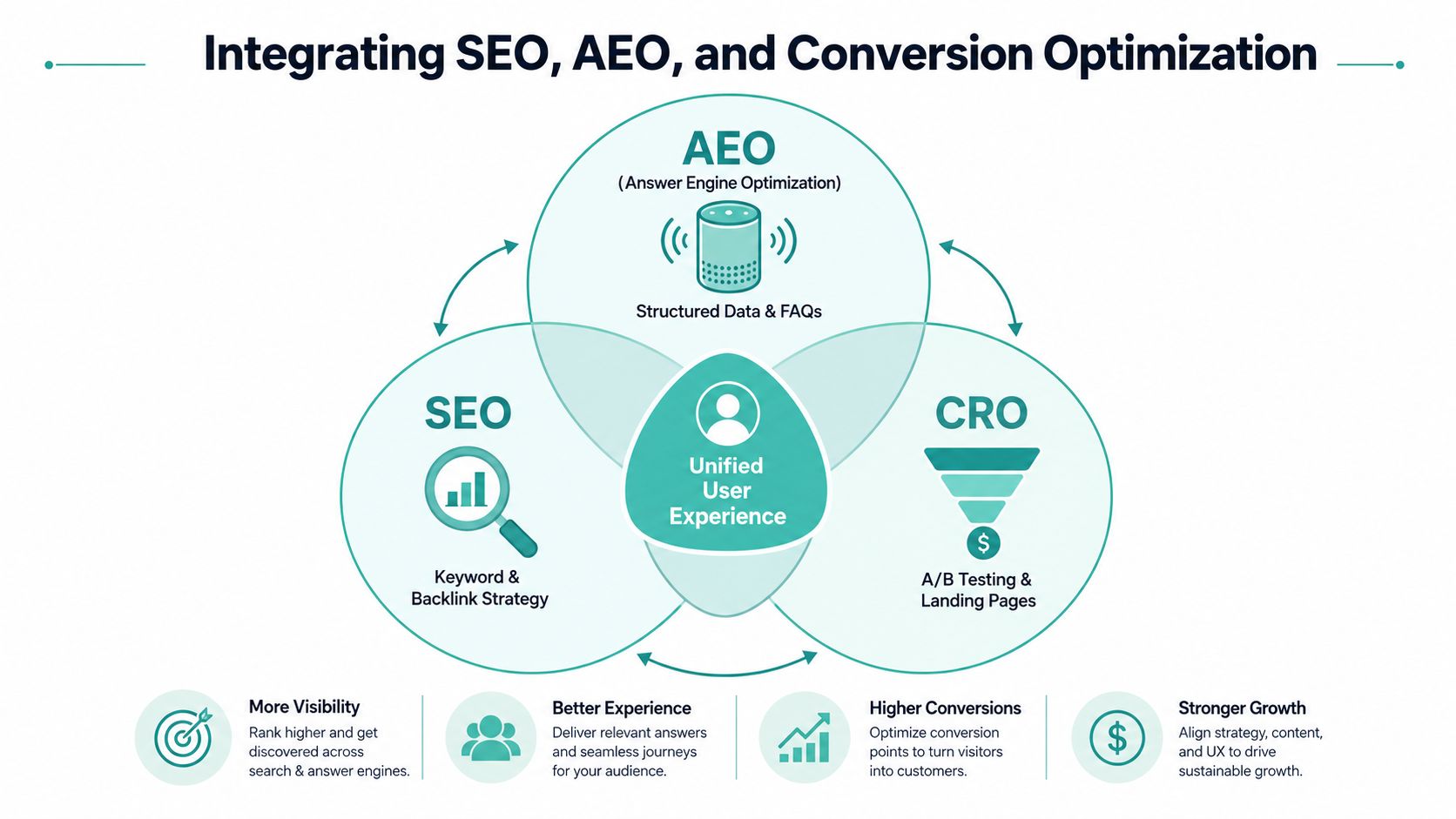
A polished service website can rank well and still produce few leads. SEO, answer engine optimization, and conversion rate optimization must shape the same page strategy. Search attracts a relevant visitor, answer-focused content resolves uncertainty, and conversion design makes the next action clear. If those jobs are handled separately, the site may earn visibility without helping a prospect decide.
Match content format to intent
Informational searches belong in educational articles, preparation guides, comparisons, and FAQs. These pages can use softer calls to action because the visitor may still be researching. Transactional searches need dedicated service pages with clear contact options, service-area relevance, trust evidence, and direct answers to buying concerns.
Answer engines need content they can extract without stripping away context. Use conversational headings, concise definition paragraphs, answer-first FAQs, comparison tables, and structured data that matches visible content. The guidance in how to build an SEO-friendly FAQ page emphasizes clear answers, conversational structure, and schema alignment for service businesses.
Turn objections into searchable answers
Prospects often want to know whether a provider serves their area, how long the process takes, what preparation requires, and which factors affect price. Put those answers on the relevant service page instead of burying them in broad marketing language. A page that handles pre-call objections gives search engines useful context and gives visitors fewer reasons to delay contacting the business.
Use one source of truth for each important answer. If the service page conflicts with the FAQ or location page, human trust and machine interpretation both suffer. Reviews should appear near the decision path. A local-search source citing BrightLocal's 2026 survey reports that 97% of consumers read reviews for local businesses, as summarized in local SEO statistics.
CRO testing creates a practical feedback loop. Test a clearer headline, shorter form, different CTA label, or stronger proof placement. Review which changes improve qualified calls, forms, or bookings, then refine the copy and answer blocks. Digital Skyrocket illustrates an agency model combining website design, local SEO, answer engine optimization, analytics, and ongoing conversion refinement for service companies.
Ongoing Reporting and Iterative Improvements
Launch day gives you a functioning system, not a finished system. The first reporting cycle should connect acquisition to actual lead events, including phone calls, form submissions, and booked consultations. Pageviews can provide context, but they don't tell an owner whether the website is producing qualified opportunities.
A useful reporting setup separates traffic by source and intent. Use UTM parameters where appropriate, call tracking for phone inquiries, form attribution, and analytics events for key interactions. Compare organic search, local-map traffic, direct visits, and referral traffic separately because each group may arrive with different expectations.
Diagnose friction before changing design
A monthly review should answer practical questions:
- Which pages attract qualified visitors?
- Which pages produce calls, forms, or bookings?
- Where do mobile users abandon the path?
- Which forms receive starts but few completions?
- Which service or location pages need better answers or proof?
Suppose a heat map shows that mobile users on an emergency plumbing page leave before reaching the contact form. The right response isn't automatically more copy or a redesigned color palette. Move the call action into the early experience, test a sticky mobile CTA, shorten the form, and confirm that the page explains urgency, availability, and what happens after submission.
Maintain the system quarterly
Content and technical quality decay when nobody owns them. Review underperforming service pages, outdated service-area information, broken internal links, review visibility, form delivery, schema validation, and plugin or platform updates. Test critical forms and phone actions manually, not only through automated reports.
Use an impact-effort matrix to prioritize changes. A small form simplification with clear evidence of friction may outrank a large visual redesign. A page with strong qualified traffic but weak inquiries deserves attention before an article that receives visits without commercial intent.
The reporting habit should create a queue of specific experiments. Change one meaningful variable, define the lead event, observe the relevant traffic segment, and document the result. That process turns website design from a launch project into an operating discipline.
Your Next Steps to Launch a Lead-Generating Site
Start by auditing your current website against this framework and identifying the single highest-impact gap. A service website earns more over time when its content, technical performance, proof, and conversion paths improve together. Treating it as a finished brochure leaves prospects judging the business through an asset nobody actively improves.
Use a practical 90-day roadmap to assign sequence and ownership:
- Weeks 1 to 2, discovery and competitive audit: Record business goals, buyer objections, search opportunities, existing rankings, traffic sources, lead events, competitors, and service-area priorities.
- Weeks 3 to 5, architecture and content production: Finalize page hierarchy, service templates, location structure, internal links, headlines, FAQs, proof points, and paths to contact.
- Weeks 6 to 8, technical build and quality assurance: Develop responsive layouts, install analytics, optimize assets, validate forms, test structured data, and check Core Web Vitals.
- Weeks 9 to 10, soft launch and measurement validation: Release carefully, confirm call and form tracking, inspect mobile behavior, and resolve indexing or usability problems.
- Weeks 11 to 12, optimization sprints: Use early data to improve the page, CTA, form, content block, or mobile interaction creating the most friction.
Three decisions shape long-term return more than decorative polish. Choose a CMS that supports ongoing CRO rather than static pages. Schedule monthly content and technical maintenance, including service and location updates. Establish baseline conversion metrics before launch so later changes have a credible comparison point.
Local search intent remains active. One compiled 2026 benchmark set reports that 80% of U.S. consumers search for a local business online at least weekly, while 32% search daily or multiple times a day, as summarized in local SEO statistics for 2026. These visitors need a fast, specific, trustworthy path to action, especially on mobile and on pages that answer questions before a call.
Review the evidence each week. If positioning is unclear, rewrite the opening. If forms lose users, shorten the path. If mobile performance is weak, measure the bottleneck before changing another visual element. If answer engines overlook the company, clarify service, location, process, and proof in content that can be extracted accurately.
Digital Skyrocket plans and builds lead-generating websites for service companies, combining custom web design with local SEO, answer engine optimization, performance work, and ongoing conversion improvements. Visit Digital Skyrocket to discuss a website strategy built around qualified calls, forms, and consultations rather than appearance alone.