A pretty website can still be a poor business tool. A 2024 academic review of 40 U.S. homepages found that more than 96.8% were inaccessible under the study's evaluation approach, even though the average error rate declined from 7.33% in 2013 to 3.06% in 2023 (historical accessibility review). Better design standards helped, but progress didn't automatically produce usable websites.
That distinction matters for law firms, dentists, roofers, HVAC contractors, and other service businesses. An attractive brochure site earns compliments. A productive website earns qualified calls, emails, appointment requests, and consultation forms by connecting search visibility, local relevance, trust, usability, and conversion paths.
These web design best practices work best as a connected system. Mobile design affects whether a visitor can call. Information architecture affects whether search traffic reaches the right service page. Accessibility affects whether someone can complete an intake form. Analytics reveals which improvements produce valuable inquiries rather than just more page views. The recommendations below focus on what to build, what to test, and where common design shortcuts fail.
Table of Contents
- 1. Mobile-First Responsive Design
- 2. Strategic Keyword Integration and Search Intent Alignment
- 3. Clear Information Architecture and Conversion Path Mapping
- 4. High-Converting Call-to-Action Design and Placement
- 5. Technical Performance Optimization and Page Speed
- 6. Trust Signals, Credibility Elements, and Social Proof
- 7. Content Strategy Aligned With Customer Journey and Intent
- 8. Local SEO Optimization and Geographic Targeting
- 9. Answer Engine Optimization and Featured Snippet Targeting
- 10. Conversion Rate Optimization and Analytics Instrumentation
- 10-Point Web Design Best Practices Comparison
- Turn the Checklist Into a Measurable Lead System
1. Mobile-First Responsive Design
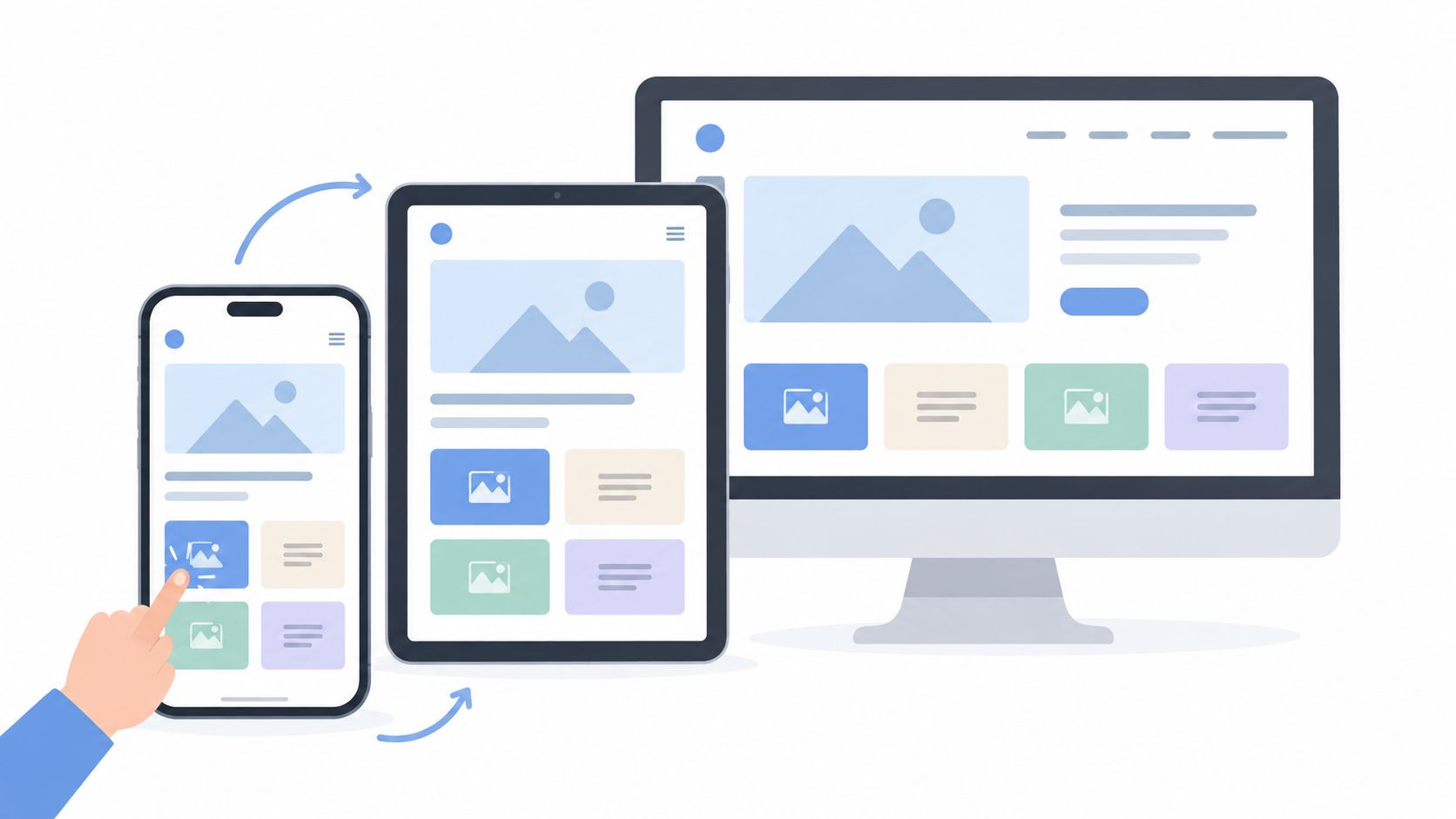
A service website should earn its first impression on a phone. Google uses the mobile version of a website's content for indexing and ranking, and it recommends responsive design because one URL can serve the same HTML across devices while adapting the display to screen size (Google's mobile-first indexing guidance).
Design the primary journey at mobile widths before adding desktop enhancements. A person looking for an HVAC contractor may need to tap a phone number immediately. A prospective legal client may want to see practice areas, credentials, and a consultation option without pinching, zooming, or hunting through a desktop-style menu.
Design for thumbs, not cursors
Baymard reports that mobile users are five times more likely to abandon a task when a site isn't optimized for mobile, while 66% of mobile sites place tappable elements too close together and 32% use touch targets that are too small (Baymard's mobile UX statistics). The same research reports that 61% of mobile sites fail to use the correct keyboard layout for at least one form field.
Use generous spacing, clear tap targets, telephone and email input types, compressed images, and a short path to contact. Test on real phones with different connection speeds, orientation changes, and assistive technologies. Browser emulation can reveal layout problems, but it won't show every interaction problem.
For a law firm, place the consultation action and trust signals high on the mobile page. For a dentist, make appointment booking easy between work calls. For a roofer, let visitors reach storm-damage services without navigating through a desktop mega-menu. A focused conversion-focused web design approach connects the responsive layout to the action that matters.
2. Strategic Keyword Integration and Search Intent Alignment
A page shouldn't rank for a phrase it fails to answer. Keyword research becomes useful when it reveals what the visitor wants, how urgent the need is, and which page should satisfy that intent.
“Truck accident attorney Tyler Texas” signals a different need from “what should I do after a truck accident?” The first search may belong on a focused local practice-area page. The second may deserve an educational resource that explains immediate steps and leads readers toward a consultation without forcing a sales pitch too early.
Match phrases to useful pages
Create separate pages for distinct services and meaningful service areas instead of making one generic page rank for everything. An HVAC company might build focused pages for furnace repair in Plano, emergency AC repair, and an explanation of why an air conditioner isn't cooling. A dental practice can address cosmetic dentistry, emergency tooth extraction, and appointment information with different content structures.
Use Google Search Console to review queries that already generate impressions and clicks. Study competitor coverage for gaps, then write naturally for people rather than repeating a phrase mechanically. Question-based searches can reveal opportunities for explanatory content, while local service terms often need clear proof of geographic relevance.
Practical rule: Give every important query a page with a clear purpose, a specific audience, and an obvious next step.
Review rankings and landing-page behavior regularly, but don't treat position as the final business metric. A lower-volume service query that produces qualified calls may deserve more attention than a broad term that brings uncommitted visitors. A structured content gap analysis can help identify missing service, location, and question topics.
3. Clear Information Architecture and Conversion Path Mapping
Visitors shouldn't have to understand your internal organization before they can understand your services. Information architecture should reflect the questions prospects ask, then guide them toward proof and contact.
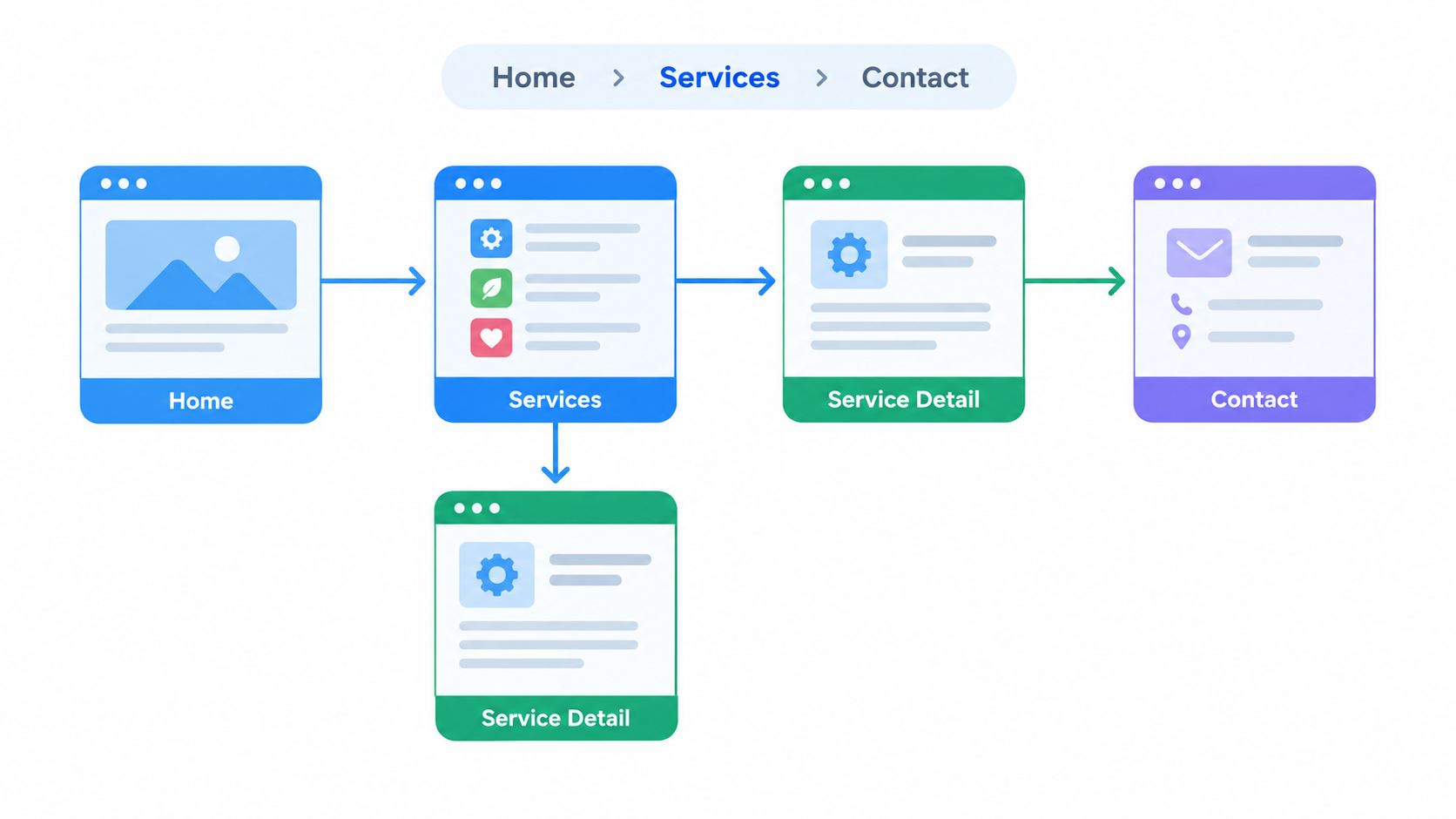
A personal injury firm might organize its site around Home, Practice Areas, a specific claim type, Case Results, and Contact. A roofing company may need a path from Services to Repair, Replacement, or Inspection, followed by Service Areas and city-specific pages. A multi-location HVAC business should make both service type and local team easy to find.
Build around real visitor questions
Interview customers, intake staff, and sales teams before restructuring pages. Ask what people request on the phone, which terms they use, and what information they need before agreeing to speak with someone. Then map existing URLs so useful content, backlinks, and search visibility don't disappear during the redesign.
Use contextual links inside service pages rather than placing every destination in the main menu. Breadcrumbs can show hierarchy and help visitors move back to a broader service or location. Internal links should connect related services, supporting articles, credentials, reviews, and contact options.
A dental site might move a visitor from emergency dentistry to treatment information, patient guidance, and appointment booking. A roofer might connect a hail-damage page to inspection, insurance guidance, and nearby service locations. This is more useful than forcing every visitor through the homepage.
Create a visual structure before development with a sample sitemap for a website. Test labels and paths with people who weren't involved in building the site. Internal familiarity often hides confusing navigation.
4. High-Converting Call-to-Action Design and Placement
A call to action should tell visitors what happens next, not merely announce that an interaction exists. “Submit” describes a button. “Request My Estimate” or “Schedule My Consultation” describes the visitor's intended outcome.
Place the primary action where the visitor has enough context to use it. A service page may need a phone option near the opening, a consultation form after trust evidence, and another contact option after frequently asked questions. Repeating the same relevant action can help, but adding unrelated buttons everywhere creates decision noise.
Connect the CTA to urgency and readiness
An HVAC contractor can use “Call for Emergency Service” when the visitor has an urgent problem. A dental practice might use “Book My Appointment” beside a scheduling option. A roofing company can offer “Request a Storm Damage Inspection,” while a law firm can present a free case evaluation with both a phone number and a form.
Sticky mobile actions can keep calling or booking available during a long page, provided they don't cover content or interfere with assistive technology. Use sufficient contrast, clear focus states, and labels that remain understandable out of context. Don't rely on color alone to communicate that a button is actionable.
Track each CTA by page and device. Compare calls, form completions, appointment starts, and qualified outcomes rather than judging success by clicks alone. A phone number may be the best option for an emergency service visitor, while a two-step form may suit someone still evaluating a legal matter. Test the path that fits the visitor's readiness instead of forcing every prospect into one form.
5. Technical Performance Optimization and Page Speed
Performance is part of design because every decorative effect, image, script, and embedded tool competes for the visitor's attention and device resources. A roofing gallery that looks impressive on a desktop can become a liability when large images delay the service message on a phone.
Google's PageSpeed Insights defines a good Largest Contentful Paint at 2.5 seconds or less, while results above 4 seconds are poor. It defines good Interaction to Next Paint at 200 milliseconds or less, with results above 500 milliseconds poor, and good Cumulative Layout Shift at 0.1 or less, with results above 0.25 poor (Google's Core Web Vitals guidance).
Optimize what visitors need first
Compress and properly size images, use modern formats with suitable fallbacks, and lazy-load media below the opening viewport. Defer noncritical JavaScript, minify CSS and scripts, use caching, and select hosting that can handle the business's geographic audience. A CDN can help serve assets efficiently across cities, but it won't repair bloated page architecture.
A law firm may prioritize the opening headline, consultation button, and attorney image before loading testimonial videos. A dentist can delay gallery media until after appointment information. An HVAC contractor should make the phone action usable before adding elaborate animations.
Monitor real-user Core Web Vitals through Google tools rather than relying only on a local development environment. Test pages with image galleries, maps, chat widgets, and embedded scheduling systems because third-party features often create unexpected delays. Performance work succeeds when visitors can identify the service, trust the business, and begin contact without waiting for decorative elements.
6. Trust Signals, Credibility Elements, and Social Proof
Visitors evaluate credibility before they read every sentence. Design should make it easy to verify who the business serves, what it does, where it operates, and why a prospect should trust it with a consequential decision.
Use real team photography, clear credentials, transparent service information, client reviews, case explanations, and relevant certifications. A personal injury firm can explain attorney experience and the types of matters handled. A roofer can show completed work with permission. A dental practice can present treatment galleries with patient consent. An HVAC company can introduce technicians and explain qualifications.
Make proof specific and honest
Generic claims such as “the best service” rarely help visitors decide. More useful evidence includes the business's service area, response process, team identity, guarantees that genuinely apply, and what a customer should expect after making contact. If a business serves commercial clients, recognizable client logos may help, but only when permission exists and the relationship is accurately represented.
Reviews should be easy to find and handled professionally, including negative feedback. Don't publish invented results, vague testimonials, or exaggerated promises. Don't add review structured data just to decorate search results, because markup must accurately represent visible content and comply with search guidelines.
Trust also includes clarity about limitations. A law firm should avoid implying a guaranteed case outcome. A contractor should explain inspection requirements. A dentist should distinguish general information from individualized medical advice. Honest boundaries often build more confidence than aggressive persuasion.
A visitor doesn't need more hype. They need enough credible information to decide whether contacting the business is sensible.
Design trust signals near the actions they support. A consultation button is more persuasive beside attorney credentials and a clear intake explanation. An estimate request works better near project photos, service-area details, and a description of what happens next.
7. Content Strategy Aligned With Customer Journey and Intent
A service website needs content for different levels of readiness. Someone asking what causes roof damage needs education. Someone comparing replacement materials needs decision support. Someone searching for a roofer in a specific city needs evidence of local fit and a direct contact path.
Build content around actual customer questions. A personal injury firm may publish pages about injury types, case processes, and local considerations. An HVAC company can explain seasonal maintenance, repair versus replacement, and equipment problems. A dental practice can compare cosmetic procedures, explain treatment options, and address payment questions. A roofing business can cover storm assessment, insurance processes, and material choices.
Give every page a job
Separate important services instead of hiding every offering inside one long page. Create location-specific content when the business genuinely serves those areas, and add details that demonstrate local relevance rather than changing only the city name. Develop pillar pages with supporting articles, then link the supporting content back to the relevant service.
Your sales and intake teams already have a content calendar. Their recurring questions can become FAQ entries, service explanations, and article topics. Seasonal demand can shape publishing priorities for emergency repairs, maintenance, storm response, or appointment availability.
Refresh pages when facts, services, staff, or processes change. Updating content isn't a reason to alter a page without purpose, but outdated information can undermine both trust and conversion. Keep the writing direct, define unfamiliar terms, and lead readers from an answer to evidence and then to an appropriate next action.
The best content doesn't force every visitor to read everything. It lets a ready buyer confirm fit quickly while giving a researching visitor enough depth to continue confidently.
8. Local SEO Optimization and Geographic Targeting
Local visibility depends on more than placing a city name in a title tag. A service business must make its location, service area, contact details, operating hours, and local proof consistent across its website and business profiles.
Complete and maintain the Google Business Profile with accurate information, current photos, appropriate categories, and a process for requesting genuine customer reviews. Build dedicated pages for significant service areas when the business can provide useful local information there. Include local phone details where appropriate, explain coverage, and describe the services available in each area.
Avoid thin location pages
A Dallas page that only replaces “Tyler” with “Dallas” gives visitors little reason to trust the business. A useful HVAC page can explain which services the team provides in Dallas, how scheduling works, and what nearby customers should know. A roofing page can discuss regionally relevant weather concerns without pretending to have completed work that never happened.
Use consistent name, address, and phone information across relevant directories. Add LocalBusiness structured data when it accurately describes the organization, service areas, hours, and contact details. Monitor rankings and conversions by location, because one city may generate many impressions while another produces more valuable inquiries.
A multi-location dental practice should make each location easy to distinguish, with correct contact details and appointment paths. A law firm serving several Texas cities should connect practice-area pages to relevant local pages instead of making prospects search through a generic service list.
Local SEO and web design should reinforce each other. The page that ranks for a service-area query must also answer the visitor's practical questions and make contact easy.
9. Answer Engine Optimization and Featured Snippet Targeting
A visitor referred by an AI platform may arrive with more context than someone who starts with a broad search. A 2025 analysis of approximately 82,000 websites found that visitors from common AI platforms viewed about four pages per visit, 1.2 fewer than search visitors, and were 4.1% more likely to bounce (Ahrefs' AI traffic quality study).
That pattern suggests a shorter decision journey. The visitor may already have received a summary and now wants to verify fit, credentials, location, availability, and the next action. A page that repeats broad educational content without surfacing those answers can lose the opportunity.
Answer first, then prove the answer
Use clear question headings, concise initial answers, definitions, ordered steps, and comparison structures where they help. A law firm can explain contingency fees and case timelines. An HVAC company can answer why a furnace makes noise or why an AC coil freezes. A dental practice can compare crowns and veneers. A roofer can explain how to approach hail damage and when repair may be more appropriate than replacement.
Write for people first, then use appropriate structured data that accurately reflects the visible content. Add author or business credentials, service and location specificity, limitations, and a clear contact path. Don't publish shallow FAQ blocks solely to target snippets, and don't assume that more content automatically improves visibility.
For each answer-oriented page, ask what the visitor needs immediately after reading the answer. That might be an inspection request, an appointment, a case evaluation, or a phone conversation. Measure those actions instead of treating page views as the only success signal.
10. Conversion Rate Optimization and Analytics Instrumentation
A redesign isn't finished when it goes live. It becomes useful when the business can see which pages attract qualified visitors, where people abandon forms, which devices create problems, and which inquiries become real opportunities.
Start with a baseline for organic traffic, rankings, calls, form submissions, chats, and appointment requests. Configure Google Analytics 4 or another analytics platform to record meaningful lead actions. Use UTM parameters for external campaigns, connect call tracking carefully, and distinguish a form start from a completed submission.
Test the highest-friction path first
Baymard's checkout research found that 17% of online shoppers abandoned an order solely because the checkout process was difficult. Its testing indicated that an ideal flow can contain as few as 12 to 14 form elements, while average U.S. ecommerce flows contained 23.48 default form elements (Baymard's checkout research). Lead forms aren't ecommerce checkouts, but the cognitive-load principle still applies.
Make only qualification-critical fields required. Explain why you request sensitive information, support browser autofill, use accurate labels and validation, and consider click-to-call, scheduling, or a two-step form. Track field errors, form starts, completions, and abandonment by device.
Use heat maps and session recordings carefully, with privacy protections, to find interaction problems. Test one meaningful change at a time when possible, document both successful and unsuccessful tests, and account for seasonal differences. A roofing business may need different priorities during storm season than during routine maintenance periods.
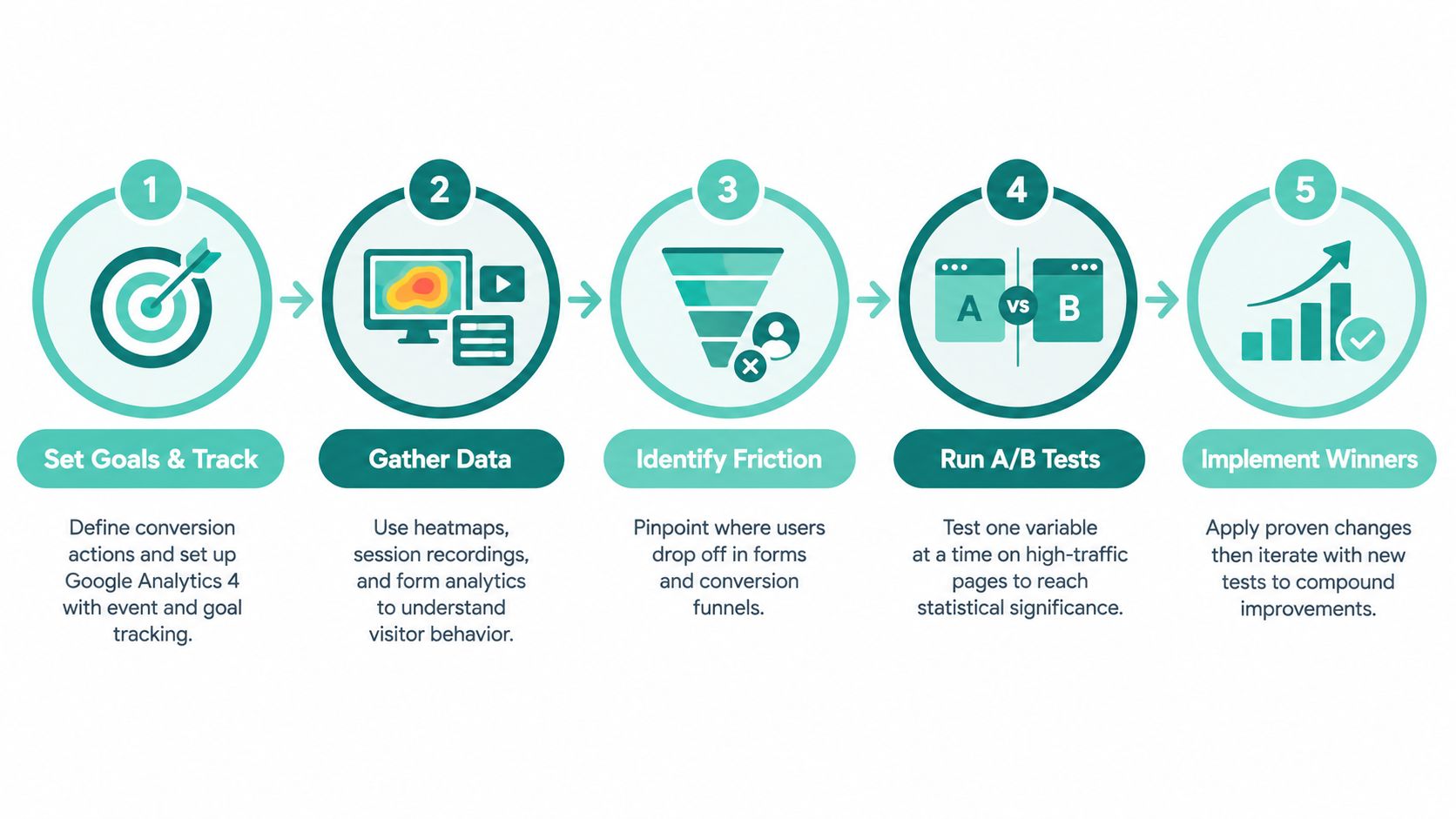
A monthly dashboard should connect organic landing pages to conversion rate, lead volume, and lead quality. Teams can also use AmaJova's 2026 guide to digital products as a separate example of how a digital offer can be presented through a defined conversion path, but service businesses should keep their own primary actions tied to calls, consultations, estimates, and bookings.
10-Point Web Design Best Practices Comparison
| Approach | Implementation Complexity 🔄 | Resource Requirements ⚡ | Expected outcomes 📊⭐ | Ideal use cases 💡 | Key advantages ⭐ |
|---|---|---|---|---|---|
| Mobile-First Responsive Design | 🔄 Moderate, front-end work + device testing | ⚡ Moderate, developers, designers, device testing | 📊 Faster mobile loads, lower bounce, higher mobile conversions | 💡 Local service sites with predominantly mobile users (HVAC, roofing, legal) | ⭐ Better mobile UX, single codebase, improved SEO |
| Strategic Keyword Integration & Intent Alignment | 🔄 Moderate, ongoing research and mapping | ⚡ Moderate, SEO tools, skilled copywriting | 📊 Higher qualified organic traffic and better CTRs | 💡 Businesses targeting high‑intent local queries and niche services | ⭐ Improves targeted visibility and topical authority |
| Clear Information Architecture & Conversion Paths | 🔄 High, discovery, structure, and potential redirects | ⚡ Moderate–High, UX design, content audit, dev time | 📊 Improved findability, reduced friction, higher conversion rates | 💡 Multi-service or multi-location sites needing clear journeys | ⭐ Reduces cognitive load and improves crawlability |
| High‑Converting CTA Design & Placement | 🔄 Low–Moderate, design + iteration/testing | ⚡ Low–Moderate, designer, copywriter, CRO tool | 📊 Immediate uplift in conversions when optimized | 💡 Pages focused on lead generation and urgent service prompts | ⭐ Direct and testable conversion improvements |
| Technical Performance Optimization & Page Speed | 🔄 High, technical audits and implementation | ⚡ High, developers, CDN/premium hosting, tooling | 📊 Faster load times, better SEO, lower bounce rates | 💡 Media-heavy sites or markets where competitors are slow | ⭐ Strong SEO signals and better user experience |
| Trust Signals, Credibility & Social Proof | 🔄 Low–Moderate, content collection and display | ⚡ Moderate, photography, testimonial collection, markup | 📊 Higher trust, improved lead quality and conversion rates | 💡 High‑stakes services (legal, medical, home services) | ⭐ Reduces perceived risk; differentiates brand |
| Content Strategy Aligned with Customer Journey | 🔄 High, ongoing planning and production | ⚡ High, content writers, SEO, editorial process | 📊 Sustained organic traffic across funnel stages; authority build | 💡 Services with long decision cycles or education needs | ⭐ Nurtures leads and captures long‑tail queries |
| Local SEO Optimization & Geographic Targeting | 🔄 Moderate, setup + ongoing management | ⚡ Moderate, GBP management, citations, location pages | 📊 Dominant local visibility and higher-intent map traffic | 💡 Single- and multi-location service businesses | ⭐ Drives immediate-action local leads and map presence |
| Answer Engine Optimization & Featured Snippet Targeting | 🔄 Moderate, content structuring + schema | ⚡ Moderate, writers, schema, content updates | 📊 Greater chance of featured snippets and voice visibility | 💡 FAQ/how‑to content and question-driven searches | ⭐ Captures prime SERP real estate and voice queries |
| CRO Testing & Analytics Instrumentation | 🔄 High, test design, stats, and iteration | ⚡ High, A/B tools, analytics setup, analysts | 📊 Increases conversions without extra traffic; data-driven gains | 💡 Sites with sufficient traffic for reliable tests | ⭐ Measurable conversion lifts and informed decision-making |
Turn the Checklist Into a Measurable Lead System
The strongest websites don't treat design, SEO, accessibility, AEO, and CRO as separate projects. They treat them as connected parts of one lead-generation system. A page that ranks but loads slowly wastes search visibility. A beautiful service page that hides the phone number creates friction. A form that works for a mouse user but not a keyboard user excludes prospects and creates an avoidable service problem.
Sequence the work around the customer journey. Start by defining the services and locations the business wants to grow. Build a clear page hierarchy around those priorities, then map the paths from search result to service page, trust evidence, and contact action. This structure gives content writers, designers, developers, and SEO specialists the same operating plan.
Next, remove mobile and performance friction. Check that the mobile experience contains equivalent primary content, structured data, metadata, images, videos, and links to the desktop experience. Don't hide important content behind interactions that Googlebot or users may never trigger. Validate real devices, forms, phone links, focus states, and Core Web Vitals.
Then clarify the conversion experience. Replace vague buttons with specific actions, make forms as short as the qualification process allows, and provide alternatives for visitors who prefer calling or scheduling. Add credible proof near important decisions, including real team information, accurate reviews, service-area details, credentials, and clear explanations of what happens after contact.
Accessibility belongs in every stage, not at the end of a redesign. WCAG 2.2 requires a contrast ratio of at least 4.5:1 for normal text and 3:1 for large-scale text in applicable situations (WCAG 2.2 contrast requirements). Combine automated scans with keyboard testing and assistive-technology testing, because a basic automated pass doesn't prove that a visitor can complete intake.
Finally, measure qualified inquiries and lead outcomes. Review the pages that attract valuable prospects, the forms that create errors, the devices that produce abandonment, and the service areas that generate business. Improve the highest-impact path first instead of redesigning every page based on preference.
If your team needs development support for a redesign, Hire Developers is one possible resource to evaluate. The right partner should connect strategy, content, technical implementation, accessibility, local search, and measurement rather than delivering an isolated visual refresh.
Before rebuilding, assess the current site against these practices. Identify whether visitors can find the right service, confirm local relevance, trust the business, understand the next step, and complete that step without unnecessary barriers. That assessment will produce a better redesign brief than a collection of screenshots or competitor observations.
Digital Skyrocket plans, builds, and search engine optimizes lead-generating websites for law firms, dentists, roofers, HVAC companies, and other service businesses, with responsive design, local SEO, AEO, analytics, and ongoing CRO connected to qualified inquiries. If your business needs a new website and ongoing SEO, visit Digital Skyrocket to explore a practical approach to building and improving the full lead-generation system.