Technical SEO makes your site easy for search and answer engines to crawl, render, index, and serve, with measurable targets such as LCP under 2.5 seconds, INP under 200 milliseconds, and CLS under 0.1. It determines whether a page is technically eligible to appear in Google results, create a smooth visitor experience, and become a usable source for AI-generated answers.
You may recognize the frustrating version of this problem. A roofing company publishes a detailed service page, adds strong photos, explains its process, and includes a clear phone number. Yet the page generates little visibility and no calls. The content may be useful, but a blocked crawler, a JavaScript-dependent page, a confusing canonical signal, or a painfully slow mobile experience can keep that work from producing results.
Technical SEO is the infrastructure beneath your marketing. Think of it as the access roads, wiring, plumbing, and signs that allow people to enter a building and find the right room. If those systems fail, a beautifully designed website can still be difficult for search engines, potential customers, and answer engines to use.
This guide explains what is technical SEO in practical terms, then connects the main components to leads for local and service businesses. You'll learn how Google discovers, crawls, renders, and indexes pages, why Core Web Vitals matter, how AI answer engines change eligibility, and which fixes deserve attention first when your budget and time are limited.
Table of Contents
- Introduction Why Technical SEO Decides If You Get Found
- What Technical SEO Really Means in Plain Language
- The Core Components That Make Your Site Search Ready
- How Technical Health Translates Into Rankings Leads and AI Answers
- Your Technical SEO Audit Checklist and Common Fixes
- Tools to Measure Technical SEO and Track Progress
- Next Steps to Turn Technical Fixes Into More Qualified Inquiries
Introduction Why Technical SEO Decides If You Get Found
A local HVAC company might have excellent service descriptions and a strong reputation, but its emergency repair page loads a blank shell until JavaScript finishes. A law firm might have a carefully written page for a specific practice area, but the page is accidentally marked noindex. A contractor may have dozens of useful location pages, yet no internal links point to some of them.
In each case, the owner sees a finished page. Google may see something incomplete, blocked, duplicated, or difficult to interpret.
The hidden gap between publishing and visibility
Search engines don't judge a page only by reading its copy. Google has to discover the URL, crawl the HTML, render necessary resources, decide which version belongs in its index, and then serve the page for an appropriate search. AI answer engines also need reliable access to content they may extract, interpret, and attribute.
That creates a practical distinction:
- Good content answers a customer's question.
- Technical SEO makes that answer reachable and reusable.
- Conversion design gives the visitor a clear next action.
A technical issue can interrupt any point in that chain. If a service page never enters the index, it can't attract an organic visitor. If the mobile layout shifts while someone tries to tap the call button, that visitor may leave. If key explanations appear only after client-side JavaScript runs, some systems may not receive the information they need.
A page can't generate a qualified inquiry if the systems that should discover it can't reliably access or understand it.
What you'll be able to do after reading
The right response isn't to fix every warning in a software report. Service businesses need a sequence that starts with issues capable of blocking visibility and leads, then moves toward performance, clarity, and answer-engine readiness.
You'll see that sequence here:
- Define the technical foundation in plain language.
- Examine the core systems that make a website search-ready.
- Connect those systems to rankings, user experience, leads, and AI citations.
- Apply a prioritized audit for local and service-business websites.
- Choose tools that show whether fixes are working.
- Turn the findings into a practical action plan.
The result should be less mystery and more control. Technical SEO isn't an abstract developer exercise. It's the eligibility layer that helps a service page get found, understood, visited, and acted on.
What Technical SEO Really Means in Plain Language
Think of your website as a commercial building. The copy, images, and offers are the rooms and services inside it. Technical SEO is the foundation, entrances, floor plan, lighting, signs, and safety systems that help visitors and inspectors move through the building.
Search engines perform a similar inspection. They need to find the address, enter the site, understand the page, identify the correct version, and decide whether it can be shown. Answer engines need content they can access and interpret accurately enough to reuse and attribute.
Core definition: Technical SEO is the discipline of making a website easier for search engines to crawl, render, index, and serve correctly.
Each verb describes a different checkpoint:
- Crawl means a search engine can access the URL and its important resources.
- Render means the system can process the page as a user would see it, including necessary JavaScript.
- Index means the page is eligible to be stored and considered for search results.
- Serve means the correct page can be presented for a relevant query or answer.
The order matters. A page that renders beautifully in a browser can still be blocked from crawling. A page that Google crawls can still be excluded with a noindex directive. A page that is indexed can still perform poorly if it loads slowly or shifts while users interact with it.
From vague best practice to measurable experience
Google's Core Web Vitals give technical SEO concrete operating targets. The current thresholds are LCP under 2.5 seconds, INP under 200 milliseconds, and CLS under 0.1, covering loading performance, responsiveness, and visual stability. Google explains these standards in its Core Web Vitals documentation.
Google evaluates these metrics using real page views at the 75th percentile, rather than relying on one perfect laboratory test. A page is classified as good for a metric when at least 75% of page views meet the good threshold, while a poor classification applies when at least 25% of page views are poor, as explained by web.dev's Core Web Vitals threshold guidance.
That distinction matters to a business owner. A developer's laptop may show a fast page, while mobile visitors on slower connections experience delays. Search Console's Core Web Vitals report uses actual field data and groups URLs into Poor, Need improvement, and Good, giving teams a view of the experience real users receive.
Technical SEO also supports channels beyond organic listings. A service company may combine organic work with paid search for growth-stage companies, but paid traffic still lands on pages that must load, function, and guide users clearly. Infrastructure affects every route into the website.
The Core Components That Make Your Site Search Ready
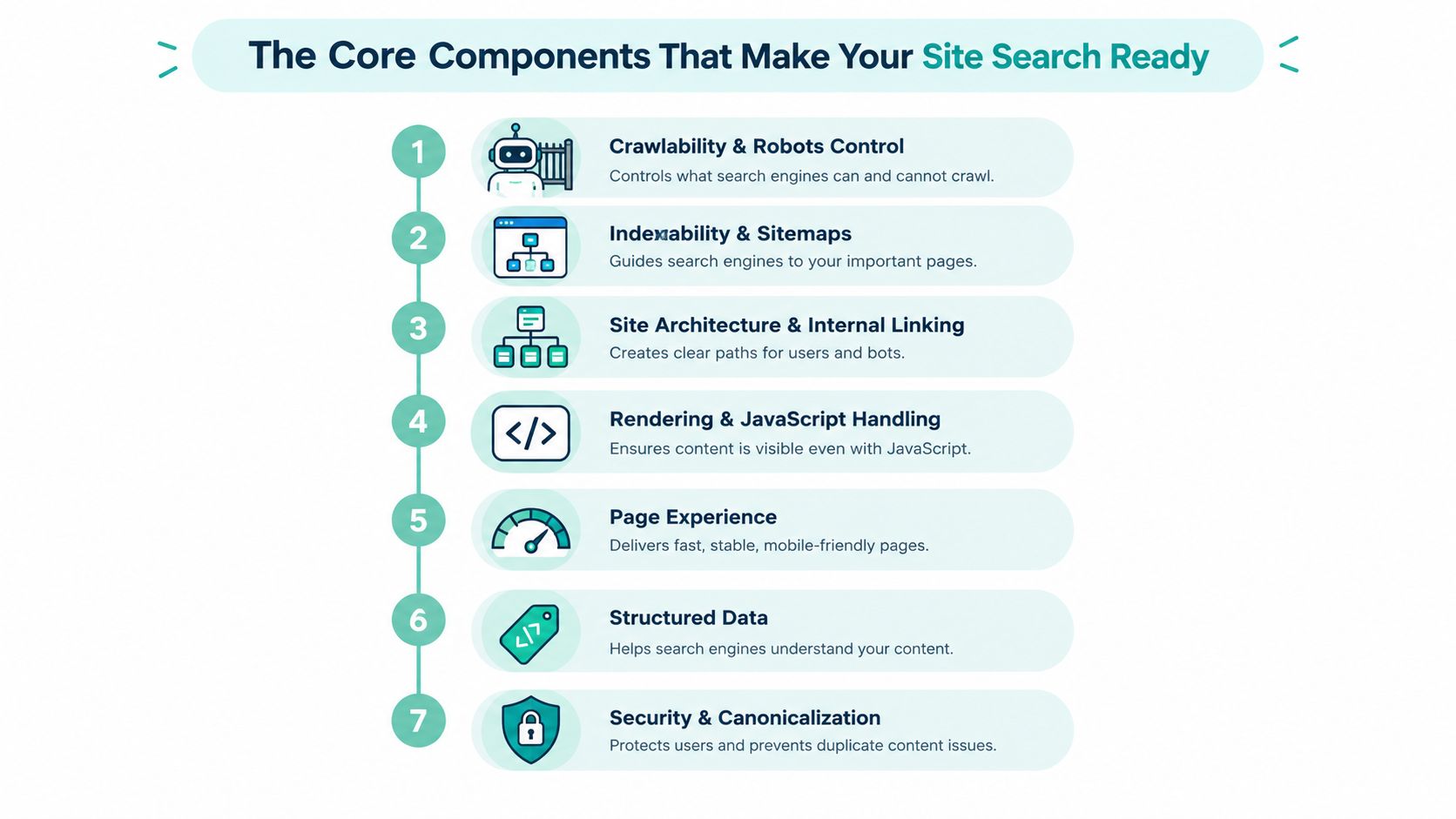
A search-ready website has several connected systems. They work in a logical order, much like a visitor following signs from a street entrance to a reception desk.
Crawlability and robots control
Crawlability answers a basic question: can a search engine reach the page and the resources needed to understand it? The robots.txt file can guide crawler access, but an incorrect Disallow rule may block an important service page, stylesheet, script, or image.
Use a clear robots.txt guide from UpTime Web Hosting when reviewing the file. The goal isn't to block everything that seems unimportant. It's to prevent waste while keeping valuable pages and rendering resources accessible.
Indexability and sitemaps
Crawling doesn't guarantee inclusion in search results. Indexability concerns whether Google can store and consider a page. A noindex directive tells Google not to show a page in results, and Google documents both the standard directive and a googlebot-specific variant in its robots meta tag documentation.
An XML sitemap acts like a current site map for important URLs. Each sitemap file supports no more than 50,000 URLs and no more than 50 MB uncompressed, according to the XML sitemap protocol limits. Larger sites need separate files and, where appropriate, a sitemap index.
Site architecture and internal linking
Architecture determines how users and crawlers move through the site. A home services company should link from its main services area to individual repair, installation, and location pages rather than leaving those pages isolated.
Broken links and orphan pages create dead ends. A practical companion resource on crawl budget optimization can help teams think about which URLs deserve discovery and how internal paths support them.
Rendering and JavaScript handling
Google's process separates crawling from rendering. It can first receive raw HTML, then render JavaScript in a later queue using a headless Chromium-based renderer, before making an indexing decision, as described in Google's crawl, render, and index sequence.
If a law firm's practice-area heading, explanatory copy, internal links, or canonical signal appears only after a script runs, indexing can be delayed or incomplete. Server-rendered or initial HTML output is safer for critical information.
Performance and page experience
Performance affects whether a page feels usable after it has been found. Large images, render-blocking scripts, excessive third-party tools, and heavy main-thread work can delay content or interaction.
Core Web Vitals provide the operating measurements, while PageSpeed Insights and Search Console help identify whether the issue affects real users or only a controlled test.
Mobile experience and security
A service page must work on the device most customers use to call, tap, or submit a form. Responsive layouts, readable text, stable buttons, and secure HTTPS reduce friction and help visitors trust the site.
Security isn't a decorative badge. A browser warning can interrupt a visitor at the moment they intend to request an estimate or book a consultation.
Structured data
Structured data gives search systems explicit clues about entities and page types, such as an organization, service, event, or review. It can't rescue inaccessible content, and it must match what users can see, but accurate markup can reduce ambiguity.
How Technical Health Translates Into Rankings Leads and AI Answers
Technical SEO creates a chain of eligibility rather than a single ranking trick. Google must reach a page before it can evaluate the content. A visitor must load and use the page before that content can produce a call or form submission. An answer engine must access and interpret the information before it can consider citing it.
The business impact of a technical failure
Suppose two local service pages answer the same customer question with similar relevance. One page delivers its main content quickly, responds smoothly to taps, and keeps the call-to-action in place. The other runs heavy scripts, shifts the form lower on the screen, and delays the main content.
The second page may remain technically accessible, but it creates weaker conditions for page experience and engagement. Google's Core Web Vitals ranking guidance connects slow main-thread execution, render-blocking scripts, and layout instability with pages falling below experience thresholds.
That doesn't mean speed replaces relevance. It means a technically clean page avoids preventable friction when content quality is comparable.
Technical SEO now reaches answer engines
Traditional SEO asks whether a page can earn a blue-link result. Modern technical SEO must also ask whether an answer system can retrieve, understand, extract, and attribute the page's information.
Machine-reusable content matters. A service page becomes easier to reuse when its central answer is present in accessible HTML, headings describe the subject clearly, links establish context, and structured data agrees with the visible page. A page hidden behind interaction or rendered inconsistently gives an answer engine less dependable material to work with.
Resources covering practical steps for AI visibility can help extend this thinking beyond traditional rankings. For a broader explanation of the related discipline, see answer engine optimization.
Prioritize what can block a lead
A small business shouldn't begin with cosmetic warnings. Start with problems that can prevent a high-value page from being discovered, indexed, or used.
Prioritize in this order:
- Access barriers: Check blocked service pages, incorrect robots rules, and accidental
noindexdirectives. - Index signals: Review sitemaps, canonicals, redirects, and duplicate URL versions.
- Conversion friction: Test mobile forms, phone links, page stability, and loading behavior.
- Interpretation clarity: Improve rendering, headings, structured data, and consistent entity details.
- Monitoring: Recheck the pages that matter most to inquiries, not only the homepage.
A page that becomes crawlable but remains unusable on a phone still loses opportunities. A fast page with a noindex tag remains invisible. The strongest return comes from removing the earliest failure in the chain, then verifying the entire journey through to the inquiry.
Your Technical SEO Audit Checklist and Common Fixes
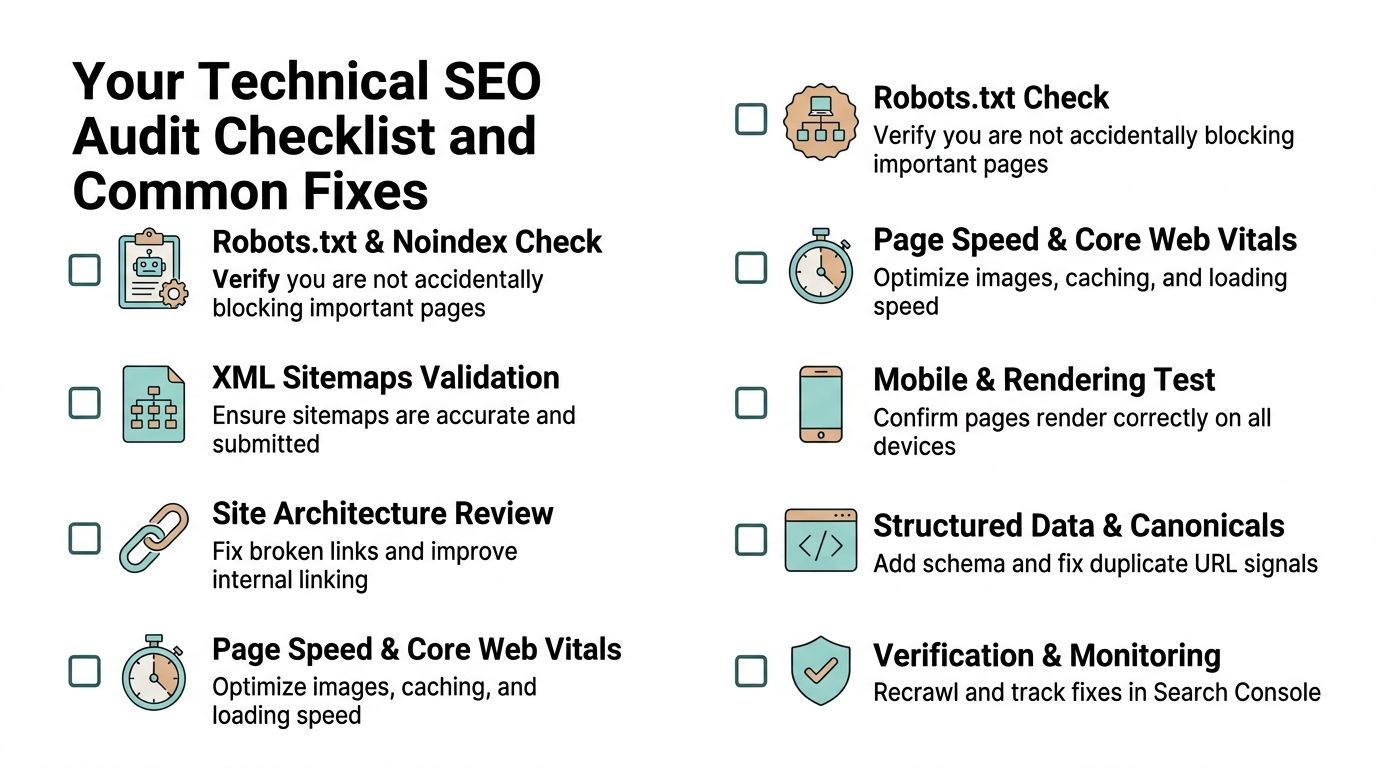
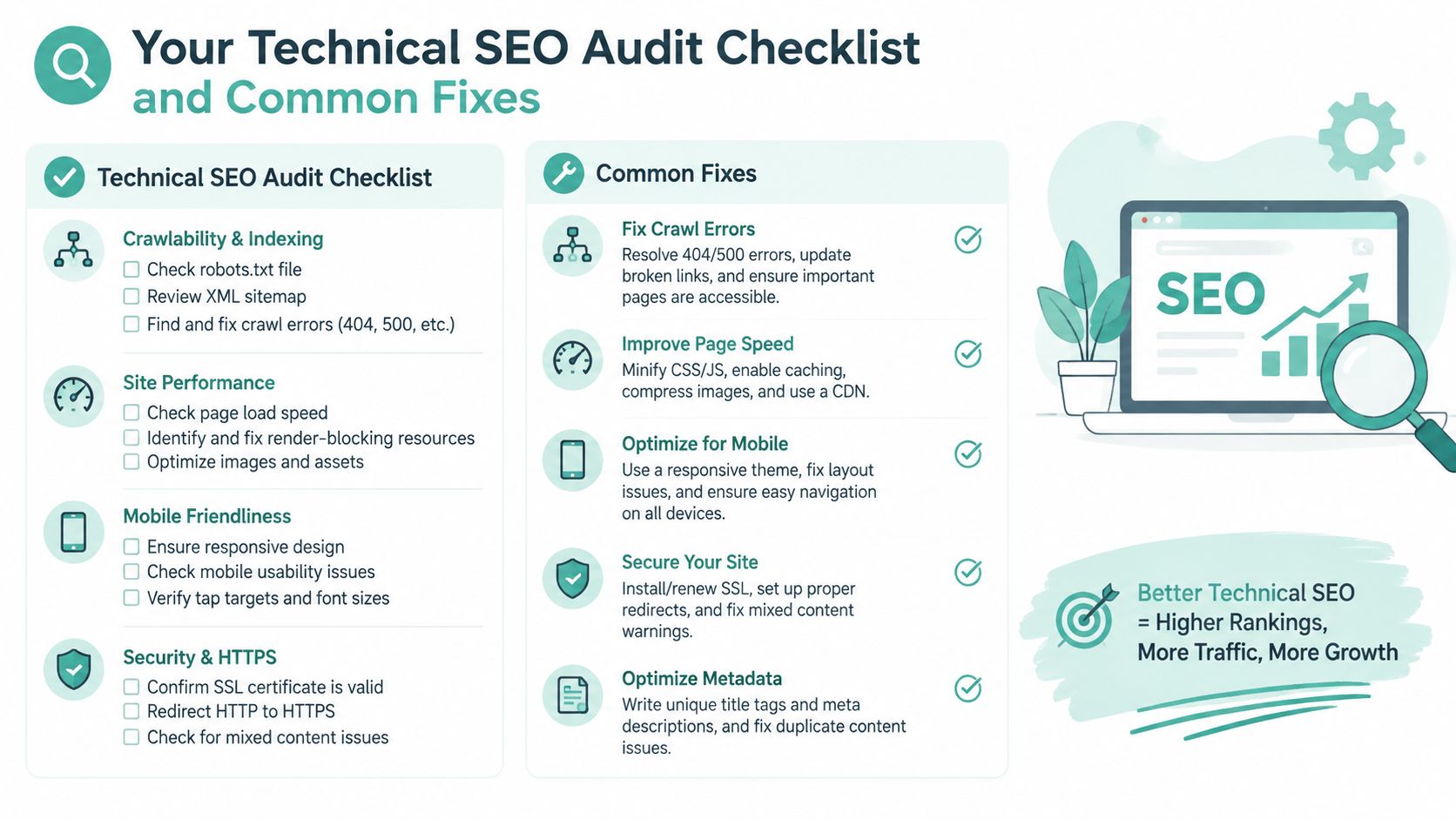
A useful audit starts with pages tied to revenue, such as core services, location pages, consultation pages, and contact paths. Don't treat every URL as equally urgent. A blocked emergency-service page deserves attention before a low-priority archive page.
Start with discovery and indexation
Check robots.txt and noindex first. Look for rules that block important folders, scripts, or service URLs. Then inspect the page source and Search Console for accidental noindex directives. The common mistake is carrying a staging restriction into production. The fix is to remove the restriction from pages intended to appear, while keeping deliberate exclusions in place.
Validate XML sitemaps. Include canonical, indexable URLs that return successfully. Remove redirected, duplicate, and excluded URLs, then submit the current sitemap in Search Console. Remember the protocol limits of 50,000 URLs and 50 MB uncompressed per sitemap file, documented in the sitemap guidance.
Review canonicals and redirects. A canonical should point to the preferred version, not an old domain, an unrelated page, or a URL that redirects elsewhere. The common mistake is allowing HTTP, HTTPS, www, non-www, parameter, and trailing-slash versions to compete. Choose the intended version and make internal links consistent.
Inspect paths, rendering, and experience
Crawl internal links. Find broken links, orphan pages, long or confusing paths, and important services buried without contextual links. The fix is to connect related pages through service hubs, location pages, navigation, and useful body copy. A website audit checklist can help organize the broader review.
Test rendered content. Compare the raw HTML with the rendered page. Confirm that the service name, location context, main explanation, internal links, form, and structured data are available reliably. If key content appears only after a user action, move essential information into the initial HTML or use dependable server-side rendering.
Measure field performance. Use Search Console's Core Web Vitals report to identify real-user groups classified as Poor, Need improvement, or Good. Fix oversized images, unnecessary scripts, layout shifts, and slow server or resource delivery. Validate changes across important templates rather than celebrating one fast test result.
Finish with usability and meaning
Confirm mobile and HTTPS behavior. Open important pages on actual phones and test menus, tap targets, forms, click-to-call links, and sticky elements. Confirm that secure pages don't load insecure resources and that redirects preserve the intended URL.
Validate structured data. Check that markup matches visible content and identifies the page accurately. Remove stale fields rather than adding schema because a plugin offers it.
Recheck after deployment. A redesign, plugin update, template change, or migration can reopen old problems. Recrawl affected templates, inspect representative URLs, and watch Search Console after submitting fixes.
A 2026 industry source reports that only 51.8% of source websites meet recommended Core Web Vitals standards, which shows why these fundamentals still deserve operational attention, as summarized by Netcore Design's technical SEO overview. The exact priority for your business should come from the pages and actions that produce inquiries.
Tools to Measure Technical SEO and Track Progress
Tools answer different questions. Search Console shows how Google sees your site in search, while a crawler simulates discovery across links and templates. PageSpeed Insights helps investigate performance, and structured-data validators test whether markup is readable and valid.
| Task | Best Tool Type | What to Look For |
|---|---|---|
| Check indexing and search visibility | Google Search Console | Excluded URLs, indexing patterns, sitemap processing, and Core Web Vitals groups |
| Measure real-user experience | Search Console field reports | Poor, Need improvement, and Good classifications based on field data |
| Investigate page performance | PageSpeed Insights | LCP, INP, CLS, render-blocking resources, image weight, and main-thread work |
| Discover crawl problems | Site crawler | Broken links, redirects, orphan pages, blocked resources, duplicate URLs, and response errors |
| Test rendering | Rendering-capable crawler or browser inspection | Whether critical text, links, forms, canonicals, and structured data appear after processing |
| Validate structured data | Schema validator | Syntax, supported properties, and agreement with visible page content |
| Monitor crawl activity | Search Console and server-side reporting | Discovery patterns, crawl behavior, and whether important pages are being revisited |
Read performance reports correctly
A single laboratory run is a diagnostic, not a verdict. Search Console's Core Web Vitals view reflects real page views and evaluates the 75th percentile over a trailing 28-day window, so improvements may take time to appear in the field report. The threshold details and reporting model are documented in Google's Core Web Vitals documentation and the web.dev explanation of percentile evaluation.
Set a baseline before making changes. Record which templates are affected, which URLs generate inquiries, and which metrics or indexation states need improvement. After deployment, compare the same page groups and verify that a technical fix didn't damage forms, links, canonicals, or mobile layouts.
Use tools to make decisions, not collect warnings
A crawl report may list hundreds of issues, but the business question is narrower: which problem prevents a valuable page from being found or converted? Digital Skyrocket is one option for service businesses that want website planning, technical implementation, SEO, AEO, reporting, and conversion improvements coordinated around qualified inquiries.
Next Steps to Turn Technical Fixes Into More Qualified Inquiries
A practical plan keeps technical SEO connected to business priorities rather than treating it as an endless maintenance list.
First phase
Start with discovery and indexation. Review robots rules, noindex, sitemaps, canonicals, redirects, broken links, and the index status of your most important service and location pages. If Google can't reliably reach or store those pages, performance refinements won't solve the central problem.
Second phase
Move to performance, rendering, mobile usability, HTTPS, and conversion paths. Test the pages customers use to call, request an estimate, schedule an appointment, or submit a consultation form. Fix the slowest and most disruptive template issues, then confirm the changes with field data and real-device checks.
Third phase
Improve structured data, content clarity, internal linking, and answer-engine readiness. Make key explanations available in accessible HTML, align visible copy with markup, and organize pages so both people and machines can understand the relationship between services, locations, and expertise.
Handle straightforward content, link, and sitemap corrections internally when someone on your team can test the result safely. Bring in technical help when a redesign, JavaScript framework, migration, multi-location structure, or recurring performance problem affects lead-generating pages. Judge progress by qualified calls, forms, and consultations, not rankings alone.
Digital Skyrocket plans and builds lead-generating websites for service businesses, combining web design, technical SEO, local SEO, AEO, reporting, and conversion optimization. Visit Digital Skyrocket to explore a discovery-led approach for turning technical improvements into more qualified inquiries.